Teleprompterly
Teleprompterly is a free browser-based teleprompter with video and audio recording.
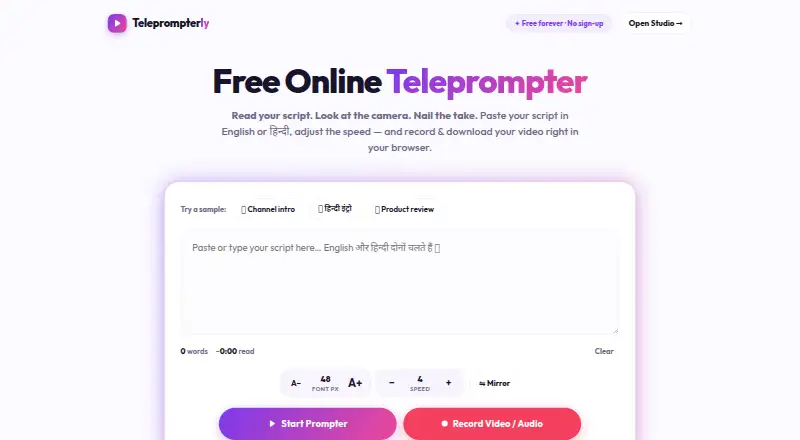
What Teleprompterly is
Teleprompterly is a free browser-based teleprompter with video and audio recording. Its Studio records from a camera and microphone while displaying the scrolling script over the camera feed, with 16:9, 9:16 and 1:1 framing options. Readers can choose among ten scroll speeds and adjust them while reading. Display controls include font sizing, an eye-line marker, a progress bar, tap-to-pause and keyboard shortcuts. Mirror mode flips text for beam-splitter teleprompter rigs. The tool supports English and Hindi in Devanagari, including mixed-language scripts, and works in Chrome, Edge, Safari and Firefox on desktop and mobile browsers. It can be used alongside Zoom, Microsoft Teams, Google Meet and Webex. Scripts are stored in browser storage, and recordings stay in browser memory until downloaded; the site says nothing is sent to a server. The free plan has unlimited script length, requires no account and adds no watermark. The page must load before use, and voice-follow scrolling is described as a feature of native apps rather than Teleprompterly.
Good
- Free plan allows unlimited script length
- Records video and audio with downloads
- Offers three framing options
- Scripts and recordings stay in browser storage or memory
Watch out
- Page must load before use
- Voice-follow scrolling is not offered
- No remote control is listed
Who it suits
Teleprompterly suits creators who want to read a script while recording in a browser. It can also suit people using a phone or tablet browser, including for vertical recording.
Verdict
Teleprompterly combines script scrolling with browser-based video and audio recording at no cost. Readers who need voice-follow scrolling should note that it is not offered here.
Plans and prices
From Teleprompterly's own pricing page, checked 14 Oct 2026.
| Plan | Price | What it gives you |
|---|---|---|
| Free | Free | unlimited script length · no account · no watermark · video and audio recording · downloads · free forever |
| Weekly Pro | $4.99 a month | premium features · in-app purchase |
| Monthly | $7.99 a month | Voice Follow · recording · unlimited local scripts · monthly; cancel through Apple subscription settings |
| Monthly Pro | $9.99 a month | premium features · in-app purchase |
| Yearly Pro | $39.99 a year | premium features · in-app purchase |
| Annual | $49.99 a year | Voice Follow · recording · unlimited local scripts · annual; includes 7-day free trial |
The facts
Each one read from Teleprompterly's own pages, with the date it was checked.
Where it runs
- App developer
- The Apple listing identifies North Studio as the developer and NORTH STUDIO LLC as the seller.checked 14 Oct 2026
- App privacy disclosure
- Apple’s listing says North Studio reports purchases and identifiers may be used for tracking, with additional analytics and diagnostics data not linked to identity.checked 14 Oct 2026
- App subscription pricing
- The US App Store lists Monthly Pro at $9.99, Weekly Pro at $4.99, and Yearly Pro options at $39.99 and $49.99.checked 14 Oct 2026
- Browser support
- The maker names Chrome, Edge, Safari and Firefox on desktop and mobile.checked 14 Oct 2026
- iOS requirement
- The North Studio app requires iOS 17.0 or later and supports iPhone and iPad.checked 14 Oct 2026
- Native app features
- The iOS listing describes an on-screen guide, AI script generation, adjustable text layout, social-video cropping and clean exports without burned-in prompt text.checked 14 Oct 2026
What it does
- Audio recording
- Studio includes audio-only recording with a live waveform for voice-overs.checked 14 Oct 2026
- Clean export
- The teleprompterly.app version says prompt text is an on-device overlay and exported clips contain clean camera footage with audio.checked 14 Oct 2026
- Display controls
- Controls include 24–96 px text, an eye-line marker, progress bar, tap-to-pause and keyboard shortcuts.checked 14 Oct 2026
- Export format
- Recorded takes can be downloaded directly as .webm files.checked 14 Oct 2026
- Hardware compatibility
- The teleprompterly.app version supports mirrored text for hardware teleprompter glass and adjustable font, color and background opacity.checked 14 Oct 2026
- Intended users
- The site describes Teleprompterly as a free online teleprompter with video recording made for creators.checked 2 Oct 2026
- Languages
- The web app supports English, Hindi in Devanagari and mixed-language scripts.checked 14 Oct 2026
- Limit: eye-line positioning
- An Apple reviewer complained that viewers can still see eye movement unless the script is positioned very close to the camera.checked 14 Oct 2026
- Local processing
- The teleprompterly.app privacy policy says scripts, folders, favorites and settings are stored locally and there is no cloud-sync service.checked 14 Oct 2026
- Meeting software
- The browser prompter can be used alongside Zoom, Microsoft Teams, Google Meet and Webex.checked 2 Oct 2026
- Mirror mode
- Mirror mode flips text horizontally for beam-splitter teleprompter glass.checked 14 Oct 2026
- Mobile use
- Phone and tablet users get touch controls and can record vertical 9:16 video from the browser.checked 14 Oct 2026
- Native premium features
- The iOS listing says premium removes the watermark, enables unlimited scripts and recordings, and adds auto-scroll while recording.checked 14 Oct 2026
The company
- Company headquarters
- The reviewed maker pages do not state a headquarters location.checked 14 Oct 2026
- Founded year
- The reviewed maker pages do not state a founding year.checked 14 Oct 2026
- Maker copyright
- The web homepage carries a 2026 copyright notice for Teleprompterly.checked 14 Oct 2026
Money
- Free access
- The web tool says every feature is free forever with no sign-up, trial timer or premium unlock.checked 14 Oct 2026
- Native free limits
- The iOS free version allows up to five scripts and recordings and places a watermark on exported videos.checked 14 Oct 2026
The full review of Teleprompterly
Overview
Teleprompterly is a browser teleprompter that records video and audio while a script scrolls. It is best suited to creators and presenters who want a no-cost way to read and record on a phone or computer. Its useful framing and reading controls are balanced by a firm limit: scrolling does not follow your voice.
Key features
The Studio records from the camera and microphone while placing the moving script over the camera feed. Three aspect ratios—16:9, 9:16 and 1:1—make it workable for landscape, vertical-phone and square recordings. That flexibility is valuable for creators producing different formats, while the recording remains a browser-based workflow rather than a separate editing or production suite.
Ten scroll-speed levels can be adjusted as you read. Font-size controls, an eye-line marker and a progress bar help keep the script readable and show where you are; tap-to-pause and keyboard shortcuts give you direct ways to manage the pace. Mirror mode flips the text for a beam-splitter rig, a useful accommodation for that setup rather than a general display mode. English and Hindi in Devanagari are supported, including mixed-language scripts.
Teleprompterly can run alongside Zoom, Microsoft Teams, Google Meet and Webex, extending its use to remote presentations. It also works in Chrome, Edge, Safari and Firefox on desktop and mobile browsers, and supports phone and tablet use, including vertical 9:16 recording. The page must load before you can use it, so it is a poor fit when you need the prompter to be ready without an initial load. The site describes voice-follow scrolling as a feature of native apps, not Teleprompterly; readers who want the script to track spoken delivery should choose another tool.
Scripts are kept in browser storage, and recordings stay in browser memory until downloaded. Teleprompterly says nothing is sent to a server, which suits users who prefer local handling of scripts and recordings. Downloading is part of the workflow: recordings are not described as being stored in an online account.
Pricing
The Free plan costs nothing and is billed Free forever. It includes unlimited script length, requires no account, adds no watermark, and provides video and audio recording with download. With no free trial or paid plan required, it is a strong starting point for creators who can work within a browser and do not need voice-follow scrolling or remote control. The free plan's stated inclusions avoid script-length and watermark restrictions, though the page-load requirement still matters for access.
Platforms
Teleprompterly supports web, Windows, macOS, Linux, iOS and Android. On mobile, the browser-based setup supports phones and tablets, including vertical 9:16 recording. It is a single-screen display, so readers looking for a separate remote-control workflow should look elsewhere.
Who it's for
Choose Teleprompterly if you make video or audio content, present remotely, or need a straightforward way to read a script while recording without paying or creating an account. Its mix of adjustable pacing, mirrored text and multiple recording shapes makes it more capable than a bare scrolling page. It is not the right choice if spoken-word tracking, remote control, or availability before a browser page loads is essential.
Pros and cons
- Pros: Free forever, with no account, watermark or script-length cap, makes it practical for regular personal recording.
- Pros: Three recording aspect ratios and adjustable reading controls serve both vertical-phone creators and conventional landscape presenters.
- Pros: Browser storage for scripts and in-memory recordings give users a locally oriented workflow; the site says nothing is sent to a server.
- Cons: No voice-follow scrolling means you must manage the pace yourself rather than letting speech guide the script.
- Cons: No remote control and a single-screen display limit flexibility for setups that rely on a separate operator or display.
- Cons: The page must load before use, making it less suitable when immediate or offline readiness is important.
Alternatives
Teleprompter Software is the broader category directory for comparing options.
FluidPrompter is worth considering if keyboard or mouse control and a defined one-user, one-prompter setup suit your needs; its free Starter Plan limits scripts to 600 words, unlike Teleprompterly's unlimited script length.
Speakflow may fit better if you want a paid option that includes recording and storage for one hour of video. Its free tier has limited Flow and seven-day script history.
Teleprompter.com is an alternative if remote control or cloud script storage matters more than avoiding a watermark: its free Starter recordings include a watermark, but the plan includes those features.
VoicePrompter is a relevant alternative for readers seeking voice scrolling; its free offering includes three custom scripts, while Teleprompterly does not follow speech.
EasyPrompter is another option to compare for browser-based prompting.
CuePrompter is an alternative to compare for teleprompter use.
OtO is another teleprompter option to consider.
QPrompt is an alternative to compare for teleprompter use.
Verdict
Teleprompterly is a good choice for creators and presenters who want a free, account-free browser tool that combines script scrolling with video and audio recording. Its unlimited scripts, watermark-free downloads and flexible framing are compelling at no cost. Look elsewhere if you need voice-follow scrolling, remote control or a prompter that is ready before a page loads.
Alternatives to Teleprompterly
- 1

FluidPrompter
Free planAndroidiOSWebLinux8.0From $9 a month - 2
OtO
Free planAndroidmacOSWindows7.6From $9.90 a year - 3

Prompt+
Free planiOSmacOS7.4$19.99 one-time - 4

Teleprompter.com
Free planAndroidiOSWebmacOS7.4From $90 a year - 5

Speakflow
Free planAndroidiOSWebmacOS7.3From $19 a month - 6
TeleprompterFlow
Free planAndroidiOSWebmacOS7.3Free plan