
Teleprompter.com
Teleprompter.com helps people deliver scripted videos and presentations, either by showing a script beside the camera while recording or by serving as the di…
What Teleprompter.com is
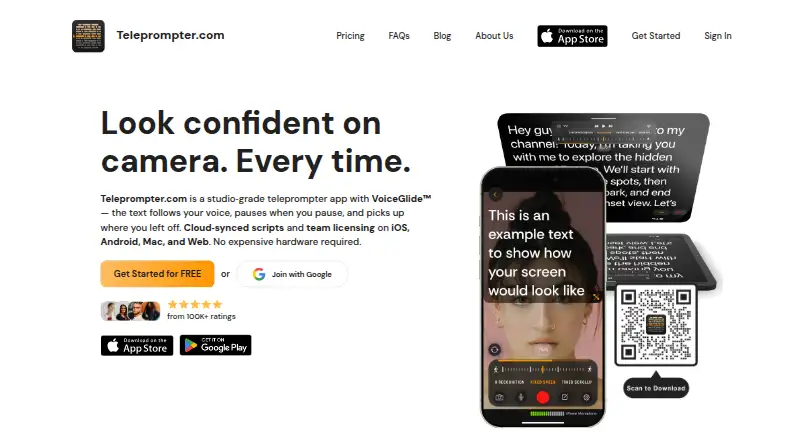
Teleprompter.com helps people deliver scripted videos and presentations, either by showing a script beside the camera while recording or by serving as the display in a physical teleprompter rig. Its VoiceGlide feature follows the speaker’s pace, pauses when they do, and can find their place again after an unscripted aside. Recording options include camera and microphone selection; editing tools include subtitles, noise removal, trimming, resizing, and background replacement. Scripts can be imported from Google Drive, Dropbox, iCloud, Word, PDF, or plain text. Controls include Bluetooth devices, presentation remotes, foot pedals, game controllers, Apple Watch, and a web remote. Live-stream destinations include Facebook, YouTube, TikTok, and Instagram, with RTMP streaming available for other destinations. The app works on Android, iOS, macOS, and the web, including offline use. The free plan exports videos with a watermark.
Good
- VoiceGlide follows the speaker and pauses with them.
- Imports scripts from cloud drives, documents, PDFs, and text.
- Offers subtitles, noise removal, trimming, and resizing.
- Supports live streaming to named platforms and RTMP destinations.
- Works on Android, iOS, macOS, and the web.
Watch out
- Free-plan video exports include a watermark.
- The listed paid-from price is $7.50/user/mo with annual billing.
- The Pro trial lasts seven days.
Who it suits
It suits people preparing scripted videos or presentations, whether they use an on-screen script while recording or a physical teleprompter rig. Its remote controls and editing options may also help creators who want to manage recording and polish videos in the same app.
Verdict
Teleprompter.com combines script display, recording, editing, remote controls, and live streaming across mobile, desktop, and web. The free plan is available, but its exports carry a watermark; the listed paid entry point is $7.50/user/mo with annual billing.
Plans and prices
From Teleprompter.com's own pricing page, checked 30 Sep 2026.
| Plan | Price | What it gives you |
|---|---|---|
| Starter | Free | recordings include watermark · cloud script storage · iOS, Android, macOS, and web · custom fonts and colors · remote control |
| Pro | $90 a year | 4K recording without watermark · horizontal and vertical mirroring · remote preview · subtitle generation · Clean Audio · 7-day free trial · $90.00 per seat per year (= $7.50 per seat/month, billed annually) |
| Max | $299.88 a year | 100GB cloud storage · longer Clean Audio · longer subtitle generation · priority support · 7-day free trial · $299.88 per year (= $24.99/month, billed annually) |
| Team | $299.88 a year | multiple editors · shared workspace · dedicated customer success · $299.88 per seat per year (= $24.99 per seat/month, billed annually) |
The facts
Each one read from Teleprompter.com's own pages, with the date it was checked.
What it does
- AI assistant integration
- An optional MCP server and API connect scripts with assistants such as Claude or ChatGPT, with user-granted read and write permissions for scripts and folders.checked 30 Sep 2026
- Data handling
- The company says it does not sell script content or use it to train its own models, and staff access content only when explicitly asked as part of support.checked 30 Sep 2026
- Live streaming
- Native live-stream destinations listed include Facebook, YouTube, TikTok, and Instagram, with RTMP URL streaming for other destinations.checked 30 Sep 2026
- Offline use
- The pricing FAQ says the app works fully offline, and the platform feature page describes Bluetooth remote control that works without internet.checked 30 Sep 2026
- Privacy and security
- The privacy policy says traffic uses HTTPS and TLS, stored data is encrypted at rest by infrastructure providers, and production data access is limited to staff who need it.checked 30 Sep 2026
- Product
- Teleprompter.com is a teleprompter and video recording app for creating camera-ready videos and presentations.checked 30 Sep 2026
- Recording and editing
- Recording features include camera and microphone selection, and editing features include subtitles, noise removal, trimming, resizing, and background replacement.checked 30 Sep 2026
- Remote control
- The app supports control with Bluetooth devices, presentation remotes, foot pedals, game controllers, Apple Watch, and a web-based remote.checked 30 Sep 2026
- Script imports
- Scripts can be imported from Google Drive, Dropbox, iCloud, Word, PDF, and plain text sources.checked 30 Sep 2026
- Support
- The company offers email and in-app chat support, priority support for Pro and Max customers, and a dedicated customer success contact for Team customers.checked 30 Sep 2026
- Use modes
- It can record video with a script beside the camera or act as a display in a physical teleprompter rig.checked 30 Sep 2026
- VoiceGlide
- VoiceGlide scrolls along with the speaker, pauses when they pause, and finds their place again if they ad-lib.checked 30 Sep 2026
The company
- Founded
- 2018checked 23 Sep 2026
- Headquarters
- Budapest, Hungarychecked 23 Sep 2026
Money
- Plans and limits
- The pricing FAQ says plans have no limits on video length, recording count, or script storage, and the free plan exports videos with a watermark.checked 30 Sep 2026
Where it runs
- Platforms
- The app is available on iOS, macOS, Android, and web, and the company says feature availability varies by platform.checked 30 Sep 2026
The full review of Teleprompter.com
Teleprompter.com combines script prompting, recording, and editing for people making camera-ready videos or presentations. It suits creators who want voice-following prompts and a workflow that reaches from script import to streaming. Its breadth is a strength, but the free plan’s export watermark makes paid service the practical choice for finished videos.
Overview
The app can display a script beside the camera while recording, or act as the display in a physical teleprompter rig. VoiceGlide tracks a speaker’s pace, pauses when they do, and can recover the place after an ad-lib. That makes it better suited to natural delivery than a prompt that simply scrolls at a fixed speed.
Teleprompter.com also combines recording controls, editing tools, remote operation, and live streaming. The company was founded in 2018 and is based in Budapest, Hungary.
Key features
Recording and editing
Camera and microphone selection give presenters control over their recording setup. Editing covers subtitles, noise removal, trimming, resizing, and background replacement. Pro adds 4K recording without a watermark, subtitle generation, and Clean Audio; Max offers longer subtitle generation and Clean Audio. This is a useful range for creators who want prompting and basic post-production in one app, though the advanced tools depend on a paid plan.
Script imports and controls
Scripts can come from Google Drive, Dropbox, iCloud, Word, PDF, or plain text, reducing the need to rebuild material already stored elsewhere. Control options include Bluetooth devices, presentation remotes, foot pedals, game controllers, Apple Watch, and a web-based remote. The app can work offline, and Bluetooth remote control does not require internet, which is valuable when recording away from a reliable connection.
Streaming, privacy, and integrations
Native live-stream destinations include Facebook, YouTube, TikTok, and Instagram; RTMP URLs cover other destinations. An optional MCP server and API connect scripts with assistants such as Claude or ChatGPT, with read and write access granted by the user for scripts and folders.
The privacy policy says traffic uses HTTPS and TLS, stored data is encrypted at rest by infrastructure providers, and access to production data is limited to staff who need it. The company says it does not sell script content or use it to train its own models, and that staff access content only when explicitly asked for support. These are relevant assurances for users handling scripts, though they do not replace an organization’s own security review.
Pricing
Starter is free and includes cloud script storage, custom fonts and colors, remote control, and access on iOS, Android, macOS, and web. Its central compromise is a watermark on exported video. The pricing FAQ says plans have no limits on video length, recording count, or script storage, so the free tier’s stated restriction is not a recording or script quota.
Pro costs $7.50/user/mo with annual billing and includes 4K recording without a watermark, horizontal and vertical mirroring, remote preview, subtitle generation, and Clean Audio. A 7-day free trial is offered. For an individual creator who wants clean exports and editing features, this is the clearest upgrade.
Team costs $24.99/user/mo with annual billing and adds multiple editors, a shared workspace, and a dedicated customer success contact. It fits collaborators managing scripts together, but the per-seat charge matters as a team grows.
Max costs $24.99/user/mo with annual billing and includes 100GB of cloud storage, longer Clean Audio and subtitle generation, and priority support, along with a 7-day free trial. It is aimed at users who need more storage or longer processing allowances; Team is the more relevant choice when shared editing and a customer success contact matter. The published plan terms specify annual billing, while prices for the paid tiers are stated per user or seat.
Platforms
Teleprompter.com supports Android, iOS, macOS, and the web. That range makes it a plausible choice for people who prepare scripts on one device and record or present on another, with the caveat that platform-specific capabilities are not detailed here.
Who it's for
Choose it if you make spoken videos or presentations and want voice-tracking, multiple ways to control scrolling, and recording and editing in the same product. It is also a strong fit for streamers who use its named social destinations or an RTMP URL, and for teams that need shared workspaces. Look elsewhere if you require watermark-free exports without a subscription or do not need its broader recording workflow.
Pros and cons
- Pros: VoiceGlide follows speech and can recover after ad-libs, which supports more natural delivery.
- Pros: Broad remote-control support, including foot pedals and Apple Watch, gives presenters several hands-free options.
- Pros: Offline operation and script imports from common file and cloud sources suit varied recording setups.
- Pros: Video length, recording count, and script storage are not capped by plan, according to the pricing FAQ.
- Cons: Starter exports carry a watermark, limiting its appeal for publishing finished videos at no cost.
- Cons: Team is charged per seat, so collaboration has a recurring cost that rises with the number of editors.
- Cons: The optional assistant connection grants script and folder read or write permissions, so users should consider the access they approve.
Alternatives
For a broader comparison, see Teleprompter Software.
- Speakflow is another freemium option with Android, iOS, macOS, web, and Windows support; its Free plan has limited flow and a 7-day script history, while Plus is $19.00 per month and records and stores 1 hour of video.
- VoicePrompter is a freemium alternative with a free web app that requires no account and works offline as a PWA.
- FluidPrompter offers a free Starter Plan limited to one user, one prompter, and 600-word scripts, with keyboard and mouse controls; consider it if those limits suit a basic setup.
- PromptSmart is a paid alternative with a free trial; consider it if you want to compare a paid product rather than start with a free plan.
- Prompt+ is limited to iOS and macOS and has a free tier for scripts up to 750 characters; its $19.99 one-off Premium Teleprompter purchase removes that limit.
- Teleprompter Pro is a freemium option for iOS and macOS.
- EasyPrompter is a freemium web option.
- OtO is a freemium option for Android, macOS, and Windows.
Verdict
Teleprompter.com is the strongest fit for creators who want a voice-responsive prompt alongside recording, editing, remote controls, and streaming across several platforms. The main reason to choose it is that unusually broad end-to-end workflow; the main reason to look elsewhere is the watermark on free exports, followed by the ongoing annual cost for clean video and higher-tier capabilities.
Getting started
- Open Teleprompter.com on the web or install it on Android, iOS, or macOS
- Create or import a script from a supported source
- Choose the camera and microphone for recording
- Select a display mode or connect a physical teleprompter rig
- Pair a remote device or use the web remote
- Choose the Starter, Pro, Team, or Max plan
Limits worth knowing
Starter exports videos with a watermark. The pricing FAQ says plans have no limits on video length, recording count, or script storage; paid tiers differ in features such as 4K recording, shared workspaces, storage, subtitle generation, and support.
Questions
Is there a free plan?
Yes. Starter is free and includes cloud script storage, custom fonts and colors, and remote control.
What does Pro cost?
Pro is $19.99 a month per seat and includes 4K recording without a watermark, subtitle generation, remote preview, and Clean Audio.
Which platforms are supported?
Teleprompter.com supports web, macOS, iOS, and Android.
Can it work offline?
Yes. The pricing FAQ says the app works fully offline, and Bluetooth remote control works without internet.
Can teams share scripts?
Yes. Team includes multiple editors, a shared workspace, and a dedicated customer success contact.
Does it integrate with AI assistants?
An optional MCP server and API can connect scripts with assistants such as Claude or ChatGPT, using permissions granted for scripts and folders.
Alternatives to Teleprompter.com
- 1

FluidPrompter
Free planAndroidiOSWebLinux8.0From $9 a month - 2
Teleprompterly
Free planAndroidiOSWebLinux8.0From $39.99 a year - 3
OtO
Free planAndroidmacOSWindows7.6From $9.90 a year - 4

Prompt+
Free planiOSmacOS7.4$19.99 one-time - 5

Speakflow
Free planAndroidiOSWebmacOS7.3From $19 a month - 6
TeleprompterFlow
Free planAndroidiOSWebmacOS7.3Free plan