
VoicePrompter
VoicePrompter is a voice-controlled teleprompter that follows speech through a full script and scrolls along as you speak.
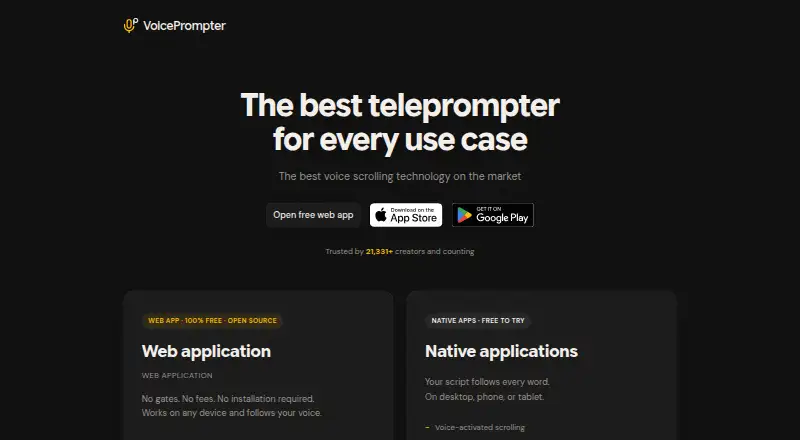
What VoicePrompter is
VoicePrompter is a voice-controlled teleprompter that follows speech through a full script and scrolls along as you speak. Its browser app offers mirror mode, voice commands, 34 auto-detected languages, and built-in video recording; it can also be installed as a PWA for offline use. The iPhone and Android apps can show a floating picture-in-picture prompter over other apps while filming. On iPhone, video recording supports up to 4K, any lens, and 10-bit HDR. The Mac app says its window is excluded from screen capture during sharing and recordings, and lists compatibility with FaceTime, Zoom, Teams, Google Meet, Loom, and Riverside. Square-bracketed script text appears as a cue but is skipped during voice scrolling. Firefox supports manual scrolling only, without voice control.
Good
- Tracks speech across the whole script.
- Browser app includes mirror mode and voice commands.
- PWA can work offline after installation.
- Mobile apps offer a floating prompter while filming.
- Square-bracketed text can show cues without stopping scrolling.
Watch out
- Firefox offers manual scrolling only.
- Android speech recognition may require a connection on some setups.
- Free plan allows three custom scripts.
Who it suits
It suits creators, sales reps, webinar hosts, podcasters, course creators, and non-native speakers presenting on camera. It is available on web, Windows, macOS, iOS, and Android.
Verdict
VoicePrompter brings speech-following prompts to browser and mobile workflows, with recording and display options across several platforms. Check Firefox's voice-control limit and the Android recognition requirements for your setup.
Plans and prices
From VoicePrompter's own pricing page, checked 2 Oct 2026.
| Plan | Price | What it gives you |
|---|---|---|
| Free | Free | 3 custom scripts · voice scrolling · floats over any app on mobile |
| Web app | Free | No fees · no account · works offline as a PWA |
| Pro | $3.34 a month | Unlimited scripts · voice scrolling · floats over any app on mobile · $3.34/mo |
| Lifetime | $99.99, paid once | Unlimited scripts · voice scrolling · floats over any app on mobile · $99.99 one-time |
The facts
Each one read from VoicePrompter's own pages, with the date it was checked.
Where it runs
- Android recognition limit
- Android on-device speech recognition depends on the device and installed language service; some combinations may require a connection.checked 2 Oct 2026
- Mac screen sharing
- The Mac app says its window is excluded from screen capture and stays invisible during sharing and recordings.checked 2 Oct 2026
- Web browser limit
- Firefox has limited support and provides manual scrolling only, without voice control.checked 2 Oct 2026
What it does
- Audience
- The maker describes the product as intended for creators, sales reps, webinar hosts, podcasters, course creators, and non-native speakers presenting on camera.checked 2 Oct 2026
- Integrations
- The Mac app says it works with FaceTime, Zoom, and Teams without plugins or modifications; the site also lists Google Meet, Loom, and Riverside.checked 2 Oct 2026
- Mobile overlay
- The iPhone and Android apps can float a picture-in-picture prompter over other apps while filming.checked 2 Oct 2026
- Mobile recording
- The iPhone app can record video in up to 4K, with any lens and 10-bit HDR.checked 2 Oct 2026
- Offline use
- The web app can be installed as a PWA and used offline after installation.checked 2 Oct 2026
- Privacy
- The privacy policy says it does not collect, store, or sell personal data and does not transmit web voice audio or transcriptions to its backend servers.checked 2 Oct 2026
- Product
- VoicePrompter is a voice-controlled teleprompter that tracks speech against the whole script and scrolls as the user speaks.checked 2 Oct 2026
- Script notes
- Text inside square brackets is displayed as a cue but skipped during voice scrolling.checked 2 Oct 2026
- Support
- The maker says he is an independent developer and invites feedback, bug reports, and feature requests by email at [email protected].checked 2 Oct 2026
- Web features
- The free browser app supports mirror mode, 34 auto-detected languages, voice commands, and built-in video recording.checked 2 Oct 2026
The full review of VoicePrompter
VoicePrompter is a speech-following teleprompter for browser, desktop and mobile presentations. It is a strong fit for creators, sales presenters, webinar hosts and anyone filming on a phone who wants the script to track natural pauses instead of a fixed pace. The free tiers are unusually capable, although Firefox and some Android recognition setups limit the main voice-control advantage.
Overview
VoicePrompter matches what you say against the entire script and scrolls accordingly. In practice, that is more forgiving than speed-based prompting when delivery slows, pauses or varies from take to take. It is available on web, Windows, macOS, iOS and Android, with recording and overlay features differing by platform.
Key features
The free browser app combines mirror mode, voice commands, automatic detection for 34 languages and built-in video recording. Installing it as a progressive web app allows offline use after installation, useful for a presenter who wants a browser workflow without depending on a live connection. Firefox is the notable exception: it offers manual scrolling only, so users of that browser do not get voice control.
Square-bracketed text appears on screen as a cue but is skipped while voice scrolling advances. This is a practical way to keep stage directions, reminders or emphasis notes visible without making them part of the spoken progression.
The iPhone app records up to 4K, works with any lens and supports 10-bit HDR. Both iPhone and Android apps can place a picture-in-picture prompter over other apps while filming, which suits a phone camera workflow where the recording app and prompt need to coexist. Android recognition depends on the device and its installed language service; some combinations require a connection, so Android users should not assume identical offline behavior.
On Mac, the app says its window is excluded from screen capture and remains invisible during sharing and recordings. That is valuable for presenters using FaceTime, Zoom or Teams without plugins or modifications. The site also lists Google Meet, Loom and Riverside as supported services. Privacy is a clear strength: the policy says personal data is not collected, stored or sold, and web voice audio and transcriptions are not sent to backend servers.
Pricing
VoicePrompter uses a freemium model and offers a free trial. The Web app costs free, with no fees, no account and offline PWA use. The separate Free plan is also free and allows three custom scripts, voice scrolling and a floating prompter over any mobile app. It is sufficient for occasional presenters, but the script cap matters to anyone maintaining a large library.
Pro costs $3.34 a month, billed at $3.34/mo, and removes the script limit while retaining voice scrolling and mobile floating prompts. It is the sensible recurring choice for regular creators who need more than three scripts. Lifetime costs $99.99, paid once, billed as a $99.99 one-time payment, with the same unlimited-script feature set. Frequent long-term users may prefer it to an ongoing subscription; casual users get less benefit from paying upfront.
Platforms
Supported platforms are web, Windows, macOS, iOS and Android. The web version is the broadest low-cost entry point, while iPhone adds high-resolution HDR recording and both mobile apps add floating prompts. Mac is the strongest fit for screen-sharing workflows because its prompt window is designed to stay out of captures.
Who it's for
VoicePrompter suits video creators, sales representatives, webinar hosts, podcasters, course creators and non-native speakers presenting on camera. Choose it when speech-tracking, phone overlays or private browser recognition matter more than a large collaboration feature set. It is a weaker choice for Firefox-dependent presenters and Android users whose language service cannot provide dependable on-device recognition.
Pros and cons
Pros
- Speech-based scrolling: tracks delivery against the full script, handling pauses better than fixed-speed prompting.
- Capable free access: browser recording, 34-language detection, voice commands and offline PWA use require no paid plan.
- Phone-friendly filming: floating picture-in-picture prompts work over other apps, with iPhone recording up to 4K and 10-bit HDR.
- Privacy-focused design: the policy says voice audio and transcriptions stay out of backend servers.
Cons
- Firefox limitation: manual scrolling replaces voice control.
- Android variability: recognition depends on the device and installed language service, and some setups need a connection.
- Free script cap: the Free plan permits only three custom scripts; unlimited storage requires Pro or Lifetime.
Alternatives
For a wider directory of options, see Teleprompter Software.
Choose FluidPrompter instead if you need Linux support or a starter tier built around one user, one prompter and a 600-word script limit. Speakflow is the better alternative when a seven-day script history on its free plan or paid video recording is more important than VoicePrompter's lower Pro price. Pick Teleprompter.com for cloud script storage, custom fonts and colors, remote control and cross-device recording, accepting a watermark on Starter recordings.
Teleprompterly is a free option with unlimited script length, no account, no watermark and downloadable video and audio recording. CueFlow is a free, no-sign-up alternative with no premium tiers. Choose EasyPrompter if two saved scripts, 500 promptable words and read-only offline access cover your needs. CueCast Prompter is another freemium option for its supported desktop platforms. CuePrompter is worth considering if browser recording, local conversion and template AI are priorities.
Verdict
VoicePrompter is recommended for presenters who want speech-following prompts across phone, browser and desktop workflows, especially with floating mobile display, offline PWA use or Mac screen sharing. Its low-cost unlimited plans and privacy position strengthen the case. Look elsewhere if you rely on Firefox voice control or need Android recognition that works consistently regardless of the device's language service.
Alternatives to VoicePrompter
- 1

FluidPrompter
Free planAndroidiOSWebLinux8.0From $9 a month - 2
Teleprompterly
Free planAndroidiOSWebLinux8.0From $39.99 a year - 3
OtO
Free planAndroidmacOSWindows7.6From $9.90 a year - 4

Prompt+
Free planiOSmacOS7.4$19.99 one-time - 5

Teleprompter.com
Free planAndroidiOSWebmacOS7.4From $90 a year - 6

Speakflow
Free planAndroidiOSWebmacOS7.3From $19 a month