
FluidPrompter
FluidPrompter is a browser-based teleprompter for video makers and presentation speakers.
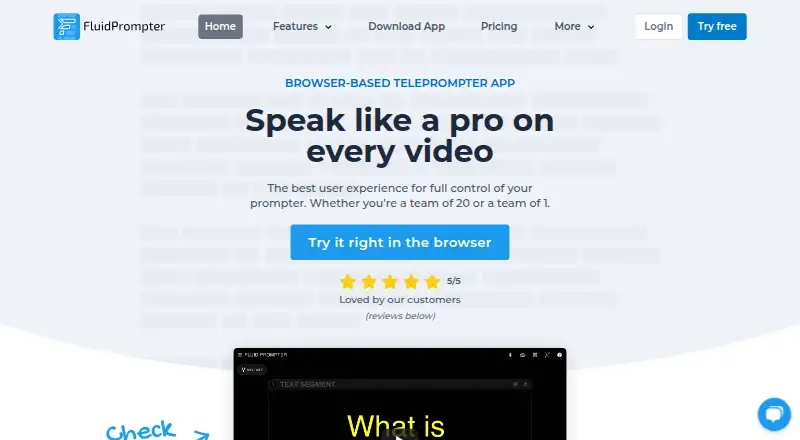
What FluidPrompter is
FluidPrompter is a browser-based teleprompter for video makers and presentation speakers. It lets users adjust scroll speed continuously, divide scripts into segments, insert pauses, edit text, and upload or download .txt files. Display settings cover font size, text width, margins, cue position, and screen flipping or mirroring. Paid plans can synchronize multiple displays, including screens used by remote crew members. Supported controls include listed Bluetooth devices from AirTurn, Neewer, and YC Onion; analog foot pedals on paid plans use AirTurn hardware. Studio Team adds SDI output for BlackMagic DeckLink or UltraStudio devices and control of compatible robotic prompter stands. Starter is free for one user and one prompter, with a 600-word script limit and keyboard or mouse controls. Solo Creator costs $9 a month and includes two synchronized prompters and unlimited script length. Studio Team costs $29 a month; Enterprise pricing is custom. Browser and desktop options are listed, while iOS/iPadOS and Android apps are described as coming soon.
Good
- Variable scroll speed and detailed display controls.
- Scripts can include segments and pauses.
- Paid plans synchronize multiple displays.
- Studio Team includes SDI output and hardware controls.
- Free Starter plan is available.
Watch out
- Starter allows one user and one prompter.
- Starter scripts are limited to 600 words.
- iOS/iPadOS and Android apps are coming soon.
- Studio Team costs $29 a month.
Who it suits
FluidPrompter suits solo creators, speakers, presenters, and media teams who need on-screen script prompts. Its synchronized-display and production hardware options may suit teams working with remote crew members or studio equipment.
Verdict
FluidPrompter combines script editing and display controls with options for synchronized screens and production hardware. The free plan has firm user, device, and script-length limits; paid plans expand those capabilities.
Plans and prices
From FluidPrompter's own pricing page, checked 15 Oct 2026.
| Plan | Price | What it gives you |
|---|---|---|
| Starter Plan | Free | 1 user · 1 prompter · 600-word script limit · keyboard/mouse controls |
| Solo Creator | $9 a month | 1 hardware remote · 2 synchronized prompters · unlimited script length · single user |
| Studio Team | $29 a month | 2+ hardware remotes · 3+ synchronized prompters · SDI output · advanced hardware controls · priority email support · per user |
| Enterprise Plan | Priced on request | priority support · custom invoice · custom terms · reseller payment option |
The facts
Each one read from FluidPrompter's own pages, with the date it was checked.
What it does
- API and SDKs
- The public documentation pages describe app use and hardware connections but do not present a public API or SDK.checked 15 Oct 2026
- Controller support
- The feature page lists keyboard, mouse, wireless remotes, gamepads, stream decks, and pedals as control options.checked 15 Oct 2026
- Desktop downloads
- The download page lists Windows 10/11, macOS, Debian/Ubuntu Linux, and Red Hat Enterprise Linux packages.checked 15 Oct 2026
- Desktop-only features
- SDI output and transparent overlay window mode require the FluidPrompter Desktop App.checked 15 Oct 2026
- Display controls
- Users can customize font size, text width, margins, cue position, and screen flipping or mirroring.checked 3 Oct 2026
- Documentation scope
- The public documentation sitemap covers getting started, accounts, system requirements, and hardware guides.checked 15 Oct 2026
- File handling
- Scripts can be uploaded and downloaded as .txt files.checked 15 Oct 2026
- Focus guide
- The cue position can be placed at the center, top, or bottom of the display.checked 15 Oct 2026
- Founder background
- Founder Ben says he started the product after launching the BensTechLab hardware-review channel in 2020 and working as a software architect and developer.checked 15 Oct 2026
- Hardware brands
- Supported handheld Bluetooth controllers include AirTurn, Neewer, and YC Onion, with AirTurn analog-pedal support on paid plans.checked 15 Oct 2026
- Hardware compatibility
- The maker lists support for AirTurn, Neewer, and YC Onion handheld Bluetooth controls, and paid-plan analog foot-pedal controls via AirTurn hardware.checked 3 Oct 2026
- Independent description
- NuSpark/GainForge describes FluidPrompter as a browser teleprompter for video creators and presenters with multi-device synchronization, customizable displays, and controller compatibility.checked 15 Oct 2026
- Independent index ranking
- MobilesTalk ranks FluidPrompter second among 31 teleprompter products with an index score of 72/100.checked 15 Oct 2026
- Independent limit: enterprise pricing
- MobilesTalk notes that Enterprise pricing is available only by request.checked 15 Oct 2026
- Independent limit: starter tier
- MobilesTalk identifies the Starter tier's one-user, one-device, and 600-word restrictions.checked 15 Oct 2026
- Independent praise: controls
- MobilesTalk praises adjustable text layout, cue position, and screen mirroring.checked 15 Oct 2026
- Independent praise: scripting
- MobilesTalk highlights segmented and editable scripts plus .txt import and export.checked 15 Oct 2026
- Independent praise: synchronization
- MobilesTalk says paid plans can synchronize displays for remote crew members.checked 15 Oct 2026
Where it runs
- Browser requirements
- Current browsers support prompting; Chrome, Brave, and Edge additionally support Bluetooth and USB controllers, while Safari and Firefox do not.checked 15 Oct 2026
- Independent limit: mobile apps
- MobilesTalk notes that iOS/iPadOS and Android native apps are listed as coming soon.checked 15 Oct 2026
The company
- Company headquarters
- The listed Langley, British Columbia, Canada address is marked as a mailing address only.checked 15 Oct 2026
- Company legal name
- The site identifies the maker as FluidLabs Software Ltd.checked 15 Oct 2026
- Headquarters
- Langley, British Columbia, Canadachecked 28 Sep 2026
Money
- Free plan limits
- The Starter plan is limited to one user, one prompter device, and scripts of 600 words or less.checked 3 Oct 2026
The full review of FluidPrompter
FluidPrompter is a browser-based teleprompter for video makers and presentation speakers. It best suits people who need adjustable prompting, with synchronized displays and production hardware available as teams scale up. Its free tier is tightly capped, while the paid plans make the case for longer scripts, remote controls, and multi-screen setups.
Overview
FluidPrompter focuses on preparing a script and controlling how it moves across a display. Variable scroll speed, segmenting and pauses give speakers more control over pacing; adjustable text layout and mirroring help adapt the prompt to different setups. The strongest distinction between plans is not just capacity: higher tiers add remote operation, synchronized screens, and, at the top end, production hardware support.
That makes it a practical fit for solo creators and presenters who want a straightforward prompting workflow, as well as media teams that need more than one screen or operator. The trade-off is clear: Starter is restrictive for longer scripts, and users needing multi-device workflows must pay for them.
Key features
Script and pacing controls
Scripts can be edited, divided into segments, and marked with pauses, then uploaded or downloaded as .txt files. Continuously variable scroll speed lets a speaker adjust pacing rather than choose from a fixed set of speeds. These tools serve scripted delivery well, though the free plan’s 600-word ceiling limits longer talks, lessons, and video scripts.
Display and remote controls
Font size, text width, margins, cue position, and screen flipping or mirroring can be adjusted to suit a prompting arrangement. Starter relies on keyboard and mouse controls; Solo Creator adds one hardware remote and two synchronized prompters, a meaningful step up for someone operating a camera-facing display alongside another screen. The maker lists compatibility with AirTurn, Neewer, and YC Onion handheld Bluetooth controls. Paid plans also support analog foot pedals through AirTurn hardware.
Team and production features
Studio Team supports two or more users and remotes, at least three synchronized prompters, SDI output for BlackMagic DeckLink or UltraStudio devices, and control of compatible robotic presidential prompter stands. Those additions make it the relevant tier for coordinated production, not a necessary upgrade for a solo speaker. It also includes priority email support.
Pricing
| Plan | Price | What it includes |
|---|---|---|
| Starter Plan | free | One user, one prompter, scripts up to 600 words, keyboard and mouse controls. |
| Solo Creator | $9 a month | One user, one hardware remote, two synchronized prompters, unlimited script length. |
| Studio Team | $29 a month | Two or more users and remotes, three or more synchronized prompters, SDI output, advanced hardware controls, priority email support. |
| Enterprise Plan | Custom pricing | Priority support, custom invoice and terms, and a reseller payment option. |
Starter is a useful no-cost option for short scripts and single-device prompting, but its word, user, and device limits are firm. Solo Creator is the sensible upgrade for an individual who needs longer scripts, a hardware remote, or a second synchronized display. Studio Team costs more but is aimed at multi-person and hardware-heavy production. Enterprise is for organizations needing custom commercial arrangements. There is no free trial; the paid monthly terms are the stated prices, and the free tier remains available without a paid commitment.
Privacy and account security
FluidPrompter says it will not release, sell, or rent submitted personal information to third parties. Payment card details are entered with payment providers rather than directly with FluidPrompter. Its privacy policy also cautions that it cannot guarantee the security of transmitted information and places responsibility for protecting passwords and account details on users.
Platforms
FluidPrompter is browser-based and its download page lists Windows 10/11, macOS, Debian/Ubuntu, and RedHat Linux. Although the platform listing also names Android and iOS, the download page says those apps are coming soon, so users on those devices should not assume native apps are ready. Browser use is the clearest supported route across the listed desktop systems.
Who it's for
Solo YouTubers, livestream hosts, webinar presenters, course creators, public speakers, and in-house media teams all fit the product’s stated audience. Starter works for short, single-display scripts; Solo Creator better fits an individual recording longer material or using a remote; Studio Team is the choice when multiple people, displays, or production hardware are involved. It is a weaker fit for anyone who needs a generous free script allowance or an established native mobile app today.
Pros and cons
- Pros: Variable scrolling, script segments, and pauses give speakers useful control over delivery.
- Pros: Display adjustments and mirroring accommodate different prompting arrangements.
- Pros: Paid tiers scale from one remote and two screens to team workflows, SDI output, and compatible robotic stands.
- Cons: Starter allows only one user, one device, and 600-word scripts, which quickly rules it out for longer material or multi-screen work.
- Cons: Android and iOS apps are described as coming soon, leaving browser use as the practical option for now.
- Cons: Solo Creator is still limited to one user and one hardware remote; teams need the substantially more expensive Studio Team tier.
Alternatives
Speakflow is another freemium option; its free tier has Limited Flow and a seven-day script history, while Plus costs $19 a month and includes one hour of video recording and storage. Choose it when that recording-and-storage allowance matters more than FluidPrompter’s lower-priced Solo Creator tier and multi-display options.
Teleprompter.com offers a free Starter plan with cloud script storage, remote control, and custom fonts and colors, but recordings include a watermark. Its free trial and listed iOS, Android, macOS, and web platforms may make it a better match for users prioritizing those platform choices or trial access.
Teleprompterly is free and supports Android, iOS, Linux, macOS, web, and Windows; its free plan allows unlimited script length and video and audio recording downloads without an account or watermark. Choose it if those no-cost allowances outweigh FluidPrompter’s paid synchronized-display and production-hardware features.
VoicePrompter has a free web app that needs no account and works offline as a PWA, making it a reasonable alternative when those conditions matter.
Prompt+ is limited to iOS and macOS; its free plan caps scripts at 750 characters, while Premium Teleprompter removes that limit for a one-off 19.99 USD purchase. It suits readers who want a one-time purchase rather than a monthly subscription and only need those platforms.
PromptSmart is a paid alternative with a free trial and support for Android, iOS, Linux, macOS, web, and Windows.
OtO offers a free demo version for unlimited personal use and supports Android, macOS, and Windows.
QPrompt is a free option for Windows, macOS, Linux, and Android.
For more choices, see Teleprompter Software.
Verdict
FluidPrompter is best for a solo creator or production team that needs flexible pacing and display control, with a clear upgrade path from one screen to synchronized displays and specialized hardware. Solo Creator is the strongest fit for individual work beyond short scripts; Studio Team makes sense when its team and production features are genuinely needed. Look elsewhere if a generous free script allowance or ready native mobile apps are essential.
Getting started
- Visit the FluidPrompter website
- Open the browser version or choose a listed desktop option for Windows, macOS, or Linux
- Start with the free Starter plan, or choose Solo Creator or Studio Team
- Edit a script or upload a .txt file, then adjust its display settings
- Use keyboard and mouse controls on Starter, or connect listed hardware controls on a suitable paid plan
Limits worth knowing
Starter is free for one user and one prompter device, with a 600-word script limit and keyboard or mouse controls. Solo Creator costs $9.00 per month; Studio Team costs $29.00 per month and includes at least two users, two hardware remotes, and three synchronized prompters.
Questions
Does FluidPrompter have a free plan?
Yes. Starter costs nothing and allows one user, one prompter, scripts up to 600 words, and keyboard or mouse controls.
How much do the paid plans cost?
Solo Creator costs $9.00 per month. Studio Team costs $29.00 per month.
What platforms are available?
The download page lists browser use and desktop options for Windows 10/11, macOS, Debian/Ubuntu, and RedHat Linux. It says iOS/iPadOS and Android apps are coming soon.
Can I use a hardware remote or foot pedal?
The maker lists Bluetooth controls from AirTurn, Neewer, and YC Onion. Paid-plan analog foot-pedal controls use AirTurn hardware.
What does Studio Team include?
It includes two or more users, two or more hardware remotes, three or more synchronized prompters, SDI output, advanced hardware controls, and priority email support.
Is there an Enterprise plan price?
Enterprise is a custom plan; prospective customers are directed to contact FluidPrompter. Its listed terms include priority support, a custom invoice, custom terms, and a reseller payment option.
Alternatives to FluidPrompter
- 1
Teleprompterly
Free planAndroidiOSWebLinux8.0From $39.99 a year - 2
OtO
Free planAndroidmacOSWindows7.6From $9.90 a year - 3

Prompt+
Free planiOSmacOS7.4$19.99 one-time - 4

Teleprompter.com
Free planAndroidiOSWebmacOS7.4From $90 a year - 5

Speakflow
Free planAndroidiOSWebmacOS7.3From $19 a month - 6
TeleprompterFlow
Free planAndroidiOSWebmacOS7.3Free plan