TeleprompterFlow
TeleprompterFlow is a voice-controlled teleprompter for presenters, streamers, and content creators.
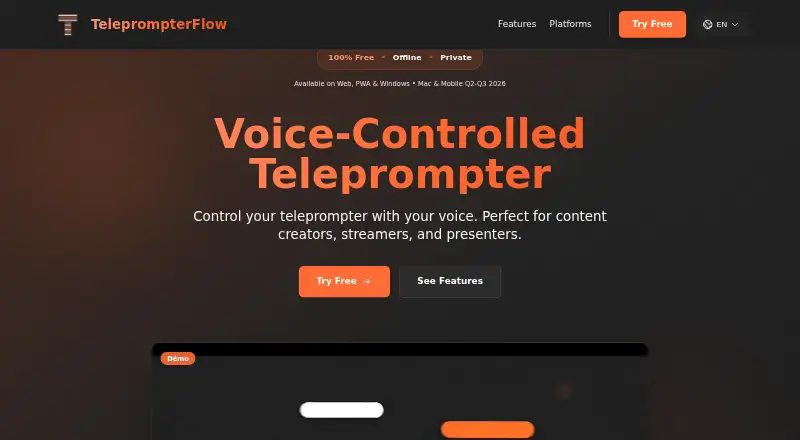
What TeleprompterFlow is
TeleprompterFlow is a voice-controlled teleprompter for presenters, streamers, and content creators. It advances a script automatically as the user speaks and supports 34 languages. The web app runs locally in the browser, keeps scripts on the device, and can work without an internet connection; the site says it uses no tracking or external servers. Users can adjust scroll speed, font size, and colors, and mirror mode can flip text horizontally or rotate it 180° for use with a one-way mirror. Integrated video recording captures a reader in split-screen or overlay mode. Recent scripts are saved locally so users can resume where they left off. The web app can be installed on a device's home screen as an app, and a native Windows application is available as a beta download. The product is described as free forever, with no signup or credit card required; its Free plan is free. The site lists macOS and mobile apps as coming soon.
Good
- Scrolls automatically as the user speaks.
- Supports 34 languages.
- Works offline in the browser.
- Includes split-screen and overlay video recording.
- Scripts stay on the device, according to the site.
Watch out
- Native Windows app is a beta download.
- macOS and mobile apps are listed as coming soon.
- Listed mobile apps are not currently described as available.
Who it suits
TeleprompterFlow suits people who present, stream, or create videos and want scripts to move with their speech. Its offline browser use and mirror mode may fit readers who need a local, adjustable teleprompter.
Verdict
TeleprompterFlow pairs voice-controlled scrolling with local scripts, mirror options, and recording. The web app is free, while the native Windows download is beta and other listed app platforms are still upcoming.
Plans and prices
From TeleprompterFlow's own pricing page, checked 15 Oct 2026.
| Plan | Price | What it gives you |
|---|---|---|
| Free | Free | voice-controlled scrolling · offline use · mirror mode · integrated video recording · no signup · no credit card · Free forever |
The facts
Each one read from TeleprompterFlow's own pages, with the date it was checked.
What it does
- AI script generation
- The app interface includes a Generate AI Script control.checked 15 Oct 2026
- Cloud sync
- The app page labels cloud synchronization as PREMIUM and lists automatic backup, cross-device access and version restore.checked 15 Oct 2026
- Customization
- Users can change scrolling speed, font size and colors.checked 15 Oct 2026
- Display controls
- The app exposes font size, line height, active-line position, margins, lookahead words and paragraph spacing.checked 15 Oct 2026
- Formatting controls
- The app includes formatting preservation, smooth animations, active-word highlighting and screen rotation.checked 15 Oct 2026
- Independent file-format claim
- SSKOO lists TXT, DOCX, PDF, SRT and Markdown among supported script formats.checked 15 Oct 2026
- Independent listing rating
- SSKOO shows no user rating and a count of 0 for TeleprompterFlow.checked 15 Oct 2026
- Independent system requirements
- SSKOO lists Windows 10 or later and at least 4 GB of memory as minimum requirements.checked 15 Oct 2026
- Interface
- The product offers light and dark themes and animated interface elements.checked 15 Oct 2026
- Keyboard shortcuts
- The app lists shortcuts for picture-in-picture, microphone toggle, restart, play/pause and exiting picture-in-picture.checked 15 Oct 2026
- Languages
- The home page advertises support for 34 languages.checked 15 Oct 2026
- Limit: maturity
- SSKOO characterizes the product as early-stage with an immature ecosystem and comparatively limited features.checked 15 Oct 2026
- Limit: speech recognition
- SSKOO says the experience depends on speech-recognition quality and microphone conditions.checked 15 Oct 2026
- Mirror mode
- Mirror mode horizontally flips and rotates the display 180 degrees for one-way teleprompter glass.checked 15 Oct 2026
- Offline
- The site says the app works without an internet connection.checked 9 Oct 2026
- Offline mode
- The maker says the product works without an internet connection.checked 15 Oct 2026
- Praise: voice following
- SSKOO praises the natural voice-controlled scrolling and reduced need for manual operation.checked 15 Oct 2026
The company
- Company headquarters
- No headquarters location is stated on the opened maker pages.checked 15 Oct 2026
- Company identity
- The opened maker pages identify the product and copyright holder only as TeleprompterFlow.checked 15 Oct 2026
- Founded year
- No founding year is stated on the opened maker pages.checked 15 Oct 2026
Money
- Free-trial term
- The app page advertises a 7-day free trial for premium cloud synchronization.checked 15 Oct 2026
- Planned macOS support
- A native macOS application is listed for Q2 2026.checked 15 Oct 2026
- Planned mobile support
- iPhone, iPad and Android applications are listed for Q3 2026.checked 15 Oct 2026
- Planned platforms
- The site lists macOS for Q2 2026 and iPhone, iPad, and Android apps for Q3 2026 as coming soon.checked 9 Oct 2026
Alternatives to TeleprompterFlow
- 1

FluidPrompter
Free planAndroidiOSWebLinux8.0From $9 a month - 2
Teleprompterly
Free planAndroidiOSWebLinux8.0From $39.99 a year - 3
OtO
Free planAndroidmacOSWindows7.6From $9.90 a year - 4

Prompt+
Free planiOSmacOS7.4$19.99 one-time - 5

Teleprompter.com
Free planAndroidiOSWebmacOS7.4From $90 a year - 6

Speakflow
Free planAndroidiOSWebmacOS7.3From $19 a month