Tab Stash
Tab Stash is a free, open-source Firefox extension for saving batches of tabs as bookmarks and reopening a tab or group later.
What Tab Stash is
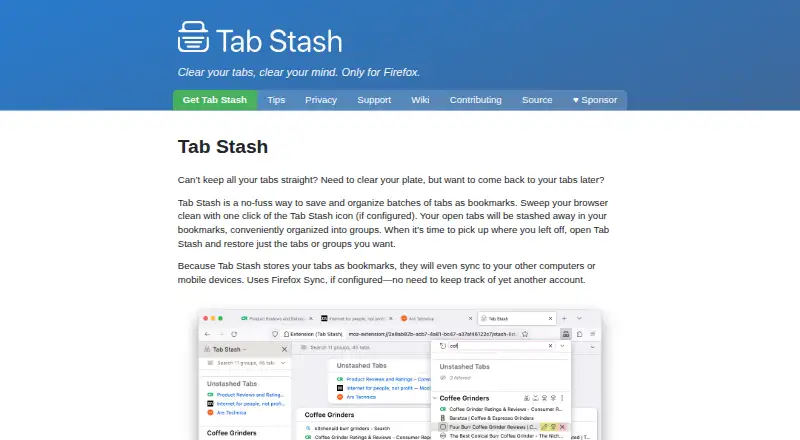
Tab Stash is a free, open-source Firefox extension for saving batches of tabs as bookmarks and reopening a tab or group later. It organizes saved tabs with groups and sub-groups, drag-and-drop reordering, and multi-selection. You can view a stash in Firefox’s sidebar, a popup, or a full-browser tab, then use quick search to find saved items. Recently deleted items can be recovered; by default, they remain on your computer for up to six months. Stashes can be imported and exported in rich text, Markdown, OneTab, and other formats. Version 3.5 supports Firefox’s native tab groups, allowing tabs to move between open groups and the stash. Because saved tabs are bookmarks, they can sync to other computers or mobile devices through Firefox Sync when configured. Tab Stash includes a dark mode that can follow the operating system setting or be switched manually. The maker says user information is not shared with the developer or third parties except as described in the privacy policy; saved and deleted items are stored locally rather than in the cloud.
Good
- Groups, sub-groups, and drag-and-drop organization
- Search and recovery for recently deleted items
- Imports and exports several stash formats
- Firefox Sync can sync saved bookmarks across devices
Watch out
- Available only for Firefox
- Firefox Sync must be configured for syncing
Who it suits
Tab Stash suits Firefox users who want to save tab collections and organize them for later. It may also suit users who want to sync saved tabs through Firefox Sync or keep saved and deleted items on their computer.
Verdict
Tab Stash combines bookmark-based storage with grouping, search, and recovery options. It is limited to Firefox, and cross-device syncing depends on Firefox Sync being configured.
Plans and prices
From Tab Stash's own pricing page, checked 4 Oct 2026.
| Plan | Price | What it gives you |
|---|---|---|
| Free | Free | Free forever · open-source Firefox extension |
The facts
Each one read from Tab Stash's own pages, with the date it was checked.
Where it runs
- Appearance
- Tab Stash has dark mode and can match the operating system’s dark mode or be switched manually.checked 4 Oct 2026
What it does
- Availability
- The maker describes Tab Stash as a Firefox extension, and the official site says it is only for Firefox.checked 4 Oct 2026
- Firefox Sync
- Because stashed tabs are stored as bookmarks, they can sync to other computers or mobile devices through Firefox Sync when configured.checked 4 Oct 2026
- Firefox tab groups
- Version 3.5 supports Firefox’s native tab groups, letting users organize them and move tabs between the stash and open groups.checked 4 Oct 2026
- Import and export
- It can import and export stashes in rich text, Markdown, OneTab, and other formats.checked 4 Oct 2026
- Local storage
- Stashed tabs are stored in bookmarks, and deleted items are retained on the user’s computer rather than in the cloud.checked 4 Oct 2026
- Organization
- The extension supports groups and sub-groups, drag-and-drop reorganization, and multi-selection.checked 4 Oct 2026
- Permissions
- Required permissions cover tabs, recently closed tabs, hiding and showing tabs, bookmarks, and browser settings; the settings permission is read-only.checked 4 Oct 2026
- Privacy
- The developer says Tab Stash does not share user information with the developer or third parties, except as described in its privacy policy.checked 4 Oct 2026
- Search and recovery
- It includes quick search and can recover recently deleted items; deleted items are saved on the computer for up to six months by default.checked 4 Oct 2026
- Support
- Users can search GitHub for existing reports or file an issue; the developer says they cannot promise a response timeframe but try to respond quickly, especially to serious issues.checked 4 Oct 2026
- Views
- Users can view their stash in the Firefox sidebar, a popup, or a full-browser tab view.checked 4 Oct 2026
- What it does
- Tab Stash saves and organizes batches of browser tabs as bookmarks so users can restore individual tabs or groups later.checked 4 Oct 2026
The company
- Maker and location
- The product page identifies Josh Berry as its maker; his GitHub Sponsors profile lists California.checked 4 Oct 2026
Alternatives to Tab Stash
- 1

Toby
Free planAndroidiOSWebExtension8.1From $4.50 a month - 2

Tabblar
Free planAndroidiOSWebAPI8.0From $5 a month - 3
tabExtend
Free planAndroidiOSWebExtension8.0From $8 a month - 4
Workona
Free planiOSWebExtensionLinux7.6From $12 a month - 5

Pinako
Free planWebLinuxWindows6.9From $5 a month - 6
Tabmanager.io
Free planExtension6.4From $35.88 a year