SwiftLint
SwiftLint is a free, open-source tool for checking Swift code against style conventions.
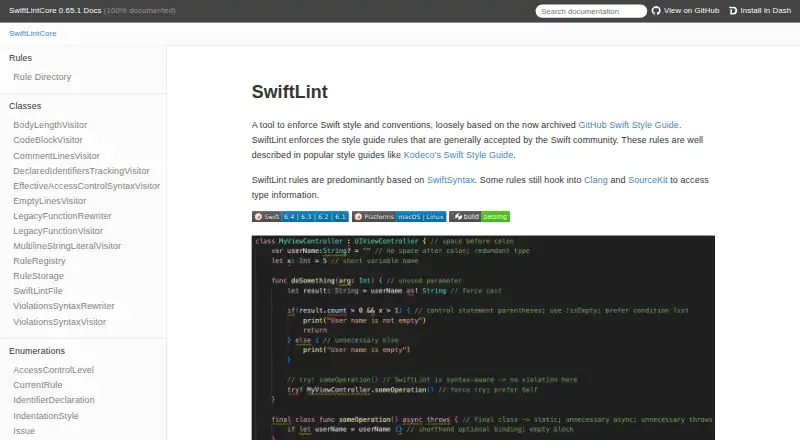
What SwiftLint is
SwiftLint is a free, open-source tool for checking Swift code against style conventions. It includes more than 200 built-in rules, with opt-in rules disabled until a project enables them. A `.swiftlint.yml` file can set active rules, paths to include or exclude, and rule-specific settings. The command-line tool supports linting, analysis, baselines, rule listings, and multiple reporters. It can automatically correct some violations with `--fix` or `--autocorrect`, overwriting affected files, so its documentation cautions that the source should be valid and compilable. SwiftLint integrates with Xcode and Swift Package Manager, and documented integrations include pre-commit, Fastlane, Docker, Visual Studio Code, and MegaLinter. Installation options include package managers, prebuilt packages, and building from source. It should run with the Swift toolchain used to compile the project. SwiftLint is MIT licensed, maintained by volunteers, and described by its maintainers as not a commercial product.
Good
- More than 200 built-in rules.
- Projects can configure rules and paths.
- Can automatically correct certain violations.
- Integrates with Xcode and Swift Package Manager.
- Available for Linux, macOS, and Windows.
Watch out
- Autocorrection overwrites affected files.
- Analyzer rules are considerably slower than lint rules.
- Plugin cannot directly use configurations outside the project directory.
- Should use the project’s Swift toolchain.
Who it suits
SwiftLint suits developers and teams who want to check Swift code against configurable style rules within their editor, build, or CI workflows. It is intended for valid, compilable Swift source.
Verdict
SwiftLint offers configurable checks and integrations for Swift projects, with automatic correction for some violations. Keep its compilable-source requirement, toolchain alignment, and file-overwriting corrections in mind.
Plans and prices
From SwiftLint's own pricing page, checked 10 Oct 2026.
| Plan | Price | What it gives you |
|---|---|---|
| SwiftLint | Free | Open-source Swift linting tool · MIT licensed |
The facts
Each one read from SwiftLint's own pages, with the date it was checked.
What it does
- Analysis limitation
- SwiftLint is designed to analyze valid, compilable Swift source code, and its analyzer rules are considerably slower than lint rules.checked 9 Oct 2026
- Auto-correction
- SwiftLint can automatically correct certain violations and overwrites the affected files on disk when doing so.checked 9 Oct 2026
- Autocorrection
- SwiftLint can automatically fix correctable violations with `--fix` or `--autocorrect`.checked 10 Oct 2026
- Built-in rules
- SwiftLint includes over 200 rules, and opt-in rules are disabled by default.checked 9 Oct 2026
- CI integrations
- SwiftLint documents a Fastlane action and a Docker image, and says it is embedded in MegaLinter.checked 10 Oct 2026
- Configuration
- File inclusions and exclusions can be configured in a `.swiftlint.yml` configuration file.checked 10 Oct 2026
- Custom rules
- Users can define Swift custom rules, which require building with Bazel, or regex-based custom rules that official builds can run.checked 9 Oct 2026
- Distribution
- The project documents installation through Homebrew, CocoaPods, Mint, Bazel, Swift Package Manager, prebuilt packages, and source builds.checked 9 Oct 2026
- Editor integration
- The documentation describes integration with Visual Studio Code through the `vscode-swiftlint` extension.checked 10 Oct 2026
- Install options
- The documentation lists Homebrew, CocoaPods, Mint, Bazel, a prebuilt package, and building from source as installation options.checked 10 Oct 2026
- Integrations
- Documented integrations include Swift Package Manager and Xcode plugins, pre-commit, Fastlane, Docker, Visual Studio Code, and MegaLinter.checked 9 Oct 2026
- License
- The GitHub repository identifies SwiftLint as MIT licensed.checked 10 Oct 2026
- License and commercial status
- SwiftLint is MIT licensed, maintained by volunteers in their free time, and described by its maintainers as not a commercial product.checked 9 Oct 2026
- Output
- The command line supports linting, analysis, baselines, rule listings, and multiple reporters.checked 10 Oct 2026
- Plugin limitation
- The build tool plugin does not directly support configurations located outside the package or project directory.checked 10 Oct 2026
- Purpose
- SwiftLint enforces Swift style and conventions based on rules generally accepted by the Swift community.checked 10 Oct 2026
- Rule engine
- Its rules are predominantly based on SwiftSyntax, with some using Clang and SourceKit to access type information.checked 10 Oct 2026
- Security consideration
- The project warns that bypassing Xcode plugin and macro validation implicitly trusts them and has security implications.checked 9 Oct 2026
- Security note
- The documentation warns that disabling Xcode plugin and macro validation for unattended use bypasses validation dialogs and implicitly trusts all plugins and macros.checked 10 Oct 2026
- Source requirement
- SwiftLint is designed to analyze valid, compilable Swift source code; non-compiling code can produce unexpected results, especially with autocorrection.checked 10 Oct 2026
- Support
- The maintainers ask users to support the project by contributing, reporting issues, and helping the community, and note that volunteer time is limited.checked 9 Oct 2026
- Swift Package Manager
- SwiftLint can run as a Swift Package command plugin or build tool plugin.checked 10 Oct 2026
- Toolchain requirement
- SwiftLint should run with the same Swift toolchain used to compile the project; its development tests require Swift 6.1 or higher, while Swift Package Manager plugins work down to Swift 5.9.checked 9 Oct 2026
Where it runs
- Platform releases
- The 0.65.1 release lists a universal macOS binary, Windows installers and binaries for AMD64 and ARM64, and AMD64 Linux binaries.checked 9 Oct 2026
The full review of SwiftLint
SwiftLint is a free, open-source linter that checks Swift code against community style conventions. It suits Swift developers who want configurable checks in their editor, build, or CI workflow. Its broad rule set and integrations make it a practical choice, provided your code compiles and SwiftLint uses the project’s toolchain.
Overview
SwiftLint combines a command-line interface with configurable rules for Swift projects. Its rules are predominantly based on SwiftSyntax; some use Clang and SourceKit to access type information. The command line also supports analysis, baselines, rule listings, and multiple reporters.
Over 200 built-in rules give teams a substantial starting point. Opt-in rules are disabled by default, so projects can choose stricter checks deliberately rather than inherit every rule. A .swiftlint.yml file controls enabled rules, paths to include or exclude, and rule settings.
Key features
Rules and corrections
Teams can define custom Swift rules, but those require building with Bazel. Regex-based custom rules are a more accessible option because official builds can run them. SwiftLint can also fix certain violations with --fix or --autocorrect. That saves manual edits for correctable issues, but corrections overwrite affected files on disk; review changes and keep a safe version of the source before applying them.
Project integrations
SwiftLint integrates with Xcode through a build tool plugin or a Run Script Build Phase, and with Swift Package Manager as a command or build tool plugin. Other documented connections include pre-commit, Fastlane, Docker, Visual Studio Code through the vscode-swiftlint extension, and MegaLinter. This range makes it feasible to run checks during local editing, builds, and CI rather than relying on a separate manual pass.
The build tool plugin does not directly support configurations outside the package or project directory, which can complicate repositories that centralize configuration elsewhere. The documentation also warns that disabling Xcode plugin and macro validation bypasses validation dialogs and implicitly trusts those components—an important security trade-off for unattended use.
Pricing
| Plan | Price | Includes |
|---|---|---|
| SwiftLint | free | Open-source Swift linting tool; MIT licensed |
SwiftLint is free and open source, with no paid tier or trial to weigh against its core functionality. It is maintained by volunteers in their free time, and its maintainers say it is not a commercial product. Users who need help sustaining it can contribute, report issues, and support the community; volunteer time is limited, so this is not a substitute for a guaranteed commercial support arrangement.
Platforms
SwiftLint supports Linux, macOS, and Windows. The 0.65.1 release lists a universal macOS binary, Windows installers and AMD64 and ARM64 binaries, and AMD64 Linux binaries. Installation options include Homebrew, CocoaPods, Mint, Bazel, Swift Package Manager, prebuilt packages, and source builds.
Toolchain alignment matters: SwiftLint should run with the same Swift toolchain used to compile the project. Its development tests require Swift 6.1 or higher, while Swift Package Manager plugins work down to Swift 5.9. Check the toolchain requirements for the integration you plan to use rather than treating platform support alone as sufficient.
Who it's for
SwiftLint is a strong fit for Swift teams that want to enforce shared conventions across editors, builds, and CI, and that can configure rules to match their codebase. It is less suitable as a checker for code that is still syntactically broken: it is designed for valid, compilable source, and non-compiling code can produce unexpected results, especially with autocorrection. Analyzer rules are considerably slower than lint rules, so projects should account for that when deciding how broadly to run analysis.
Pros and cons
- Pros: More than 200 built-in rules and configurable opt-in checks let teams tune enforcement rather than accept a fixed style policy.
- Pros: Xcode and Swift Package Manager support, plus editor and CI integrations, fit SwiftLint into several stages of a project workflow.
- Pros: Free, MIT-licensed distribution and multiple installation routes make it accessible across supported platforms.
- Cons: It expects compilable Swift source, limiting its reliability while code is in an invalid state.
- Cons: Autocorrection overwrites files, so careless use can replace source changes.
- Cons: Matching the compiler’s toolchain and the plugin’s configuration-path restriction require setup attention; analyzer rules also run considerably slower than lint rules.
- Cons: Volunteer maintenance means support capacity is limited, which may not suit teams that require commercial support.
Alternatives
For Swift projects, SwiftLint is the focused option among these alternatives. Choose another tool when its language or target better matches your work:
- Biome is a free toolchain for web projects; choose it for web work rather than Swift linting.
- Cppcheck offers free core static analysis and a Project plan with custom pricing; consider it when C/C++ analysis is the need.
- Hadolint is a free, open-source Dockerfile linter; choose it for Dockerfiles.
- JSHint is a free JavaScript linter; choose it for JavaScript rather than Swift.
- PMD is a free, downloadable static code analyzer; consider it for code analysis outside SwiftLint’s specific Swift focus.
- Ruff is an open-source developer tool in the Python ecosystem; choose it for Python work.
- ShellCheck is free static analysis for shell scripts, available on the web, terminal, or in editors; choose it for shell code.
- actionlint is a free, MIT-licensed command-line static checker with a browser playground; consider it for the checks it provides.
Browse more options in Linters.
Verdict
SwiftLint is an easy recommendation for Swift developers who want a free, adaptable style checker integrated into their project workflow. Its rule depth and broad integration options are the main reasons to choose it. Look elsewhere if you need analysis of non-compiling code, guaranteed commercial support, or a tool for a language other than Swift.
Getting started
- Choose an installation route such as Homebrew, CocoaPods, Mint, Bazel, Swift Package Manager, a prebuilt package, or a source build.
- Install SwiftLint for Linux, macOS, or Windows.
- Set project rules, paths, and rule settings in `.swiftlint.yml`.
- Run it with the same Swift toolchain used to compile the project.
- Connect it through an Xcode build tool plugin or Run Script Build Phase, or use a documented editor or CI integration.
Limits worth knowing
SwiftLint's auto-correction covers certain violations and overwrites the affected files. It is designed for valid, compilable Swift source, and analyzer rules are considerably slower than lint rules.
Questions
How much does SwiftLint cost?
SwiftLint is free and open source under the MIT license.
Which platforms does SwiftLint support?
It supports Linux, macOS, and Windows.
Does it work with Xcode and Swift Package Manager?
Yes. It supports Xcode projects through a build tool plugin or Run Script Build Phase, and Swift Package Manager command or build tool plugins.
Can SwiftLint fix violations automatically?
Yes, it can correct certain violations with `--fix` or `--autocorrect`. Corrections overwrite affected files.
What integrations are documented?
They include pre-commit, Fastlane, Docker, Visual Studio Code, and MegaLinter, as well as Xcode and Swift Package Manager.
What Swift toolchain should it use?
SwiftLint should run with the same Swift toolchain used to compile the project. Its Swift Package Manager plugins work down to Swift 5.9.
Alternatives to SwiftLint
- 1

Cppcheck
Free planOpen sourceLinuxmacOSSelf-hostedWindows7.4Free plan - 2
JSHint
Free planOpen sourceWebAPIExtensionLinux7.4Free plan - 3
Flake8
Free planOpen sourceAPILinuxmacOSSelf-hosted7.3Free plan - 4
PMD
Free planLinuxmacOSSelf-hostedWindows6.8Free plan - 5

Ruff
Free planWebLinuxmacOSSelf-hosted6.5Free plan - 6

Biome
Free planWebExtensionLinuxmacOS6.4Free plan