Hadolint
Hadolint is a free Dockerfile linter that checks files for errors and best practices.
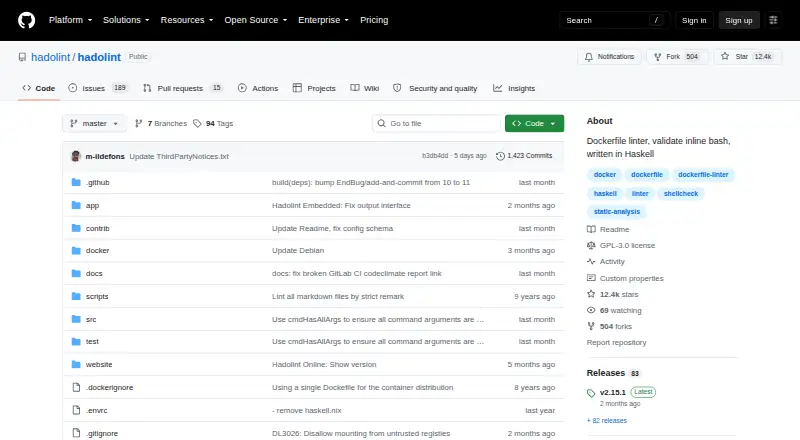
What Hadolint is
Hadolint is a free Dockerfile linter that checks files for errors and best practices. It parses Dockerfiles into an abstract syntax tree and applies rules to that structure. For Bash code inside Dockerfile RUN instructions, it uses ShellCheck. Hadolint checks carry the DL prefix, while ShellCheck checks use SC. Users can ignore rules, override severity, set failure thresholds and configure output formats, label schemas and trusted registries. Supported reports include tty, JSON, Checkstyle, Code Climate, GitLab Code Climate, GNU, Codacy, SonarQube, SARIF and JUnit. It can run in Docker or Podman containers, as a pre-commit hook, or through prebuilt binaries for macOS, Windows and Linux. Installation options also include Homebrew, Scoop, Nix and source builds. The project documents integrations with CI services such as GitHub Actions, GitLab CI, Azure DevOps Pipelines and Jenkins, as well as editors including VS Code, Atom, Emacs, Vim and NeoVim. An online version is hosted at hadolint.github.io/hadolint. The repository identifies its license as GPL-3.0.
Good
- Free and GPL-3.0 licensed
- Checks Bash in RUN instructions with ShellCheck
- Configurable rules, severity and failure thresholds
- Supports multiple report formats
- Documented CI and editor integrations
Watch out
- Focused on Dockerfiles and embedded Bash
- Prebuilt binaries listed for three operating systems
Who it suits
Hadolint suits developers who want to check Dockerfiles and Bash commands in RUN instructions. Its documented CI, editor and pre-commit integrations may fit teams incorporating linting into their development workflows.
Verdict
Hadolint combines Dockerfile rules with ShellCheck analysis for commands inside RUN instructions, plus configurable reports and integrations. It is a focused linting tool rather than a general-purpose code checker.
Plans and prices
From Hadolint's own pricing page, checked 8 Oct 2026.
| Plan | Price | What it gives you |
|---|---|---|
| Hadolint | Free | Open-source Dockerfile linter · GPL-3.0 |
The facts
Each one read from Hadolint's own pages, with the date it was checked.
What it does
- Bash analysis
- It uses ShellCheck to lint Bash code inside Dockerfile RUN instructions.checked 8 Oct 2026
- CI integrations
- The project documents integrations including GitHub Actions, GitLab CI, Azure DevOps Pipelines, Bitbucket Pipelines, CircleCI, Drone CI, Jenkins, and Travis CI.checked 8 Oct 2026
- Configuration
- Users can configure ignored rules, severity overrides, failure thresholds, output format, label schemas, and trusted registries.checked 8 Oct 2026
- Container use
- Hadolint can run from Docker or Podman container images published on Docker Hub and GitHub Container Registry.checked 8 Oct 2026
- Downloads
- Prebuilt binaries are offered for OSX, Windows, and Linux, with installation also described through Homebrew, Scoop, Nix, containers, or source builds.checked 8 Oct 2026
- Editor integrations
- Documented editor integrations include VS Code, Atom, Emacs, Geany, Sublime Text, Vim, and NeoVim.checked 8 Oct 2026
- Latest release
- The release page opened for this research lists v2.15.1 as the latest release.checked 8 Oct 2026
- License
- The repository identifies its license as GPL-3.0.checked 8 Oct 2026
- Online version
- The README links to an online version hosted at hadolint.github.io/hadolint.checked 8 Oct 2026
- Output formats
- Supported report formats include tty, json, checkstyle, codeclimate, gitlab_codeclimate, gnu, codacy, sonarqube, sarif, and junit.checked 8 Oct 2026
- Parsing
- The linter parses Dockerfiles into an abstract syntax tree and applies rules to it.checked 8 Oct 2026
- Pre-commit
- Hadolint is available as a pre-commit hook, including a Docker-based hook option.checked 8 Oct 2026
- Purpose
- Hadolint is a Dockerfile linter that checks Dockerfiles for errors and best practices.checked 8 Oct 2026
- Rule sources
- Its rules include Hadolint rules with the DL prefix and ShellCheck rules with the SC prefix.checked 8 Oct 2026
The full review of Hadolint
Hadolint is a free linter for Dockerfiles, best suited to developers and teams who want to catch build-file and embedded-shell issues in their local or CI workflow. Its narrow scope is an advantage for container work, but it will not replace language-specific analysis elsewhere in a project.
Overview
Hadolint parses Dockerfiles into an abstract syntax tree and applies its own rules alongside ShellCheck analysis for Bash inside RUN instructions. In practice, that pairing lets a single focused check cover both Dockerfile conventions and the shell commands used to build an image.
The project is open source under GPL-3.0, and its plan costs free. An online version is also linked from the project, alongside options for running Hadolint locally. The clear tradeoff is scope: teams looking for broad application-code analysis will need additional tools.
Key features
Rules carry either a DL prefix for Hadolint checks or an SC prefix for ShellCheck checks. Users can ignore rules, override severity, set failure thresholds, configure label schemas, and define trusted registries. These controls let teams adapt linting to their conventions and decide which findings should block a build, but they also leave the enforcement policy for each project to configure.
Reports can be produced as terminal output or in JSON, Checkstyle, Code Climate, GitLab Code Climate, GNU, Codacy, SonarQube, SARIF, and JUnit formats. That breadth is useful when a CI or reporting system expects a particular format; teams still need to choose and wire the output into their workflow.
Hadolint can run from Docker or Podman images published on Docker Hub and GitHub Container Registry. It is also offered as a pre-commit hook, including a Docker-based option. These routes make it possible to add checks at different points in development without requiring one installation approach.
Documented CI integrations include GitHub Actions, GitLab CI, Azure DevOps Pipelines, Bitbucket Pipelines, CircleCI, Drone CI, Jenkins, and Travis CI. Editor integrations cover VS Code, Atom, Emacs, Geany, Sublime Text, Vim, and NeoVim. The project offers prebuilt binaries for OSX, Windows, and Linux, and describes installation through Homebrew, Scoop, Nix, containers, or source builds.
Pricing
Hadolint is free, with a plan priced at free. The plan is an open-source Dockerfile linter under GPL-3.0, so it fits individual developers and teams that want linting without a subscription or trial decision. There is no free trial because the tool is free; no paid tier or per-seat pricing is part of this offer.
Platforms
Hadolint supports Linux, macOS, Windows, and web access through its online version. Prebuilt binaries cover OSX, Windows, and Linux, with additional installation paths through package managers, containers, or source builds. Editor integrations and CI options provide further ways to bring checks into a development workflow, though the linter itself remains focused on Dockerfiles.
Who it's for
Hadolint is the right fit for developers maintaining Dockerfiles who want consistent checks for both image instructions and Bash embedded in build commands. Teams can use its configurable severities and failure thresholds to make selected findings actionable in CI, while pre-commit and editor integrations support earlier feedback.
It is not the right primary choice for someone seeking a general code checker, or for projects whose main linting needs lie outside Dockerfiles and embedded shell. Its focus is useful precisely because it avoids trying to cover every language.
Pros and cons
- Dockerfile and embedded-shell checks together: AST-based Dockerfile rules and ShellCheck analysis cover two relevant layers of container builds in one tool.
- Flexible reporting and enforcement: Multiple report formats and configurable severities and thresholds can suit varied CI workflows.
- Several adoption paths: Binaries, package managers, containers, source builds, pre-commit, editor integrations, and documented CI integrations offer choices for fitting it into an existing process.
- Specialist scope: It checks Dockerfiles and shell within RUN instructions, so it cannot stand in for analysis of the rest of an application.
- Policy needs configuration: Teams must decide which rules to ignore, how to set severities, and what threshold should fail a build.
Alternatives
For other tools in this category, see Linters. Choose among these alternatives according to the language or workflow you need to check:
- SwiftLint is a free, open-source option for Swift linting; choose it when Swift code, rather than Dockerfiles, is the target.
- Biome is a free, open-source toolchain for web projects; it is the better fit when the project is web-focused.
- Cppcheck offers free core static analysis and a Project plan with custom pricing; consider it for static analysis needs outside Hadolint's Dockerfile scope.
- JSHint is a free tool with no paid plans stated; choose it when a project needs a different linting tool.
- PMD is a free downloadable static code analyzer under a BSD-style license; it is an option for general static analysis rather than Dockerfile-specific checks.
- Ruff is an open-source, permissively licensed tool from a maker focused on Python developer tools; it is the alternative to consider for Python projects.
- ShellCheck is free, open-source static analysis for shell scripts that can be used on the web, in a terminal, or in editors; pick it when shell scripts themselves are the focus rather than Dockerfiles.
- actionlint is a free, MIT-licensed static checker with a command-line tool and browser playground; consider it for its own checking workflow.
Verdict
Choose Hadolint if Dockerfiles are a regular part of your work and you want Dockerfile rules plus ShellCheck checks for embedded build commands, with no license fee and enough integration options to fit local and CI routines. Look elsewhere if you need one analyzer for application code across languages; Hadolint's strongest case is its focused coverage of container build definitions.
Getting started
- Open https://github.com/hadolint/hadolint
- Use the online version at hadolint.github.io/hadolint or install Hadolint locally
- Install a prebuilt binary for Linux, macOS, or Windows
- Choose Homebrew, Scoop, Nix, a container, or a source build
- Run Hadolint as a pre-commit hook or through a documented CI integration
- Configure ignored rules, severities, thresholds, output, labels, or trusted registries
Questions
Is Hadolint free?
Yes. Hadolint is listed as free, with a free plan and no free trial.
Which platforms does Hadolint support?
It supports Linux, macOS, Windows, and web access through its online version.
What does Hadolint check?
It checks Dockerfiles for errors and best practices, and uses ShellCheck for Bash code inside RUN instructions.
Can its rules and output be customized?
Yes. Users can ignore rules, change severity, set failure thresholds, configure labels and trusted registries, and select among supported report formats.
Does Hadolint integrate with CI and editors?
Yes. Documented integrations include GitHub Actions, GitLab CI, Azure DevOps Pipelines, Bitbucket Pipelines, CircleCI, Drone CI, Jenkins, Travis CI, VS Code, Atom, Emacs, Geany, Sublime Text, Vim, and NeoVim.
How can Hadolint be installed?
Options include prebuilt Linux, macOS, and Windows binaries, Homebrew, Scoop, Nix, Docker or Podman containers, pre-commit, and source builds.
Alternatives to Hadolint
- 1

Cppcheck
Free planOpen sourceLinuxmacOSSelf-hostedWindows7.4Free plan - 2
JSHint
Free planOpen sourceWebAPIExtensionLinux7.4Free plan - 3
Flake8
Free planOpen sourceAPILinuxmacOSSelf-hosted7.3Free plan - 4
PMD
Free planLinuxmacOSSelf-hostedWindows6.8Free plan - 5
SwiftLint
Free planLinuxmacOSWindows6.6Free plan - 6

Ruff
Free planWebLinuxmacOSSelf-hosted6.5Free plan