JSHint
JSHint is a free, community-driven static analysis tool that checks JavaScript code for errors and potential problems.
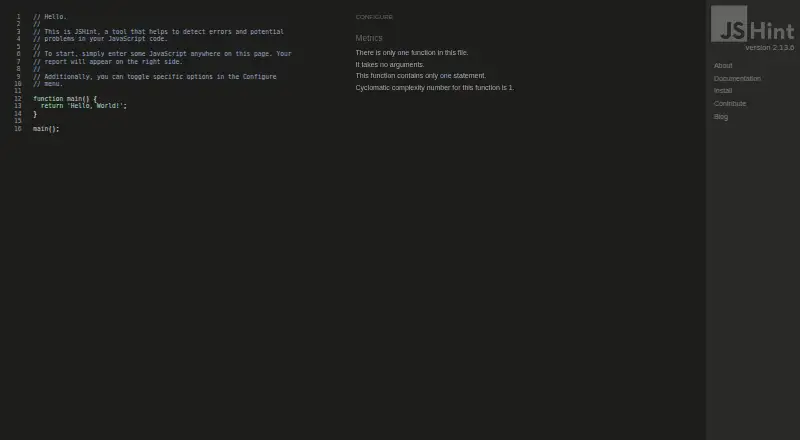
What JSHint is
JSHint is a free, community-driven static analysis tool that checks JavaScript code for errors and potential problems. It can flag syntax errors, issues caused by implicit type conversion, and leaking variables. The project positions it as an aid for developers working on complex programs and avoiding typos and language gotchas. JSHint is distributed as a Node module with a library and command-line program, and it can also be used through a JavaScript API. Configuration options include command-line settings, a `.jshintrc` file, `package.json`, and inline source directives. Standalone files are available for browser-like environments and Mozilla Rhino, while releases are published to npm for Node.js. The project lists integrations for editors and IDEs including Vim, Emacs, Sublime Text, Visual Studio, VS Code, Eclipse, and JetBrains IDEs, as well as build tools such as Grunt, Ant, and Maven. JSHint is licensed under the MIT Expat license. Its project documentation notes that static analysis cannot establish whether a program is correct or fast, or whether it has memory leaks, and recommends using it alongside unit and functional tests and code reviews.
Good
- Flags syntax errors and potential code problems.
- Offers command-line and JavaScript API use.
- Supports several configuration methods.
- Lists editor, IDE, and build-tool integrations.
- Licensed under MIT Expat.
Watch out
- Cannot determine whether a program is correct or fast.
- Cannot determine whether a program has memory leaks.
- Project recommends pairing checks with tests and reviews.
Who it suits
JSHint suits JavaScript developers who want automated checks for syntax issues and common language pitfalls. It can fit into workflows using Node.js, supported editors, or listed build integrations.
Verdict
JSHint can catch some JavaScript issues, but static analysis is only one part of code review. The project recommends supplementing it with tests and reviews.
Plans and prices
From JSHint's own pricing page, checked 11 Oct 2026.
| Plan | Price | What it gives you |
|---|---|---|
| JSHint | Free | Publicly available · no paid plans stated |
The facts
Each one read from JSHint's own pages, with the date it was checked.
What it does
- API
- JSHint can be used as a JavaScript module through its JavaScript API.checked 11 Oct 2026
- Audience
- The project says it aims to help JavaScript developers write complex programs while avoiding typos and language gotchas.checked 11 Oct 2026
- Build integrations
- Listed workflow integrations include Grunt, Ant/Maven, QUnit, pre-commit, overcommit and JSXHint.checked 15 Oct 2026
- CLI input
- The CLI lints files, recursively traverses directories and accepts standard input when the path is '-'.checked 15 Oct 2026
- CLI reporters
- Users can provide custom reporters or use the built-in jslint and CheckStyle-compatible reporters.checked 15 Oct 2026
- Complexity checks
- The web interface includes cyclomatic-complexity reporting.checked 15 Oct 2026
- Configuration
- Projects can configure JSHint with a .jshintrc file, package.json jshintConfig or the CLI --config option.checked 15 Oct 2026
- Documentation depth
- Official documentation covers installation, CLI usage, API calls, options, configuration directives and custom reporters.checked 15 Oct 2026
- Editor integrations
- The project lists integrations for Vim, Emacs, Sublime Text, Atom, TextMate, Visual Studio, VS Code, Brackets, Eclipse, NetBeans, JetBrains, Notepad++ and Gedit.checked 15 Oct 2026
- Environment assumptions
- Preset assumptions include browser, Node.js, jQuery, development consoles, ES6, Mozilla extensions and older ES3 environments.checked 15 Oct 2026
- Environments
- The project provides standalone files for browser-like environments and Mozilla Rhino, and publishes releases to npm for Node.js.checked 11 Oct 2026
- Error detection
- JSHint checks for syntax errors, implicit conversion bugs, leaking variables and other common JavaScript problems.checked 15 Oct 2026
- Extensibility
- Custom reporter modules receive structured error data and can print, write or send results elsewhere.checked 15 Oct 2026
- GitHub adoption
- The public repository shows about 9,100 stars and 1,600 forks.checked 15 Oct 2026
- HTML extraction
- The CLI can extract JavaScript from HTML files using auto, always or never modes.checked 15 Oct 2026
- Independent feature assessment
- JavaSpring describes JSHint as configurable, community-driven, supportive of modern JavaScript and clearer in its error messages than JSLint.checked 15 Oct 2026
- Independent setup complaint
- JavaSpring notes that JSHint requires users to define rules and that overly relaxed settings can permit poor practices.checked 15 Oct 2026
- Inline directives
- Source comments can set jshint, jslint, globals, exported and ignore directives, including function-scoped settings.checked 15 Oct 2026
- Installation
- Official installation supports browser-like standalone files, Mozilla Rhino, npm global installation and npm development dependencies.checked 15 Oct 2026
- Latest release
- GitHub lists JSHint 2.13.6 as the latest release, dated 2022-11-11, with fixes for const initialization and an error message.checked 15 Oct 2026
- Licence
- JSHint is released under the MIT Expat licence; versions before 2.12.0 had partially non-free JSON-licensed code.checked 15 Oct 2026
- License
- JSHint is licensed under the MIT Expat license.checked 11 Oct 2026
- Limit: documentation and support
- G2 summaries say some users want more comprehensive documentation and perceive support quality as weaker than alternatives.checked 15 Oct 2026
- Limit: documentation discoverability
- A practitioner evaluation reports that finding documentation for particular error messages and disabling or customizing rules can be difficult.checked 15 Oct 2026
The full review of JSHint
JSHint is a free, open-source static analyzer for JavaScript that surfaces syntax mistakes and common language pitfalls before they spread through a codebase. It is best suited to developers who want configurable checks that can run from Node.js, an editor, a build task, or a browser-oriented environment. The bottom line is straightforward: JSHint is a useful, broadly integrable warning system, but it cannot judge program behavior on its own.
Overview
JSHint examines JavaScript for syntax errors, trouble caused by implicit type conversion, and variables that leak outside their intended scope. Those checks target the sort of typos and language gotchas that become expensive when they reach a shared branch or production release. Its community-driven project is aimed at developers writing complex programs, and the MIT Expat license permits use under an established open-source license.
Rules can be adjusted with command-line options, a .jshintrc file, package.json, or inline source directives. That gives a team several ways to align warnings with project conventions, although consistency matters when the same code is checked from different entry points. JSHint is deliberately not a complete correctness test: it cannot determine whether a program is correct or fast, and it cannot identify memory leaks.
Key features
Several ways to run the analyzer
The core project includes both a library and a command-line program distributed as a Node module. A JavaScript API allows another JavaScript program to invoke JSHint directly. Standalone files are provided for browser-like environments and Mozilla Rhino, while releases for Node.js are published to npm. This range makes JSHint practical in projects that do not share one runtime, but it also means teams should decide where configuration lives and keep those settings synchronized.
Editor and build connectivity
The installation guidance lists integrations for Vim, Emacs, Sublime Text, Atom, TextMate, Visual Studio, VS Code, Brackets, Eclipse, NetBeans, and JetBrains IDEs. Build and workflow support is listed for Grunt, Ant, Maven, pre-commit, and QUnit. JSHint also reports CI support, so checks can sit beside other automated gates rather than relying on a developer remembering to run a command manually. The breadth is valuable for mixed-tool teams; it does not remove the maintenance work of choosing which warnings should block a change.
Scope and support
JSHint supports one language: JavaScript. It includes security rules and IDE support, and bug reports and suggestions are directed to GitHub Issues. The current maintainers listed by the project are Rick Waldron, Caitlin Potter, Mike Pennisi, and Luke Page.
Pricing
JSHint is free and open source. Its sole listed plan, JSHint, costs free and is publicly available; no paid plans or free trial are stated. There are no seat charges or usage quotas to weigh in the plan description, making it a straightforward choice for individuals and teams that want a no-cost JavaScript checker. The trade-off is that this is a tool rather than a priced service tier: teams are responsible for integrating and maintaining it in their own workflow.
Platforms
JSHint is available through API and web access, with extensions and runtimes covering Linux, macOS, and Windows. Node.js distribution, browser-like standalone files, Mozilla Rhino support, editor integrations, and build integrations give it more deployment options than a command-line-only checker. Choose the form that matches your existing environment instead of treating the platform list as a promise of identical behavior in every host.
Who it's for
JSHint fits JavaScript developers and teams that want early warnings for syntax and language pitfalls, especially when their work spans Node.js, browser-oriented code, multiple IDEs, or established build tools. It is also a sensible foundation for projects that need configurable rules and CI checks without a subscription. It is not sufficient for teams seeking proof of functional correctness, performance, or absence of memory leaks; those concerns require tests and review in addition to linting.
Pros and cons
Pros
- Free and open source: the 0.00 USD plan removes licensing cost and the MIT Expat license supports broad use.
- Configurable policy: command-line options, configuration files, package metadata, and inline directives let projects express their own rules.
- Broad workflow reach: a Node module, JavaScript API, standalone files, IDE integrations, build integrations, and CI support make it adaptable.
- Useful early warnings: syntax, implicit-conversion, and leaking-variable checks target concrete JavaScript failure modes.
Cons
- Limited to static signals: JSHint cannot establish correctness or speed and cannot detect memory leaks.
- One-language focus: its supported language is JavaScript, so polyglot teams need other analyzers for the rest of their stack.
- Configuration discipline is required: multiple ways to invoke the tool can lead to inconsistent rules unless a team standardizes them.
- No paid service tier: organizations expecting a managed commercial plan must operate the open-source tool within their own workflow.
Alternatives
Browse the Linters ranking when you want to compare tools across languages and use cases.
- SwiftLint is the better fit for free, MIT-licensed linting of Swift projects on Linux, macOS, or Windows.
- Biome suits web projects seeking a free, open-source toolchain across extension, desktop, and web environments.
- Cppcheck is the relevant choice for C and C++ static analysis, with a free core and an optional project plan.
- Hadolint targets Dockerfiles rather than JavaScript and is free under GPL-3.0.
- PMD is a free downloadable static code analyzer for teams working on its supported codebases.
- Ruff is the alternative for Python-focused teams wanting Astral's open-source developer tooling.
- ShellCheck provides free, GPLv3 static analysis for shell scripts in terminals, editors, or the web.
- actionlint is the better match for checking GitHub Actions workflows with a free MIT-licensed command-line tool and browser playground.
Verdict
Choose JSHint if you need a no-cost, configurable JavaScript checker that can plug into Node.js, editors, build systems, and CI. Its main reason to stay in a toolkit is reach: it can meet developers in many environments while flagging several common language mistakes. Look elsewhere, or add complementary tools, if your priority is behavioral correctness, performance analysis, memory-leak detection, or linting languages beyond JavaScript.
Alternatives to JSHint
- 1

Cppcheck
Free planOpen sourceLinuxmacOSSelf-hostedWindows7.4Free plan - 2
Flake8
Free planOpen sourceAPILinuxmacOSSelf-hosted7.3Free plan - 3
PMD
Free planLinuxmacOSSelf-hostedWindows6.8Free plan - 4

Ruff
Free planWebLinuxmacOSSelf-hosted6.6Free plan - 5
SwiftLint
Free planLinuxmacOSWindows6.6Free plan - 6

Biome
Free planWebExtensionLinuxmacOS6.4Free plan