
SVGtoCode
SVGtoCode is a browser-based service for converting, editing, optimizing, and analyzing SVG files.
What SVGtoCode is
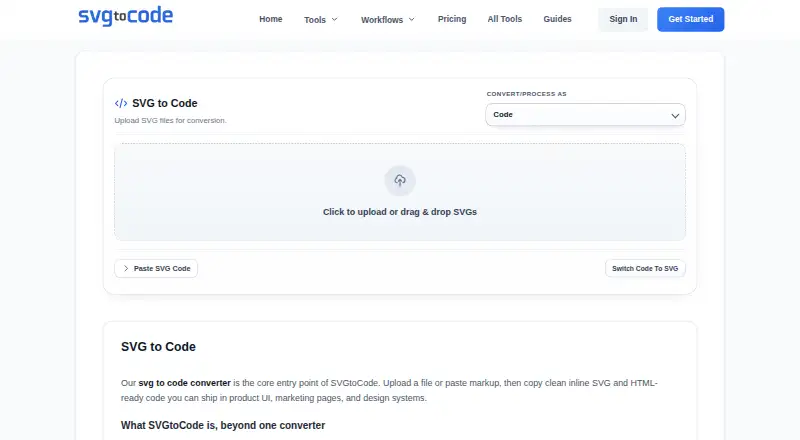
SVGtoCode is a browser-based service for converting, editing, optimizing, and analyzing SVG files. Its code tools convert SVGs to JSX, TSX, Vue, HTML, CSS, React Native, Angular, Svelte, and JSON. It also offers image exports including PNG, JPG, WebP, GIF, BMP, ICO, TIFF, PDF, and EPS, plus an SVG editor, viewer, prettifier, compressor, and dimensions tool. Guest use and a free account are available: Guest supports batches of 10 files up to 5 MB each, while a free account supports 20 files up to 10 MB each. Both exclude AI generation and priority support; Guest also lacks ZIP downloads. Pro adds AI text-to-SVG generation, priority support, and no ads, with a monthly plan at $2.99 per month and a yearly plan at $24.99 per year. A lifetime option is listed at $39.99 per once. The service identifies frontend developers, UI engineers, designers, agency teams, and product marketers as intended users. Its homepage says SVG processing is browser-based; its SVG-to-PNG page says that tool processes files in the browser so they are never uploaded.
Good
- Converts SVGs into numerous code formats.
- Offers a wide range of image export formats.
- Includes editing and optimization tools.
- SVG-to-PNG processing happens in the browser.
- Free guest use and account options are available.
Watch out
- Guest batches are limited to 10 files.
- Free options exclude AI generation and priority support.
- Pro Monthly costs $2.99 per month.
- Guest use has a 5 MB file limit.
Who it suits
SVGtoCode suits frontend developers, UI engineers, designers, agency teams, and product marketers who work with SVGs. Free guest and account options provide different batch and file-size limits.
Verdict
SVGtoCode brings SVG conversion, editing, and optimization tools together with free and paid access options. Compare the free batch and file-size limits with the Pro plans if you need AI generation or priority support.
Plans and prices
From SVGtoCode's own pricing page, checked 3 Oct 2026.
| Plan | Price | What it gives you |
|---|---|---|
| Free Account | Free | 20 files per batch · 10 MB max file · no AI generation · no priority support · ZIP downloads · forever |
| Guest | Free | 10 files per batch · 5 MB max file · no AI generation · no priority support · no ZIP downloads · instant use |
| Pro Monthly | $2.99 a month | Unlimited batch size · AI generation · priority support · no ads · monthly |
| Pro Yearly | $24.99 a year | All monthly features · 2 months free · early access to beta tools · yearly |
| Lifetime Access | $39.99, paid once | One-time payment · forever updates · VIP support · lifetime |
The facts
Each one read from SVGtoCode's own pages, with the date it was checked.
What it does
- AI generation
- AI Text to SVG generates vector icon concepts from prompts and is described as a Pro-only feature.checked 3 Oct 2026
- Asset conversions
- The tools list SVG image exports including PNG, JPG, WebP, GIF, BMP, ICO, TIFF, PDF, and EPS.checked 3 Oct 2026
- Audience
- The homepage identifies frontend developers, UI engineers, designers, agency teams, and product marketers as intended users.checked 3 Oct 2026
- Batch limits
- The pricing comparison lists batch sizes of 10 files for Guest, 20 for Free Account, and 100 for Pro, while the Pro card says unlimited batch size.checked 3 Oct 2026
- Code outputs
- Its listed code workflows include SVG conversions to JSX, TSX, Vue, HTML, CSS, React Native, Angular, Svelte, and JSON.checked 3 Oct 2026
- Data collected
- The privacy policy says the service collects account details, billing-related information, technical usage data, and support communications.checked 3 Oct 2026
- Data sharing
- The privacy policy says personal data is not sold and may be shared with service providers supporting hosting, analytics, payments, security, and communication.checked 3 Oct 2026
- Editing and optimization
- The site lists an SVG editor, viewer, prettifier, compressor, and dimensions tool.checked 3 Oct 2026
- Payments
- The privacy policy names Stripe, PayPal, and Razorpay as possible payment processors and says full card details are not stored on its servers.checked 3 Oct 2026
- Privacy and processing
- The homepage says SVG processing is browser-based, and the SVG to PNG page says that tool processes files in the browser so they are never uploaded.checked 3 Oct 2026
- Purpose
- SVGtoCode provides browser-based tools to convert, optimize, analyze, and work with SVG files.checked 3 Oct 2026
- Support
- The contact page says support covers account, billing, payment, and tool issues, aims to respond within 24 business hours, and operates Monday to Friday.checked 3 Oct 2026
The company
- Headquarters
- Jaipur, Rajasthan, Indiachecked 28 Sep 2026
- Maker
- The About page says SVGtoCode is operated by Abhishek Sharma and gives a business address in Jaipur, Rajasthan, India.checked 3 Oct 2026
The full review of SVGtoCode
SVGtoCode is a browser-based toolkit for converting, editing, and optimizing SVGs, with code and image exports for common development workflows. It suits developers and designers who want several SVG utilities in one place; its free tiers are useful for occasional work, while larger batches and AI generation require a paid plan.
Overview
SVGtoCode covers both sides of SVG work: converting files into formats and frameworks, and inspecting or refining the vectors themselves. Its range of outputs is a practical strength for people moving assets between design and frontend workflows. It is less compelling if the main need is AI-generated vectors, since generation is reserved for Pro.
The homepage says processing is browser-based, and the SVG-to-PNG tool says files are not uploaded. The privacy policy also says the service collects account and billing information, technical usage data, and support communications. It does not sell personal data, but may share it with service providers for hosting, analytics, payments, security, and communication. Card details are not stored on its servers; Stripe, PayPal, and Razorpay may process payments.
Key features
- Code conversion: SVGs can be converted to JSX, TSX, Vue, HTML, CSS, React Native, Angular, Svelte, and JSON. That breadth makes it useful when the same asset needs to move across different frontend stacks.
- Image exports: Export options include PNG, JPG, WebP, GIF, BMP, ICO, TIFF, PDF, and EPS, alongside SVG. This is a substantial format range for a general-purpose toolkit.
- Editing and cleanup: The site includes an editor, viewer, prettifier, compressor, and dimensions tool. These utilities make SVGtoCode more than a one-way converter, though the listed tools do not establish a full design-suite replacement.
- AI Text to SVG: Pro adds prompt-based vector icon concepts. It is a useful extra for users who want generation within the same toolkit, but not a reason to choose the free tier for AI work.
- Support: Support covers account, billing, payment, and tool issues, operates Monday to Friday, and aims to respond within 24 business hours. That is a defined support window, but not round-the-clock coverage.
Pricing
SVGtoCode is freemium, with Guest and Free Account access at no charge and paid plans starting at $2.99 a month. The main distinctions are batch size, maximum file size, ZIP downloads, AI generation, and support.
- Guest — free, billed instant use: Allows 10 files per batch and a 5 MB maximum file size, without AI generation, priority support, or ZIP downloads. It is suited to a quick, occasional conversion, but the smaller batch and file cap make it the most constrained option.
- Free Account — free, billed forever: Raises the batch allowance to 20 files and maximum file size to 10 MB, and adds ZIP downloads. It still excludes AI generation and priority support, making it the better no-cost choice for recurring but modest-volume work.
- Pro Monthly — $2.99 a month, billed monthly: Adds AI generation, priority support, no ads, and unlimited batch size according to the Pro card. A pricing comparison separately gives Pro a batch size of 100 files, so the stated batch allowance is inconsistent; confirm the applicable cap if large batches matter. This plan fits users who need the paid features without an annual commitment.
- Pro Yearly — $24.99 a year, billed yearly: Includes monthly features, two months free, and early access to beta tools. It suits users confident they will keep using Pro; yearly billing trades flexibility for the stated saving.
- Lifetime Access — $39.99, paid once, billed lifetime: Offers a one-time payment, forever updates, and VIP support. It may suit long-term users who prefer not to renew, though AI generation and other Pro features are not expressly itemized for this plan.
Commercial licensing is included. No free trial is part of the stated plan terms.
Platforms
SVGtoCode runs on the web. Browser-based processing is a useful fit for users who want tools without a desktop installation, while the browser workflow may not suit teams specifically seeking a native app.
Who it's for
Frontend developers, UI engineers, designers, agency teams, and product marketers are the intended audience. Developers benefit most from the framework conversion options; designers and marketers may value the range of image exports and vector utilities. The free account is a sensible starting point for occasional work, while Pro is the more fitting option for high-volume batches or prompt-based icon concepts.
Pros and cons
- Pro: Many code targets and image formats are gathered in one browser-based toolkit, reducing the need to switch between separate conversion utilities.
- Pro: The free account supports batches of 20 and files up to 10 MB, with ZIP downloads, giving regular low-volume users more room than Guest access.
- Pro: Browser-side processing is stated for the homepage and SVG-to-PNG tool, and the latter says files are never uploaded.
- Con: Free access excludes AI generation and priority support, so users seeking prompt-based vector concepts must pay.
- Con: The Pro batch allowance is described both as 100 files and unlimited, making the practical limit unclear.
- Con: Guest access lacks ZIP downloads and caps batches at 10 files and files at 5 MB, which can quickly constrain repeated or larger jobs.
Alternatives
For a broader comparison of tools focused on generated vector art, browse AI Vector Generators.
- SmartSVG is worth considering when weekly credits and a free commercial license matter: its free plan gives 30 credits per week, with AI generation and SVG conversion drawing from that allowance.
- AnnoMotion may suit users who want access across web, API, and Windows, plus free daily credits; its stated free plan also begins with 15 credits after email verification.
- Recraft is an option for users seeking a free daily-credit plan or API access, with 30 daily credits on its free tier.
- SVG.new is a more focused alternative for vectorization: its free plan permits three vectorizations per day and includes full-color SVG output, an editor, and downloads for personal use.
- SVG AI may fit buyers who prefer one-time credit purchases; its 25-credit option costs 8.99 USD once, with credits that never expire and commercial usage rights.
- OmniSVG is a free alternative with a demo that needs no account and allows five generations per day, with image uploads up to 5 MB.
- Vectorizer.AI is an alternative for users looking for API access or a web app; its API plan starts at $9.99 a month for 50 credits.
- Amnt is another paid web option.
Verdict
SVGtoCode is a strong fit for developers and design teams who want SVG conversion, cleanup, and exports together, especially if the free account’s 20-file batches and 10 MB cap are enough. Pro is the route to AI generation and priority support, but the conflicting batch-size claims deserve clarification. Look elsewhere if generated vectors are your primary need and you want a clearly bounded free credit allowance, or if you need a desktop platform.
Alternatives to SVGtoCode
- 1

Recraft
Free planAndroidiOSWebAPI8.2Free plan - 2

Wix Logo Maker
Free planAndroidiOSWebAPI8.2Free plan - 3

Clearly Logo Maker
Free planWebAPImacOSWindows7.8From $29 a month - 4

DaVinci AI Photo Restoration
AndroidiOSWeb7.7From $39.99 a month - 5

AnnoMotion
Free planWebAPIWindows7.6From £4.50 a month - 6

LOGO.com
Free planWebAPI7.6Free plan