
SmartSVG
SmartSVG is a web tool for creating SVG artwork from text prompts and converting raster images into SVG files.
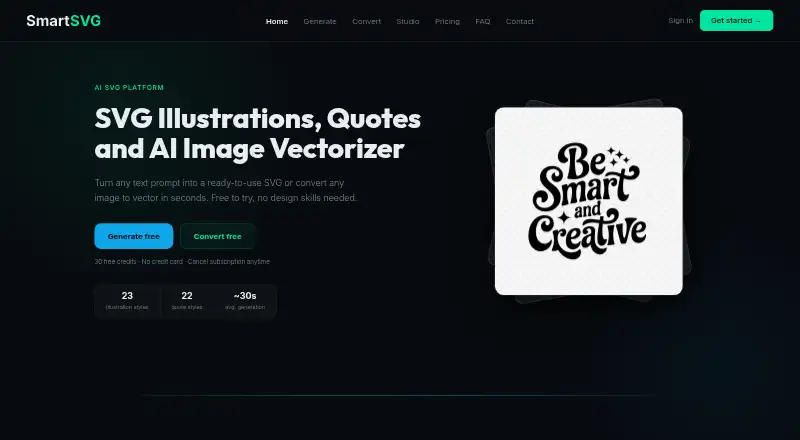
What SmartSVG is
SmartSVG is a web tool for creating SVG artwork from text prompts and converting raster images into SVG files. Its generator offers 23 illustration styles and 22 typography styles. The converter accepts PNG, JPG, WEBP, GIF, BMP, and TIFF files, and can process up to 8 images at a time for a ZIP download. A built-in editor lets users change SVG colors; the site also describes offset outlines and direct SVG-node editing. The converter is intended for logos, icons, illustrations, clipart, and flat art, rather than photographs or highly detailed realistic images. SmartSVG lists a commercial license with its free and paid plans. The free plan costs nothing, billed forever, and includes 30 credits per week; AI generation uses 10 credits and conversion uses 5. Studio offers shared credits for up to 6 team members. Uploaded originals are not stored, and SVG history is deleted automatically after 6 months.
Good
- Offers 23 illustration and 22 typography styles.
- Converts up to 8 images per batch.
- Commercial license is included with every plan.
- Uploaded original files are not stored.
Watch out
- Not optimized for photographs or detailed realistic images.
- Free plan provides 30 credits per week.
- SVG history is deleted after 6 months.
Who it suits
SmartSVG suits people who need editable SVGs from text prompts or flat artwork, including users of Cricut, Silhouette Cameo, Brother ScanNCut, Siser, Glowforge, or xTool. Its Studio plan may suit teams of up to 6 members sharing credits.
Verdict
SmartSVG covers prompt-based creation and raster-to-SVG conversion, with editing and batch processing tools. Check the image limits and credit use against your artwork needs.
Plans and prices
From SmartSVG's own pricing page, checked 4 Oct 2026.
| Plan | Price | What it gives you |
|---|---|---|
| Free | Free | 30 credits / week · AI generation (10 credits) · SVG conversion (5 credits) · commercial license included · no credit card needed · forever |
| 150 credits | $7, paid once | 150 credits · never expire · once |
| Maker | $12 a month | 500 credits / month · 10 credits per AI generation · 5 credits per SVG conversion · credits reset monthly · commercial license included · monthly |
| 500 credits | $15, paid once | 500 credits · never expire · once |
| Creator | $21 a month | 1,000 credits / month · rollover up to 3,000 credits · 10 credits per AI generation · 5 credits per SVG conversion · commercial license included · monthly |
| 1,000 credits | $27, paid once | 1,000 credits · never expire · once |
| Studio | $79 a month | 6,000 shared credits / month · up to 6 members · no per-seat fees · commercial license included · monthly |
The facts
Each one read from SmartSVG's own pages, with the date it was checked.
What it does
- Batch conversion
- Users can convert up to 8 images at once and download them as a ZIP.checked 4 Oct 2026
- Commercial use
- The pricing page lists a commercial license as included with the free, Maker, Creator, and Studio plans.checked 4 Oct 2026
- Conversion limits
- The converter says it works best with logos, icons, illustrations, clipart, and flat art, and is not optimized for photographs or highly detailed realistic images.checked 4 Oct 2026
- Editing
- The built-in editor lets users change SVG colors, and the home page also describes offset outlines and direct SVG-node editing.checked 4 Oct 2026
- Image conversion
- The converter accepts PNG, JPG, WEBP, GIF, BMP, and TIFF files and outputs SVGs.checked 4 Oct 2026
- Integrations
- The home page identifies Cricut, Silhouette Cameo, Brother ScanNCut, Siser, Glowforge, and xTool users among the intended audiences.checked 4 Oct 2026
- Payments
- The pricing page says payments are handled securely through Stripe.checked 4 Oct 2026
- Product
- SmartSVG offers AI text-to-SVG generation and raster-image-to-SVG conversion through an online tool.checked 4 Oct 2026
- Security and retention
- The converter says original uploaded files are never stored and SVG history is retained for 6 months before automatic deletion.checked 4 Oct 2026
- Support
- The FAQ page directs users who cannot find an answer to contact SmartSVG.checked 4 Oct 2026
- SVG generation
- The generator offers 23 illustration styles and 22 typography styles for creating SVGs from text prompts.checked 4 Oct 2026
The company
- Team use
- The Studio plan provides a shared credit pool for up to 6 team members, per-member credit limits, and individual conversion histories.checked 4 Oct 2026
The full review of SmartSVG
Overview
SmartSVG is a web tool for generating SVGs from text prompts and converting raster images into vector files. It suits makers and designers who need editable artwork for cutting or engraving workflows, especially when their source images are flat rather than photographic. Its free tier and one-time credit packs make it approachable, but output quality depends on choosing work that fits the converter’s limits.
Key features
Text-to-SVG generation includes 23 illustration styles and 22 typography styles. That range gives prompt-led projects useful starting points, though each generation costs credits, so frequent experimentation can draw down a plan quickly. A built-in editor supports color changes, offset outlines and direct SVG-node editing, giving users ways to refine the vector rather than stopping at the initial result.
The converter accepts PNG, JPG, WEBP, GIF, BMP and TIFF, and can process up to eight images in one batch with a ZIP download. It is best suited to logos, icons, illustrations, clipart and other flat artwork; photographs and highly detailed realistic images are a poor fit. SVG is the export format, so users who need another output format should look elsewhere.
SmartSVG says uploaded originals are never stored, while conversion history is automatically deleted after six months. Commercial licensing is included across the Free, Maker, Creator and Studio plans, which makes the free option usable for commercial projects as well as personal work.
Pricing
The Free plan costs nothing, billed forever, and includes 30 credits per week. AI generation costs 10 credits per generation and SVG conversion costs 5; there is no credit-card requirement. It is a practical way to assess whether the styles and conversion results suit a workflow, but the weekly allowance constrains sustained use.
For occasional work, the 150-credit pack costs $7, paid once and credits never expire. The 500-credit pack costs $15, paid once, and the 1,000-credit pack costs $27, paid once; both also have non-expiring credits. These avoid monthly renewal and suit uneven workloads, but offer no recurring monthly allowance.
Maker costs $12 a month, billed monthly, for 500 credits each month. Generation uses 10 credits and conversion 5, and credits reset monthly, so unused allowance does not carry forward. Creator costs $21 a month, billed monthly, for 1,000 credits, with rollover up to 3,000 credits; that is the stronger fit for regular use that varies from month to month. Both include commercial licensing.
Studio costs $79 a month, billed monthly, and provides 6,000 shared credits for up to six members, with no per-seat fees. Per-member credit limits and individual conversion histories make it the team option; solo users are unlikely to need its shared-pool structure. There is no free trial. Payments are handled through Stripe.
Platforms
SmartSVG runs on the web. Its stated audiences include Cricut, Silhouette Cameo, Brother ScanNCut, Siser, Glowforge and xTool users, making it relevant to common cutting and engraving workflows without requiring a desktop platform.
Who it's for
Choose SmartSVG if you need prompt-based vector creation, flat-art conversion, or batch processing in a browser, and value commercial rights across every plan. It is less suitable when source material is photographic, highly detailed, or when a non-SVG export is essential. Teams can share a substantial monthly pool in Studio; occasional users can avoid a subscription with non-expiring credit packs.
Pros and cons
- Pro: The free plan includes a commercial license and 30 weekly credits, so users can make commercial work without an upfront purchase.
- Pro: Batch conversion handles up to eight files at once and packages them as a ZIP, reducing repetitive downloads.
- Pro: One-time credit packs never expire, suiting occasional projects better than monthly credits that reset.
- Con: The converter is not optimized for photographs or highly detailed realistic images, limiting its usefulness for those source files.
- Con: SVG is the sole export format, which rules it out for workflows that require other file types.
- Con: Maker credits reset monthly, so a quiet month can mean paid allowance goes unused.
Alternatives
Browse AI Vector Generators for a broader category comparison. Consider SVGtoCode if a 20-file batch allowance on its free account is the relevant starting point. AnnoMotion is an option for users who want API, web and Windows access, with a free trial and free credits after email verification. Recraft offers 30 daily credits on its free plan and lists API access. SVG.new provides three daily vectorizations, a built-in editor and personal-use downloads on its free plan. SVG AI sells non-expiring credit packs, including a 25-credit pack for $8.99, paid once. OmniSVG is a free demo with five daily generations and uploads up to 5 MB, across web, Linux, macOS and self-hosted use. Vectorizer.AI is worth considering for its API and desktop-platform availability; its API plan starts at $9.99 a month for 50 credits. Amnt is another paid web option.
Verdict
SmartSVG is a strong fit for makers and designers who want prompt-generated or converted flat artwork as editable SVGs, particularly if they value commercial licensing and the choice between subscriptions and non-expiring credits. Its batch tools and editor add practical refinement, but the photo limitation and SVG-only export are decisive constraints. Look elsewhere if realistic source images or other export formats are central to your work.
Alternatives to SmartSVG
- 1

Recraft
Free planAndroidiOSWebAPI8.2Free plan - 2
Wix Logo Maker
Free planAndroidiOSWebAPI8.2Free plan - 3

Clearly Logo Maker
Free planWebAPImacOSWindows7.8From $29 a month - 4

DaVinci AI Photo Restoration
AndroidiOSWeb7.7From $39.99 a month - 5

AnnoMotion
Free planWebAPIWindows7.6From £4.50 a month - 6
LOGO.com
Free planWebAPI7.6Free plan