Superposition
Superposition extracts design tokens from websites so teams can use them in code and design tools.
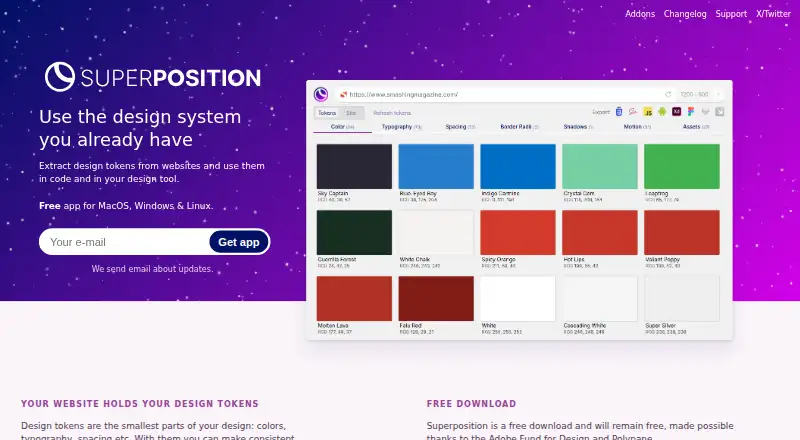
What Superposition is
Superposition extracts design tokens from websites so teams can use them in code and design tools. It identifies colors, typography, spacing, and other tokens, while filtering out unused styling to help avoid collecting incorrect values. Users can export tokens to CSS, Scss, JavaScript, Figma, and Adobe XD; Sketch, Swift, and Android exports are described as planned. A token’s CSS value can also be copied from its group overview. Figma and Adobe XD plugins surface tokens relevant to a selected object and apply them when clicked. Chrome and Firefox add-ons can open the current page in Superposition or send its link from a context menu. The desktop app is available for MacOS, Windows, and Linux, alongside a browser extension. Windows and Mac update automatically; Linux users receive update notices and install updates themselves. Superposition is free and intended to remain free. A planned design system generator is a paid extension, though no price is stated.
Good
- Exports tokens to CSS, Scss, JavaScript, Figma, and Adobe XD.
- Filters unused styling.
- Copies token CSS values from group overviews.
- Figma and Adobe XD plugins apply relevant tokens.
- Free desktop app for MacOS, Windows, and Linux.
Watch out
- Sketch, Swift, and Android exports are still planned.
- Linux users must install updates themselves.
- The design system generator is a paid extension with no listed price.
Who it suits
Superposition suits designers and developers who want to extract and reuse website styling tokens in code or design tools. It may also suit teams using Figma or Adobe XD who want object-specific token options.
Verdict
Superposition brings token extraction, filtering, exports, and design-tool plugins into one free workflow. Check the export formats and Linux update process against your needs; the planned generator is a separate paid extension.
Plans and prices
From Superposition's own pricing page, checked 7 Oct 2026.
| Plan | Price | What it gives you |
|---|---|---|
| Superposition | Free | Free desktop app; MacOS, Windows & Linux |
| Design system generator | Priced on request | Paid extension; price not stated |
The facts
Each one read from Superposition's own pages, with the date it was checked.
What it does
- Adobe XD integration
- The Adobe XD panel plugin shows applicable tokens for a selected object and applies them when clicked.checked 7 Oct 2026
- Clipboard
- Users can click a token in its group overview to copy its CSS value to the clipboard.checked 7 Oct 2026
- Design system generator
- The site describes a planned generator for creating tokens and components, adding usage instructions, and exporting documented design systems to share.checked 7 Oct 2026
- Exports
- It exports tokens to CSS, Scss, JavaScript, Figma, and Adobe XD, with Sketch, Swift, and Android exports described as on the way.checked 7 Oct 2026
- Figma integration
- The Figma plugin shows applicable tokens such as colors and typography for a selected object and applies them when clicked.checked 7 Oct 2026
- Filtering
- The app filters out unused styling so users do not end up with incorrect design tokens.checked 7 Oct 2026
- Installer note
- The maker warns that some operating systems or antivirus software may flag the installer because it is not downloaded often, and advises Windows users to verify Firstversionist B.V. as publisher if Protected your PC appears.checked 7 Oct 2026
- Pricing
- The app is described as free and intended to remain free; the design system generator is described as a paid extension, without a listed price.checked 7 Oct 2026
- Purpose
- Superposition extracts design tokens from websites for use in code and design tools.checked 7 Oct 2026
- Support
- The maker says support capacity is limited and responses may take a while; users can contact them through Twitter direct messages or email.checked 7 Oct 2026
- Token types
- The site describes design tokens such as colors, typography, and spacing.checked 7 Oct 2026
- Updates
- The app automatically updates on Windows and Mac, while Linux users receive update notifications and can download and install updates.checked 7 Oct 2026
Where it runs
- Browser add-ons
- Chrome and Firefox add-ons can open the current page in Superposition or send a link to it from the context menu.checked 7 Oct 2026
The full review of Superposition
Overview
Superposition turns website styling into reusable design tokens for code and design tools. It is best suited to designers and developers who need to capture colors, typography, and spacing without building a broader design-system process around them.
The focused extraction workflow is free, with exports and plugins that connect tokens to common tools. Its scope is narrower than a complete system for documenting and sharing components.
Key features
Superposition filters out unused styling, helping keep extracted tokens relevant rather than treating every encountered style as something to reuse. Its grouped token overview also lets users click a value to copy its CSS, a practical shortcut for developers making targeted changes.
Current exports include CSS, Scss, JavaScript, Figma, and Adobe XD. Sketch, Swift, and Android exports are described as on the way, so users who need those formats now should look elsewhere.
The Figma plugin surfaces applicable tokens, including colors and typography, for a selected object and applies a token when clicked. The Adobe XD panel follows the same selection-based approach. Chrome and Firefox add-ons can open the current page in Superposition or send it from the context menu, which streamlines collecting pages to inspect.
A planned design system generator would create tokens and components, add usage instructions, and export documented systems for sharing.
Pricing
The Superposition desktop app costs nothing and runs on MacOS, Windows, and Linux. The app is intended to remain free, making it a clear fit for individuals who need token extraction without a subscription or a stated seat limit.
The design system generator is a paid extension with custom pricing. It is aimed at users who need documented, shareable systems in addition to extraction, but there is no stated price to weigh against that broader scope.
Platforms
The desktop app supports MacOS, Windows, and Linux, with browser add-ons for Chrome and Firefox. Windows and Mac update automatically; Linux users receive update notifications and must download and install updates themselves, so Linux users take on more maintenance.
Some operating systems or antivirus software may flag the installer because it is not downloaded often. If Windows shows “Protected your PC,” the maker advises verifying Firstversionist B.V. as the publisher before proceeding.
Who it's for
Superposition suits designers and developers who want to extract a site's colors, typography, and spacing, then reuse those values in code or design tools. Its free price and direct exports are particularly useful for a solo workflow or a small project that does not need shared documentation or component governance.
It is less compelling for teams seeking a complete design-system platform today, or for anyone whose workflow depends on Sketch, Swift, or Android exports. Support capacity is limited, and responses may take a while; users can contact the maker by Twitter direct message or email.
Pros and cons
- Pro: The core desktop app is free and intended to stay free, so token extraction does not depend on a recurring plan.
- Pro: Filtering unused styles and copying a token's CSS value help make extraction more selective and immediately useful in code.
- Pro: Figma and Adobe XD plugins apply relevant tokens to selected objects, linking extracted values to design work.
- Con: Sketch, Swift, and Android exports are still forthcoming, limiting its fit for workflows that need those formats now.
- Con: The planned generator is a separate paid extension with custom pricing, so documented system creation is not part of the free app.
- Con: Linux updates require manual downloading and installation, and support responses may be slow.
Alternatives
Particles UI is worth considering for teams that want a CLI with local token management and export that work without an account; its free plan, free trial, and Linux, MacOS, web, and Windows support also broaden the platform choice.
Zaklad is another free-plan option for users who need Android, iOS, or web support rather than Superposition's desktop focus.
Terrazzo is a free, MIT-licensed open-source toolset for users who prefer that model and work on iOS, MacOS, or web.
Bezel may suit users looking for a web-based design system option, though its free tier is limited and not yet open for signup.
Carbon Design System is a free, open-source web design system for readers who want to use or contribute to an established system rather than extract tokens from websites.
Design Tokens is a closer fit for users seeking Figma variable sync, CSS/SASS export, and W3C JSON import/export, with a free tier capped at three themes per workspace, two workspaces, and two users.
Luro is a web-based option for teams organizing source files and pages, with its free Starter plan capped at one editor, one source file, ten viewers, and 20 pages.
Spec Layer may suit Figma users who want publishing updates and AI writing uses, with a free tier capped at one Figma file and 10 monthly publishing updates.
Browse Design System Software for more options in the category.
Verdict
Choose Superposition if you want a free, focused way to extract website tokens and carry them into code, Figma, or Adobe XD. Its filtering and selection-based plugins make that narrow job practical; look elsewhere if you need exports it has not yet added, a documented system generator included in the core app, or more responsive support.
Getting started
- Open the Superposition website
- Download the desktop app for MacOS, Windows, or Linux
- Install the Chrome or Firefox add-on if needed
- Open a website in Superposition
- Review token groups and click a token to copy its CSS value
- Export tokens to CSS, Scss, JavaScript, Figma, or Adobe XD
- Use the Figma or Adobe XD plugin on a selected object
Limits worth knowing
The free Superposition desktop app covers MacOS, Windows, and Linux.
Questions
Is Superposition free?
Yes. The desktop app is listed as free and is intended to remain free. The planned design system generator is a paid extension.
Which operating systems are supported?
The desktop app supports MacOS, Windows, and Linux, with browser extensions for Chrome and Firefox.
What can Superposition export?
It exports design tokens to CSS, Scss, JavaScript, Figma, and Adobe XD. Sketch, Swift, and Android exports are described as on the way.
Does it work with Figma and Adobe XD?
Yes. Their plugins show applicable tokens for a selected object and apply them when clicked.
How do updates work?
Windows and Mac update automatically. Linux users receive update notifications and download and install updates.
What is the design system generator?
It is a planned paid extension for creating tokens and components, adding usage instructions, and exporting documented design systems to share.
Alternatives to Superposition
- 1

Zaklad
Free planAndroidiOSWebAPI7.9From €9.50 a month - 2

Bezel
Free planWebAPI7.3From $7 a month - 3
Particles UI
Free planWebLinuxmacOSWindows7.0From $19 a month - 4

Supernova
Free planWebAPImacOS6.8From $35 a month - 5
Bit
Free planAndroidiOSWebAPI6.7Free plan - 6

zeroheight
Free planWeb6.7From $49 a month