
Supernova
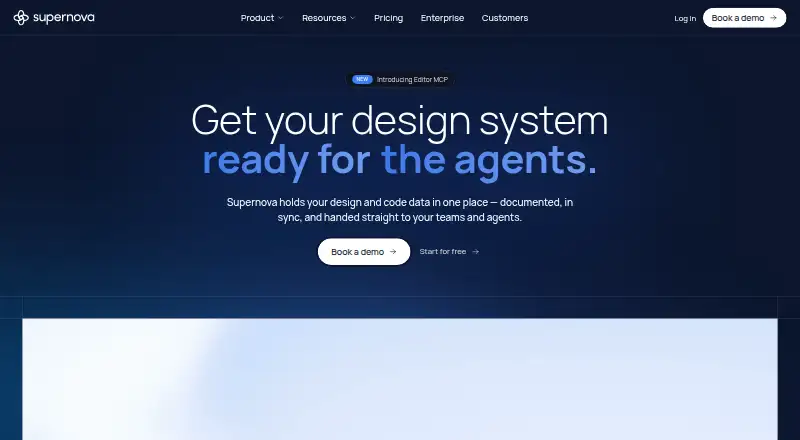
Supernova brings design system information, code data, documentation, and AI context into a shared source for teams and agents.
What Supernova is
Supernova brings design system information, code data, documentation, and AI context into a shared source for teams and agents. It tracks component health, manages design tokens, and supports multiple brands in one workspace. Its documentation editor offers real-time collaboration, page history, and publishing. Through MCP, it distributes filtered design system context to tools including Cursor, Copilot, and Claude Code. Code automation can export tokens and open a pull request after design system changes. Listed integrations include Figma, Storybook, Tokens Studio, GitHub, Azure, Bitbucket, GitLab, and VS Code; pre-built integrations are included in the Free plan. Free allows up to five seats, but limits documentation pages, connected data sources, page history, and analytics periods. Pro costs $35 a month per editor seat. Supernova Portal is available on the web, and its desktop app is currently Mac-only.
Good
- Tracks component health and manages design tokens.
- Supports multiple brands in one workspace.
- Documentation supports real-time collaboration and publishing.
- Free plan includes pre-built integrations.
- MCP context supports Cursor, Copilot, and Claude Code.
Watch out
- Free has a 20-page documentation limit.
- Free page history lasts 7 days.
- Desktop app is currently Mac-only.
Who it suits
Supernova is aimed at design system teams, engineers, designers, and product managers who work from shared product knowledge. It may suit teams that want design system context available to AI tools and code workflows.
Verdict
Supernova connects design system management, documentation, integrations, and AI context in one workspace. Review Free plan limits and the per-editor Pro price when assessing fit.
Plans and prices
From Supernova's own pricing page, checked 3 Oct 2026.
| Plan | Price | What it gives you |
|---|---|---|
| Free | Free | Up to 5 seats · 1,000 workspace credits/month · 1 design system · 2 AI contexts · 1 automation pipeline · up to 10 skills · up to 100 feedback captures |
| Pro | $35 a month | Up to 15 seats · up to 25 MCP consumers · unlimited documentation viewers · 3,000 workspace credits/seat · 2 design systems · 10 AI contexts · 5 automation pipelines · per editor seat; page also shows Yearly (-22%) |
| Enterprise | Priced on request | Unlimited seats · custom MCP consumers · 5,000 workspace credits/seat · unlimited design systems, contexts, and pipelines · SAML SSO · priority support and onboarding · Custom |
The facts
Each one read from Supernova's own pages, with the date it was checked.
What it does
- AI and MCP
- Supernova distributes filtered design system contexts to AI tools through MCP, including Cursor, Copilot, and Claude Code.checked 3 Oct 2026
- Code automation
- Code automation can export tokens and open a pull request when design system changes are made.checked 3 Oct 2026
- Design system management
- The platform tracks component health, manages design tokens, and supports multiple brands in one workspace.checked 3 Oct 2026
- Documentation
- Its documentation editor supports real-time collaboration, page history, and publishing.checked 3 Oct 2026
- Enterprise security
- The Enterprise page lists GDPR, ISO, SOC 2, CCPA, and USDP, along with SSO including SCIM provisioning and granular permissions.checked 3 Oct 2026
- Integrations
- Listed integrations include Figma, Storybook, Tokens Studio, GitHub, Azure, Bitbucket, GitLab, and VS Code.checked 3 Oct 2026
- Intended users
- Supernova describes its intended users as design system teams, engineers, designers, and product managers working from shared product knowledge.checked 3 Oct 2026
- Product
- Supernova centralizes design and code data, documentation, and AI context so teams and agents can use a shared source of truth.checked 3 Oct 2026
- Support
- All plans include in-product support chat, while Enterprise adds priority support and onboarding.checked 3 Oct 2026
Where it runs
- Desktop app
- Supernova Portal is available in a web application and a desktop app that is currently available only for Mac.checked 3 Oct 2026
Money
- Free-plan integration access
- The integrations page says all pre-built integrations are included in the Free plan.checked 3 Oct 2026
- Free-plan limits
- The comparison lists 20 documentation pages, 3 Figma data sources, 1 Storybook data source, 7-day page history, and 30-day documentation analytics for Free.checked 3 Oct 2026
The company
- Headquarters
- Dover, Delaware, United Stateschecked 28 Sep 2026
The full review of Supernova
Supernova brings design systems, documentation, code automation, and AI context into a shared workspace. It best suits teams coordinating designers and engineers around reusable product knowledge. Its breadth is a strong fit for that work, but Free-plan caps and Pro’s per-editor price deserve a close look.
Overview
Supernova centralizes design and code data so teams and AI tools can work from shared product context. It combines design system management with collaborative documentation, integrations, and automation rather than focusing on a single handoff task. That makes it most compelling when a team needs several of those capabilities connected; smaller teams looking only for one narrow tool may not need the full workspace.
Key features
Design systems and documentation
Supernova tracks component health, manages design tokens, and supports multiple brands in one workspace. That combination can help teams maintain shared systems across product lines. Its editor adds real-time collaboration, page history, and publishing, making documentation part of the same workflow rather than a separate reference point.
AI context and automation
Filtered design-system context can be sent to AI tools through MCP, including Cursor, Copilot, and Claude Code. This is useful for teams that want those tools to draw on relevant system context. Automation can export tokens and open a pull request when the design system changes, connecting design updates with code review.
Integrations and handoff
Integrations include Figma, Storybook, Tokens Studio, GitHub, Azure, Bitbucket, GitLab, and VS Code. Free includes access to the pre-built integrations, which makes it possible to connect existing tools before upgrading. Supernova also supports Figma files, design tokens, asset handoff, code snippets, and version history.
Pricing
Supernova is freemium. The Free plan costs nothing and supports up to 5 seats, 1,000 workspace credits per month, 1 design system, 2 AI contexts, 1 automation pipeline, up to 10 skills, and up to 100 feedback captures. It also caps documentation at 20 pages, Figma data sources at 3, and Storybook data sources at 1; page history lasts 7 days and documentation analytics cover 30 days. That is a useful way for a small team to get started, but the documentation and history caps could constrain a growing system.
Pro costs $35 a month, billed per editor seat; the page also shows Yearly (-22%). It allows up to 15 seats and 25 MCP consumers, unlimited documentation viewers, 3,000 workspace credits per seat, 2 design systems, 10 AI contexts, and 5 automation pipelines. Pro’s per-editor billing matters when more contributors need editing access, while unlimited documentation viewers can still suit broader audiences. The higher seat and workspace limits make it the more practical choice for teams whose work exceeds Free’s caps.
Enterprise has custom pricing. It includes unlimited seats, custom MCP consumers, 5,000 workspace credits per seat, unlimited design systems, contexts, and pipelines, plus SAML SSO, priority support, and onboarding. Its security offering lists GDPR, ISO, SOC 2, CCPA, and USDP, as well as SSO with SCIM provisioning and granular permissions. That makes Enterprise the natural fit for larger organizations with extensive access and governance needs. All plans include in-product support chat.
Platforms
Supernova is available through API and web, with a macOS desktop app. Supernova Portal is available as a web application and desktop app, though the desktop app is currently Mac-only.
Who it's for
Supernova is aimed at design system teams, engineers, designers, and product managers working from shared product knowledge. It is especially suitable for teams that want documentation, tokens, integrations, and AI context in one workspace. It is less compelling for a team that needs only a lightweight reference or a single-purpose design tool.
Pros and cons
- Pro: Design system management, collaborative documentation, MCP context, and code automation sit in one workspace, reducing the need to stitch together those workflows separately.
- Pro: Pre-built integrations are included on Free, so teams can connect tools such as Figma and GitHub without upgrading first.
- Pro: Enterprise combines SAML SSO, SCIM provisioning, granular permissions, and listed compliance standards for organizations with stronger governance needs.
- Con: Free limits documentation to 20 pages and page history to 7 days, which may be restrictive for teams maintaining a substantial system.
- Con: Pro is priced per editor seat, so the $35.00 USD monthly price scales with the number of editors.
- Con: The desktop app is currently limited to Mac, ruling it out for teams seeking a desktop client on other platforms.
Alternatives
For a narrower or differently shaped workflow, consider these alternatives:
- Particles UI is an alternative with a free plan and CLI; its maker says the CLI is MIT-licensed and local token management and export work without an account.
- Zaklad is a freemium alternative available on Android, iOS, and web.
- Tokens Studio is a freemium alternative available as an extension and on the web; its Variables plan is €17 a month when billed annually, with one editor seat included.
- zeroheight is a web-based freemium alternative; its Free plan includes one editor, one styleguide, one token set, and MCP Standard Search with 500 calls per month.
- Spec Layer is a web-based freemium alternative with a Free plan capped at one Figma file and 10 publishing updates per month.
- Bezel is a web-based freemium alternative with a free tier for one project and one theme, though it is not yet open for signup.
- Handoff is a free alternative available on web, API, desktop, and self-hosted platforms.
- UI Vault is a web-based freemium alternative with core platform, style guides, and Figma-powered living guides on its Free plan.
Browse the Design System Software, Developer Handoff Software, and Web Design Software directories to compare by category.
Verdict
Choose Supernova if your team wants design systems, documentation, AI context, and code automation working from shared product knowledge. Its broad workflow and Free-plan integrations are the strongest reasons to start there. Look elsewhere if the Free documentation caps are too tight, per-editor Pro pricing does not fit your team, or you need a desktop app beyond macOS.
Alternatives to Supernova
- 1

Zaklad
Free planAndroidiOSWebAPI7.9From €9.50 a month - 2

Bezel
Free planWebAPI7.3From $7 a month - 3
Particles UI
Free planWebLinuxmacOSWindows7.0From $19 a month - 4
Bit
Free planAndroidiOSWebAPI6.7Free plan - 5

zeroheight
Free planWeb6.7From $49 a month - 6

Carbon Design System
Free planWeb6.6Free plan