
SqlBak
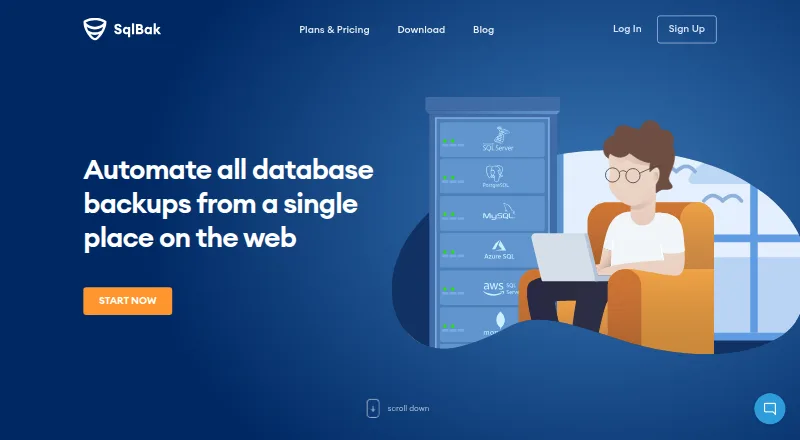
SqlBak automates database backups and provides a web service for managing backups across multiple servers.
What SqlBak is
SqlBak automates database backups and provides a web service for managing backups across multiple servers. Listed database support includes SQL Server, PostgreSQL, MySQL, Azure SQL, Amazon RDS for SQL Server and MongoDB. Backup destinations include cloud storage, FTP, SSH, and local or network folders. For SQL Server, the listed tools include point-in-time recovery, full, differential and transaction-log backups, automatic verification, compression, health monitoring and one-click restore. The app runs as a background service on Windows or Linux servers; Docker and Raspberry Pi installation are also described. SqlBak says backups are encrypted and sent directly from the server to the user's storage, and database credentials are encrypted and stored on the server. Its free plan covers one server, two databases and one month of backup history. Standard costs $6 per month per server, and Professional costs $9 per month per server. A 30-day trial gives access to Professional features and requires no credit card to start.
Good
- Supports six listed database types.
- Backups can go to cloud, network and local destinations.
- SQL Server features include point-in-time recovery and one-click restore.
- 30-day Professional-feature trial requires no credit card.
- Plans can be upgraded, downgraded or cancelled at any time.
Watch out
- Free plan covers one server and two databases.
- Free plan keeps one month of backup history.
- Standard and Professional are charged per server.
Who it suits
SqlBak may suit users who need to automate backups for supported databases and manage multiple servers through a web service. It offers a free tier for small setups and paid per-server plans with longer backup history.
Verdict
SqlBak combines automated backup management with a broad list of destinations and database support. Check the free plan's server, database and history limits against your needs before choosing a paid per-server tier.
Plans and prices
From SqlBak's own pricing page, checked 19 Oct 2026.
| Plan | Price | What it gives you |
|---|---|---|
| Free | Free | 1 server · 2 databases · local/network folder, external HDD/NAS, FTP, Box, Backblaze B2, Yandex.Disk · server-down alerts every 60 min · 1-month backup history · AES encryption · health check · extended support · white label · public API |
| Standard | $6 a month | FTPS, SFTP, Dropbox, Google Drive, OneDrive, OneDrive for Business · server-down alerts every 10 min · 6-month backup history · AES encryption · health check · extended support · white label · public API · month / server if you start now! |
| Professional | $9 a month | Amazon S3, Microsoft Azure Storage, S3 Compatible · server-down alerts every 5 min · 12-month backup history · AES encryption · health check every 60 min · extended support · white label · public API · month / server if you start now! |
The facts
Each one read from SqlBak's own pages, with the date it was checked.
What it does
- Agent architecture
- A lightweight Windows or Linux agent runs as a background service and connects the database server to the web account.checked 19 Oct 2026
- API and CLI
- The site says users can check backup status with a REST API and use a command-line interface to connect servers and configure jobs.checked 29 Sep 2026
- API integration example
- A provider blog documents using the API to send SqlBak job status, date and backup-type results into Zabbix.checked 19 Oct 2026
- Automation
- It supports maintenance jobs, command-line execution from scripts or batch files, scheduled jobs and email notifications.checked 19 Oct 2026
- Backup features
- The SQL Server page lists point-in-time recovery, full, differential and transaction-log backups, automatic backup verification, compression, health monitoring, and one-click restore.checked 29 Sep 2026
- Backup formats
- Local SQL Server connections produce native .bak files, while remote connections use generated SQL scripts.checked 19 Oct 2026
- Centralized management
- A web dashboard can manage backups from any number of connected servers on one page.checked 19 Oct 2026
- CLI
- SqlBak-CLI is a free beta command-line utility for SQL Server and MySQL backup, cloud transfer and restore.checked 19 Oct 2026
- CLI limitation
- The CLI roadmap lists PostgreSQL restore, MySQL binary-log incrementals, automatic email and 7zip as future features rather than current capabilities.checked 19 Oct 2026
- Compliance
- SqlBak says it is PCI DSS compliant, has no access to credit-card data, and has compliance validated annually by Stripe.checked 29 Sep 2026
- Compression
- Backup files can use Zip, 7Zip or SQL Server native compression.checked 19 Oct 2026
- Credential handling
- Database connection credentials are encrypted and stored on the customer server rather than on SqlBak.com.checked 19 Oct 2026
- Current distributor version
- ComponentSource lists SqlBak version 3.4.5 dated April 30, 2026.checked 19 Oct 2026
- Database support
- The site lists backup support for SQL Server, PostgreSQL, MySQL, Azure SQL, Amazon RDS SQL Server, and MongoDB.checked 29 Sep 2026
- Data path
- Backups are encrypted and uploaded directly from the customer server to the selected storage, bypassing SqlBak.com.checked 19 Oct 2026
- Deployment
- The SqlBak app runs as a background service on Windows or Linux servers; the download page also describes Docker and Raspberry Pi installation.checked 29 Sep 2026
- Destinations
- Listed backup destinations include Amazon S3, Google Drive, Dropbox, OneDrive, Microsoft Azure, S3-compatible storage, Backblaze B2, Box, Wasabi, Google Cloud, Aruba Cloud, Yandex Disk, FTP, local or network folders, and SSH.checked 29 Sep 2026
- Documentation status
- SqlBak says its main product documentation is still under development and directs users to support and blog articles.checked 19 Oct 2026
- Encryption
- The pricing page says all plans include SSL encryption, and paid plans list AES encryption.checked 29 Sep 2026
- GDPR
- Pranas.NET states that it is fully GDPR compliant.checked 19 Oct 2026
Where it runs
- CLI platforms
- The CLI documentation says it has no dependencies and supports popular Linux distributions plus all Windows and Windows Server versions.checked 19 Oct 2026
The company
- Company history
- Pranas.NET says it was founded in Manhattan in 2003, moved to New Jersey in 2016 and released SqlBak in 2010.checked 19 Oct 2026
- Founded
- 2003checked 28 Sep 2026
- Headquarters
- Hawthorne, New Jersey, United Stateschecked 28 Sep 2026
The full review of SqlBak
SqlBak is a database backup service for automating jobs and managing backups across servers, with a web interface and server-side app. It is best suited to administrators who need several database types and storage destinations; SQL Server users get the clearest set of recovery controls.
Its appeal is operational flexibility, but the free tier is small and paid prices are per server, so costs can rise as deployments grow.
Overview
SqlBak supports Microsoft SQL Server, PostgreSQL, MySQL, Azure SQL, Amazon RDS for SQL Server, and MongoDB. Backup frequency is customizable, and the service can manage backups from multiple servers. This breadth makes it a plausible fit for mixed database environments, although the most detailed backup features are specifically described for SQL Server.
The app runs as a background service on Windows or Linux servers. Docker and Raspberry Pi installation are also described, while management is provided through a web service. SqlBak was founded in 2003 and is based in Hawthorne, New Jersey.
Key features
SQL Server backups can be full, differential, or transaction-log based, with point-in-time recovery, automatic verification, compression, health monitoring, and one-click restore. Together these controls make SqlBak more useful for recovery planning than a service focused only on creating backup copies. Users of other supported databases should not assume they receive the same documented set of controls.
Destinations span Amazon S3, Google Drive, Dropbox, OneDrive, Microsoft Azure, S3-compatible storage, Backblaze B2, Box, Wasabi, Google Cloud, Aruba Cloud, Yandex Disk, FTP, local or network folders, and SSH. That range can help teams keep backups in an existing storage environment rather than being confined to one provider.
SqlBak says backups are encrypted and move directly from the server to the user's storage, bypassing SqlBak.com; database credentials are encrypted and stored on the server. All plans include SSL encryption, while paid plans also include AES encryption. SqlBak says it is PCI DSS compliant, has no access to credit-card data, and has compliance validated annually by Stripe.
A REST API can check backup status, and a command-line interface can connect servers and configure jobs. These options suit administrators who want to work with the service programmatically. Point-in-time recovery and restore verification are also supported.
Pricing
The free plan costs nothing and allows one server, two databases, one-month backup history, and server-down alerts every 60 minutes. It is useful for a small setup or initial evaluation, but the server and database caps make it a poor fit for a larger estate.
Standard costs $6 a month, billed per server if you start now. It raises backup history to six months and sends server-down alerts every 10 minutes. That is the lower-cost paid step for users who need longer retention and more timely alerts, but it offers less history and slower alerts than Professional.
Professional costs $9 a month, billed per server if you start now, and includes 12-month backup history and server-down alerts every five minutes. It is the stronger choice for users who value longer retention or faster notification. Extended support is listed for both Standard and Professional.
A 30-day trial provides Professional features and requires no credit card to start. The service is pay-as-you-go: users can upgrade, downgrade, or cancel at any time, and prepaying for a year earns an additional 10% off.
Platforms
SqlBak supports API, Linux, self-hosted, web, and Windows environments. The background service runs on Windows or Linux servers, with Docker and Raspberry Pi installation also described. This hybrid arrangement keeps backup jobs near the servers while providing web-based management.
Who it's for
SqlBak is a strong candidate for administrators managing backups across multiple servers, especially when they need a choice of database engines and destinations or SQL Server recovery controls. The free tier is suited to very small setups; teams with more servers or databases should compare the per-server paid cost against their deployment size.
It is less compelling for anyone seeking a generous free allowance or uniform, detailed backup controls across every supported database. The specific recovery capabilities are clearest for SQL Server.
Pros and cons
- Pros: Broad database support and a long list of storage destinations give administrators flexibility to fit backups into existing environments.
- Pros: SQL Server point-in-time recovery, multiple backup types, verification, and one-click restore provide meaningful recovery options.
- Pros: The no-card 30-day Professional trial lets users evaluate the higher tier before committing.
- Cons: The free plan's one-server and two-database caps limit its usefulness beyond a small deployment.
- Cons: Paid plans are billed per server, so the monthly cost scales with the number of servers.
- Cons: The strongest feature detail is for SQL Server, leaving less certainty for teams evaluating other supported databases.
Alternatives
For a broader comparison, browse Database Backup Software.
- MySQL is worth considering for users who want a freemium option with a free plan and a Community Edition that includes SQL and NoSQL applications, replication and high-availability components, and connectors.
- DBAegis offers a free Community plan capped at one admin, three connections, and three schedules, making it an alternative to compare for a small PostgreSQL setup.
- Barman is a free, self-hosted Linux PostgreSQL disaster-recovery tool for readers who want that narrower focus.
- Databasus is free, open-source software with all described product features, for users who prefer that model.
- pg_probackup is a free backup and recovery utility for PostgreSQL clusters, suited to readers focused on that task.
- Database Vault has a free plan with weekly automated backups, seven-day retention, 1 GB of storage, a low-priority queue, and basic email notifications; compare it if that allowance fits your needs.
- Percona XtraDB Cluster is free, open-source database clustering software, with paid support and services offered separately.
- pgBackRest is free, open-source software under the MIT license for personal or commercial use.
Verdict
Choose SqlBak if you need to coordinate database backups across servers, value broad destination support, or need SQL Server recovery controls such as point-in-time restore and verification. Its main reason to reconsider is scale: the free tier is tightly capped and paid plans charge per server. For small deployments, start with the free plan or no-card trial; for larger ones, check the total server count against the paid tiers before settling on it.
Alternatives to SqlBak
- 1

MySQL
Free planAPILinuxmacOSSelf-hosted7.9Free plan - 2

DBDock
Free planOpen sourceWebAPILinuxmacOS7.5Free plan - 3

Quemsi
Free planOpen sourceWebAPILinuxmacOS7.5Free plan - 4

IBM Db2
Free planWebAPILinuxSelf-hosted7.4From $630 a month - 5
DBAegis
Free planOpen sourceWebAPILinuxSelf-hosted7.2Free plan - 6

DT Database Backup Wizard
Free planWindows7.2Free plan