
DT Database Backup Wizard
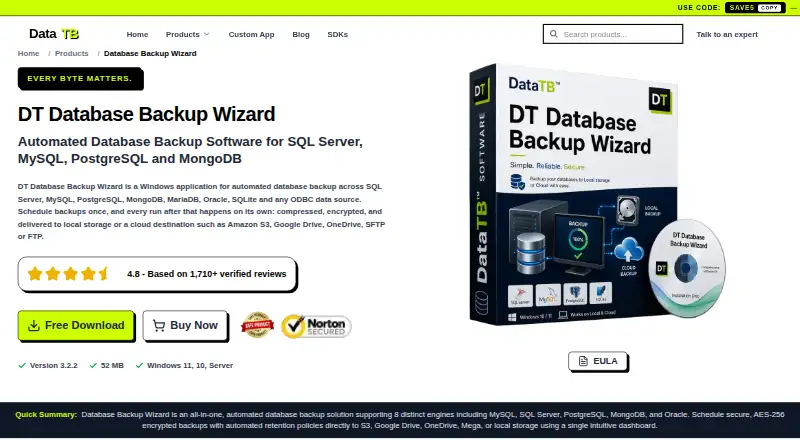
DT Database Backup Wizard is a Windows application for automating database backups.
What DT Database Backup Wizard is
DT Database Backup Wizard is a Windows application for automating database backups. It supports SQL Server, MySQL, PostgreSQL, MongoDB, MariaDB, Oracle, SQLite, and ODBC sources. Jobs can run hourly, daily, weekly, at custom intervals, or manually. Users can preview tables and records, then choose full, schema-only, data-only, or date-filtered backups. Files can stay local or go to FTP, SFTP, Amazon S3, OneDrive, Google Drive, or Mega. Optional AES encryption and compression can be combined, and the application can delete older backups automatically. Its run history records timestamps, status, and error details. The free demo allows connection testing and up to two manual backups per database; scheduling, cloud destinations, and retention are limited, while encryption and compression are preview-only. Listed systems are Windows 11, Windows 10, and Windows Server, with a dual-core CPU and 4 GB RAM minimum. The maker warns FTP transfers are unencrypted and recommends SFTP for sensitive backups.
Good
- Supports eight database types and ODBC sources.
- Jobs can run on hourly, daily, weekly, or custom schedules.
- Backups can target local, cloud, FTP, or SFTP destinations.
- AES encryption and compression can be enabled together.
Watch out
- The demo allows only two manual backups per database.
- Scheduling and cloud destinations are limited in the demo.
- FTP transfers are unencrypted.
- Windows is the only listed platform.
Who it suits
It suits freelancers, agencies, small development teams, and IT administrators who need scheduled backups across supported database types. The free demo can serve those who only need connection tests or a small number of manual backups.
Verdict
DT Database Backup Wizard offers broad database support and configurable backup jobs, but the demo restricts several important functions. Choose a paid tier based on server count, term, and support requirements.
Plans and prices
From DT Database Backup Wizard's own pricing page, checked 4 Oct 2026.
| Plan | Price | What it gives you |
|---|---|---|
| Free Demo | Free | Up to 2 manual backups per database · Limited scheduling, cloud destinations and retention · Encryption and compression preview only · Community/documentation support |
| Starter | $29, paid once | 1 server · Full access · No refund · Billed once · 1 Month |
| Standard | $49, paid once | 2 servers · Full access · Standard support · Billed once · 6 Months |
| 6 Months | $49, paid once | 6-month licence · One-time payment |
| 1 Years | $89, paid once | 1-year licence · One-time payment |
| Home | $99, paid once | 5 servers · Full access · 1 year of feature updates · Priority support · 30-day money-back guarantee · Billed once · 1 Year |
| 2 Years | $149, paid once | 2-year licence · One-time payment |
| Corporate | $199, paid once | 10 servers · Full access · 2 years of feature updates · Priority support · 30-day money-back guarantee · Billed once · 2 Years |
| 3 Years | $199, paid once | 3-year licence · One-time payment |
| Enterprise | $299, paid once | 20 servers · Full access · 3 years of feature updates · 24/7 dedicated support · 30-day money-back guarantee · Billed once · 3 Years |
The facts
Each one read from DT Database Backup Wizard's own pages, with the date it was checked.
What it does
- API and SDKs
- The product page does not list a public API or SDK for DT Database Backup Wizard.checked 21 Oct 2026
- Backup selection
- The product offers full, schema-only, data-only, and date-filtered backup options.checked 21 Oct 2026
- Database support
- The product lists SQL Server, MySQL, PostgreSQL, MongoDB, MariaDB, Oracle, SQLite, Firebird, IBM DB2, and ODBC sources as supported.checked 21 Oct 2026
- Demo limits
- The free demo allows connection testing and up to two manual backups per database, while scheduling, cloud destinations, encryption, compression, and retention are limited or preview-only.checked 4 Oct 2026
- Demo restrictions
- The free demo allows up to two manual backups per database and limits scheduled backups, cloud destinations, retention, encryption, and compression.checked 21 Oct 2026
- Destinations
- Listed destinations include local storage, FTP, SFTP, Amazon S3, OneDrive, Google Drive, and Mega.checked 21 Oct 2026
- Documentation depth
- The product page provides feature explanations, setup steps, FAQs, and specifications, while the demo support is described as community and documentation.checked 21 Oct 2026
- Encryption and compression
- Encryption and compression are optional per-job settings that can be used independently or together.checked 21 Oct 2026
- FTP limitation
- The product page says FTP transfers are unencrypted and recommends SFTP for sensitive backups.checked 21 Oct 2026
- Independent pricing listing
- Software Advice lists one-time plans priced at $49, $89, $149, and $199 for terms of 6 months, 1 year, 2 years, and 3 years.checked 21 Oct 2026
- Independent product description
- GetApp describes the product as supporting data preview, schema-only or data-only backups, several remote destinations, filtering, scheduling, and backup history.checked 21 Oct 2026
- Intended users
- The maker identifies freelancers and agencies, small development teams, and IT administrators as users the product serves.checked 4 Oct 2026
- Licence
- The product page identifies a free demo and a paid full version but does not name an open-source licence.checked 21 Oct 2026
- Live preview
- Users can preview database tables and records before selecting what to back up.checked 21 Oct 2026
- Praise: reviewer feedback
- The reviewed G2, Capterra, GetApp, and Software Advice listings show no product reviews, so they provide no repeated reviewer praise or complaints.checked 21 Oct 2026
- Product
- DT Database Backup Wizard is a Windows application for automated database backups.checked 4 Oct 2026
- Product version and size
- The product page lists version 3.2.2 with a download size of 52 MB.checked 21 Oct 2026
- Rating on Capterra
- 0.0 out of 5 from 0 reviewschecked 21 Oct 2026
- Rating on G2
- 0.0 out of 5 from 0 reviewschecked 21 Oct 2026
The company
- Company founding
- The maker's opened home and about pages do not state a founding year.checked 21 Oct 2026
- Company identity
- The maker identifies itself as Data TB Software and describes itself as an independent software company.checked 21 Oct 2026
- Company location
- The vendor lists its address as Nehru Place, New Delhi, 110019, India.checked 21 Oct 2026
- Headquarters
- New Delhi, Indiachecked 28 Sep 2026
Where it runs
- Rating on GetApp
- 0.0 out of 5 from 0 reviewschecked 21 Oct 2026
Alternatives to DT Database Backup Wizard
- 1

MySQL
Free planAPILinuxmacOSSelf-hosted7.9Free plan - 2

SqlBak
Free planWebAPILinuxSelf-hosted7.6From $6 a month - 3

DBDock
Free planOpen sourceWebAPILinuxmacOS7.5Free plan - 4

Quemsi
Free planOpen sourceWebAPILinuxmacOS7.5Free plan - 5

IBM Db2
Free planWebAPILinuxSelf-hosted7.4From $630 a month - 6
DBAegis
Free planOpen sourceWebAPILinuxSelf-hosted7.2Free plan