
Spendbase
Spendbase provides businesses with multi-currency accounts, payment cards, and controls for managing team spending.
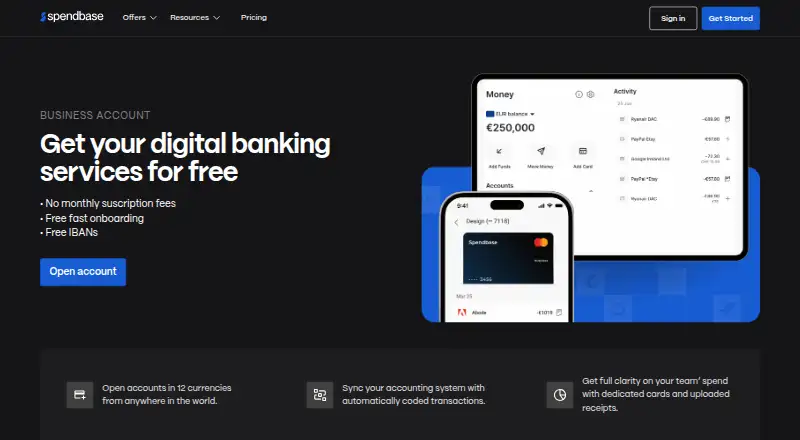
What Spendbase is
Spendbase provides businesses with multi-currency accounts, payment cards, and controls for managing team spending. Businesses can hold and move money in 12 currencies and send or receive payments through SWIFT, SEPA, and Faster Payments. Virtual and physical cards can be assigned, frozen, or deactivated, with spending limits set per card; cardholders can also have transaction, daily, weekly, and monthly limits. Teams can request spending approval, capture receipts in the mobile app, and sync transaction coding to ERP or accounting software. Spendbase lists integrations such as Google Workspace, Slack, QuickBooks, Xero, and NetSuite; third-party integrations are read-only. Its Android and iOS apps support card management, spending tracking, and 3DS transaction confirmation, while more detailed settings are available on the web. A Free business account has no monthly or per-user fee and includes free card issuance for eligible business customers. Pricing is also listed as on request. Transaction fees include 1% for currency conversion and £20 for SWIFT transfers; currency and card availability depend on company registration location.
Good
- Hold and move money in 12 currencies.
- Virtual and physical cards include spending limits.
- Receipt capture is available in the mobile app.
- Free account has no monthly or per-user fee.
Watch out
- Free account is limited to eligible business customers.
- Currency conversion fee is 1%.
- SWIFT transfers have a flat £20 fee.
- No free trial is listed.
Who it suits
Spendbase may suit startups, scale-ups, distributed teams, and enterprises that need company spending controls. Businesses should check currency availability for their registration location.
Verdict
Spendbase brings accounts, cards, and expense controls into one business platform, with mobile and web access. Review transaction fees and location-dependent currency availability for your business.
Plans and prices
From Spendbase's own pricing page, checked 9 Oct 2026.
| Plan | Price | What it gives you |
|---|---|---|
| Free business account | Free | No monthly fee · no per-user fee · free card issuance · eligible business customers only |
The facts
Each one read from Spendbase's own pages, with the date it was checked.
What it does
- Accounts
- Businesses can hold and move money in 12 currencies and send or receive payments via SWIFT, SEPA and Faster Payments.checked 9 Oct 2026
- Banking providers
- The site says UK and EEA accounts and cards are issued in partnership with Moorwand Ltd, while US digital banking accounts are provided by Sutton Bank.checked 9 Oct 2026
- Cards
- Spendbase offers virtual and physical cards, with per-card spending limits and the ability to assign, freeze or deactivate cards.checked 9 Oct 2026
- Expense controls
- The product supports spend requests and approvals, captures receipts in the mobile app and can sync transaction coding to ERP or accounting software.checked 9 Oct 2026
- Integration access
- Spendbase says its third-party integrations are read-only and fetch data to display in its platform.checked 9 Oct 2026
- Integrations
- Spendbase’s integration directory lists identity providers, business apps and accounting tools including Google Workspace, Microsoft Workspace, Slack, QuickBooks, Xero and NetSuite.checked 9 Oct 2026
- Limits
- Cardholders can have per-transaction, daily, weekly and monthly spending limits; available currencies and card currencies depend on the company’s registration location.checked 9 Oct 2026
- Security
- Spendbase’s Trust Center lists SOC 2 Type II, ISO 27001 and PCI DSS certifications as active or valid on its certification page.checked 9 Oct 2026
- Support
- The site says users can contact support through free in-app chat at any time.checked 9 Oct 2026
- Transaction fees
- The maker lists a 1% currency conversion fee, a flat £20 fee for SWIFT transfers, no fee for SEPA and SEPA Instant payments, and a 2% fee on ATM withdrawals above the monthly free allowance.checked 9 Oct 2026
- What it does
- Spendbase offers businesses multi-currency accounts, payment cards and tools to manage team spending.checked 9 Oct 2026
- Who it serves
- The site describes the product for startups and scale-ups, larger companies with distributed teams, and enterprises.checked 9 Oct 2026
The company
- Company
- Spendbase’s team page says the company began in 2023 and lists its headquarters as Lewes, Delaware.checked 9 Oct 2026
- Founded
- 2023checked 28 Sep 2026
- Headquarters
- Lewes, Delaware, United Stateschecked 28 Sep 2026
Where it runs
- Mobile app
- Spendbase’s Google Play listing says its app supports 3DS transaction confirmation, card management and spending tracking, with more detailed settings on the web platform.checked 9 Oct 2026
The full review of Spendbase
Overview
Spendbase is a business finance platform that pairs multi-currency accounts and payment cards with controls for team spending. It suits companies that want to manage payments and employee expenses in one place; its breadth is useful, but transaction fees and location-dependent account and card options call for a close fit check.
Key features
Businesses can hold and move money in 12 currencies, with payments through SWIFT, SEPA and Faster Payments. Virtual and physical cards can be assigned, frozen or deactivated, and each can have a spending limit. Cardholders can also be subject to per-transaction, daily, weekly and monthly caps, giving finance teams several levers to control spend.
Spend requests and approvals create a checkpoint before purchases. The mobile app captures receipts, tracks spending, manages cards and confirms 3DS transactions; more detailed settings are on the web platform. That makes mobile useful for routine tasks, while administrators needing deeper configuration should expect to use the web version.
Transaction coding can sync to ERP or accounting software. Integrations include QuickBooks, Xero and NetSuite, as well as Google Workspace, Microsoft Workspace and Slack. Third-party integrations are read-only: they fetch data for display in Spendbase, rather than writing changes back to those services.
Costs to account for include a 1% currency conversion fee, £20 per SWIFT transfer, no fee for SEPA and SEPA Instant payments, and a 2% fee on ATM withdrawals above the monthly free allowance. Available account and card currencies depend on the company’s registration location. UK and EEA accounts and cards are issued with Moorwand Ltd; US digital banking accounts are provided by Sutton Bank.
Pricing
The Free business account costs nothing, with no monthly or per-user fee and free card issuance. It is restricted to eligible business customers, so it is not a general-purpose free tier. Spendbase also has paid pricing on request and no free trial. Custom pricing means teams should establish the full cost for their needs before committing, alongside the transaction charges.
Platforms
Spendbase supports Android, iOS and web. The mobile apps handle receipts, card management, spending tracking and 3DS confirmation, while more detailed settings sit on the web platform. This split suits teams that need mobile access for everyday card use but can rely on web for fuller administration.
Who it's for
Spendbase is positioned for startups and scale-ups, larger companies with distributed teams, and enterprises. It is strongest for businesses seeking accounts, cards, approvals and expense workflows together, especially where multiple currencies matter. Companies should first confirm that their registration location supports the currencies and card options they need. The listed integration set may help organizations already using common accounting, identity and workplace tools, but read-only access limits what those connections can do.
Pros and cons
- Pro: Accounts, payment rails, physical and virtual cards, approvals and receipt capture bring several spending tasks into one platform.
- Pro: Multiple card limits and the ability to freeze or deactivate cards give finance teams meaningful controls over employee spending.
- Pro: The free account has no monthly or per-user fee and includes free card issuance for eligible businesses.
- Con: Currency conversion and SWIFT transfers carry fees, and ATM withdrawals cost 2% above the monthly free allowance.
- Con: Currency and card availability varies with registration location, which can rule out a desired setup for some businesses.
- Con: Paid pricing is custom, and third-party integrations are read-only rather than a route to update connected systems.
Alternatives
For businesses comparing tools in this category, see SaaS Management Platforms. For a freemium option with identity-provider connection, a browser extension, SSO connection and a 10-app allowance, consider Corma. ManageEngine SaaS Manager Plus offers a free tier for up to two applications after its trial and a paid yearly tier for up to five, making it a more bounded choice for organizations managing a small app portfolio.
Teisko has a free plan with one admin account, unlimited apps, up to 100 managed users, 20 invoice extractions per month and up to three access reviews annually. SpendVera offers a free web plan for up to 10 subscriptions and a Growth plan for up to 50, which is relevant to teams focused on subscription cost visibility. TechStackTrack has a free Start plan for up to 50 subscriptions and three users, with receipt inbox and renewal-alert features; its Grow plan is paid.
Vendr offers a free Chrome extension with pricing insights for more than 20,000 software products. 1Password is a paid option without a free plan for teams whose need is password management rather than business accounts and expense controls. Matrix42 FastViewer is a paid remote-support option with a free trial, rather than a business spending platform.
Verdict
Choose Spendbase if your business wants multi-currency accounts, cards and expense controls together, with mobile access for employees and web settings for administrators. The free account can lower the entry cost for eligible companies, but conversion and transfer charges, location-dependent availability and custom paid pricing make it a less convincing fit for businesses that need predictable costs or a particular currency setup.
Getting started
- Visit the Spendbase website.
- Check whether your business is eligible for the Free business account.
- Choose the web platform or the Android or iOS app.
- Use the mobile app for card management, spending tracking, 3DS confirmation and receipt capture.
- Set card spending limits and configure spend requests and approvals.
- Connect from the listed integration directory if you use a supported business or accounting tool.
Limits worth knowing
The Free business account is for eligible business customers. Available account and card currencies depend on the company’s registration location; listed charges include 1% currency conversion, £20 per SWIFT transfer and 2% on ATM withdrawals above the monthly free allowance.
Questions
Is Spendbase free?
The Free business account costs nothing, with no monthly or per-user fee and free card issuance for eligible business customers. No free trial is offered.
What platforms does Spendbase support?
Spendbase is available on Android, iOS and the web. The mobile apps support card management, spending tracking and 3DS transaction confirmation.
What payment methods and currencies does it support?
Businesses can hold and move money in 12 currencies and send or receive payments through SWIFT, SEPA and Faster Payments. Available currencies depend on the company’s registration location.
What integrations are available?
Listed integrations include Google Workspace, Microsoft Workspace, Slack, QuickBooks, Xero and NetSuite. Third-party integrations are read-only and fetch data to display in Spendbase.
What fees does Spendbase list?
The listed fees include 1% for currency conversion, £20 for SWIFT transfers, no fee for SEPA and SEPA Instant payments, and 2% on ATM withdrawals above the monthly free allowance.
Who provides Spendbase accounts and cards?
UK and EEA accounts and cards are issued in partnership with Moorwand Ltd. US digital banking accounts are provided by Sutton Bank.