Spelling Notebook
Spelling Notebook helps students build and practice personalized spelling lists on Apple devices.
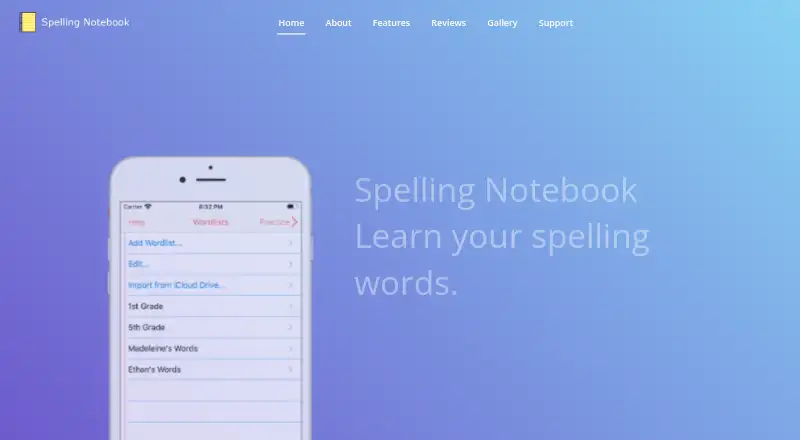
What Spelling Notebook is
Spelling Notebook helps students build and practice personalized spelling lists on Apple devices. They can hear each word, take tests and focus practice on words that need more work. The searchable dictionary contains more than 100,000 words, and users can add words. Its built-in voice speaks dictionary entries and added English words; users can also record a word or phrase in their own voice. Dictionary spelling can be set for US, UK, Australian, Canadian or New Zealand English. Students can create, edit, rename, delete, copy and paste lists, and import words between them. The app keeps test and practice history for reviewing previous results and progress. Lists can be moved through iCloud Drive or shared by AirDrop or email, and test results can be emailed. The maker recommends the app for all ages, including kids, and says students can practice independently. It is listed for iPhone, iPad and iPod touch, with iOS and macOS platforms. The app has a free plan; an optional 1.99 USD one-time in-app purchase removes the free version’s word-list limit, according to an App Store user review.
Good
- Searchable dictionary includes more than 100,000 words.
- Supports five regional English spelling options.
- Practice can focus on missed words.
- Lists can be shared or moved through iCloud Drive.
Watch out
- The free version has a word-list limit, according to a user review.
- Available platforms are iOS and macOS.
Who it suits
It suits students who want to practice spelling independently, including children and learners of different ages. The regional dictionary options may help users working with one of the listed varieties of English.
Verdict
Spelling Notebook combines custom lists, tests and targeted practice with tools for reviewing progress. Its free download may be enough to try the core approach, while the listed one-time purchase removes the free version’s word-list limit.
Plans and prices
From Spelling Notebook's own pricing page, checked 8 Oct 2026.
| Plan | Price | What it gives you |
|---|---|---|
| Free | Free | Free app download; user review reports a 10-word list limit |
| Upgrade to Premium | $1.99, paid once | In-app purchase; removes the free version’s word-list limit, according to an App Store user review |
The facts
Each one read from Spelling Notebook's own pages, with the date it was checked.
What it does
- Audience
- The maker recommends the app for all ages, including kids, and says students can practice independently.checked 8 Oct 2026
- Dictionary
- The app includes a searchable spelling dictionary with more than 100,000 words, and users can add words to it.checked 8 Oct 2026
- English regions
- The built-in spelling dictionary supports UK, US, Canadian, Australian, and New Zealand English.checked 8 Oct 2026
- Intended users
- The maker lists the recommended ages as “All, Kids” and says students can practice independently.checked 8 Oct 2026
- Lists
- Users can create, edit, rename, delete, and import words between multiple word lists.checked 8 Oct 2026
- Payment handling
- The policy says payment card details are handled directly by third-party processors and identifies Apple Store In-App Payments.checked 8 Oct 2026
- Practice
- After the first test, the app focuses practice on words that need work; users can change practice settings.checked 8 Oct 2026
- Practice and progress
- Users can focus practice on words they missed and view past test and practice results.checked 8 Oct 2026
- Privacy
- The privacy policy says it may collect contact details, cookies, and usage data, and that data from users outside New Zealand may be transferred to and processed in New Zealand.checked 8 Oct 2026
- Privacy policy
- The policy says it may collect email address, name, cookies, and usage data, and that data may be transferred to and processed in New Zealand.checked 8 Oct 2026
- Progress
- The app keeps a history of word-list tests and practice so users can review past results and progress.checked 8 Oct 2026
- Pronunciation
- A built-in voice can speak dictionary words and added English words; users can also record a word or phrase in their own voice.checked 8 Oct 2026
- Purpose
- Spelling Notebook lets students create personalized word lists, hear each word, take spelling tests, and practice words they have not yet mastered.checked 8 Oct 2026
- Regional spelling
- The built-in dictionary supports US, UK, Australian, Canadian, and New Zealand English, selected by region.checked 8 Oct 2026
- Results
- Users can email test results.checked 8 Oct 2026
- Security
- The policy says it uses commercially acceptable means to protect personal data but cannot guarantee absolute security.checked 8 Oct 2026
- Sharing
- The maker says word lists can be exported or imported with iCloud Drive and shared using AirDrop or email.checked 8 Oct 2026
- Support
- The maker lists in-app help and gives [email protected] as its support contact.checked 8 Oct 2026
- Word lists
- Users can create, edit, rename, delete, copy, and paste word lists, and import words from one list into another.checked 8 Oct 2026
Where it runs
- Platform
- The maker lists the app for iPhone, iPad, and iPod touch.checked 8 Oct 2026
The full review of Spelling Notebook
Overview
Spelling Notebook is a spelling practice app for learners who want to build and rehearse their own word lists. It suits students and families on Apple devices, especially when independent, spoken practice matters. Its strongest case is targeted review; the free version’s reported 10-word list limit may push regular users toward the one-time upgrade.
Key features
Lists, pronunciation, and practice
A searchable dictionary of more than 100,000 words supports US, UK, Australian, Canadian, and New Zealand English, with a regional setting to match the spelling conventions a student needs. Learners can add words, create and manage multiple lists, and import words from one list to another. That flexibility works well for class assignments and personal vocabulary, though the free version’s reported limit can constrain longer lists.
The app can speak dictionary words and added English words, and users can record their own word or phrase. Students can take spelling tests through dictation, then direct later practice toward words that need work; practice settings can also be adjusted. This makes review more focused than repeating every word equally, while the option to record a prompt may help families use familiar pronunciations.
Progress and sharing
Test and practice history gives learners a way to revisit previous results and see how their work changes over time. Lists can be moved through iCloud Drive or shared by AirDrop or email, and test results can be emailed. These options are useful for moving lists between devices or sending results to someone supporting a student, although the app’s emphasis is individual practice rather than classroom management.
Spelling Notebook includes in-app help and provides support by email. Its privacy policy says it may collect names, email addresses, cookies, and usage data, and that data from users outside New Zealand may be processed there. Payment card details are handled by third-party processors, including Apple in-app payments; the company says it uses commercially acceptable safeguards but cannot guarantee absolute security.
Pricing
The Free plan costs nothing and provides a free app download. An App Store user review reports a 10-word list limit, so it is best treated as a way to try the basic approach or practise a short list rather than a dependable option for longer assignments.
Upgrade to Premium costs $1.99, paid once as an in-app purchase and removes the free version’s word-list limit, according to an App Store user review. It is the more practical choice for students who expect to maintain multiple or longer lists; the free option gives up that capacity.
Platforms
Spelling Notebook is listed for iOS and macOS. The maker identifies iPhone, iPad, and iPod touch as supported devices, making it an Apple-focused option rather than a choice for Android or web-based practice.
Who it's for
The maker recommends the app for all ages, including children, and says students can practise independently. It is a sensible fit for a learner who needs custom spelling lists, spoken prompts, and a record of test and practice results. Families or students who need cross-platform access, shared classroom oversight, or a free tier without the reported list cap should consider other options.
Pros and cons
- Pros: A large dictionary with five English-region settings and the ability to add words makes it adaptable to different school spelling conventions.
- Pros: Dictation, user-recorded prompts, and practice focused on missed words give students several ways to work through difficult vocabulary.
- Pros: Test and practice history, plus list sharing and emailed results, helps learners revisit work and pass it on.
- Cons: The reported 10-word free-list limit is restrictive for longer assignments; removing it requires a one-time purchase.
- Cons: Its listed device support is limited to Apple platforms, which rules it out for learners who need Android or browser access.
Alternatives
For a broader platform choice, SpellMe runs on Android, iOS, Linux, macOS, web, and Windows. Its free Basic plan includes five lists of up to ten words each, plus 300+ curated phonics word lists and Regular Mode; choose it when curated phonics content or non-Apple access matters more than Spelling Notebook’s regional dictionary and targeted review.
Spelling Shed is another freemium option for Android, iOS, and web, with a free plan that includes tests, Hive games, challenges, and custom leagues, each with seven days of history, plus clever rostering for classrooms. It is the better fit when classroom tools and game-based practice are priorities.
Spelling.Live runs on Android, iOS, and web. Its free sign-up credits provide 200 credits that expire after 90 days without a practice session, so it may suit someone who prefers a credit-based option and needs browser access.
SpellingJoy is a free-plan freemium alternative for Android, iOS, and web.
Spelvo is available on Android and web, with a free plan limited to three lifetime snaps and one child profile. It is a different fit for users who want those platforms and can work within that cap.
PenPoints is a free Android and iOS option aimed at classroom use: teachers without a school plan can send one homework exercise per week, use 90 SpellStation credits, and run up to five live class assessments.
Spelling Boost is an Android freemium alternative whose free plan includes audio dictation tests, custom lists, handwriting input, and progress tracking.
Word Club is free on Android and iOS, with 450 School Level Study List words, 4,000 Words of the Champions words, and spelling and vocabulary quizzes. It may suit learners who prefer ready-made word collections to building their own lists.
Browse more options in Spelling Apps.
Verdict
Choose Spelling Notebook if an Apple-device learner needs custom lists, spoken dictation, focused practice on missed words, and a history of results. The one-time upgrade is a modest route past the free version’s reported list cap, but learners who need Android or web support—or classroom-oriented tools—are better served by a broader-platform alternative.
Alternatives to Spelling Notebook
- 1
Spelling.Live
Free planAndroidiOSWebAPI8.0From £5.99 a month - 2

SpellMe
Free planAndroidiOSWebLinux8.0From £12 a year - 3
Spelvo
Free planAndroidWeb7.6From 9.90 MYR a month - 4

Squeebles Spelling Connect
AndroidiOSWebmacOS7.6From £29.99 a year - 5

Spello
AndroidiOSWebmacOS7.5From £10 a year - 6
Spelling Shed
Free planAndroidiOSWeb7.2$2.99 one-time