Spelling.Live
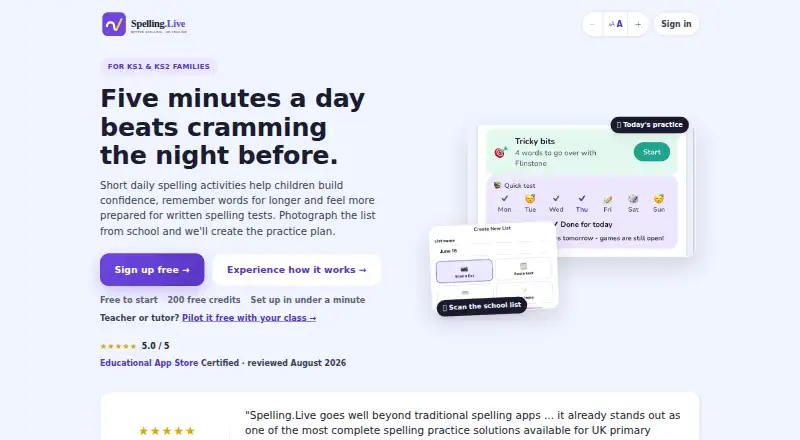
Spelling.Live turns school spelling lists into daily practice for children in KS1 and KS2.
What Spelling.Live is
Spelling.Live turns school spelling lists into daily practice for children in KS1 and KS2. Families can create a list by photographing a school list, pasting text, or entering words. Children can practise by handwriting, typing, speaking, choosing answers, tracing, or doing paper activities. A weekly Learning plan schedules practice and can be adjusted to weekly, fluid, or classic rhythms. Spaced repetition brings back weaker words, while difficulty adjusts to the child's stage. AI features include personalized spelling tips, picture hints, sentence generation, and handwriting marking. Teachers and tutors can create classes, assign lists, review group reports, scan batches of paper tests, and import pupil rosters from Google Classroom. Settings for each child include OpenDyslexic or Lexend fonts, colour overlays, adjustable spacing, and slower speech. The service is available on Android, iOS, and web. Free sign-up includes 200 credits, which expire after 90 days without a practice session. Paid packs cost £4.00 for 400 credits or £20.00 for 5,000 credits, paid once; a £5.99-a-month Family plan covers practice for up to 4 children without using credits, and schools can pilot it free with one class for six weeks.
Good
- Lists can be created from photos, pasted text, or typed words.
- Practice includes handwriting, speech, tracing, and paper activities.
- Teachers can scan batches of paper tests.
- Accessibility settings include alternative fonts and colour overlays.
Watch out
- Free 200 credits expire after 90 days without practice.
- Practice uses credits unless you pay £5.99 a month for the Family plan.
- No free trial is listed.
Who it suits
Spelling.Live suits KS1 and KS2 families looking for varied spelling practice, and teachers or tutors who need class and group tools. Per-child display and speech settings may suit learners who benefit from those adjustments.
Verdict
Spelling.Live combines home practice with class tools and several ways for children to work through spelling lists. Consider how quickly credits may be used, or whether the £5.99-a-month Family plan suits a child who practises daily; the free allocation expires after a long break.
Plans and prices
From Spelling.Live's own pricing page, checked 30 Sep 2026.
| Plan | Price | What it gives you |
|---|---|---|
| Free sign-up credits | Free | 200 credits · expire after 90 days without a practice session |
| 400-credit pack | £4, paid once | 400 credits · about 200 practice activities · no subscription · £4 once; valid 12 months |
| Family plan | £5.99 a month | Up to 4 children · unlimited practice · 20 new pictures per month · £5.99 a month; renews monthly |
| 5,000-credit pack | £20, paid once | 5,000 credits · about 2,500 practice activities · no subscription · £20 once; valid 12 months |
The facts
Each one read from Spelling.Live's own pages, with the date it was checked.
What it does
- Accessibility
- Per-child settings include OpenDyslexic or Lexend fonts, colour overlays, adjustable spacing, and slower speech.checked 30 Sep 2026
- Accessibility settings
- Per-child settings include OpenDyslexic or Lexend fonts, colour overlays, adjustable spacing, slower speech and gentler handwriting feedback.checked 15 Oct 2026
- Adaptive practice
- Spaced repetition brings weaker words back automatically, and difficulty adjusts to the child's stage.checked 30 Sep 2026
- AI coach
- The AI Spelling Coach creates pronunciation, mnemonic, word-structure and mistake-specific advice from recorded errors.checked 15 Oct 2026
- AI data use
- The privacy policy says user inputs sent to AI providers are not used to train their models.checked 15 Oct 2026
- AI features
- AI features include personalised spelling tips, picture hints, sentence generation, and handwriting marking.checked 30 Sep 2026
- API and automation
- Users can generate an API key and add words through Siri Shortcuts, Google Assistant or other automation tools.checked 15 Oct 2026
- Classroom tools
- Teachers and tutors can create classes, assign spelling lists, review group reports, and scan batches of paper tests for marking.checked 30 Sep 2026
- Curriculum alignment
- The service maps practice to the National Curriculum for England from Year 1 through Year 6.checked 15 Oct 2026
- Data location
- The service says account and children's practice data are stored in the European Union, with hosting in Frankfurt.checked 15 Oct 2026
- Data rights
- Parents can export their data or permanently delete the account and linked child data from the app.checked 15 Oct 2026
- Data storage
- The maker says account and children's practice data are stored in the EU (Ireland), while hosting is set to the EU (Frankfurt).checked 30 Sep 2026
- Dictation
- The app can dictate words for a paper test and mark the photographed sheet automatically.checked 15 Oct 2026
- Google Play availability
- Google Play lists Spelling Live as a free education app by Manoj Amritlal Shah, updated 22 August 2026.checked 15 Oct 2026
- Google Play data disclosure
- Google Play says no data is shared with third parties, data is encrypted in transit and deletion can be requested.checked 15 Oct 2026
- Handwriting analysis
- Handwriting attempts are checked for spelling and letter formation, including stroke order, joins, spacing and reversals.checked 15 Oct 2026
- Integration
- Teachers can import pupil rosters from Google Classroom.checked 30 Sep 2026
- Integrations
- The maker says the service is listed in Google Workspace Marketplace for Google Classroom class import.checked 15 Oct 2026
Where it runs
- Apple reviewer praise
- Reviewers praise quick school-list entry, useful handwriting progress feedback, and enjoyable games.checked 15 Oct 2026
The company
- Company founder
- The service was built by Manoj Shah, who describes himself as an enterprise solution architect with EY and Defra experience.checked 15 Oct 2026
- Company location
- The maker says Spelling.Live is made in the UK.checked 15 Oct 2026
- Company size and funding
- The opened maker pages identify an individual founder but state no employee count, funding or outside owner.checked 15 Oct 2026
- Headquarters
- United Kingdomchecked 23 Sep 2026
Money
- Learning plan
- A weekly Learning plan schedules activities and can be edited or set to weekly, fluid, or classic rhythms.checked 30 Sep 2026
The full review of Spelling.Live
Overview
Spelling.Live is a spelling-practice service for KS1 and KS2 children, with tools for both home learning and classroom use. It is best suited to families following school spelling lists and teachers who want to set and review group work. Its flexible practice formats are a strength; regular use draws down credits unless the family takes the £5.99-a-month Family plan, so families should weigh packs against the plan.
Key features
Practice shaped around school lists
Families can turn a spelling sheet into a practice list by photographing it, pasting its text or entering words directly. Children can then work by handwriting, typing, speaking, choosing answers, tracing or practising on paper. That variety gives families different ways to approach the same list; frequent sessions, however, either draw down credits or call for the monthly Family plan.
A plan that adapts
The weekly Learning plan can be edited or set to weekly, fluid or classic rhythms, which helps fit practice to a child's routine. Spaced repetition brings weaker words back automatically, and difficulty adjusts to the child's stage. Phonics instruction, dictation and corrective practice broaden the offer beyond simple word quizzes. AI tools add personalised spelling tips, picture hints, generated sentences and handwriting marking.
Classroom and accessibility tools
Teachers and tutors can create classes, assign lists, review group reports and scan batches of paper tests for marking. Google Classroom roster imports can reduce the work of setting up pupil groups. Per-child options include OpenDyslexic or Lexend fonts, colour overlays, adjustable spacing and slower speech, giving families and educators practical ways to tailor presentation and pace.
Privacy
The maker says the service is built for UK GDPR and the Children's Code. Handwriting photos and voice recordings are processed and then discarded; inputs sent to AI providers are not used to train their models, and the company says it maintains data processing agreements with those providers. Account and children's practice data are stored in Ireland, with hosting in Frankfurt. Privacy and data requests can be sent to [email protected].
Pricing
Spelling.Live offers a free allocation of credits, two one-time credit packs and a monthly Family plan that needs no credits. Schools can pilot it free with one class for six weeks, with no card or contract.
- Free sign-up credits: free for 200 credits. They expire after 90 days without a practice session, so this is best for trying the service or occasional use rather than a long break between sessions.
- 400-credit pack: £4, paid once, valid for 12 months, with no subscription or renewal. The smaller purchase suits families who want to top up without committing to a larger balance.
- 5,000-credit pack: £20, paid once, valid for 12 months, also with no subscription or renewal. Its larger balance is aimed at families expecting sustained practice; unused credits still have a 12-month validity limit.
- Family plan: £5.99 a month for up to 4 children, with practice that uses no credits and 20 new pictures a month; it renews monthly and can be cancelled any time.
The free allocation is capped and the packs are not unlimited access, while the Family plan suits children who practise most days. Families should choose based on likely practice frequency and remember that inactivity can expire the free credits.
Platforms
Spelling.Live is available on Android, iOS and the web, covering phones, tablets and browser use.
Who it's for
Spelling.Live is a strong fit for KS1 and KS2 families who want to turn school lists into varied, scheduled practice, especially when accessibility settings or adaptive review matter. Its class, reporting and paper-test tools also make it relevant to teachers and tutors. It is less suitable for families seeking unlimited free practice who want neither a credit balance nor a monthly plan.
Pros and cons
- Pros: Lists can be created from photos, pasted text or manual entry, so families can work directly from school materials.
- Pros: Multiple practice modes, adjustable learning rhythms and spaced repetition support varied and targeted review.
- Pros: Class management, group reports, batch paper marking and Google Classroom roster imports extend its usefulness to educators.
- Pros: Child-specific display and speech options offer concrete accessibility adjustments.
- Cons: Practice uses credits unless you take the £5.99-a-month Family plan, so frequent sessions need a pack or the plan.
- Cons: Free credits expire after 90 days without a practice session, and paid packs are valid for 12 months.
Alternatives
Spelling Apps is the broader category directory for comparing spelling tools.
- SpellMe is worth considering if a free basic tier with 5 word lists of 10 words each, 300+ curated phonics lists and Regular Mode is a better fit; it also offers a free trial and broader platform support, including desktop systems.
- Spelling Shed is another freemium option for Android, iOS and web, with a free tier that includes tests, games, challenges and leagues with seven-day histories, plus classroom rostering.
- Spelling Boost suits Android users looking for free core audio dictation tests, custom lists, handwriting input and progress tracking.
- PenPoints is a free Android and iOS option with teacher and classroom features, including limits on homework exercises, credits and live assessments for teachers without a school plan.
- Spello may suit families who prefer an annual plan and unlimited practice: its Families plan is £10 a year for the first year, then 20.00 GBP/year, for up to four children, with a daily per-child cap of 10–60 minutes.
- DoodleSpell is part of a paid DoodleEnglish school subscription, with school pricing billed per pupil per year.
- Spell Up is another freemium option for Android, iOS and web.
- Spelling Test Buddy is a paid option for web, iOS and Android.
Verdict
Choose Spelling.Live if you want school-list practice with several ways to learn, adaptive review and useful tools for educators. Its strongest case is the combination of flexible home practice, accessibility settings and classroom workflows. Look elsewhere if you want unlimited practice for free, or a free tier that does not expire after a long pause.
Getting started
- Open https://spelling.live/ on Android, iOS, or the web
- Sign up to receive 200 free credits
- Create a spelling list by photographing, pasting, or entering words
- Choose practice activities and set the Learning plan rhythm
- Teachers can create classes, assign lists, or import rosters from Google Classroom
- Buy a 400- or 5,000-credit pack, or take the £5.99-a-month Family plan, when the free credits run out
Limits worth knowing
Free sign-up includes 200 credits, which expire after 90 days without a practice session. The 400-credit pack costs 4.00 GBP once and is valid for 12 months; the 5,000-credit pack costs 20.00 GBP once and is also valid for 12 months. The Family plan (£5.99 a month) covers practice for up to 4 children without using credits.
Questions
Is Spelling.Live free?
Free sign-up includes 200 credits. Additional packs cost 4.00 GBP for 400 credits or 20.00 GBP for 5,000 credits, each purchased once.
Which devices support Spelling.Live?
It is available on Android, iOS, and the web.
Does it use subscriptions?
Credit packs are one-time purchases. The Family plan is a subscription: £5.99 a month for up to 4 children, renewing monthly, cancel any time.
Can teachers use Spelling.Live?
Yes. Teachers and tutors can create classes, assign spelling lists, review group reports, scan batches of paper tests, and import pupil rosters from Google Classroom. Schools can pilot it free with one class for six weeks, with no card or contract.
What accessibility options are available?
Per-child settings include OpenDyslexic or Lexend fonts, colour overlays, adjustable spacing, and slower speech.
How are children’s recordings and AI inputs handled?
The maker says handwriting photos and voice recordings are processed then discarded. Inputs sent to AI providers are not used to train their models.
Alternatives to Spelling.Live
- 1

SpellMe
Free planAndroidiOSWebLinux8.0From £12 a year - 2
Spelvo
Free planAndroidWeb7.6From 9.90 MYR a month - 3
Squeebles Spelling Connect
AndroidiOSWebmacOS7.6From £29.99 a year - 4

Spello
AndroidiOSWebmacOS7.5From £10 a year - 5
Spelling Shed
Free planAndroidiOSWeb7.2$2.99 one-time - 6
SpellingJoy
Free planAndroidiOSWeb7.1From $2.99 a month