
solidtime
solidtime is open-source time-tracking software for freelancers and teams.
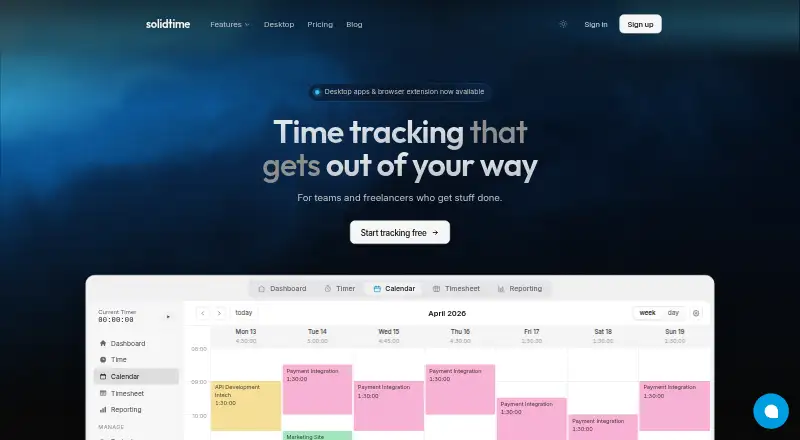
What solidtime is
solidtime is open-source time-tracking software for freelancers and teams. It records time with a live timer, a drag-and-drop calendar, and a weekly timesheet, organizing entries by client, project, task, and tag. Users can set project rates and budgets, then filter reports by those categories and billable status. Reports can be shared or exported as PDF, CSV, or Excel files.
The software can create invoices from billable time, with PDF and structured e-invoice output, tax rates, discounts, and EU reverse-charge. Its desktop app detects the active app and document and pauses the timer when it detects idle time; detected activity stays on the device until made into a time entry. Desktop versions are available for macOS, Windows 10/11, and Linux. Solidtime also offers self-hosting, including a free open-source option. The Professional plan costs €8 a month when billed annually, excluding VAT, or €9 a month billed monthly, excluding VAT. Its cloud service is hosted within the EEA, primarily in France.
Good
- Tracks time with timer, calendar, and timesheet.
- Organizes entries by client, project, task, and tag.
- Exports reports as PDF, CSV, or Excel.
- Creates invoices from billable time.
- Offers free open-source self-hosting.
Watch out
- Timesheet approvals are not offered.
- Professional costs €8 a month billed annually, excluding VAT.
- Professional monthly billing costs €9 a month, excluding VAT.
Who it suits
The Solo plan is aimed at freelancers, while Professional is described for teams billing clients that need access controls, estimates, and richer reporting. Teams or individuals who want self-hosted deployment can consider the open-source option.
Verdict
solidtime brings time tracking, project organization, reporting, and invoicing together, with both cloud and self-hosted options. Check the plan details against your needs for team access, reporting, and deployment.
Plans and prices
From solidtime's own pricing page, checked 20 Sep 2026.
| Plan | Price | What it gives you |
|---|---|---|
| Professional | €8 a month | Team support · Project access management · Organization access management · Invoicing · Project and task estimates · PDF reports · Billed annually; excl. VAT |
| Solo | Free | 1 user · Clients, Projects, Tags & Tasks · Calendar View · Timesheet View · Breaks · Automatic Activity Tracking · Reporting · Free |
| Open Source | Free | Self-hosted deployment · All core features · No invoicing · No private Docker Registry · No priority support · €0 forever |
| Professional (annual billing) | €8 a month | Per user · Everything in Solo · Team support · Access management · Billable hours & rates · Invoicing · Estimates · Rounding · PDF and shareable reports · Priority support · Billed annually · excl. VAT |
| Professional (monthly billing) | €9 a month | Per user · Everything in Solo · Team support · Access management · Billable hours & rates · Invoicing · Estimates · Rounding · PDF and shareable reports · Priority support · Billed monthly · excl. VAT |
| Business (comparison starting price) | €49 a year | Self-hosted deployment · All core features · Invoicing · Private Docker Registry · Team size determines price · from €49 / year |
| Business | €199 a year | Self-hosted deployment · All core features · Invoicing · Private Docker Registry · Team size selector shown at 5 users · €199 / year · excl. VAT · one organization |
| Enterprise | Priced on request | Self-hosted deployment · All core features · Invoicing · Private Docker Registry · Priority support · Custom |
The facts
Each one read from solidtime's own pages, with the date it was checked.
What it does
- Billable time
- Yeschecked 20 Sep 2026
- Cloud hosting
- The privacy policy says the cloud service is hosted within the EEA, primarily in France with Scaleway.checked 5 Oct 2026
- Data export
- Yeschecked 20 Sep 2026
- Data protection
- The DPA describes TLS encryption in transit, role-based access, logged data changes, logically separated customer data, and encrypted offsite backups.checked 5 Oct 2026
- Desktop activity tracking
- The desktop app detects the active app and document and pauses the timer when it detects idle time; activity remains on the device until turned into a time entry.checked 5 Oct 2026
- Integrations and imports
- The GitHub project README lists time-data imports from Toggl, Clockify, and Timeentry CSV.checked 5 Oct 2026
- Intended users
- The cloud pricing page describes Solo for freelancers and Professional for teams billing clients who need access controls, estimates, and richer reporting.checked 5 Oct 2026
- Invoicing
- The product offers invoices from billable time, including PDF and structured e-invoice output, tax rates, discounts, and EU reverse-charge.checked 5 Oct 2026
- Open-source license
- The source repository states that Solidtime is available under the GNU Affero General Public License v3.0.checked 5 Oct 2026
- Payments
- Paid-plan card payments are handled by Paddle as Merchant of Record, and Solidtime says it does not receive or store card details.checked 5 Oct 2026
- Product
- Solidtime describes itself as open-source time-tracking software for teams and freelancers.checked 5 Oct 2026
- Project organization
- Users can organize time by client, project, task, and tag, and set project rates and budgets.checked 5 Oct 2026
- Project tracking
- Yeschecked 20 Sep 2026
- Reporting
- Reports can be filtered and grouped by member, project, client, task, tag, or billable state, then shared or exported as PDF, CSV, or Excel.checked 5 Oct 2026
- Self-hosting
- Solidtime offers self-hosted deployment, with a free open-source option and paid on-premise licenses.checked 5 Oct 2026
- Support
- The Professional cloud plan includes priority support; the on-premise comparison lists priority support for Enterprise but not Open Source or Business.checked 5 Oct 2026
- Tracking
- The time-tracking feature includes a live timer, drag-and-drop calendar, and weekly timesheet.checked 5 Oct 2026
Where it runs
- Desktop app
- Yeschecked 20 Sep 2026
- Desktop platforms
- The desktop app is offered for macOS, Windows 10/11, and Linux, with Apple Silicon and Intel macOS builds and x64 and ARM options listed.checked 5 Oct 2026
- Timesheet approvals
- Nochecked 20 Sep 2026
Money
- Free plan
- Yeschecked 20 Sep 2026
The company
- Headquarters
- Vienna, Austriachecked 28 Sep 2026
The full review of solidtime
solidtime is an open-source time tracker for freelancers and teams that need project hours to become reports and invoices. It suits client-service work particularly well; teams that require formal timesheet approvals should choose another system.
Overview
Recording is flexible: use a live timer, rearrange entries on a drag-and-drop calendar, or complete a weekly timesheet. Hours can be assigned to clients, projects, tasks, and tags, with rates and budgets attached to projects. That structure makes billable project work considerably more manageable than a bare stopwatch, but the absence of timesheet approvals is a significant limitation for organizations with a mandatory review workflow.
The desktop application recognizes the active application and document and pauses timing after idle periods. Detected activity remains on the device until you deliberately convert it into a time entry, giving users useful context without silently filling their timesheets.
Key features
Reporting and billing
Reports can be filtered or grouped by member, project, client, task, tag, and billable status. They can be shared or exported in PDF, CSV, and Excel formats, so a freelancer can deliver a client-ready summary while a team can continue analysis elsewhere. Invoices generated from billable time support PDF and structured e-invoice output, tax rates, discounts, and EU reverse-charge handling. This is a strong end-to-end path from tracked hours to a payable document.
Open source and deployment
The software is released under the GNU Affero General Public License v3.0. The free Open Source option supports self-hosted deployment, while paid on-premise licensing adds commercial features and support. The cloud service is hosted in the EEA, primarily in France with Scaleway. TLS protects data in transit; role-based access, logged data changes, logically separated customer data, and encrypted offsite backups address common operational concerns. Paid card transactions go through Paddle as merchant of record, and solidtime says it does not receive or retain card details.
Imports
Time data can be imported from Toggl, Clockify, and Timeentry CSV, which reduces the cost of moving an existing history into the system.
Pricing
The freemium structure covers both individual and organizational use. It is the logical starting point for an independent professional who does not need team controls.
Professional costs €8.00 per user per month when billed annually, excluding VAT, or €9.00 per user per month when billed monthly, excluding VAT. Both versions include everything in Solo, team support, access management, billable hours and rates, invoicing, estimates, rounding, PDF and shareable reports, and priority support. Annual billing is cheaper but commits you to that billing term; monthly billing costs more and is easier to change.
Open Source costs €0.00 forever and includes all core features with self-hosted deployment. It is the clearest fit for technically capable users who want control of hosting and can operate it themselves, rather than a managed cloud service.
Business on-premise pricing starts at €49 per year, with team size determining the final price. A separate Business plan is listed at €199 per year, excluding VAT, for one organization and five users. It includes self-hosting, core features, invoicing, and a private Docker Registry. Enterprise has custom pricing and adds all core features, self-hosting, invoicing, a private Docker Registry, and priority support. Enterprise is therefore aimed at organizations that need a commercial on-premise arrangement; Open Source has no listed priority support, while Enterprise does.
Platforms
solidtime runs on the web and supports API access, Windows, macOS, Linux, and self-hosted installations. Desktop builds cover Windows 10/11, Linux, and both Apple Silicon and Intel Macs. This broad coverage works for mixed-device teams and organizations that want deployment control.
Who it's for
Freelancers billing by the hour, agencies, consultancies, and teams that need project-level rates, estimates, client reports, and invoices are the strongest audience. Professional is the practical cloud choice when several people need controlled access and shared reporting. Developers and privacy-conscious organizations may prefer the AGPL self-hosted edition. It is a weaker match for companies whose process depends on manager approval of every timesheet.
Pros and cons
Pros
- Live, calendar, and weekly entry methods accommodate different working habits.
- Client, project, task, tag, rate, and budget organization supports detailed billable tracking.
- PDF, CSV, and Excel reporting plus structured invoicing connect time records to client administration.
- Free AGPL self-hosting provides a no-license-cost deployment path.
- On-device activity detection supplies context without automatically creating entries.
Cons
- No timesheet approvals means teams cannot enforce a formal sign-off stage.
- Professional costs per user, and annual billing is required for the lower €8 rate.
- Self-hosting shifts setup, maintenance, and operational responsibility to the customer.
- Solo pricing is not published, making individual cost planning less certain.
Alternatives
Choose TimeCamp instead if you need Android and iOS apps alongside web, desktop, and self-hosted access, or a free plan with unlimited users and projects.
Harvest is a better fit for an individual freelancer who wants a free plan limited to one seat and two projects.
Pick Miru if an open-source option with Android and iOS support is your priority.
Invoice Ninja is the more focused choice when invoicing is central, with a free tier covering five clients and unlimited invoicing.
Consider Avaza when you need its broader collaborator, scheduling, and chat allowances on the free plan.
Paymo suits users who prefer a free tier capped at one user, one client, two projects, and 1 GB of storage.
TMetric is worth choosing for a free plan supporting up to two seats and paid features such as billable rates and expenses.
Zoho Invoice is the alternative for a free, invoice-first product with a stated allowance of up to two users, three projects, and 500 invoices per year for Indian businesses.
For broader category comparisons, see Time Billing Software, Time Tracking Software, and Employee Time Tracking Software.
Verdict
Choose solidtime when you want open-source flexibility or a managed cloud tracker that carries billable project time through reporting and invoicing. Its combination of deployment options, granular organization, and EU-oriented billing is compelling. Look elsewhere if manager-approved timesheets are essential, or if you want a simpler consumer-style tracker with less deployment and plan complexity.
Alternatives to solidtime
- 1

Harvest
Free planAndroidiOSWebmacOS8.3From $9 a month - 2

Paymo
Free planAndroidiOSWebAPI8.3Free plan - 3
Teamdeck
Free planAndroidiOSWebAPI8.2From $2 a month - 4
TMetric
Free planAndroidiOSWebAPI8.2From $7 a month - 5

TimeCamp
Free planAndroidiOSWebLinux8.1From $3.99 a month - 6

Clockify
Free planAndroidiOSLinuxmacOS8.0From $0.79 a month