Miru
Miru is open-source software for teams that bill by the hour, bringing time tracking, invoicing, expenses, payments, and reporting together.
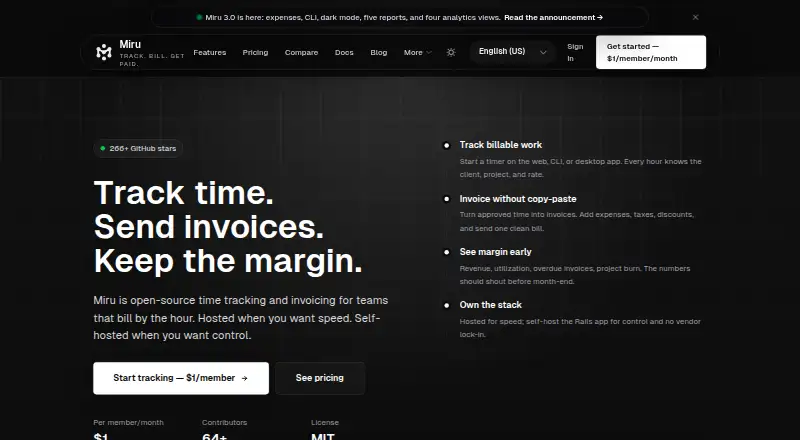
What Miru is
Miru is open-source software for teams that bill by the hour, bringing time tracking, invoicing, expenses, payments, and reporting together. Team members can record time with timers or manual entries, submit work for weekly approval, and use rates set for each team member. Miru can generate and send invoices from tracked or approved work, including expenses, taxes, and discounts. Reports cover paid, pending, overdue, and projected revenue, as well as project and team analytics. A client portal is available, but recurring invoices are not. Miru offers hosted and self-hosted options: the MIT-licensed Rails app can be run by customers who take responsibility for operations, backups, upgrades, and security maintenance. The self-hosted plan is free; Miru Cloud is $1 a month, billed Or $10/member/year. Its desktop timer supports macOS, Linux, and Windows, while iOS and Android apps are in beta. Hosted data is described as encrypted at rest and in transit.
Good
- Timers and manual time entries with weekly approvals
- Invoices include expenses, taxes, and discounts
- Client portal and expense billing are available
- Desktop timer syncs with Miru
- Self-hosted plan includes every feature and unlimited members
Watch out
- Recurring invoices are not available
- iOS and Android apps are in beta
- Self-hosters handle backups, upgrades, and security maintenance
Who it suits
Miru suits agencies, consultants, freelancers, startups, and service teams that track billable hours and invoice clients. It can also suit teams that want to self-host and manage their own operations.
Verdict
Miru combines billable time tracking with invoicing, expense billing, and revenue reporting. Consider whether you want to manage a self-hosted installation or use Miru Cloud, and note that mobile apps remain in beta.
Plans and prices
From Miru's own pricing page, checked 20 Oct 2026.
| Plan | Price | What it gives you |
|---|---|---|
| Self-hosted | Free | all features · unlimited members · Docker deployment · community Discord support · $0 |
| Miru Cloud | $1 a month | time tracking · invoicing and Stripe payments · expenses and client management · team management and leave · advanced reports and analytics · API and CLI · custom invoice branding · priority email support · $1/member/mo |
| Miru Cloud Annual | $10 a year | same features as Miru Cloud · $10/member/year |
| Managed Miru | $1,000 a month | dedicated deployment · upgrades, backups and monitoring · integration help · security review support · SLA options · $1K/month plus usage |
The facts
Each one read from Miru's own pages, with the date it was checked.
What it does
- API
- Miru exposes a REST API with CRUD operations for time entries, invoices, clients, projects, expenses and payments using bearer-token authentication.checked 20 Oct 2026
- API rate limits
- The API documentation says login, signup, PDF export and checkout endpoints are throttled per IP while other endpoints have no blanket quota.checked 20 Oct 2026
- Billable time
- Users can track time with timers or manual entries, get weekly approvals, and set rates per team member.checked 2 Oct 2026
- CLI
- The CLI installs with a shell command and supports time entries, invoices, expenses, payments, projects, clients and Harvest CSV imports.checked 20 Oct 2026
- Client portal
- A client portal lets customers view invoice information and pay through secure links without creating a Miru account.checked 20 Oct 2026
- Compliance
- Miru says GDPR compliance is implemented and SOC 2 Type II is in progress.checked 20 Oct 2026
- Desktop
- The local-first desktop timer is available for macOS Apple Silicon, macOS Intel, Linux x64, and Windows x64, and syncs with Miru.checked 2 Oct 2026
- Expense management
- Users can log expenses, attach receipts, route approvals, categorize costs and include project expenses on invoices.checked 20 Oct 2026
- Independent feature coverage
- MEDevel independently listed team, client, client-portal, project, reporting and Stripe-payment capabilities.checked 20 Oct 2026
- Independent licence fact
- MEDevel reported that Miru is released under the MIT licence by Saeloun.checked 20 Oct 2026
- Independent praise
- MEDevel described Miru as an open-source web tool that handles time tracking, invoicing and accounting for small businesses.checked 20 Oct 2026
- Integrations
- Official pages identify Stripe payments, QuickBooks Online export or sync, SMTP email, CSV and PDF export, Zapier, Make and n8n connectivity.checked 20 Oct 2026
- Intended users
- Miru says it is best for agencies, consultants, freelancers, startups, and service teams that track billable hours and send invoices.checked 2 Oct 2026
- Invoicing
- Miru generates invoices from tracked hours, supports line items, taxes, discounts and branded PDFs, and emails invoices to clients.checked 20 Oct 2026
- Licence
- The project is released under the MIT licence and the hosted feature set is stated to be present in the open-source version.checked 20 Oct 2026
- Limit: Clutch reviewer complaint
- One Clutch review warns that remote-team time-zone differences can make schedules difficult without deliberate communication.checked 20 Oct 2026
- MCP and OpenAPI
- Miru publishes an MCP endpoint, an OpenAPI description and llms.txt files for agent and integration workflows.checked 20 Oct 2026
- Mobile
- Miru describes its iOS and Android app as in beta, with early access through TestFlight and Google Play internal testing.checked 2 Oct 2026
The company
- Company founding
- LinkedIn gives Saeloun a founding year of 2019.checked 20 Oct 2026
- Company headquarters
- LinkedIn lists Saeloun headquarters in Boston, Massachusetts, with an additional Pune location.checked 20 Oct 2026
- Company size
- LinkedIn lists Saeloun as a privately held software-development company with 11–50 employees.checked 20 Oct 2026
- Headquarters
- Indiachecked 28 Sep 2026
- Maker
- Miru is built and open-sourced by Saeloun, a Ruby on Rails consultancy with 50+ engineers that says it ships from India.checked 2 Oct 2026
Where it runs
- Desktop app
- The desktop timer is local-first and supports menu-bar controls, timer stacking, idle recovery and synchronization with Miru Web.checked 20 Oct 2026
The full review of Miru
Miru is an open-source time and billing platform for people who charge clients for hours worked. It suits service businesses that want time capture, approvals, invoicing, and revenue reporting in one workflow. Its appeal is the breadth of that workflow and flexible deployment; the tradeoff is either managing your own installation or choosing a paid service.
Overview
Miru connects timers and manual entries to weekly approvals, member-specific rates, invoices, expense billing, and revenue reports. That makes it more useful than a standalone timer when recorded work needs to become client charges and be followed through to payment. Reports cover paid, pending, overdue, and projected revenue, as well as project and team analytics.
The MIT-licensed Rails app can be self-hosted, but that choice puts operations, backups, upgrades, and security maintenance on your team. Miru Cloud and Managed Miru offer alternatives for teams that would rather not take on that work. The product is built and open-sourced by Saeloun, a Ruby on Rails consultancy with more than 50 engineers.
Key features
Time, approvals, and invoices
Timers and manual time entries accommodate different working habits, while weekly approvals provide a review point before billable work is finalized. Rates can be set per team member, which is useful when billing depends on who performed the work. Miru can generate invoices from approved or tracked work and include expenses, taxes, and discounts. It also supports invoice sending and client portals, but not recurring invoices, so businesses with repeat billing will need to handle that process another way.
Expenses, reporting, and integrations
Expenses can be billed alongside time, and revenue reporting helps teams distinguish paid work from amounts still pending or overdue while viewing projected revenue. Integrations include Stripe, Google Calendar, SMTP email, CSV and PDF export, CSV import, REST API, CLI, Zapier, Make, and n8n. QuickBooks Online support is a one-way export of clients, invoices, and recorded payments, not a two-way sync.
Deployment, security, and support
The local-first desktop timer is available for macOS Apple Silicon and Intel, Linux x64, and Windows x64, and syncs with Miru. Hosted data is encrypted in transit with TLS 1.3 and at rest with AES-256. Miru states that it is GDPR compliant and that SOC 2 Type II is in progress; enterprise customers can request a data processing addendum. Hosted users get priority email support, while self-hosted users rely on Discord community support. Managed Miru includes monitoring and support.
Pricing
Miru offers three deployment plans, all with unlimited members, making the main distinction less about seat caps and more about who runs the service.
- Self-hosted: free. It includes every feature, unlimited members, Docker deployment, and Discord community support under the MIT license. This is the strongest fit for teams able to operate their own service; the zero price does not remove the work of backups, upgrades, and security maintenance.
- Miru Cloud: $1 a month, billed Or $10/member/year. Every feature is included, with unlimited members, a 14-day Pro trial, and no credit card required. It is the hosted option for teams that want to avoid self-managing deployment. The stated annual billing term is per member, so compare that charge with your team size.
- Managed Miru: $1 a month, billed Base service plus usage; scope agreed before you commit. It adds a dedicated deployment, upgrades, backups, monitoring, integration help, security review support, and SLA options. This fits organizations wanting operational assistance, though the final scope and cost depend on what is agreed.
Platforms
Miru lists Android, iOS, Linux, macOS, Windows, web, API, and self-hosted availability. The desktop timer has specific x64 and Mac processor support, while the iOS and Android apps remain in beta, with early access through TestFlight and Google Play internal testing. Teams needing mature mobile apps should treat that as a limitation rather than assuming parity with the web experience.
Who it's for
Miru is aimed at agencies, consultants, freelancers, startups, and service teams that track billable hours and send invoices. It is a particularly good fit when approvals, expenses, and revenue visibility belong in the same workflow. A small team wanting only a basic timer, or a business that depends on recurring invoices or stable mobile apps, has reason to look elsewhere.
Pros and cons
- Pro: Time capture leads into approvals, rates, expense billing, and invoices, reducing the need to separate those steps across tools.
- Pro: Unlimited members on both the free self-hosted plan and Miru Cloud avoid a seat ceiling as a team grows.
- Pro: Self-hosting is MIT-licensed and includes every feature, giving technically capable teams a no-subscription route.
- Con: Self-hosted customers carry the operational burden of backups, upgrades, and security maintenance.
- Con: Mobile apps are in beta, and recurring invoices are not supported, which weakens the fit for mobile-first or subscription-style billing workflows.
- Con: QuickBooks Online sync is one-way, limiting workflows that depend on changes flowing back into Miru.
Alternatives
For a broader comparison, see Time Billing Software. Consider these alternatives when their limits or focus better match your workflow:
- TimeCamp is another freemium option with a free plan offering unlimited users and projects, worth considering when those caps are the priority.
- Harvest may suit an individual freelancer who can work within its free plan's one seat and two projects.
- Invoice Ninja is a relevant alternative when invoicing is central: its free plan allows unlimited invoicing but caps clients at five.
- solidtime offers a Solo plan for one user and a Professional plan at €8 a month, billed annually, excl. VAT; consider it when that one-user option or stated team plan better fits.
- Avaza is another freemium option with a free plan, for readers comparing alternatives.
- Paymo may fit a solo user whose needs fit its free plan's one user, one client, two projects, and 1 GB of storage.
- TMetric is worth considering for a very small team that fits its free plan's two-seat limit.
- Zoho Invoice is free for Indian businesses and may suit those within its limits of two users, three projects, and 500 invoices per year.
Verdict
Choose Miru if your agency or service team wants billable time, approvals, expenses, invoicing, and revenue reporting together, and you can either operate a self-hosted installation or pay for hosting. Its strongest reason to choose it is that integrated billing workflow without member caps on the listed plans. Look elsewhere if beta mobile apps, the lack of recurring invoices, or the responsibility of running a self-hosted service conflicts with how you work.
Getting started
- Visit miru.so
- Choose Self-hosted, Miru Cloud, or Managed Miru
- For self-hosting, deploy the MIT-licensed Rails app with Docker
- For desktop tracking, install the timer for macOS, Linux, or Windows
- For mobile beta access, use TestFlight or Google Play internal testing
Questions
Is Miru open source?
Yes. Miru is an MIT-licensed Rails application that can be self-hosted.
What does the free plan include?
The free Self-hosted plan includes every feature, unlimited members, Docker deployment, and community support on Discord.
How much is Miru Cloud?
Miru Cloud costs $1 a month, or $10 per member per year, and includes a 14-day Pro trial with no credit card required.
Which platforms does Miru support?
Miru lists Android, iOS, Linux, macOS, self-hosted, web, Windows, and an API. The desktop timer supports macOS Apple Silicon or Intel, Linux x64, and Windows x64.
Does Miru integrate with QuickBooks?
Yes. A one-way sync exports clients, invoices, and recorded payments to QuickBooks Online.
Are mobile apps available?
iOS and Android apps are in beta, with early access through TestFlight and Google Play internal testing.
Alternatives to Miru
- 1

Avaza
Free planAndroidiOSWebAPI8.3From $11.95 a month - 2

Harvest
Free planAndroidiOSWebmacOS8.3From $9 a month - 3

Paymo
Free planAndroidiOSWebAPI8.3Free plan - 4

Invoice Ninja
Free planAndroidiOSWebAPI8.2From $40 a year - 5
TMetric
Free planAndroidiOSWebAPI8.2From $7 a month - 6

TimeCamp
Free planAndroidiOSWebLinux8.1From $3.99 a month