SoftPerfect Bandwidth Manager
SoftPerfect Bandwidth Manager is a Windows network tool for monitoring traffic and setting bandwidth limits and quality-of-service rules.
What SoftPerfect Bandwidth Manager is
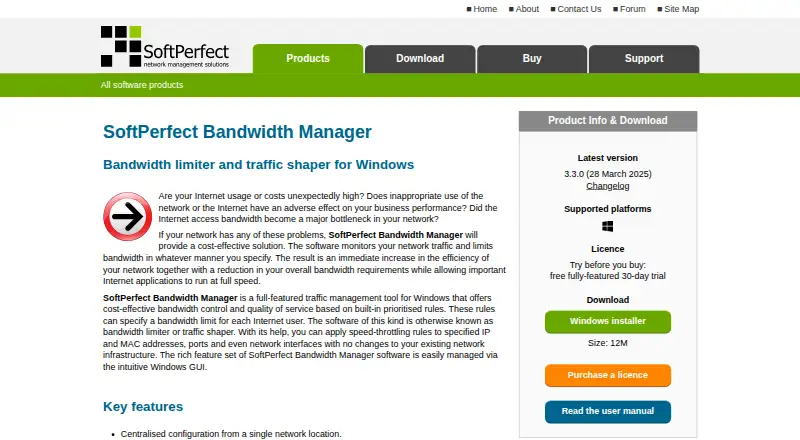
SoftPerfect Bandwidth Manager is a Windows network tool for monitoring traffic and setting bandwidth limits and quality-of-service rules. Administrators can direct rules at IP or MAC addresses, ports, protocols, or network interfaces, then prioritize bidirectional rate and usage limits. Configuration can be centralized at one network location, usually without installing client software on end-user devices. Quotas, scheduling, email alerts, usage reports, and a live monitor help track network use. The Enterprise edition adds deep packet inspection to identify IM, P2P file sharing, gaming, and media streaming. A Windows GUI console can manage the service remotely over TCP port 8701; the vendor says there is no web-based management interface. A free Lite plan allows five rules or streams. The product is listed for Windows, macOS, and Linux, while its stated purpose is Windows traffic management.
Good
- Rules target addresses, ports, protocols, or interfaces.
- Centralized configuration usually needs no client software.
- Includes quotas, scheduling, reports, and live monitoring.
- Free Lite plan includes five rules or streams.
Watch out
- No web-based management interface.
- Windows bridged connections are unsupported.
- Windows 10 is the minimum required version.
Who it suits
It suits businesses or individuals who need to manage network traffic and apply usage limits. Larger deployments may benefit from centralized configuration and site or worldwide licence options.
Verdict
Bandwidth Manager combines granular traffic rules with quotas and reporting, with a free Lite option and several paid licence scopes. Check the bridged-connection limitation and Windows version requirement before choosing it.
Plans and prices
From SoftPerfect Bandwidth Manager's own pricing page, checked 30 Sep 2026.
| Plan | Price | What it gives you |
|---|---|---|
| Lite | Free | 5 rules/streams · usage reports and live usage monitor · penalties for heavy downloads/uploads |
| Standard — single device | $49, paid once | 500 rules/streams · batch rule creation · download/upload quotas · web access to usage reports · Perpetual licence; includes one year of free updates |
| Professional — single device | $99, paid once | 2,000 rules/streams · scheduled rules · port mappings and HTTP redirect · email quota notifications · Perpetual licence; includes one year of free updates |
| Enterprise — single device | $149, paid once | Unlimited rules/streams · DPI detection for IM, P2P file sharing, gaming and media streaming · Perpetual licence; includes one year of free updates |
| Standard — site licence | $499, paid once | Unlimited devices at one organisation site · 500 rules/streams · Perpetual licence; includes one year of free updates |
| Professional — site licence | $1,000, paid once | Unlimited devices at one organisation site · 2,000 rules/streams · Perpetual licence; includes one year of free updates |
| Enterprise — site licence | $1,500, paid once | Unlimited devices at one organisation site · unlimited rules/streams · Perpetual licence; includes one year of free updates |
| Standard — worldwide licence | $1,500, paid once | Unlimited devices at unlimited organisation locations · 500 rules/streams · Perpetual licence; includes one year of free updates |
| Professional — worldwide licence | $3,000, paid once | Unlimited devices at unlimited organisation locations · 2,000 rules/streams · Perpetual licence; includes one year of free updates |
| Enterprise — worldwide licence | $4,500, paid once | Unlimited devices at unlimited organisation locations · unlimited rules/streams · Perpetual licence; includes one year of free updates |
The facts
Each one read from SoftPerfect Bandwidth Manager's own pages, with the date it was checked.
What it does
- API and database
- The service can be accessed through an XML-based API without official documentation, or through its standard SQLite 3 database.checked 30 Sep 2026
- Deployment
- Centralized configuration is available from one network location, and end users usually need no client software installed.checked 30 Sep 2026
- DPI
- The Enterprise edition detects IM, P2P file sharing, gaming and media streaming using deep packet inspection.checked 30 Sep 2026
- Integrations
- The vendor says the product is compatible with Microsoft ISA Server and Internet Connection Sharing.checked 30 Sep 2026
- Intended users
- SoftPerfect describes its network management software as serving businesses and individuals.checked 30 Sep 2026
- Known limitation
- The product FAQ describes lack of support for Windows bridged connections and recommends using its internal bridging instead.checked 30 Sep 2026
- Licence and updates
- Paid licences are perpetual for the version purchased and include one year of free updates.checked 30 Sep 2026
- Purpose
- The Windows tool monitors network traffic and applies bandwidth limits and quality-of-service rules.checked 30 Sep 2026
- Quotas and reports
- Features include quotas, scheduling, email notifications, comprehensive usage reports and a live usage monitor.checked 30 Sep 2026
- Remote management
- A Windows GUI management console can connect remotely to the service over TCP port 8701; the vendor says there is no web-based management interface.checked 30 Sep 2026
- Security controls
- Settings allow administrators to set a logon password for the Bandwidth Control Service and a separate limited-access password.checked 30 Sep 2026
- Support
- SoftPerfect offers technical support by email, a public forum and a personal contact centre.checked 30 Sep 2026
- Traffic rules
- Rules can target IP and MAC addresses, TCP/IP ports, protocols and network interfaces, with prioritized bidirectional rate and usage limits.checked 30 Sep 2026
The company
- Founded
- 2000checked 28 Sep 2026
- Headquarters
- Australiachecked 28 Sep 2026
Where it runs
- Windows support
- Version 3.3.0 added Windows ARM64 support and made Windows 10 the minimum required version.checked 30 Sep 2026
The full review of SoftPerfect Bandwidth Manager
SoftPerfect Bandwidth Manager is Windows software for monitoring network traffic and enforcing bandwidth limits and quality-of-service rules. It suits administrators who need centrally managed controls across users or devices without installing client software on each end user’s machine. Its rule depth, quotas and reporting are compelling, but the Windows requirement and lack of support for Windows bridged connections narrow its fit.
Overview
The service applies prioritized, two-way rate and usage limits using rules that can match IP or MAC addresses, ports, protocols and network interfaces. Administrators configure it centrally from one network location, while end users usually do not need client software installed. That makes it a practical choice for controlling shared network usage rather than just observing traffic.
Quotas, scheduling, email notifications, detailed usage reports and a live monitor cover both day-to-day oversight and policy enforcement. The management console is a Windows GUI that connects remotely to the service over TCP port 8701; there is no web-based management interface. Administrators can set a service logon password and a separate limited-access password. The vendor also says the product works with Microsoft ISA Server and Internet Connection Sharing.
Key features
- Granular traffic rules: Matching traffic by address, port, protocol or interface supports targeted rate and usage controls. Priorities and bidirectional limits make the system more useful than a simple per-device cap.
- Quotas and reporting: Usage quotas, reports, a live monitor and email notifications help administrators spot heavy use and apply limits. Some capabilities depend on the paid tier: Lite has reports and live monitoring, while web access to reports begins with Standard for a single device.
- Scheduling and traffic identification: Professional adds scheduled rules. Enterprise adds deep packet inspection to identify IM, P2P file sharing, gaming and media streaming, which is a reason to pay for that tier when controls need to distinguish those kinds of traffic.
- Integration and automation: The service can be accessed through an XML-based API, though it has no official API documentation, or through its standard SQLite 3 database. These options may suit administrators building their own workflows, but the undocumented API raises the effort involved.
The FAQ describes a significant network-design caveat: Windows bridged connections are not supported, and SoftPerfect recommends using its internal bridging instead. Check that constraint before adopting the product in an existing bridged setup.
Pricing
Lite is free and allows five rules or streams. It includes usage reports, a live usage monitor and penalties for heavy downloads or uploads. That is a useful way to start with basic oversight, but the five-rule ceiling limits how finely a larger network can be managed.
Single-device licences are one-time perpetual purchases and include one year of free updates. Standard costs $49, paid once and raises the limit to 500 rules or streams, with batch rule creation, download and upload quotas, and web access to usage reports. It fits a single-device deployment needing quotas, though it lacks Professional’s scheduled rules and notification features.
Professional costs $99, paid once for one device, with 2,000 rules or streams, scheduled rules, port mappings, HTTP redirect and email quota notifications. It is the stronger single-device choice when policies need timing or administrators need quota alerts. Enterprise costs $149, paid once and removes the rule limit, adding DPI detection for IM, P2P file sharing, gaming and media streaming; choose it when both scale and traffic classification matter.
Site and worldwide licences trade a larger upfront price for coverage across an organisation’s devices. Standard site costs $499, paid once for unlimited devices at one organisation site and 500 rules or streams; Professional site costs $1,000, paid once for 2,000 rules or streams. Standard worldwide is $1,500, paid once for unlimited devices across unlimited organisation locations, still with 500 rules or streams. Enterprise site is also $1,500, paid once, covering unlimited devices at one site with unlimited rules or streams. Professional worldwide costs $3,000, paid once for unlimited devices across unlimited locations and 2,000 rules or streams, while Enterprise worldwide costs $4,500, paid once for unlimited devices and rules or streams across unlimited locations. Each is a perpetual licence with one year of free updates. These scopes suit organisations choosing between a single site and multiple locations, and between capped and unlimited rule counts.
Platforms
Despite broader platform labels, the product is a Windows tool. Version 3.3.0 added Windows ARM64 support and raised the minimum requirement to Windows 10. Do not choose it for a Linux or macOS host on the strength of a platform label; the stated Windows requirement is the relevant constraint.
Who it's for
Bandwidth Manager is best suited to individuals or businesses administering a Windows-based network that need enforceable usage policies, centralized configuration and reporting. A single-device licence can cover a focused deployment; site and worldwide scopes are designed for organisations that need multiple devices covered under one licence. It is less suitable where web-based management is essential, Windows bridged connections must remain in use, or network infrastructure is outside the Windows requirement.
Pros and cons
Pros
- Specific, prioritized controls: Rules can target several traffic attributes and apply both rate and usage limits in both directions.
- Central administration without typical client installs: End users usually need no client software, reducing deployment work across managed devices.
- Clear upgrade path: The paid tiers add rule capacity, scheduling, quotas, notifications and, at Enterprise, DPI detection.
- Perpetual paid licences: The purchase covers the version bought and includes one year of free updates.
Cons
- Windows-only in practice: Windows 10 or later is required, despite broader platform labels.
- No web management interface: Remote administration requires a Windows GUI console connecting over TCP port 8701.
- Bridged connections are unsupported: Existing Windows bridge setups may need to be changed to use the product’s internal bridging.
- Lite is tightly capped: Five rules or streams may be insufficient for anything beyond a small, basic setup.
- API documentation is absent: The XML API can be used, but integrating with it may require extra investigation.
Alternatives
Choose ntopng instead if its freemium model and platform range—including Linux, macOS, Windows, web and self-hosted use—better match the environment; its Community plan is aimed at home and network practitioners, with a suggested maximum of 256 live local hosts.
GlassWire is a freemium option for readers who want Windows or Android coverage; its free plan includes one day of bandwidth usage, 24 hours of network history and current-day alert logs.
sFlowTrend may suit readers looking for traffic monitoring for high-speed switched networks; InMon says it works with leading switch vendors.
Consider ManageEngine NetFlow Analyzer if a freemium product with an edition capped at two interfaces is a better fit; its Standard Edition starts at $172 a month for 10 interfaces.
bwmon is a free, self-hosted option for a single Linux host under the MIT license.
Nagios XI is an alternative for readers weighing a paid product with a free tier limited to seven nodes or 100 services, whichever comes first.
Sniffnet is a free, open-source option for Linux, macOS and Windows.
Akvorado is a free option for readers considering software available across API, Linux, macOS, self-hosted and web environments.
Browse Bandwidth Monitoring Software, Network Diagnostic Software, Network Performance Monitoring Software or Network Monitoring for more options.
Verdict
Choose SoftPerfect Bandwidth Manager if you need centrally managed, rule-based bandwidth limits, quotas and usage reporting on Windows, especially when end users should not need client software. The paid tiers scale from a single device to worldwide organisational coverage, with perpetual licences and one year of updates. Look elsewhere if you need web-based administration, must retain Windows bridged connections or require a non-Windows deployment.
Getting started
- Open the SoftPerfect Bandwidth Manager website.
- Use the free Lite plan for up to five rules or streams, or select a paid licence based on rule capacity and deployment scope.
- Install the tool on Windows; Windows 10 is the minimum version, and version 3.3.0 added ARM64 support.
- Connect the Windows GUI management console remotely to the service over TCP port 8701 if needed.
- Set rules for relevant addresses, ports, protocols, or interfaces, then configure limits, quotas, or schedules.
Limits worth knowing
Lite is limited to five rules or streams and includes usage reports, a live monitor, and penalties for heavy downloads or uploads. Paid single-device plans range from 500 rules or streams in Standard to unlimited in Enterprise; site and worldwide plans vary by edition and rule capacity.
Questions
Is there a free plan?
Yes. Lite is free and allows five rules or streams, with usage reports, a live usage monitor, and penalties for heavy downloads or uploads.
How much do paid licences cost?
Single-device plans cost $49, paid once for Standard, $99, paid once for Professional, and $149, paid once for Enterprise.
Which platforms are supported?
The product is a Windows tool, with Windows 10 as the minimum required version. Version 3.3.0 added Windows ARM64 support.
Can I manage it through a browser?
The vendor says there is no web-based management interface. A Windows GUI console can connect remotely to the service over TCP port 8701.
What does Enterprise add?
Enterprise includes unlimited rules or streams on the single-device plan and deep packet inspection to detect IM, P2P file sharing, gaming, and media streaming.
Are licences subscriptions?
Paid licences are perpetual for the version purchased and include one year of free updates.
Alternatives to SoftPerfect Bandwidth Manager
- 1

ntopng
Free planOpen sourceWebAPILinuxmacOS8.3€299.95 one-time - 2
GlassWire
Free planAndroidWebWindows7.9From $2.99 a month - 3
NetBalancer
Free planWebAPIWindows7.5$34.95 one-time - 4
Sniffnet
Free planOpen sourceLinuxmacOSWindows7.4Free plan - 5

ManageEngine NetFlow Analyzer
Free planAndroidiOSWebLinux7.1From $172 a month - 6
sFlowTrend
Free planWebAPILinuxmacOS7.1Free plan