GlassWire
GlassWire is a network traffic monitor and personal firewall for viewing network activity and controlling app connections.
What GlassWire is
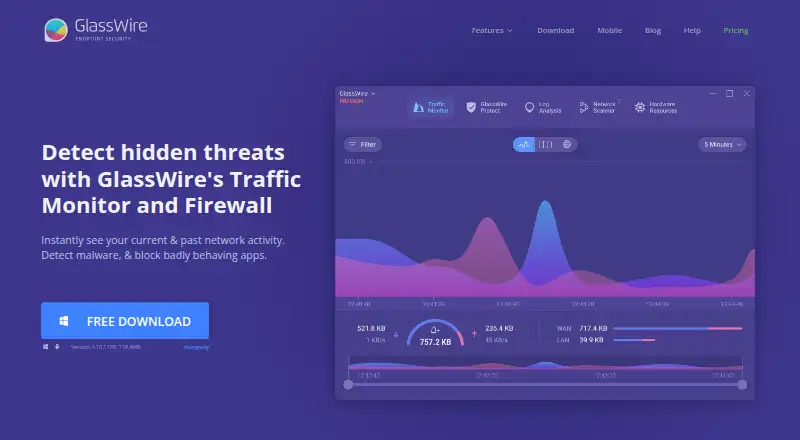
GlassWire is a network traffic monitor and personal firewall for viewing network activity and controlling app connections. Its desktop traffic analysis can break usage down by IP or host, app, traffic type and other categories. GlassWire alerts users to unusual network or app changes that could point to malware, and to unknown devices joining Wi-Fi. The Android app graphs app data use, alerts when apps access the network, and can block connections over mobile data or Wi-Fi. GlassWire says Android app and data usage information stays on the phone and that the app itself uses no data. The free tier limits network history to 24 hours, bandwidth history to one day and alert logs to the current day. The Personal Plan provides unlimited network and bandwidth history and alert logs, while Premium features also include bidirectional firewall control, custom profiles, Ask to Connect and Lockdown Mode. The desktop download requires Windows 10 or later and supports x64 and ARM64.
Good
- Shows network usage by app, host, traffic type and more.
- Alerts on unusual app changes and unknown Wi-Fi devices.
- Android app can block mobile and Wi-Fi connections.
- Personal Plan includes unlimited history and alert logs.
Watch out
- Free network history is limited to 24 hours.
- Free bandwidth history covers one day.
- Desktop requires Windows 10 or later.
Who it suits
GlassWire suits people who want to monitor network activity on Windows or track app data use on Android. The free tier may fit users who need only short-term history; longer histories are listed with the paid plan.
Verdict
GlassWire offers traffic visibility and connection controls, with a free tier and a paid plan that removes listed history limits. Check the Windows requirement for desktop use and the Android app's separate platform availability.
Plans and prices
From GlassWire's own pricing page, checked 15 Oct 2026.
| Plan | Price | What it gives you |
|---|---|---|
| Free | Free | Basic network monitoring · 1-day bandwidth history · 24-hour network history · current-day alert logs · Free Forever |
| Personal Plan | $2.99 a month | Up to 20 licenses available in Premium offering · unlimited history and alerts · Ask to Connect · Lockdown Mode · firewall profiles · Paid annually |
| Personal | $35.88 a year | All security features · Ask to Connect · Lock Down Mode · Mini Graph · themes · Wi-Fi device view · anomaly detection · live connections map · Per year |
| Duo | $50.16 a year | Contact vendor for more details · Per year |
| Family | $89.76 a year | Contact vendor for more details · Per year |
The facts
Each one read from GlassWire's own pages, with the date it was checked.
Where it runs
- Android app
- The Android app graphs app data use, alerts when apps access the network, and can block app connections over mobile or Wi-Fi.checked 29 Sep 2026
- Android permissions
- The Android app requires phone and usage permissions to calculate per-app mobile-data usage and states that it has no network connectivity itself.checked 15 Oct 2026
- Android privacy
- GlassWire states that Android app and data usage information never leaves the phone and that the app itself uses no data.checked 29 Sep 2026
- Android privacy claim
- Google Play lists no data shared with third parties and no data collected, while the app description says usage information stays on the phone.checked 15 Oct 2026
What it does
- Antivirus limitation
- GlassWire says its security layer is not comprehensive malware detection and should be used with a separate primary antivirus.checked 15 Oct 2026
- API and SDKs
- The published documentation describes the VirusTotal API connection but provides no public GlassWire product API or SDK.checked 15 Oct 2026
- Ask to Connect
- Ask to Connect pauses new network connections until the user approves or denies them.checked 15 Oct 2026
- Bandwidth export
- Traffic usage can be exported as CSV from the Usage Table.checked 15 Oct 2026
- Documentation
- Official documentation includes Windows and Android guides, quick-start instructions, FAQ pages, a forum and a version changelog.checked 15 Oct 2026
- Download verification
- GlassWire says a hash can be used to verify that a downloaded file is not corrupted or tampered with, and publishes recent hash values on its changelog page.checked 29 Sep 2026
- Firewall
- Its bidirectional firewall supports separate inbound and outbound rules for each application.checked 15 Oct 2026
- Firewall controls
- Premium includes bidirectional firewall control, custom profiles, Ask to Connect, and Lockdown Mode.checked 29 Sep 2026
- Firewall profiles
- Users can create and switch among profiles for contexts such as home, work and public Wi-Fi.checked 15 Oct 2026
- Latest release
- Version 3.11.1164 was listed at 118.4 MB with bulk firewall actions and improved GPU and memory statistics.checked 15 Oct 2026
- License model
- GlassWire software is proprietary, with a temporary, non-transferable subscription license; open-source component terms may apply separately.checked 15 Oct 2026
- Limit: firewall granularity
- A G2 reviewer says GlassWire cannot block programs by specific IP address or subscribe to IP lists and offers limited visibility into packet contents.checked 15 Oct 2026
- Limit: learning curve
- G2 and Capterra reviewers mention that deeper information can require a learning curve and is not always easy to interpret.checked 15 Oct 2026
The company
- Company history
- GlassWire says its team spent over a year building the product before Jon Hundley posted it to Hacker News, after which the team chose to work on it full time.checked 29 Sep 2026
- Company legal provider
- GlassWire services are provided by Domotz Inc., a Delaware company headquartered at 120 East 13065 South, Suite 102, Draper, Utah.checked 15 Oct 2026
- Company ownership
- GlassWire's website privacy policy describes GlassWire as a brand owned by Domotz Inc.checked 29 Sep 2026
- Company profile
- LinkedIn lists GlassWire as privately held, founded in 2014, headquartered in Austin, Texas, with 2–10 employees.checked 15 Oct 2026
- Headquarters
- Draper, Utah, USAchecked 28 Sep 2026
Money
- Free plan
- Yeschecked 21 Sep 2026
- Limit: free-tier history
- Reviewers complain that the free version limits historical connection data to roughly 24 hours.checked 15 Oct 2026
The full review of GlassWire
Overview
GlassWire combines network traffic monitoring with a personal firewall, helping users see which apps and devices are active and respond to connections they do not trust. It is most compelling for people who want app-level visibility on a Windows PC or Android phone, rather than a broader network-management suite. The free tier covers quick checks; longer-term investigation and expanded firewall controls make the paid plan more useful.
Key features
On desktop, traffic can be examined by app, IP or host, traffic type, and other categories. That level of detail helps identify what is using bandwidth instead of leaving users with an unexplained total. Alerts flag unusual network or app changes that could indicate malware and can report when an unknown device joins Wi-Fi. They are useful signals to investigate, not a substitute for broader security software.
Premium adds bidirectional firewall control, custom profiles, Ask to Connect, and Lockdown Mode. These controls make GlassWire more than a passive usage chart: users can manage app connections and apply different connection rules. The free tier is narrower, and its short history makes it a poor fit for anyone who needs to revisit activity after the immediate day has passed.
The Android app graphs data use by app, alerts when apps access the network, and can block app connections over mobile or Wi-Fi. GlassWire says Android app and data usage information stays on the phone and that the app itself uses no data, a relevant privacy assurance for phone users monitoring usage.
Pricing
GlassWire is freemium. Free costs nothing, billed Free Forever, and includes one day of bandwidth usage, 24 hours of network history, and alert logs for the current day. That is a sensible way to check current activity, but the narrow retention limits make delayed troubleshooting difficult.
The Personal Plan costs $2.99 a month, billed Paid annually. It supports up to 20 licenses and includes unlimited bandwidth usage, network history, and alert logs. Premium also brings the expanded firewall controls and dedicated support, alongside community support. This is the better fit for users who want durable records or stronger control over app connections; casual users who only need same-day visibility can stay on Free. The annual billing term is worth noting when comparing the monthly price.
Platforms
GlassWire is offered for Android, web, and Windows. The desktop download requires Windows 10 or later and supports x64 and ARM64 architectures. Android provides app-level data graphs, network-access alerts, and blocking over mobile or Wi-Fi. Users should choose another option if they need desktop software for an operating system other than Windows.
Who it's for
GlassWire suits individuals who want to identify which apps are using bandwidth, notice unusual connection activity, and optionally block app connections. It is especially practical for Windows users who value longer history and firewall controls, and for Android users who want per-app usage visibility. It is less suitable for people seeking a cross-platform desktop firewall or those who need only a minimal, one-time bandwidth report.
Pros and cons
- Useful traffic breakdowns: Desktop views by app, IP or host, and traffic type help narrow down the source of usage.
- Actionable connection controls: Premium adds bidirectional firewall control, custom profiles, Ask to Connect, and Lockdown Mode.
- Android app-level monitoring: Users can graph data use, receive network-access alerts, and block connections over mobile or Wi-Fi.
- Free history is brief: Network history lasts 24 hours, bandwidth history one day, and alert logs only cover the current day.
- Desktop support is Windows-only: The desktop download requires Windows 10 or later, limiting its fit for Mac and Linux desktop users.
Alternatives
SoftPerfect Bandwidth Manager is a reasonable alternative for users who prefer rule-based bandwidth management: its free Lite plan allows five rules or streams and includes usage reports, a live monitor, and penalties for heavy downloads or uploads. ntopng is worth considering for home and network practitioners who want an open-source option; its Community plan is aimed at small networks, with a suggested maximum of 256 live local hosts.
sFlowTrend is another option for readers evaluating network traffic monitoring software. ManageEngine NetFlow Analyzer may suit readers who want interface-based monitoring, with a free edition capped at two interfaces. bwmon is a free, self-hosted option for a single Linux host. Cacti offers free open-source network monitoring and graphing, with requirements including MySQL, PHP, RRDTool, Net-SNMP, and a PHP-capable web server. FlowViewer is free software for Linux and requires a Unix server. Nagios XI has a self-supported free plan capped at seven nodes or 100 services, whichever comes first.
For more options, browse Bandwidth Monitoring Software and Network Monitoring.
Verdict
GlassWire is a strong choice for individuals who want understandable traffic breakdowns, alerts, and app connection controls in one product, particularly on Windows and Android. Its clearest advantage is pairing visibility with a firewall, while its main drawback is that meaningful history and the most capable controls require an annual paid plan. Choose Free for short-term checks; choose Personal if keeping full records and managing connections justify the recurring cost. Look elsewhere for non-Windows desktop support or more infrastructure-oriented monitoring.
Getting started
- Open the GlassWire website
- Choose the Free plan or Personal Plan
- Install the desktop app on Windows 10 or later, or use Android or web access
- Use the traffic graphs and alerts to review activity
- Upgrade to Personal Plan for unlimited histories and premium firewall controls
Limits worth knowing
The Free plan provides one day of bandwidth usage, 24 hours of network history, and alert logs for the current day. The Personal Plan costs $2.99 a month when billed annually and supports up to 20 licenses.
Questions
Is there a free version of GlassWire?
Yes. The Free plan costs 0.00 USD and is available forever.
What platforms does GlassWire support?
The listed platforms are Android, web, and Windows. Desktop downloads require Windows 10 or later with x64 or ARM64 support.
How much is the Personal Plan?
It costs $2.99 a month when billed annually and allows up to 20 licenses.
What does Premium add?
Premium includes bidirectional firewall control, custom profiles, Ask to Connect, Lockdown Mode, and unlimited network, bandwidth, and alert history.
Does the Android app send usage data away?
GlassWire says Android app and data-usage information never leaves the phone, and the app itself uses no data.
Who makes GlassWire?
The maker is GlassWire, headquartered in Draper, Utah. Its privacy policy describes the brand as owned by Domotz Inc.
Alternatives to GlassWire
- 1

ntopng
Free planOpen sourceWebAPILinuxmacOS8.3€299.95 one-time - 2
NetBalancer
Free planWebAPIWindows7.5$34.95 one-time - 3
Sniffnet
Free planOpen sourceLinuxmacOSWindows7.4Free plan - 4

ManageEngine NetFlow Analyzer
Free planAndroidiOSWebLinux7.1From $172 a month - 5
sFlowTrend
Free planWebAPILinuxmacOS7.1Free plan - 6
SoftPerfect Bandwidth Manager
Free planLinuxmacOSWindows7.0$49 one-time