bwmon
bwmon is a self-hosted bandwidth monitor for one Linux host.
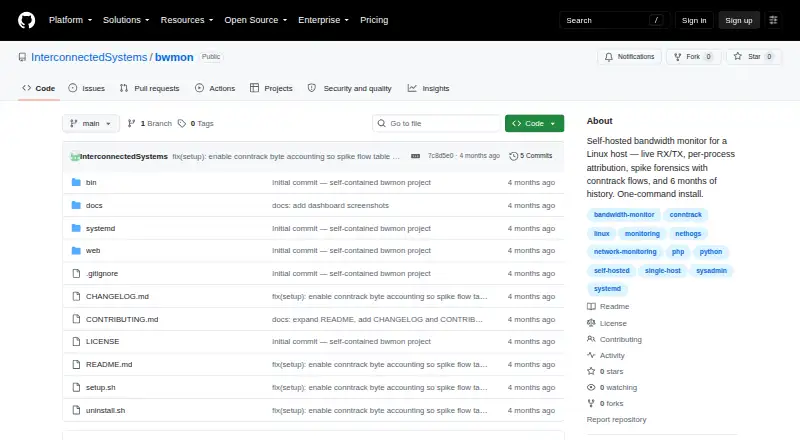
What bwmon is
bwmon is a self-hosted bandwidth monitor for one Linux host. Its live panel polls receive and transmit traffic every second, charts recent rates, and shows top processes. When interface traffic exceeds five times its rolling two-minute average, bwmon records process attribution, rates across interfaces, and leading conntrack flows to help investigate a spike. It keeps five-minute samples for six months and offers views from one hour to all time, as well as a time-of-week heatmap and rate histogram. A banner appears when the rolling five-minute average reaches 40 Mbps; cleared alerts remain in the history table. Installation uses a shell script to set up the collector, systemd service, cron jobs, and nginx server block. The dashboard opens on port 8080 by default. bwmon requires Linux kernel 4.0 or later, root access, and one monitored interface. Debian and Ubuntu use the apt-based installer; other distributions need manual dependency installation. It is free under the MIT license.
Good
- Live RX/TX panel refreshes every second.
- Shows top processes and records spike attribution.
- Keeps six months of five-minute samples.
- Free, self-hosted, and licensed under MIT.
Watch out
- Monitors only one network interface.
- Requires Linux kernel 4.0 or later and root access.
- Other distributions need manual dependency installation.
- Internet-exposed installs need added authentication.
Who it suits
bwmon suits administrators investigating bandwidth use on a single Linux host who want local monitoring and history. The project says multi-host or long-horizon analytics call for heavier tools.
Verdict
bwmon brings live traffic, process attribution, spike records, and six months of history together for a single Linux host. Its one-interface scope and Linux and root requirements make it a focused option rather than a multi-host analytics system.
Plans and prices
From bwmon's own pricing page, checked 3 Oct 2026.
| Plan | Price | What it gives you |
|---|---|---|
| bwmon | Free | Single Linux host · self-hosted · MIT license |
The facts
Each one read from bwmon's own pages, with the date it was checked.
What it does
- Alerts
- A banner appears when the rolling five-minute average reaches 40 Mbps, and cleared alerts remain in the history table.checked 3 Oct 2026
- Distribution support
- The installer uses apt for Debian and Ubuntu, while other distributions require manually installing nginx, PHP-FPM, PHP CLI, and nethogs.checked 3 Oct 2026
- History
- bwmon stores five-minute samples for six months and offers views from one hour through all time, with adaptive bucketing.checked 3 Oct 2026
- History and analytics
- It retains five-minute samples for six months and provides 1h, 24h, 7d, 30d, 6m, and all-time views, plus a time-of-week heatmap and rate histogram.checked 3 Oct 2026
- Install
- The project describes a one-command install using sudo ./setup.sh and opens its dashboard at the host on port 8080 by default.checked 3 Oct 2026
- Installation
- Installation uses a one-command shell script that sets up the collector, systemd service, cron jobs, and nginx server block.checked 3 Oct 2026
- Integrations and dependencies
- The installer can install nethogs, php-fpm, php-cli, and nginx; runtime JavaScript uses a vendored Plotly Basic build.checked 3 Oct 2026
- Intended use
- The README presents bwmon for investigating bandwidth use on a single host and says multi-host or long-horizon analytics call for heavier tools.checked 3 Oct 2026
- Interface limit
- The project describes monitoring one network interface, auto-detected from the default route unless overridden.checked 3 Oct 2026
- License
- The project is licensed under MIT.checked 3 Oct 2026
- Live monitoring
- The live panel polls RX/TX every second and shows a rolling chart and top processes.checked 3 Oct 2026
- Privacy and hosting
- The project describes itself as self-hosted, with no agents, cloud service, or signup required.checked 3 Oct 2026
- Process attribution
- A daemonized nethogs process writes top talkers to a JSON file about every two seconds for the web UI to read.checked 3 Oct 2026
- Purpose
- bwmon monitors bandwidth on a single Linux host, with live RX/TX, per-process attribution, spike forensics, and six months of history.checked 3 Oct 2026
- Requirements
- It requires a Linux host with kernel 4.0 or later and root access; the installer uses apt, while other distributions require manual dependency installation.checked 3 Oct 2026
- Requirements and limits
- bwmon requires Linux kernel 4.0 or later, root access, and one network interface to monitor; six months of history uses at most 50 MB per interface.checked 3 Oct 2026
- Resource use
- The README says six months of history uses at most 50 MB per interface and the bwprocs daemon uses less than one percent of a CPU core at idle.checked 3 Oct 2026
- Security
- The bundled nginx server block is open; the README recommends putting internet-exposed installs behind an authenticated reverse proxy or adding basic authentication.checked 3 Oct 2026
- Spike forensics
- When interface traffic exceeds five times its rolling two-minute average, bwmon records process attribution, all-interface rates, and top conntrack flows.checked 3 Oct 2026
The full review of bwmon
bwmon is a focused bandwidth investigator for administrators who need to understand traffic on one Linux machine. It is especially suitable when process-level attribution and local history matter more than fleet dashboards or cloud integrations. The free, self-hosted deployment keeps data on the host, but its Linux, root, and single-interface constraints define its audience.
Overview
bwmon combines live receive and transmit rates, process attribution, spike records, alerts, and historical analysis in a browser dashboard. It monitors one interface, normally selecting the interface on the default route unless you override it, so it fits host-level troubleshooting rather than switches, routers, or multi-server operations.
There is no cloud account, signup, or agent service to manage. The MIT license and self-hosted design suit organizations that want local control and can administer their own Linux host. The trade-off is operational responsibility: deployment, authentication, dependency management, and ongoing maintenance remain yours.
Key features
Live traffic and attribution
The live panel polls RX/TX every second and presents a rolling chart alongside top processes. A daemonized nethogs process refreshes talker data about every two seconds, giving administrators a practical link between aggregate traffic and the processes causing it, though attribution is not an instantaneous stream.
Spike investigation and alerts
When interface traffic exceeds five times its rolling two-minute average, bwmon records process attribution, rates for all interfaces, and top conntrack flows. That context is more useful for post-spike investigation than a threshold alone. Separately, a banner appears when the rolling five-minute average reaches 40 Mbps, and cleared alerts remain in the history table, creating a record of sustained high usage.
History and resource use
Five-minute samples remain available for six months. Views range from one hour, 24 hours, seven days, 30 days, and six months to all time, with adaptive bucketing. A time-of-week heatmap and rate histogram help identify recurring or unusual patterns. The project states that six months of history uses at most 50 MB per interface, while the bwprocs daemon uses less than one percent of a CPU core at idle.
Pricing
| Plan | Price | Includes |
|---|---|---|
| bwmon | free | Single Linux host, self-hosted deployment, and MIT licensing |
There is no trial because the sole plan is free. The practical limit is architectural rather than commercial: one host and one monitored interface, with no multi-host tier to expand into.
Platforms
bwmon provides an API and web dashboard for a self-hosted Linux installation. It requires Linux kernel 4.0 or later and root access. The one-command setup uses sudo ./setup.sh, installs the collector, systemd service, cron jobs, and nginx server block, and serves the dashboard on port 8080 by default.
On Debian and Ubuntu, the installer uses apt and can install nethogs, PHP-FPM, PHP CLI, and nginx. Other distributions require manual installation of those dependencies. The bundled nginx configuration is open; internet-facing deployments should be placed behind an authenticated reverse proxy or protected with basic authentication.
Who it's for
Choose bwmon for a Linux administrator investigating which processes consume bandwidth, documenting sudden spikes, or reviewing six months of behavior on a single host. Its low stated storage and idle CPU use make it reasonable for a dedicated server where local observability is the priority.
Look elsewhere if you need multiple hosts, multiple monitored interfaces, SNMP, user-level monitoring, or long-horizon network analytics. The single-interface design and root requirement also make it a poor fit for environments where central operations teams cannot install privileged host software.
Pros and cons
Pros
- Useful process context: nethogs-based attribution connects traffic to top talkers instead of stopping at interface totals.
- Investigative spike records: five-times-baseline capture includes process, all-interface, and conntrack information.
- Long local history: six months of five-minute samples, heatmap, and histogram support pattern analysis.
- Low direct cost: the complete plan is free, self-hosted, and MIT-licensed.
Cons
- One-host, one-interface scope: it cannot serve as a fleet or broad network monitoring platform.
- Privileged Linux deployment: kernel 4.0+, root access, and manual dependency work on non-Debian systems narrow deployment options.
- Security setup is yours: the open nginx block requires an authenticated reverse proxy or basic authentication before internet exposure.
- No built-in expansion path: there is no paid tier for additional hosts or interfaces.
Alternatives
SoftPerfect Bandwidth Manager is the better choice when Windows or macOS support, rule-based control, or a trial matters; its Lite plan is free with five rules/streams, while Standard for one device costs 49.00 USD.
ntopng suits readers needing broader network visibility across Linux, macOS, Windows, and self-hosted deployments; its free Community edition targets small networks with a suggested maximum of 256 live local hosts.
GlassWire is aimed at Android and Windows users who prefer a desktop-oriented freemium product; its free tier keeps one day of usage and 24 hours of network history.
sFlowTrend is an alternative for traffic monitoring in switched-network environments.
ManageEngine NetFlow Analyzer is the stronger fit for interface-based network management, with a free edition for two interfaces and paid editions starting at $172 a month.
Cacti is appropriate when you want open-source graphing across a conventional PHP, MySQL, RRDTool, and Net-SNMP stack.
FlowViewer is a free Unix-server option for flow analysis, with paid hourly support available.
Nagios XI is preferable when bandwidth work belongs inside wider infrastructure monitoring; its free tier covers seven nodes or 100 services, whichever comes first.
Verdict
bwmon is a strong recommendation for a Linux administrator who needs free, private, process-aware bandwidth investigation on one host. Its spike forensics and six-month local history are the main reasons to choose it. Choose another product when you need multi-host coverage, network-wide interfaces, or a less privileged and more centrally managed deployment.
Alternatives to bwmon
- 1

ntopng
Free planOpen sourceWebAPILinuxmacOS8.3€299.95 one-time - 2
GlassWire
Free planAndroidWebWindows7.9From $2.99 a month - 3
NetBalancer
Free planWebAPIWindows7.5$34.95 one-time - 4
Sniffnet
Free planOpen sourceLinuxmacOSWindows7.4Free plan - 5

ManageEngine NetFlow Analyzer
Free planAndroidiOSWebLinux7.1From $172 a month - 6
sFlowTrend
Free planWebAPILinuxmacOS7.1Free plan