
SnapEdit Remove Object
SnapEdit Remove Object detects objects in images and removes those users mark as unwanted.
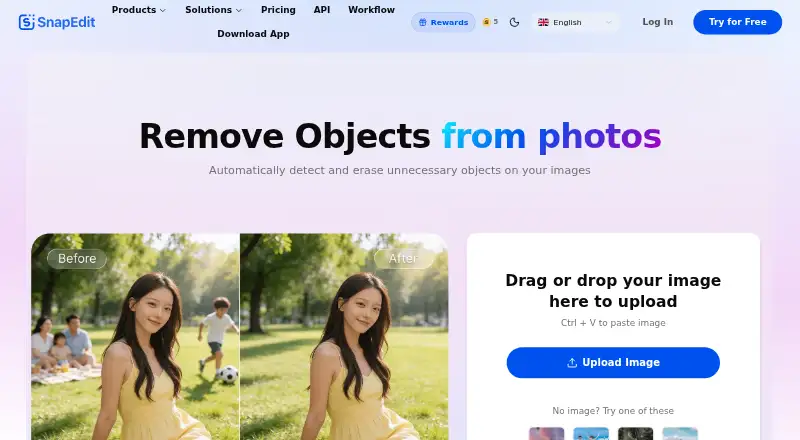
What SnapEdit Remove Object is
SnapEdit Remove Object detects objects in images and removes those users mark as unwanted. It can fill the cleared space with generated details, and a manual brush lets users adjust the result. The service is available on the web and in iOS and Android apps, with an API offering Normal, Super, and Ultra models. API requests can use manual masks, detected-object selections, or both; the remove-objects endpoint costs 2 credits for Normal, 3 for Super, and 17 for Ultra. The free plan includes 10 credits each month, limited AI features, a watermark, and exports up to 1600px. Standard costs $6 a month and includes 4,800 credits each year, batch processing, exports up to 5600px, and no watermark. PRO costs $12 a month and includes 18,000 credits each year and mobile app PRO access. A three-day trial is offered. SnapEdit is designed for casual users, designers, photographers, and online entrepreneurs.
Good
- Automatically highlights objects deemed unwanted.
- Can fill removed areas with generated details.
- Manual brush allows result adjustments.
- Available on iOS, Android, and web.
Watch out
- Free exports are limited to 1600px.
- Free plan includes a watermark and limited AI features.
- API removal uses 2, 3, or 17 credits per image.
Who it suits
SnapEdit may suit people who want to remove unwanted objects from images, including casual users, designers, photographers, and online entrepreneurs. The API also gives developers model and input-selection options for object removal.
Verdict
SnapEdit offers automatic object removal with manual refinement and generated fill. Review the free export limits and API credit costs to see whether they fit your image workflow.
Plans and prices
From SnapEdit Remove Object's own pricing page, checked 30 Sep 2026.
| Plan | Price | What it gives you |
|---|---|---|
| Standard | $6 a month | 4,800 credits each year · All AI services · 8X upscale · Batch processing · No watermark · Export max 5600px · Per month |
| PRO | $12 a month | 18,000 credits each year · AI Super Remove · AI Magic Enhance · Mobile App PRO access · Latest AI update · Per month |
| Free | — | 10 credits each month · Standard quality export max 1600px · Limited AI features · Watermark · Per month |
The facts
Each one read from SnapEdit Remove Object's own pages, with the date it was checked.
What it does
- API credits
- The remove-objects endpoint costs 2 credits for normal, 3 for super and 17 for ultra.checked 30 Sep 2026
- API input methods
- The API supports manual masks, selected detected objects, or both.checked 30 Sep 2026
- API models
- The object-removal API offers Normal, Super and Ultra models.checked 30 Sep 2026
- API pricing
- SnapEdit advertises its object-removal API from $0.004 per image.checked 30 Sep 2026
- Core function
- SnapEdit automatically detects and erases unnecessary objects from images.checked 30 Sep 2026
- Data retention
- API input and output content is processed transiently, while API metadata logs are retained for 90 days.checked 30 Sep 2026
- Generative fill
- SnapEdit can fill spaces left by removed objects with natural-looking details.checked 30 Sep 2026
- Integrations
- SnapEdit shares data with AI model providers, Creem, Firebase/Google and cloud infrastructure providers.checked 30 Sep 2026
- Manual editing
- Users can adjust results with a manual brush after AI object removal.checked 30 Sep 2026
- Object selection
- The AI automatically highlights objects deemed unwanted for deletion.checked 30 Sep 2026
- Security
- SnapEdit states that data is transmitted using TLS/HTTPS and API keys are hashed and stored securely.checked 30 Sep 2026
- Support
- SnapEdit provides email support and says responses may take 2–4 business days during peak periods.checked 30 Sep 2026
- Target users
- SnapEdit is designed for casual users, designers, photographers and online entrepreneurs.checked 30 Sep 2026
The company
- Founded
- 2022checked 23 Sep 2026
- Headquarters
- Hanoi, Vietnamchecked 23 Sep 2026
Where it runs
- Mobile apps
- SnapEdit offers mobile applications for iOS and Android.checked 30 Sep 2026
The full review of SnapEdit Remove Object
Overview
SnapEdit Remove Object is an image editor that finds unwanted objects and fills the gaps they leave. It suits casual editors and image professionals who want automatic cleanup with a manual brush for corrections.
Its web, iOS and Android apps cover direct editing, while an API offers a route for developers to add object removal to their workflows. People and text removal are supported, but free exports are limited in size and carry a watermark.
For more options, browse AI Object Removal Tools.
Key features
- Automatic selection and removal: SnapEdit highlights objects it considers unwanted, then erases them. This speeds up straightforward cleanup, though users can refine the result with a manual brush when the automatic edit needs adjustment.
- Generative fill: The cleared area is filled with generated details, making the tool useful for removing distractions without leaving an empty patch.
- People and text removal: Both are supported, extending the tool beyond removing incidental objects.
- Batch processing: Available on Standard, it can help users handling multiple images.
- API models and controls: Normal, Super and Ultra models cost 2, 3 and 17 credits per remove-objects request, respectively. The API accepts manual masks, selected detected objects or both, and is advertised from $0.004 per image. The credit cost varies substantially by model, so Ultra is a more expensive choice per request.
SnapEdit says API content is processed transiently, while metadata logs are retained for 90 days. It says data is transmitted over TLS/HTTPS and API keys are hashed and stored securely. Data is shared with AI model providers, Creem, Firebase/Google and cloud infrastructure providers. Email support is available; responses may take 2–4 business days during peak periods.
Pricing
SnapEdit uses a freemium model, with a 3-day trial and paid plans starting at $6 a month. The Free plan costs nothing and includes 10 credits each month, standard-quality exports up to 1600px, limited AI features and a watermark. It is a way to try the workflow, but the small monthly allowance and export restrictions make it a poor fit for regular polished output.
Standard costs $6 a month, billed monthly, and includes 4,800 credits each year, all AI services, 8X upscale, batch processing, watermark-free exports and a maximum export size of 5600px. It is the practical upgrade for people who need larger clean exports or batch work. PRO costs $12 a month, billed monthly, and raises the annual allowance to 18,000 credits while adding AI Super Remove, AI Magic Enhance, PRO access to the mobile app and the latest AI update. It is aimed at heavier users who need those additional services; the credit allocation is higher, but the plan still operates on credits.
The API is advertised from $0.004 per image, with actual endpoint use charged in credits by model. Its API pricing should be considered separately from the consumer plans when estimating usage.
Platforms
SnapEdit is available on the web and through iOS and Android apps. API access is also available, with model and input options suited to software integrations.
Who it's for
Casual users can use the free allowance for occasional edits, while photographers, designers and online entrepreneurs may prefer Standard for larger exports, watermark-free files and batch processing. PRO better suits users who expect to draw on its additional AI tools and mobile-app access. Developers can consider the API when they need object removal in an application, provided the per-model credit costs fit their workload.
Pros and cons
- Pro: Automatic selection, generative fill and a manual brush combine speed with a way to correct imperfect removals.
- Pro: Web, mobile and API access give individuals and developers different ways to use the service.
- Pro: Standard includes batch processing, no watermark and exports up to 5600px.
- Con: Free exports are watermarked and capped at 1600px, with just 10 credits per month.
- Con: API requests consume between 2 and 17 credits depending on model, so choosing a higher model can quickly use the allowance.
- Con: Email support may take 2–4 business days during peak periods, which may not suit users needing rapid assistance.
Alternatives
- PicWish AI Object Remover is worth considering for users who want desktop support across macOS and Windows as well as web and mobile; its free plan offers previews for most features and limited non-HD downloads per day.
- Cutout.Pro offers a $5 a month subscription with 80 credits per month, a lower-cost alternative for users whose needs fit that allowance.
- Magic Eraser by Magic Studio has a free plan with 40 AI generations, limited-resolution downloads, a watermark, one image at a time and ads; it suits users comfortable with those restrictions.
- Vmake AI Object Remover gives users 20 credits daily on its free plan, valid for one day, and registration credits to try the tool.
- Photomatic offers free object removal on iOS and web without signup, a useful option for users who want to try a simple edit without creating an account.
- Clipdrop is another freemium option with web, mobile and API access and a free plan that includes several image tools.
- Cleanup is a free option for users who want a web or mobile tool.
- Aragon Magic Eraser offers free daily credits with a free Aragon account; paid plans add credits and higher-resolution outputs.
Verdict
Choose SnapEdit if you want object removal that combines automatic selection and generated fill with manual refinement, especially if you need web, mobile or API access. Its main trade-off is the constrained free export and credit limits; users who need more free daily usage or a different platform mix should compare alternatives before committing.
Alternatives to SnapEdit Remove Object
- 1

Pixelcut
Free planAndroidiOSWebAPI8.3From $8 a month - 2
Cutout.Pro
Free planAndroidiOSWebAPI8.2From $5 a month - 3
ObjectRemover.com
Free planiOSWebmacOSWindows7.9From $19.99 a year - 4
YouCam AI Object Remover
Free planAndroidiOSWebLinux7.8From $39.99 a year - 5

BOARD AI Editor
Free planiOSWebmacOS7.7Free plan - 6
Media.io AI Object Remover
Free planAndroidiOSWebAPI7.4Free plan