
SmartTask
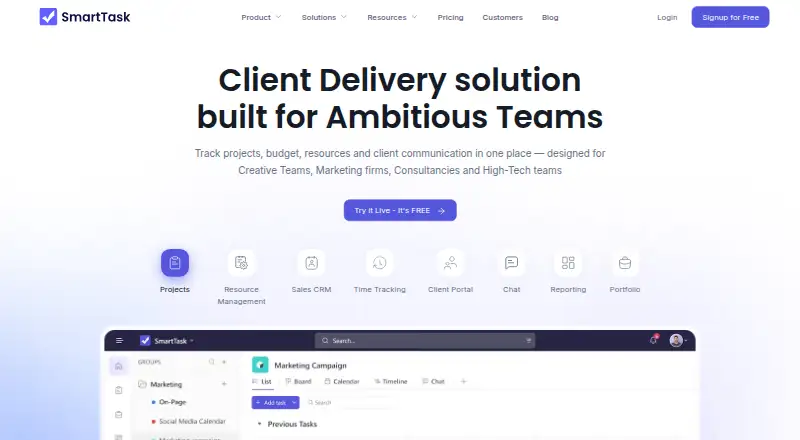
SmartTask combines project management, CRM, resource management, time tracking, budgeting, and client communication in one work management product.
What SmartTask is
SmartTask combines project management, CRM, resource management, time tracking, budgeting, and client communication in one work management product. Tasks can have recurring schedules, reminders, dependencies, subtasks, custom fields, and activity logs. Available views include lists, Kanban-style boards, calendars, timelines, dashboards, portfolios, filtered layouts, and project overviews. Time tools cover entries, timesheets, billable time, billing and cost rates, and project budgets. Resource features include AI-driven planning, time-off tracking, capacity planning, and utilization reports. Automation rules and guest access are available. Listed integrations include Slack, Microsoft Teams, HubSpot, Jira, Salesforce, Trello, Notion, Asana, Monday.com, ClickUp, and Toggl. The Slack integration can turn conversations into tasks, add task comments, and link projects with channels for notifications. SmartTask runs on Android, iOS, macOS, Windows, and the web.
Good
- Offers multiple project and task views.
- Tracks timesheets and billable time.
- Includes resource and capacity planning.
- Guest access and automation rules are available.
- Works on mobile, desktop, and web.
Watch out
- Some listed features are limited to paid plans.
Who it suits
SmartTask is intended for creative teams, marketing firms, consultancies, and high-tech teams. It may suit groups that need project tracking alongside time, budget, and resource planning.
Verdict
SmartTask brings task planning together with time, budget, CRM, and resource tools. Its free plan provides a starting option, while teams should check which views and capabilities their work requires.
Plans and prices
From SmartTask's own pricing page, checked 11 Oct 2026.
| Plan | Price | What it gives you |
|---|---|---|
| Free Forever | Free | Unlimited tasks · Unlimited users · Unlimited projects · Unlimited contacts · Unlimited guests · Karma Points · Embed views · Access to all features · per user / month billed yearly |
| Premium | $6 | Custom fields · Milestones · Reminders · Forms · Private groups · Workflows · AI Agents · Attendance · per user / month billed yearly |
| Business | $11 | Timeline view · Dashboards · Portfolios · Time tracking · Budgeting · Call recording integration · Custom branding (Add on) · per user / month billed yearly |
| Enterprise | Priced on request | Single sign-on (SSO) · Whitelabel · Enterprise API access · Customer Success Manager · Access to managed services · Contact Sales |
The facts
Each one read from SmartTask's own pages, with the date it was checked.
What it does
- Automation rules
- Yeschecked 23 Sep 2026
- Guest access
- Yeschecked 23 Sep 2026
- Integrations
- The pricing page lists Slack, Microsoft Teams, HubSpot, Zoho Projects, Trello, Notion, Jira, Monday.com, Salesforce, Typeform, Airtable, Wrike, Asana, ClickUp, and Toggl among apps to connect or replace.checked 11 Oct 2026
- Paid from
- 6checked 23 Sep 2026
- Privacy and data handling
- The privacy policy says SmartTask does not sell personal information and processes customer workspace data as needed to provide, secure, maintain, support, and improve the service.checked 11 Oct 2026
- Product
- SmartTask combines project management, CRM, resource management, time tracking, budgeting, and client communication in one work management product.checked 11 Oct 2026
- Project views
- The product offers task list, Kanban-style board, calendar, timeline, dashboard, portfolio, filtered, and project overview views.checked 11 Oct 2026
- Security
- SmartTask says its measures may include encryption in transit, authentication and access controls, role-based permissions, logging and monitoring, backups, and disaster recovery procedures.checked 11 Oct 2026
- Slack integration
- The Slack integration can turn Slack conversations into SmartTask tasks, comment on tasks, and link projects with Slack channels for notifications.checked 11 Oct 2026
- Support
- The pricing page offers meeting scheduling and chat, and Enterprise includes priority support and a Customer Success Manager.checked 11 Oct 2026
- Task management
- Features include recurring tasks, reminders, dependencies, subtasks, custom fields, and task activity logs.checked 11 Oct 2026
- Time and budgets
- SmartTask supports time entries, timesheets, billable time, billing and cost rates, and project budgeting.checked 11 Oct 2026
- Time tracking
- Yeschecked 23 Sep 2026
Where it runs
- Desktop apps
- The help center documents downloadable desktop apps for Windows and Mac.checked 11 Oct 2026
- Mobile apps
- SmartTask's help center says mobile apps are available for Android and iOS.checked 11 Oct 2026
Money
- Free plan
- Yeschecked 23 Sep 2026
- Resource planning
- Its resource management features include AI-driven resource planning, time-off tracking, capacity planning, and utilization reports.checked 11 Oct 2026
The company
- Intended teams
- The maker describes SmartTask as designed for creative teams, marketing firms, consultancies, and high-tech teams.checked 11 Oct 2026
Alternatives to SmartTask
- 1
Jira
Free planAndroidiOSWebAPI8.4Free plan - 2

Linear
Free planAndroidiOSWebAPI8.4From $10 a month - 3
Teamwork.com
Free planAndroidiOSWebAPI8.4From $9.99 a month - 4

Trello
Free planAndroidiOSWebAPI8.4From $5 a month - 5

Wrike
Free planAndroidiOSWebAPI8.4From $10 a month - 6

Avaza
Free planAndroidiOSWebAPI8.3From $11.95 a month