Skada
Skada is a free modular damage meter addon for World of Warcraft.
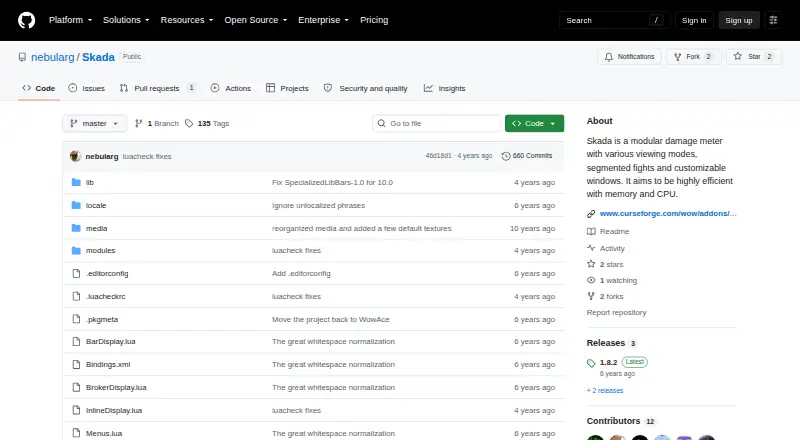
What Skada is
Skada is a free modular damage meter addon for World of Warcraft. It organizes combat information into saved fight segments that players can revisit, and offers views with different levels of detail. Display options include Bar, Inline, and Data Text windows, with support for multiple windows and customizable layouts. Users can import or export themes using theme strings. The Midnight edition targets WoW 12.0 and later and uses Blizzard’s session-based combat systems; a classic edition serves older releases. CurseForge lists Retail, Mists of Pandaria Classic, and Classic versions. Data Text can work with LDB display addons including Titan Panel, ChocolateBar, and ElvUI. Optional third-party plugins add displays or metrics for areas such as graphs, tank performance, and friendly-fire damage. Developers can use Skada’s API to create additional plugins. The project describes its aim as efficient memory and CPU use. The Midnight edition also lists UI presets, animated elements, and a theme engine with theme import and export.
Good
- Free World of Warcraft addon
- Offers Bar, Inline, and Data Text windows
- Saved fight segments can be reviewed
- API allows additional plugins
Watch out
- Midnight edition targets WoW 12.0 and later
- Classic versions serve older releases
- Some added metrics require third-party plugins
Who it suits
Skada may suit World of Warcraft players who want to review combat data across saved fights or customize how it is displayed. Its plugin support also suits players seeking additional metrics or developers creating extensions.
Verdict
Skada offers several ways to view combat data and revisit fight segments, with extensions for additional metrics. Choose the edition that matches the World of Warcraft version you play.
Plans and prices
From Skada's own pricing page, checked 7 Oct 2026.
| Plan | Price | What it gives you |
|---|---|---|
| Skada | Free | World of Warcraft addon · Retail, MoP Classic, and Classic versions |
The facts
Each one read from Skada's own pages, with the date it was checked.
What it does
- Additional features
- The Midnight edition lists UI presets, animated visual elements, and a built-in theme engine with theme import and export.checked 7 Oct 2026
- Available versions
- CurseForge lists Retail, Mists of Pandaria Classic, and Classic flavors, with the Midnight version for WoW 12.0+ and a classic version for older releases.checked 7 Oct 2026
- Current edition
- The Midnight edition supports WoW 12.0+ and uses Blizzard’s session-based combat systems, according to the project description.checked 7 Oct 2026
- Customization
- The CurseForge description says users can customize windows and import or export themes using theme strings.checked 7 Oct 2026
- Display integrations
- Data Text can be shown by LDB display addons including Titan Panel, ChocolateBar, and ElvUI.checked 7 Oct 2026
- Downloads
- CurseForge provides the addon’s downloads and lists its latest update as July 23, 2026.checked 7 Oct 2026
- Efficiency
- The project says Skada aims to use memory and CPU efficiently.checked 7 Oct 2026
- Extensibility
- The project description says its API allows developers to create additional plugins.checked 7 Oct 2026
- Fight details
- Users can browse saved fight segments and click meter entries to view more or less detail.checked 7 Oct 2026
- Game versions
- CurseForge lists Retail, Mists of Pandaria Classic, and Classic flavors for the addon.checked 7 Oct 2026
- Integrations
- Skada’s Data Text display is compatible with LDB display addons including Titan Panel, ChocolateBar, and ElvUI.checked 7 Oct 2026
- Intended users
- Its listed features include damage measurement and tank performance evaluation, including optional plugins for tanks.checked 7 Oct 2026
- License
- The addon metadata identifies its license as MIT/X; CurseForge labels it MIT License.checked 7 Oct 2026
- Midnight support
- The Midnight edition targets WoW 12.0+ and uses Blizzard's session-based combat systems.checked 7 Oct 2026
- Plugins
- The README lists third-party plugins for graphs, tank performance, friendly-fire damage, and other added displays or metrics.checked 7 Oct 2026
- Product
- Skada is a modular damage meter for World of Warcraft with different viewing modes, fight segments, and customizable windows.checked 7 Oct 2026
- Purpose
- Skada is a modular World of Warcraft damage meter with different viewing modes, segmented fights, and customizable windows.checked 7 Oct 2026
- Support
- The project suggests supporting development through GitHub Sponsors.checked 7 Oct 2026
- Window types
- Skada provides Bar, Inline, and Data Text windows, and supports multiple windows.checked 7 Oct 2026
The full review of Skada
Overview
Skada is a World of Warcraft damage meter for players who want live combat readouts alongside a record of individual fight segments. Its configurable windows and plugin support reward players who like tailoring their interface, while the edition split makes version matching essential.
It combines live measurement with session history, letting players revisit saved encounters and inspect combat data at different levels of detail. Multiple window formats make it possible to keep distinct views on screen, and Skada aims to use memory and CPU efficiently. It is a strong fit for WoW players who want a free, adaptable meter; it is not a general-purpose combat tracker for other games.
Key features
- Flexible windows: Bar, Inline, and Data Text displays can be used across multiple windows. This suits players who want different kinds of readouts available at once, though configuring several views is most useful to people who care about shaping their interface.
- Fight segments: Saved segments and adjustable detail let players inspect a particular encounter rather than relying only on the live display. That makes Skada useful for reviewing combat, not just watching a running total.
- Theme controls: Windows are customizable, and themes can be imported or exported with theme strings. The Midnight edition adds UI presets, animated visual elements, and a built-in theme engine, giving that edition more interface options.
- Integrations and plugins: Data Text works with LDB display addons such as Titan Panel, ChocolateBar, and ElvUI. Third-party plugins add displays or metrics including graphs, tank performance, and friendly-fire damage; the API also lets developers build plugins. Those additions broaden the meter, but the extra metrics depend on plugins rather than the core feature set alone.
Pricing
Skada is free: the plan costs nothing and covers the World of Warcraft addon in Retail, MoP Classic, and Classic versions. There is no paid tier described, so players do not have to trade away core functionality for a cheaper plan. The project suggests supporting development through GitHub Sponsors.
The key limitation is compatibility, not a subscription cap: the Midnight edition targets WoW 12.0+ and uses Blizzard’s session-based combat systems, while a classic version serves older releases. Choose the edition for the WoW version you play.
Platforms
Skada is for World of Warcraft on macOS and Windows. It provides a live overlay and session history, with full combat metrics. The addon is available for Retail, Mists of Pandaria Classic, and Classic flavors.
Who it's for
Skada suits WoW players who want configurable combat displays, encounter-by-encounter history, or optional tank-performance and other added metrics. Its multiple window styles and LDB compatibility are particularly useful for players already organizing their interface around addon displays. Players who want a standalone tool outside World of Warcraft should choose another product.
Pros and cons
- Pro: Bar, Inline, and Data Text windows plus multiple-window support give players meaningful control over how combat data appears.
- Pro: Saved segments and variable detail support reviewing individual fights after the live readout.
- Pro: The free plan covers multiple WoW flavors, and plugins can extend the metrics with graphs, tank performance, and friendly-fire damage.
- Con: Players need to select the edition that matches their game version, with Midnight aimed at WoW 12.0+ and a classic version for older releases.
- Con: Some added displays and metrics depend on third-party plugins, so the core meter alone may not cover every specialized need.
Alternatives
For a broader comparison, browse Game Damage Meters.
Choose Elite Insights instead if Linux support or self-hosting matters; it is free MIT-licensed software available on Linux, macOS, Windows, and self-hosted setups.
Advanced Combat Tracker is another free option for Windows desktop users.
EQ Zera is a free alternative for web or Windows, with no purchase, account, or sign-in required and no features locked.
Consider eqdps if Linux support matters; it is free on Linux and Windows, with optional EQLDB uploads.
AwowLab Overlay is a free Windows alternative with no paid tier required for its core job.
Combat Metrics is a free ESO addon, though its required libraries must be downloaded separately.
EQL Meter is a free MIT-licensed macOS and Windows app with no account or cloud backend.
STOOP is a free option for Windows 10/11 that requires no account and has no paid tiers.
Verdict
Choose Skada if you play World of Warcraft and want free live combat measurement, saved fight segments, and room to tailor displays or add metrics. Its main advantage is the combination of flexible windows and reviewable history; look elsewhere if you need a tool for another game or do not want to match an addon edition to your WoW release.
Getting started
- Visit the Skada project website on GitHub.
- Choose the version matching Retail, Mists of Pandaria Classic, Classic, or the applicable WoW release.
- Download the addon from CurseForge.
- Configure its windows and views, and import or export themes if desired.
- Add a compatible LDB display addon to show Data Text there.
Questions
How much does Skada cost?
Skada is free; its listed plan is free.
Which World of Warcraft versions does it support?
CurseForge lists Retail, Mists of Pandaria Classic, and Classic flavors. The Midnight edition targets WoW 12.0 and later, with a classic version for older releases.
What kinds of combat views does it provide?
It offers Bar, Inline, and Data Text windows, supports multiple windows, and lets users switch between saved fight segments.
Which addons can display its Data Text view?
Compatible LDB display addons include Titan Panel, ChocolateBar, and ElvUI.
Is Skada open source?
CurseForge identifies its license as MIT.
Can users add other metrics?
Third-party plugins offer additions such as graphs, tank performance, and friendly-fire damage. The API also lets developers create plugins.
Alternatives to Skada
- 1
AwowLab Overlay
Free planOpen sourceWindows7.0Free plan - 2
FF Logs
WebAPILinuxmacOS6.4From $2 a month - 3
Warcraft Logs
WebAPILinuxmacOS6.4From $2 a month - 4
Advanced Combat Tracker
Free planWindows6.1Free plan - 5
Elite Insights
Free planLinuxmacOSSelf-hostedWindows6.1Free plan - 6

EQ Zera
Free planWebWindows6.1Free plan