Advanced Combat Tracker
Advanced Combat Tracker (ACT) is a Windows MMO combat log parser that uses plugins to process game logs.
What Advanced Combat Tracker is
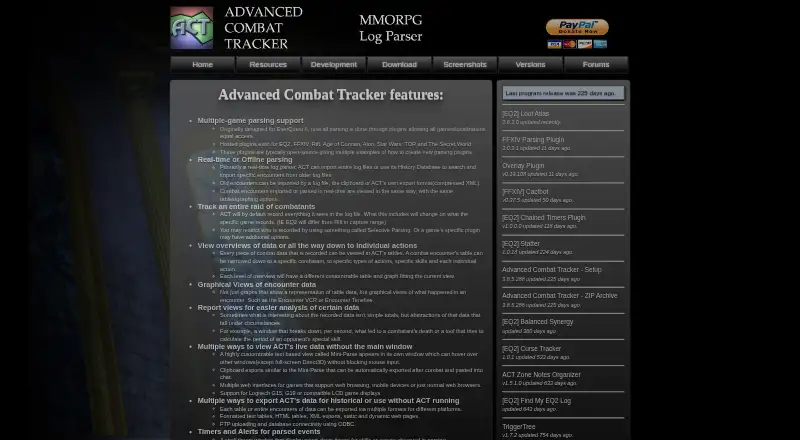
Advanced Combat Tracker (ACT) is a Windows MMO combat log parser that uses plugins to process game logs. Hosted plugins are listed for EverQuest II, Final Fantasy XIV, Rift, Age of Conan, Aion, Star Wars: The Old Republic, and The Secret World. It can parse logs in real time, import whole log files, or search its History Database for earlier encounters. Tables and graphs cover views from encounter summaries to individual actions; Encounter VCR and Encounter Timeline add graphical encounter views. Spell timers and custom triggers can match log events, capture parts of a line, play sounds, or start timers. ACT exports tables or encounters as formatted text, HTML, XML, or web pages, and supports FTP uploads and ODBC database connectivity. Its .NET plugin system accepts precompiled assemblies or C# and Visual Basic.NET source files. The software is free, with installer and ZIP downloads. The download page directs users to Microsoft .NET Framework 4.8.1; .NET Core and .NET 5–8 will not work with ACT.
Good
- Parses logs live or imports complete log files.
- History Database can surface older encounters.
- Custom triggers can play sounds or start timers.
- Exports include HTML, XML, and formatted text.
Watch out
- Windows desktop software only.
- .NET Core and .NET 5–8 will not work.
- Cactbot requires the latest OverlayPlugin and excludes ACTx86.
Who it suits
ACT suits Windows players who want to parse supported games' combat logs and review encounters. Plugin developers can use its .NET-based plugin system.
Verdict
ACT combines live parsing, encounter history, visual analysis, and configurable alerts in a free Windows tool. Check the framework requirement and the plugin-specific Cactbot limitation if relevant.
Plans and prices
From Advanced Combat Tracker's own pricing page, checked 30 Sep 2026.
| Plan | Price | What it gives you |
|---|---|---|
| Advanced Combat Tracker (freeware) | Free | Freeware software; Windows desktop download |
The facts
Each one read from Advanced Combat Tracker's own pages, with the date it was checked.
What it does
- Alerts
- ACT includes spell timers and custom triggers that can detect log events, capture parts of a line, play sound alerts, or start timers.checked 30 Sep 2026
- Alerts and timers
- ACT can track countdown timers for parsed skills or events and trigger alerts or timers from matching log lines.checked 30 Sep 2026
- Current download
- The maker's download page lists ACT Setup version 3.8.5.288, modified February 15, 2026.checked 30 Sep 2026
- Download formats
- The maker offers an installer and a ZIP archive; the ZIP includes all files from an ACTv3 installation and the ACTv3 Clipboard Sharer.checked 30 Sep 2026
- Encounter analysis
- Its tables and graphs can show data from an encounter overview down to individual combat actions.checked 30 Sep 2026
- Export and connectivity
- ACT can export formatted text, HTML, XML, and web pages, and supports FTP uploads and database connectivity through ODBC.checked 30 Sep 2026
- Exports
- ACT can export tables or encounters in formats including formatted text, HTML, XML, and web pages, and supports FTP uploads and ODBC database connectivity.checked 30 Sep 2026
- Game support
- Parsing is done through plugins, with hosted plugins listed for EQ2, FFXIV, Rift, Age of Conan, Aion, Star Wars: The Old Republic, and The Secret World.checked 30 Sep 2026
- Local configuration
- After first execution, ACT creates a configuration file under the user's %APPDATA% folder and the download page says it does not specifically save data to the Windows Registry.checked 30 Sep 2026
- Parsing modes
- ACT supports real-time parsing and can import entire log files or search its History Database for older encounters.checked 30 Sep 2026
- Plugin API
- The plugin system is based on .NET and supports precompiled assemblies or C# and Visual Basic.NET source files.checked 30 Sep 2026
- Plugin limitation
- The Cactbot download listing says it requires the latest OverlayPlugin and does not support ACTx86.checked 30 Sep 2026
- Portable use
- Portable mode stores ACT files relative to its program folder, and the maker recommends using the ZIP archive for this mode.checked 30 Sep 2026
- Privacy
- The maker says it does not intentionally collect personal information; server logs retain IP address, UserAgent, and URL request indefinitely.checked 30 Sep 2026
- Purpose
- ACT is intended as a raid analysis tool for analyzing and understanding the connected game, while player comparisons are a side effect.checked 30 Sep 2026
- Support
- The ACT forums ask help seekers to mention which game they are using, and direct FFXIV users to a community Discord and setup resources.checked 30 Sep 2026
- Visual analysis
- Encounter VCR and Encounter Timeline provide graphical views of what happened during an encounter.checked 30 Sep 2026
- Website cookies
- The maker says the main website does not serve ads or use cookies; the user forums may use cookies to keep users logged in.checked 30 Sep 2026
Where it runs
- Windows requirement
- The download page says .NET Core and .NET 5–8 will not work with ACT and points users to Microsoft .NET Framework 4.8.1.checked 30 Sep 2026
The full review of Advanced Combat Tracker
Advanced Combat Tracker is a free Windows parser for MMO combat logs, best suited to players who want to examine fights in detail and are willing to set up a game-specific plugin. Its combination of live parsing, encounter history and granular analysis makes it a capable choice; the Windows and .NET Framework requirements narrow the audience.
Overview
ACT can parse combat as it happens, import whole log files or retrieve older encounters from its History Database. That makes it useful both during play and when reviewing a past session. Tables and graphs range from encounter summaries to individual combat actions, while Encounter VCR and Encounter Timeline provide graphical views of how a fight unfolded.
Support is plugin-based, with hosted plugins for EverQuest II, Final Fantasy XIV, Rift, Age of Conan, Aion, Star Wars: The Old Republic and The Secret World. This breadth is useful for players of those games, but ACT is not a plug-and-play universal parser: choosing the right plugin is part of getting started.
Key features
Detailed encounter review
ACT combines full combat metrics with replay analysis and session history. Players can move from a high-level encounter view to individual actions, then use the VCR or Timeline for a graphical account of events. That depth suits players diagnosing a fight or comparing its details; it is more than a quick live damage readout.
Timers and custom triggers
Spell timers and countdowns can track parsed skills or events. Custom triggers match log lines, capture part of a line, play an alert sound or start a timer. These options are useful for players who want log-driven reminders, though they require configuring triggers around the events they care about.
Exports and extensibility
ACT exports tables or encounters as formatted text, HTML, XML or web pages, and supports FTP uploads and ODBC database connectivity. Its .NET plugin API accepts precompiled assemblies as well as C# and Visual Basic.NET source files, giving technically inclined users room to extend the tool. Those options add flexibility, but matter less to someone who only wants a basic live readout.
Pricing
ACT is freeware: its plan costs nothing and provides a Windows desktop download. There is no paid plan or trial to weigh, so it suits players who want combat analysis without a software charge. The trade-off is not a tiered feature limit, but the Windows platform requirement and the need to find a suitable plugin for the game.
Platforms
ACT runs on Windows. Its download page points users to Microsoft .NET Framework 4.8.1 and says .NET Core and .NET 5–8 will not work with ACT, so users should check that requirement before installing. The maker offers an installer and a ZIP archive; the ZIP includes the ACTv3 installation files and Clipboard Sharer. Portable mode keeps ACT files relative to its program folder, and the maker recommends the ZIP for that use.
After first launch, ACT creates a configuration file in the user's %APPDATA% folder. The maker says it does not specifically save data to the Windows Registry.
Who it's for
ACT is a strong fit for Windows MMO players who want to inspect combat at several levels, revisit earlier encounters or build log-based alerts. Its plugin model and .NET requirement make it less suitable for players seeking a minimal setup, or for anyone who needs a non-Windows option. The Cactbot download listing also says it requires the latest OverlayPlugin and does not support ACTx86, a constraint relevant to users considering that plugin.
Pros and cons
- Pro: Real-time parsing, whole-file imports and a History Database cover both live monitoring and retrospective review.
- Pro: Tables, graphs, VCR and Timeline views allow analysis from an encounter summary down to individual actions.
- Pro: Custom triggers, multiple export formats, FTP and ODBC support accommodate tailored alerts and downstream workflows.
- Con: Game support depends on plugins, so users need to select and configure one for their game.
- Con: Windows and .NET Framework 4.8.1 requirements exclude other platform setups and make the framework choice important.
- Con: Cactbot requires the latest OverlayPlugin and does not support ACTx86.
Alternatives
For a broader comparison, browse Game Damage Meters. Consider Elite Insights if Linux, macOS or self-hosted platforms matter; it is free and MIT-licensed, provided as-is. EQ Zera is another free option, with web and Windows support and no purchase, account or sign-in requirement or locked features. Choose eqdps if Linux support matters; it is free to use and offers optional EQLDB uploads.
AwowLab Overlay is a free Windows alternative whose core job requires no paid tier. EQL Meter may suit users who want macOS support; it is MIT-licensed and has no account or cloud backend. PQ Companion is a free Windows 10/11 option for Project Quarm. STOOP is free on Windows 10/11, with no account or paid tiers. Combat Metrics is an ESO addon; its required libraries must be downloaded separately.
Verdict
Choose ACT if you play a supported MMO on Windows and want both live parsing and substantial tools for examining past encounters. Its strongest reason to choose it is the range from granular fight analysis to configurable alerts and exports, all at no software cost. Look elsewhere if Windows or the .NET Framework requirement does not suit your setup, or if you do not want to manage game-specific plugins.
Getting started
- Visit the ACT website and download the installer or ZIP archive.
- Use the ZIP archive if you want portable mode.
- Install Microsoft .NET Framework 4.8.1; .NET Core and .NET 5–8 will not work.
- Choose a hosted plugin for a supported game.
- Run ACT to parse logs, import a log file, or search the History Database.
Limits worth knowing
ACT is Windows-only and requires Microsoft .NET Framework 4.8.1. The Cactbot download requires the latest OverlayPlugin and does not support ACTx86.
Questions
Does Advanced Combat Tracker cost anything?
ACT is listed as freeware at no cost, with a Windows desktop download.
Which games have hosted plugins?
Hosted plugins are listed for EverQuest II, Final Fantasy XIV, Rift, Age of Conan, Aion, Star Wars: The Old Republic, and The Secret World.
Can ACT import old combat logs?
Yes. It can import entire log files and search its History Database for older encounters.
What does ACT require on Windows?
The download page points users to Microsoft .NET Framework 4.8.1. It says .NET Core and .NET 5–8 will not work with ACT.
Can ACT export data?
It can export tables or encounters as formatted text, HTML, XML, or web pages, and supports FTP uploads and ODBC database connectivity.
Is ACT open source?
The plugin system accepts precompiled assemblies or C# and Visual Basic.NET source files; the listed facts do not identify ACT itself as open source.
Alternatives to Advanced Combat Tracker
- 1
AwowLab Overlay
Free planOpen sourceWindows7.0Free plan - 2
FF Logs
WebAPILinuxmacOS6.4From $2 a month - 3
Warcraft Logs
WebAPILinuxmacOS6.4From $2 a month - 4
Skada
Free planmacOSWindows6.3Free plan - 5
Elite Insights
Free planLinuxmacOSSelf-hostedWindows6.1Free plan - 6

EQ Zera
Free planWebWindows6.1Free plan