AwowLab Overlay
AwowLab Overlay is a free damage meter for World of Warcraft that reads the combat log as the game records it.
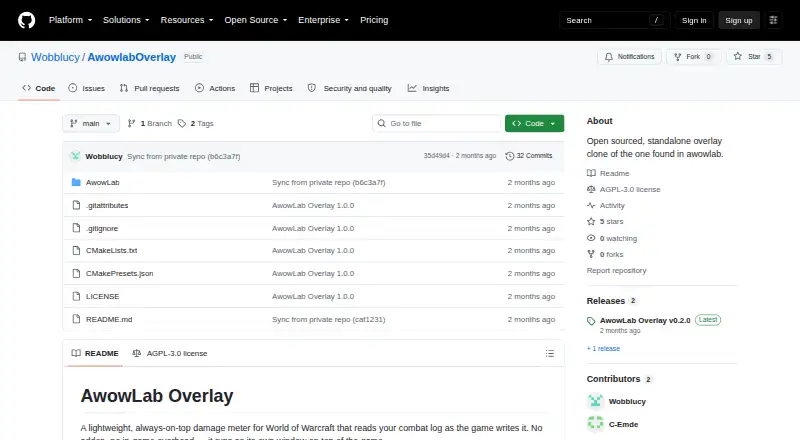
What AwowLab Overlay is
AwowLab Overlay is a free damage meter for World of Warcraft that reads the combat log as the game records it. It runs in a separate, always-on-top window, so it does not need an addon or add overhead inside the game. Live meters show DPS, HPS, and damage taken, while current-pull, whole-dungeon, and full-session views let players examine activity at different scales. Mythic+ runs are divided into trash and boss pulls, and earlier pulls can be reviewed without leaving a fight. Player breakdowns include damage and healing by spell and avoidable damage taken. Death recaps trace the hits that killed a player; boss and add breakdowns show ability details, combining enemies with the same name into one row. A report-copy control places a pull summary on the clipboard. The interface supports English, German, French, Spanish, Portuguese, and Russian. The latest release is a standalone executable that finds the Logs folder automatically. It requires 64-bit Windows 10 or 11 and a Vulkan-capable GPU, and is released under AGPL-3.0.
Good
- Displays live DPS, HPS, and damage taken
- Separates Mythic+ runs into trash and boss pulls
- Includes hit-by-hit death recaps
- Copies pull summaries to the clipboard
- Supports six interface languages
Watch out
- Requires Windows 10/11 64-bit
- Requires a Vulkan-capable GPU
- Supports World of Warcraft only
Who it suits
It suits World of Warcraft players who want live combat metrics and pull reviews in a separate window. It requires 64-bit Windows 10 or 11 and a Vulkan-capable GPU.
Verdict
AwowLab Overlay combines live meters with pull history, breakdowns, and report copying without requiring an in-game addon. Check its Windows and GPU requirements before choosing it.
Plans and prices
From AwowLab Overlay's own pricing page, checked 15 Oct 2026.
| Plan | Price | What it gives you |
|---|---|---|
| Free | Free | Windows overlay · no paid tier stated |
The facts
Each one read from AwowLab Overlay's own pages, with the date it was checked.
What it does
- AwowLab companion features
- The independent AwowLab page describes a related full application with 3D positioning, timeline scrubbing, GCD history, spell assignments, Wowhead links and an auto-updater.checked 15 Oct 2026
- Breakdowns
- Player breakdowns include per-spell damage and healing details and avoidable damage taken.checked 1 Oct 2026
- Build requirements
- Building from source requires Visual Studio 2022 with Desktop C++, CMake 3.25+, the Vulkan SDK and vcpkg libraries.checked 15 Oct 2026
- Companion installation
- The independent page says its updater is 178 KB and downloads approximately 86 MB of application files.checked 15 Oct 2026
- Companion requirements
- The independent AwowLab page lists Windows 10/11 64-bit, a Vulkan GPU such as GTX 900+/RX 400+/Intel Arc and at least 4 GB RAM.checked 15 Oct 2026
- Death recap
- Death recap shows the hits that led to a player death.checked 15 Oct 2026
- Development model
- The public repository is synchronized from a private monorepo shared with the full AwowLab application.checked 15 Oct 2026
- Distribution
- The latest release is a single self-contained AwowLabOverlay.exe file that requires no installation and finds the Logs folder automatically.checked 1 Oct 2026
- Enemy analysis
- Users can inspect boss or add ability breakdowns, with same-named enemies merged into one row.checked 1 Oct 2026
- Enemy breakdowns
- Users can select bosses or adds to inspect ability damage, with same-named enemies merged.checked 15 Oct 2026
- Funding
- The AwowLab Patreon page advertises memberships starting at $4 per month and says funds support Warcraft Logs query limits or development.checked 15 Oct 2026
- Independent description
- The developer described the overlay as an open-sourced breakout of AwowLab's damage meter for users dissatisfied with in-game death recap and augmentation attribution.checked 15 Oct 2026
- Independent praise: interface
- A Reddit commenter said the tool's ImGui-based interface looked good.checked 15 Oct 2026
- Installation
- The Windows release is a single self-contained executable that requires no installation and automatically locates the Logs folder.checked 15 Oct 2026
- Languages
- The overlay supports English, German, French, Spanish, Portuguese and Russian, while Korean and Chinese are not offered.checked 15 Oct 2026
- License
- The repository is licensed under GNU Affero General Public License 3.0; its bundled Noto Sans font uses SIL Open Font License 1.1.checked 15 Oct 2026
- Limit: advanced logging
- The overlay requires World of Warcraft advanced local combat logging to be enabled.checked 15 Oct 2026
- Limit: boss-log timing
- The developer says boss combat logs are written only after combat, so boss statistics cannot be viewed mid-pull; Mythic+ trash logs arrive about every two minutes.checked 15 Oct 2026
- Limit: delayed augmentation data
- The developer confirmed augmentation DPS is delayed rather than truly real-time and still requires local logging.checked 15 Oct 2026
- Limit: user experience
- The developer called the overlay's UI and UX the project's major pain point.checked 15 Oct 2026
- Live meters
- The overlay displays live DPS, HPS and damage-taken measurements.checked 15 Oct 2026
- Mob weighting
- Mob weighting reduces the influence of unimportant adds on dungeon meters.checked 15 Oct 2026
- Mythic+ grouping
- Mythic+ runs are grouped into trash and boss segments that can be expanded individually.checked 15 Oct 2026
The company
- Maker identity
- The public social profile identifies Wobblucy as an AwowLab developer for the Atlantis community and shows the account joined in November 2020.checked 15 Oct 2026
The full review of AwowLab Overlay
AwowLab Overlay is a free, standalone World of Warcraft combat meter for players who want live performance figures and detailed pull analysis without installing an in-game addon. It is best suited to Mythic+ and raid players who value both immediate feedback and post-pull explanation. Its focused WoW support and Vulkan requirement make it a deliberate choice rather than a universal meter.
Overview
The application reads World of Warcraft’s combat log as the game produces it and displays results in an always-on-top window. DPS, HPS, and damage-taken meters are available during a fight, while the separate-window design keeps measurement outside the game client and avoids addon overhead. That is a practical fit for players who want a companion utility rather than another interface component to configure.
AwowLab Overlay also retains earlier pulls, so reviewing what happened does not require leaving the encounter. The limitation is scope: it supports World of Warcraft only, and it depends on Windows 10 or 11 64-bit plus a Vulkan-capable GPU. Players on another operating system or without Vulkan support should choose a different meter.
Key features
- Live combat meters: DPS, healing, and damage-taken figures provide the immediate numbers needed to follow personal or group performance while combat is still underway.
- Pull history and multiple scopes: Current-pull, whole-dungeon, and full-session views serve different questions, from checking one encounter to assessing an entire run. Earlier pulls remain accessible during the fight, which is useful when comparing attempts.
- Mythic+ segmentation: Each run is organized into trash and boss pull segments instead of one undifferentiated total. That structure makes encounter-specific review more actionable for dungeon players.
- Death recap: A hit-by-hit account of what killed a player turns a death into a sequence that can be examined, rather than just a final damage event.
- Player breakdowns: Per-spell damage and healing details, together with avoidable damage taken, help identify both output choices and mistakes that reduced survivability.
- Enemy analysis: Boss and add ability breakdowns show how incoming damage was distributed. Enemies with the same name are merged into one row, keeping repeated instances easier to read.
- Report copying: One-click copying places a text summary of a pull on the clipboard, making it straightforward to share results in chat or another document.
- Standalone distribution and languages: The latest release is a single self-contained AwowLabOverlay.exe that requires no installation and finds the Logs folder automatically. The interface supports English, German, French, Spanish, Portuguese, and Russian.
Pricing
AwowLab Overlay is free: the Free plan costs nothing, with no paid tier required for its core job. That makes it suitable for any WoW player who wants combat metrics without a subscription or seat calculation. There are no paid-plan trade-offs to weigh, but the free offer does not change the Windows, GPU, or game restriction.
Platforms
The supported platform is Windows 10/11 64-bit. A Vulkan-capable GPU is required. The program imports WoW combat logs, provides live overlay output, and keeps session history. Its AGPL-3.0 license is relevant to users who care about software freedoms or want to examine and contribute to the project; issues and pull requests are welcomed, while development takes place in a private monorepo shared with the full AwowLab application.
Who it's for
Choose AwowLab Overlay if you play World of Warcraft on a compatible Windows machine and want a lightweight external window that combines live meters with pull history, Mythic+ segmentation, death recaps, and spell-level breakdowns. It is especially well matched to players diagnosing avoidable damage or comparing attempts during a dungeon or session.
Look elsewhere if you need support for another game, another operating system, or hardware without Vulkan. It is also a poor fit if your priority is a broader, multi-game analysis environment rather than a focused WoW meter.
Pros and cons
Pros
- Addon-free operation: The standalone window reads the combat log without requiring an in-game addon.
- Useful encounter structure: Pull history and Mythic+ trash/boss grouping make comparisons more meaningful than a single session total.
- Actionable diagnostics: Death recaps, per-spell player data, avoidable-damage figures, and enemy ability breakdowns explain performance as well as measure it.
- Simple deployment: One self-contained executable requires no installation and locates the Logs folder automatically.
Cons
- Windows and Vulkan dependency: Windows 10/11 64-bit and a Vulkan-capable GPU exclude otherwise interested players.
- World of Warcraft only: The utility offers no value for players seeking a cross-game meter.
- Focused rather than broad: Its feature set centers on combat-log monitoring and review, so it is not a general-purpose game analytics suite.
Alternatives
For a wider starting point, browse the Game Damage Meters category.
- Elite Insights is the better pick for Linux, macOS, self-hosted, or Windows use, and it is free MIT-licensed software.
- Skada suits players who specifically want a World of Warcraft addon across Retail, MoP Classic, and Classic versions.
- Advanced Combat Tracker is a free Windows desktop alternative.
- EQ Zera is preferable when a web option, Windows support, and no account or sign-in are priorities.
- eqdps offers free Linux and Windows use, with optional EQLDB uploads.
- Combat Metrics is the relevant choice for an ESO addon, provided its required libraries are downloaded separately.
- EQL Meter is a free macOS/Windows MIT-licensed app with no account or cloud backend.
- STOOP is another free Windows 10/11 option with no account and no paid tiers.
Verdict
AwowLab Overlay is a strong choice for WoW players on Vulkan-capable Windows PCs who want live DPS, HPS, and damage-taken meters alongside genuinely useful pull and death analysis. Its free, addon-free design and Mythic+ organization are the main reasons to choose it. Look elsewhere if you need another platform, another game, or a broader combat-analysis tool.
Alternatives to AwowLab Overlay
- 1
FF Logs
WebAPILinuxmacOS6.4From $2 a month - 2
Warcraft Logs
WebAPILinuxmacOS6.4From $2 a month - 3
Skada
Free planmacOSWindows6.3Free plan - 4
Advanced Combat Tracker
Free planWindows6.1Free plan - 5
Elite Insights
Free planLinuxmacOSSelf-hostedWindows6.1Free plan - 6

EQ Zera
Free planWebWindows6.1Free plan