
siutil Album Cover Maker
siutil Album Cover Maker is a free browser tool for creating album and CD cover art.
What siutil Album Cover Maker is
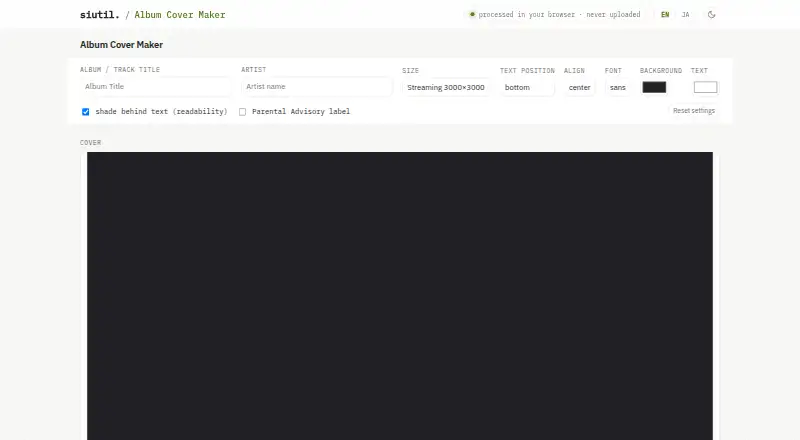
siutil Album Cover Maker is a free browser tool for creating album and CD cover art. Users can add an image by selecting, dropping, or pasting it, and the image is fitted to a square cover. They can add an album or track title and artist name, choose top, center, or bottom placement, align text left, center, or right, and select a sans or serif font. With artwork present, an optional soft shaded band can sit behind the text. Without an image, users can make a solid-color text cover. Output options include 3000×3000px and 1400×1400px square covers, plus CD jacket and 12-inch vinyl presets at 121×121mm and 314×314mm, respectively; print presets export at about 300 DPI. Finished covers save as full-size PNG files. The page says artwork and text are processed in the browser and are not sent to a server, while settings are stored on the user’s device and can be cleared with Reset. A Parental Advisory label is optional; its use should follow distributor or record-label policies.
Good
- Free browser-based cover creation.
- Square outputs include 3000×3000px and 1400×1400px.
- CD and vinyl presets export at about 300 DPI.
- Artwork and text are processed in the browser.
Watch out
- Exports are PNG files.
- Parental Advisory label use depends on distributor or label rules.
Who it suits
This tool may suit musicians or other users preparing square cover art for streaming uploads or a starting design for CD and vinyl print submissions. It is web-based and exports PNG files.
Verdict
siutil Album Cover Maker provides image and text controls, square streaming sizes, and print presets in a free web tool. Its browser processing and full-size PNG export are useful details to consider when preparing cover art.
Plans and prices
From siutil Album Cover Maker's own pricing page, checked 5 Oct 2026.
| Plan | Price | What it gives you |
|---|---|---|
| Album Cover Maker | Free | No pricing or usage limits stated on the product page |
The facts
Each one read from siutil Album Cover Maker's own pages, with the date it was checked.
What it does
- Add artwork
- Users can add a cover image or photo, which is fitted to fill the square.checked 5 Oct 2026
- Export
- The finished cover can be saved as a full-size PNG.checked 5 Oct 2026
- Fonts and readability
- The maker offers sans and serif fonts and a soft shaded band behind text when artwork is present.checked 5 Oct 2026
- Integrations
- The page names Spotify, Apple Music, and YouTube Music as examples of streaming services that use square cover art.checked 4 Oct 2026
- Intended users
- The page describes using exported covers for streaming service uploads or as a base for CD or vinyl print submissions.checked 4 Oct 2026
- Label use caveat
- The page advises following distributor or record-label policies because rules for using the Parental Advisory label differ by service and label.checked 5 Oct 2026
- Local settings
- Settings such as size, position, and colors are stored on the user's device and can be cleared with Reset.checked 5 Oct 2026
- Output sizes
- It offers square outputs at 3000×3000px and 1400×1400px for streaming, plus CD jacket at 121×121mm and 12-inch vinyl at 314×314mm.checked 5 Oct 2026
- Parental Advisory
- Users can add a classic black-and-white PARENTAL ADVISORY EXPLICIT CONTENT label in the lower-left.checked 5 Oct 2026
- Print guidance
- The FAQ says CD and vinyl presets export at about 300 DPI for print submission.checked 5 Oct 2026
- Print sizes
- It offers CD jacket 121×121mm and 12-inch vinyl 314×314mm presets, which export at about 300 DPI.checked 4 Oct 2026
- Privacy
- The page states that artwork, title, and artist name are never sent to a server and that processing happens in the browser.checked 5 Oct 2026
- Purpose
- The tool makes album and CD cover art in a browser.checked 5 Oct 2026
- Streaming guidance
- The FAQ calls 3000×3000px widely recommended for streaming cover art and says at least 1400×1400px is used.checked 5 Oct 2026
- Streaming sizes
- It offers square 3000×3000px and 1400×1400px output sizes for streaming cover art.checked 4 Oct 2026
- Text controls
- Users can add the album or track title and artist name, choose top, center, or bottom placement, left, center, or right alignment, and select a sans or serif font.checked 4 Oct 2026
- Text layout
- Users can position album or track title and artist text at the top, center, or bottom, with left, center, or right alignment.checked 5 Oct 2026
- Text-only covers
- Without added art, the maker creates a solid-color cover with the title and artist text.checked 5 Oct 2026
- Text readability
- When artwork is present, users can place a soft shaded band behind the text for readability.checked 4 Oct 2026
- Usage caveat
- The page says rules for using the Parental Advisory label vary by service and label, and directs users to follow their distributor's or record label's policies.checked 4 Oct 2026
The company
- Maker
- The product page identifies the maker as siutil.checked 5 Oct 2026
The full review of siutil Album Cover Maker
siutil Album Cover Maker is a browser tool for assembling album and CD cover art. It is best suited to musicians who already have an image or want a simple text-only cover. Its strongest case is practical: it combines streaming and print presets with full-size PNG export at no charge.
Overview
The maker keeps its scope narrow: choose a format, add artwork or a solid background, arrange a title and artist name, then export. That makes it a useful option for a straightforward release cover or a starting file for a print submission. It is less appropriate when a project needs more elaborate image editing or typography controls than the tool provides.
Key features
Streaming and print formats
Streaming presets are square canvases at 3000×3000px and 1400×1400px. The larger option matches the product FAQ’s widely recommended size, while the smaller corresponds to the minimum it says is used. CD jacket and 12-inch vinyl presets measure 121×121mm and 314×314mm, respectively, and export at about 300 DPI. Those dimensions offer a convenient starting point, but users preparing a submission should follow their distributor’s or label’s requirements.
Artwork and type
Users can add, drop, or paste an image, which is fitted to fill the square cover. Title or track name and artist text can be placed at the top, center, or bottom, aligned left, center, or right, and set in a sans or serif font. A soft shaded band behind the text is available when artwork is present, helping preserve contrast without requiring a separate background graphic. For text-only covers, the tool supports a solid-color background.
Label, export, and privacy
An optional black-and-white Parental Advisory Explicit Content label can be placed in the lower-left. Its use is subject to distributor and record-label policies, which can differ. Finished covers save as full-size PNG files. Artwork and text are processed in the browser rather than sent to a server, and the PNG is saved to the user’s device. Settings such as size, position, and colors are stored locally and can be cleared with Reset.
Pricing
The Album Cover Maker plan is free. There is no free trial because the product is already free, and no usage limits are stated. That makes it a sensible first choice for someone who needs a cover layout without committing to a paid tool. The trade-off is its focused set of controls: users who want a broader design workflow may need a different product.
Platforms
siutil Album Cover Maker runs on the web. Its browser-based processing suits users who prefer not to send cover artwork and text to a server, while local settings remain on the device until cleared.
Who it's for
This tool is a good fit for independent musicians assembling a basic cover from existing artwork, or making a solid-color design with title and artist text. Its streaming sizes suit square cover uploads for services such as Spotify, Apple Music, and YouTube Music; the physical-media presets can help prepare a CD or vinyl submission. It is not the right choice for users who need a more extensive creative toolkit.
Pros and cons
- Pros: Free access and streaming and print presets make it possible to prepare common cover formats without paying for the tool.
- Pros: Image input, basic text placement, two font styles, and a shaded text band cover the essentials for a simple layout.
- Pros: Browser processing and local settings keep artwork and text on the user’s device, according to the product’s stated behavior.
- Cons: The controls focus on image fitting and basic typography, so more involved cover design calls for another tool.
- Cons: Print presets are starting dimensions, not a substitute for checking a distributor’s or label’s submission rules.
Alternatives
For a wider set of options, browse Album Cover Maker Software. Phot.AI is worth considering for users who want a freemium tool across web, mobile, and API platforms; its free Starter plan includes 500 credits per month and one seat. iOS users comparing free options with paid add-ons can consider Cover Art Studio, which offers a free app and one-time paid options.
Mew Design AI Product Mockup Maker is a web alternative with a free plan that includes 50 signup credits and standard downloads, with a free trial also offered. TuneArt may suit users who want a web-based, credit-limited free account with access to every template. AI Album Cover Maker offers a free plan with 50 credits and a paid Pro option at $19.99 a month for 2,000 credits.
ArtificialStudio Album Cover Generator is another web-based option, with 20 free credits daily and a five-credit cost per cover on its album-cover page. CoverArt AI may appeal to users seeking a web tool with a free allowance of two credits per month and paid credit plans. MagicShot Album Cover Maker is an alternative with selected free tools and a paid Essential plan.
Verdict
Choose siutil Album Cover Maker if you need a no-cost, browser-based way to arrange basic cover art in common streaming or print dimensions and export a full-size PNG. Its privacy-conscious browser processing is another practical advantage. Look elsewhere if your cover needs more extensive design controls than image fitting and simple text layout.
Alternatives to siutil Album Cover Maker
- 1
Phot.AI
Free planAndroidiOSWebAPI8.3From $9 a month - 2

Fotor
Free planAndroidiOSWebAPI7.5Free plan - 3
ArtificialStudio Album Cover Generator
Free planWebAPI6.7From $84 a year - 4

Indiefy
Free planWeb6.7From $49 a year - 5
Le Guaro Music Cover Photo Maker
AndroidiOSWeb6.7From $11 a year - 6
MagicShot Album Cover Maker
Free planWeb6.7From $9 a month