Cover Art Studio
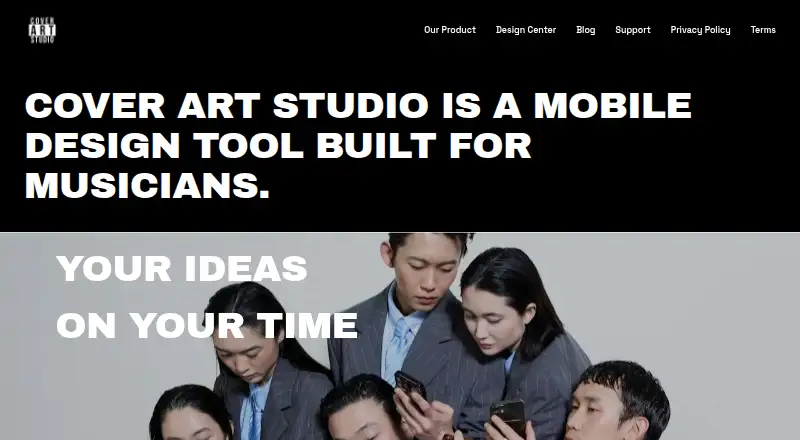
Cover Art Studio is an iOS design app for musicians creating cover artwork.
What Cover Art Studio is
Cover Art Studio is an iOS design app for musicians creating cover artwork. It can turn photos into art for albums, playlists, songs, or mixtapes, and its maker says a design can be made in as little as 30 seconds. The app is built around the time and budget constraints of modern musicians. Its Design Center includes a parental advisory sticker pack with more than 30 variations, spanning grunge, paint, and language styles. The app is free, with paid options for additional design choices. Listed one-time options include Filters, Color Picker, Cash, Fire and Smoke, Double Cup, Slatt Pack, Background Color Picker, and Renaissance, each at $0.99, paid once. An All Pack Subscription is listed at $4.99 a month. The App Store lists iPhone and iPad availability and requires iOS 17.6 or later for iPhone; Mac compatibility is not verified. The App Store page reports that the developer indicates certain data may be collected without being linked to the user, while noting Apple has not verified that information.
Good
- Creates art for albums, playlists, songs, and mixtapes.
- Maker says artwork can be created in 30 seconds.
- Sticker pack has over 30 variations.
- Free app with paid options.
Watch out
- Requires iOS 17.6 or later for iPhone.
- Mac compatibility is not verified.
- Listed one-time design options cost $0.99, paid once.
- All Pack Subscription is $4.99 a month.
Who it suits
Cover Art Studio suits musicians who want to create cover art from photos on an iPhone or iPad. It may fit users who want a free starting point with optional paid design choices.
Verdict
Cover Art Studio focuses on photo-based cover artwork for musicians and offers a free app with optional purchases. Check the iOS requirement and App Store privacy disclosure before deciding whether it suits your device and preferences.
Plans and prices
From Cover Art Studio's own pricing page, checked 4 Oct 2026.
| Plan | Price | What it gives you |
|---|---|---|
| Free | Free | Free app; paid options are also available |
| Background Color Picker | $0.99, paid once | — |
| Cash | $0.99, paid once | — |
| Color Picker | $0.99, paid once | — |
| Double Cup | $0.99, paid once | — |
| Filters | $0.99, paid once | — |
| Fire and Smoke | $0.99, paid once | — |
| Renaissance | $0.99, paid once | — |
| Slatt Pack | $0.99, paid once | — |
| All Pack Subscription | $4.99 a month | App Store lists a subscription; billing interval not stated |
The facts
Each one read from Cover Art Studio's own pages, with the date it was checked.
What it does
- Artwork types
- The App Store says users can turn photos into album, playlist, song or mixtape cover art.checked 4 Oct 2026
- Privacy data
- Apple’s App Store page reports that the developer indicates purchases, device identifiers, usage data and diagnostics may be collected without being linked to the user; Apple says this information has not been verified by Apple.checked 4 Oct 2026
- Purpose
- Cover Art Studio describes itself as a mobile design tool built for musicians to create album artwork.checked 4 Oct 2026
- Regulatory limits
- The End User License Agreement says the app is not tailored to comply with industry-specific regulations such as HIPAA or FISMA.checked 4 Oct 2026
- Speed
- The maker says its free cover maker can create artwork for albums, songs, mixtapes and playlists in as little as 30 seconds.checked 4 Oct 2026
- Sticker pack
- The Design Center lists a parental advisory sticker pack with over 30 variations, including grunge, paint and language styles.checked 4 Oct 2026
- Support
- The license says the licensor is responsible for app maintenance and support, and directs users to the email in the App Store listing.checked 4 Oct 2026
Where it runs
- Available devices
- The App Store lists the app for iPhone and iPad and says Mac compatibility is not verified.checked 4 Oct 2026
- Design approach
- The maker says the product is designed around modern musicians and their time and money constraints.checked 4 Oct 2026
- Minimum iOS
- The App Store lists iOS 17.6 or later as required for iPhone.checked 4 Oct 2026
Money
- Free and paid options
- The maker says the app is free and offers paid options for more design choices.checked 4 Oct 2026
The company
- Maker and location
- The license identifies the licensor as gnoodl, LLC, located in St. Petersburg, Florida, United States.checked 4 Oct 2026
The full review of Cover Art Studio
Cover Art Studio is an iOS design app for turning photos into cover art for albums, songs, playlists and mixtapes. It suits musicians who want a mobile, photo-based option with free access and optional paid design choices. Its focused purpose and one-time add-ons are appealing, but the iOS requirement and App Store privacy disclosure deserve a look before downloading.
Overview
The app centers on making cover artwork from photos, rather than serving as a general-purpose design tool. Its maker says the workflow can produce a cover in as little as 30 seconds and is intended for musicians working within time and budget constraints. That focus may suit a quick release or playlist image; it is less compelling for someone seeking a broader design suite or a browser-based workflow.
Key features
- Photo-based cover formats: The app supports artwork for albums, playlists, songs and mixtapes, making it relevant beyond album releases.
- Parental advisory stickers: The Design Center includes more than 30 variations, with grunge, paint and language styles. That gives musicians a range of explicit-content label treatments without requiring a separate design asset.
- Paid design options: The app is free, with purchases for additional choices. The free starting point is useful for trying the core approach, while buyers can add specific packs rather than commit to a subscription.
Pricing
The Free plan costs nothing and is a free app with paid options also available. It is the natural place to start, though the maker positions paid choices as a way to expand design options.
Individual options are one-time purchases at $0.99, paid once each: Filters, Color Picker, Cash, Fire and Smoke, Double Cup, Slatt Pack, Background Color Picker and Renaissance. These suit someone who wants one particular addition without paying monthly.
Platforms
Cover Art Studio is available for iPhone and iPad. iPhone use requires iOS 17.6 or later, so older devices may not qualify. Mac compatibility is not verified, making this a poor choice for anyone who needs a confirmed Mac workflow.
Apple’s App Store page reports that the developer indicates purchases, device identifiers, usage data and diagnostics may be collected without being linked to the user. Apple says this disclosure has not been verified by Apple. The license also says the app is not tailored for industry-specific regulatory compliance such as HIPAA or FISMA, a relevant limitation for regulated work. The licensor, gnoodl, LLC, is responsible for maintenance and support, with support directed through the email in the App Store listing.
Who it's for
This is best for musicians who want to turn photos into release or playlist artwork on a compatible iPhone or iPad and value a free entry point with small, optional purchases. It is not the strongest fit for people who need a verified Mac app, a web-based workflow, or software tailored to regulated industries.
Pros and cons
Pros
- Several music-cover formats: Album, song, mixtape and playlist art are all within its stated scope.
- Free starting point and inexpensive one-off choices: The free app and $0.99, paid once add-ons let buyers pay for individual design options rather than a subscription.
- Broad sticker selection: More than 30 parental advisory variations provide stylistic choices for explicit releases.
Cons
- Apple-device constraint: The app is listed for iPhone and iPad, with iOS 17.6 or later required for iPhone; Mac compatibility is unverified.
- Privacy disclosure is not independently verified by Apple: The developer indicates several data types may be collected, which may matter to privacy-conscious users.
Alternatives
For a wider comparison, browse Album Cover Maker Software.
- Phot.AI is a better fit for someone who needs Android, web or API access as well as iOS; its free Starter plan includes 500 credits per month, one seat and 2 GB cloud storage.
- Mew Design AI Product Mockup Maker is a web-based alternative with a free trial and a Free plan that includes 50 signup credits and standard downloads.
- siutil Album Cover Maker is worth considering for a web workflow and a free product page with no pricing or usage limits stated.
- TuneArt is a web option with a free account, limited starting credits and access to every template.
- AI Album Cover Maker is a web-based option with 50 free credits and a $19.99 a month Pro plan offering 2,000 credits.
- ArtificialStudio Album Cover Generator offers web and API access, with 20 free credits daily; its album-cover page says each cover uses five credits.
- CoverArt AI is a web alternative whose Free plan provides two credits per month and a private cover.
- Vismuse Album Cover Generator is another web option, with a free plan of 50 credits and watermarked trial downloads.
Verdict
Choose Cover Art Studio if you want a focused iPhone or iPad app for making photo-based music covers, and prefer a free starting point with low-cost individual add-ons. Its main advantages are that narrow mobile focus and the choice between one-time purchases and a subscription. Look elsewhere if you need a confirmed Mac or web workflow, or if the iOS requirement and privacy disclosure do not suit you.
Getting started
- Visit https://coverart.studio/.
- Use an iPhone or iPad; iPhone requires iOS 17.6 or later.
- Get the free app and create cover art from a photo.
- Choose paid options if you want additional design choices.
Limits worth knowing
The free app has paid options for more design choices. The listed add-ons each cost $0.99, paid once, and the All Pack Subscription is listed at 4.99 USD.
Questions
Is Cover Art Studio free?
Yes. The app is free, with paid options for more design choices.
What does it cost to add design options?
Filters, Color Picker, Cash, Fire and Smoke, Double Cup, Slatt Pack, Background Color Picker, and Renaissance each cost $0.99, paid once. The All Pack Subscription is listed at 4.99 USD.
Which devices does it support?
The App Store lists iPhone and iPad. iPhone requires iOS 17.6 or later; Mac compatibility is not verified.
Who makes Cover Art Studio?
The license identifies gnoodl, LLC, located in St. Petersburg, Florida, as the licensor.
Does the app meet industry-specific regulatory requirements?
The license says the app is not tailored to comply with industry-specific regulations such as HIPAA or FISMA.
Alternatives to Cover Art Studio
- 1
Phot.AI
Free planAndroidiOSWebAPI8.3From $9 a month - 2

Fotor
Free planAndroidiOSWebAPI7.5Free plan - 3
ArtificialStudio Album Cover Generator
Free planWebAPI6.7From $84 a year - 4
Indiefy
Free planWeb6.7From $49 a year - 5
Le Guaro Music Cover Photo Maker
AndroidiOSWeb6.7From $11 a year - 6
MagicShot Album Cover Maker
Free planWeb6.7From $9 a month