
TuneArt
TuneArt is a web-based creative workspace for making songs and lyrics, designing music-related artwork and motion, and assembling release materials.
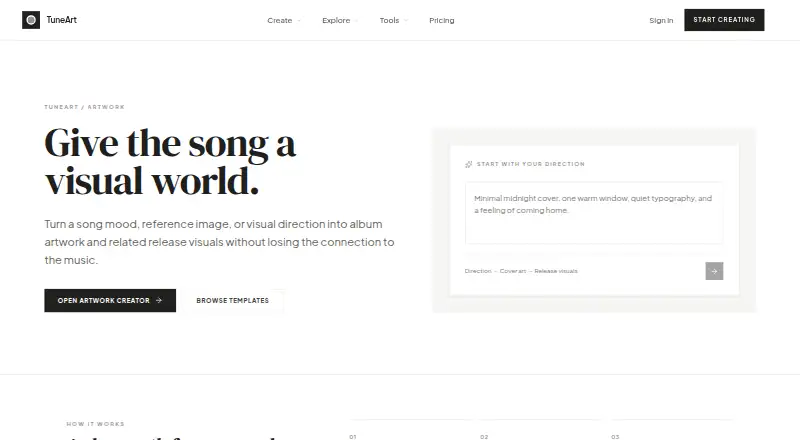
What TuneArt is
TuneArt is a web-based creative workspace for making songs and lyrics, designing music-related artwork and motion, and assembling release materials. Its project workflow links audio, lyrics, cover art, and metadata into a release-ready package. Artwork can begin with a song mood, a prompt, a reference image, or a template, then be saved in a Project or prepared for Release. AI generation uses credits, and the cost is shown before generation; all templates are available to every account. Free accounts get a limited number of starting credits that do not expire or renew. TuneArt sells one-time credit packs rather than subscriptions, and purchased credits remain valid for 12 months. Browser tools including Now Playing cards, album mockups, layouts, and a BPM and key finder are available without an account. TuneArt says it does not use user content to train AI or claim ownership of creations. The music visualizer accepts audio files up to 10 minutes and 60 MB; editing and export use no credits, while optional AI video generation has a separate credit cost.
Good
- Free accounts receive starting credits.
- All templates are available to every account.
- Browser-based music tools need no account.
- Editing and visualizer export use no credits.
- Users retain ownership of created content.
Watch out
- Free starting credits are limited.
- Purchased credits expire after 12 months.
- Visualizer uploads are limited to 10 minutes and 60 MB.
- Optional AI video generation uses separately priced credits.
Who it suits
TuneArt suits musicians or creators who want to connect songs, lyrics, artwork, and release details in one project workflow. Its browser tools may also suit people who want music-design utilities without creating an account.
Verdict
TuneArt brings creative assets and release details together, with free browser utilities and credit-based AI generation. Check the visualizer upload limit and credit terms if those features matter to your workflow.
Plans and prices
From TuneArt's own pricing page, checked 3 Oct 2026.
| Plan | Price | What it gives you |
|---|---|---|
| Free account | Free | Limited starting credits · generation uses credits · every template available |
The facts
Each one read from TuneArt's own pages, with the date it was checked.
What it does
- Account and data controls
- Users can access personal data, request account and data deletion, and export generated content through account settings.checked 2 Oct 2026
- Age limit
- TuneArt requires users to be at least 13 years old.checked 3 Oct 2026
- Artwork workflow
- The artwork creator starts from a song, prompt, reference image, or template and lets users save a cover to a Project or prepare it for Release.checked 3 Oct 2026
- Connected projects
- TuneArt connects songs, lyrics, artwork, and release materials in a shared project workflow.checked 2 Oct 2026
- Connected release materials
- TuneArt describes bringing audio, cover artwork, lyrics, and metadata together in a release-ready package.checked 3 Oct 2026
- Content and training
- TuneArt says it does not use user content to train AI models.checked 3 Oct 2026
- Credit pricing
- AI images cost 2–3 credits each depending on the model, and purchased credits are valid for 12 months.checked 3 Oct 2026
- Credit validity
- Purchased credits are valid for 12 months from purchase.checked 2 Oct 2026
- Data security
- TuneArt says user data is stored using Supabase hosted on AWS, with encryption in transit and at rest; generated images and videos are stored in secure cloud storage.checked 3 Oct 2026
- Integrations
- TuneArt lists Google AI (Gemini) for image and video generation, Spotify API for music search and metadata, Supabase for authentication and storage, Creem for payments, and Vercel for hosting and deployment.checked 3 Oct 2026
- No subscription
- TuneArt says it does not sell subscriptions; credits are purchased as one-time packs.checked 3 Oct 2026
- Notable limit
- The lyric video tool currently uses finished TuneArt songs and a public demo; arbitrary audio upload is not supported there.checked 3 Oct 2026
- Payment handling
- Creem processes payments as Merchant of Record, and TuneArt says it does not store credit card details.checked 2 Oct 2026
- Payment security
- Creem processes payments as Merchant of Record, and TuneArt says it does not store credit card details.checked 3 Oct 2026
- Product
- TuneArt is an AI-powered creative workspace for making songs and lyrics, creating music-related artwork and motion, and preparing connected release materials.checked 2 Oct 2026
- Security and storage
- TuneArt says data is stored with Supabase hosted on AWS, uses encryption in transit and at rest, and stores generated images and videos in secure cloud storage.checked 2 Oct 2026
- Support
- TuneArt says users can email general support and that it aims to respond within 1–2 business days.checked 3 Oct 2026
- What it does
- TuneArt is an AI-powered creative workspace for making songs and lyrics, creating music-related artwork and motion, and preparing connected release materials.checked 3 Oct 2026
The company
- Content and ownership
- TuneArt says it does not use user content to train AI models and does not claim ownership of content users create.checked 2 Oct 2026
- Ownership
- Users retain ownership of content they create, and TuneArt says it does not claim ownership of generated content.checked 3 Oct 2026
Money
- Free browser tools
- TuneArt offers browser-based music design tools, including Now Playing cards, album mockups, layouts, and a BPM and key finder, without an account.checked 2 Oct 2026
- Free starting credits
- Free accounts receive a limited number of credits; starting credits do not expire or renew.checked 2 Oct 2026
The full review of TuneArt
TuneArt is a web-based creative workspace for songs, lyrics, artwork, motion and release materials. It suits musicians who want those pieces connected in one project, while its free browser tools also serve people who only need a quick music graphic or BPM lookup. Its credit-based, non-subscription model is flexible, but visualizer upload limits and credit validity matter if you plan to generate regularly.
Overview
TuneArt ties creative work to a shared project: songs, lyrics, artwork and release materials can be prepared together, including a package with audio, cover art, lyrics and metadata. Artwork can begin with a mood, prompt, reference image or template, then be saved to a project or prepared for release. That connection is more useful to artists assembling a release than to someone looking only for a standalone image generator.
All templates are available to every account, and TuneArt shows the credit cost before generation. Free browser tools—including Now Playing cards, album mockups, layouts, and a BPM and key finder—work without an account. The music visualizer accepts audio up to 10 minutes and 60 MB; editing and export use no credits, while optional AI video generation costs credits.
Key features
- Artwork creation: Start from a mood, prompt, reference image or template. Album templates, AI artwork generation and print-ready export are supported.
- Connected release workflow: Keep songs, lyrics, art and release materials in a shared project rather than coordinating them as separate tasks.
- Credit-based generation: The cost is visible before generation, and templates are not gated by plan. This makes experimenting easier to price, though repeated creation consumes credits.
- Ownership and controls: TuneArt says it does not train AI on user content or claim ownership of created content. Users can access personal data, request account and data deletion, and export generated content in account settings.
TuneArt says data is stored with Supabase hosted on AWS, encrypted in transit and at rest, and generated images and videos are kept in secure cloud storage. Creem processes payments as Merchant of Record; TuneArt says it does not store card details. Users must be at least 13. Privacy and terms questions go to TuneArt's support email.
Pricing
TuneArt is freemium. The Free account costs nothing and includes limited starting credits, generation that uses credits, and access to every template. Starting credits do not expire or renew. TuneArt sells one-time credit packs rather than subscriptions; purchased credits are valid for 12 months from purchase. That avoids recurring charges, but regular users should account for the expiry window and the finite credit balance. Credit-pack prices are custom pricing.
Platforms
TuneArt is available on the web. Its browser-based design tools can be used without an account; AI generation uses credits through an account.
Who it's for
TuneArt is a good fit for independent musicians who want to develop artwork and motion alongside songs, lyrics and release materials, especially if they prefer buying credits as needed over paying a subscription. It is also useful for quick, no-account music graphics and BPM or key checks. It is less suitable for visualizer projects with audio longer than 10 minutes or larger than 60 MB, or for creators who want recurring generation without monitoring credit balance and expiry.
Pros and cons
- Pro: Shared projects connect creative assets and release materials, reducing the handoff between cover creation and release preparation.
- Pro: Every template is available on the free account, and the credit cost is shown before generation.
- Pro: Free browser tools work without an account, and visualizer editing and export do not consume credits.
- Con: Free starting credits are limited, do not replenish, and purchased credits expire after 12 months.
- Con: Visualizer uploads are capped at 10 minutes and 60 MB, which rules out longer or larger audio files.
Alternatives
For a broader comparison, see Album Cover Maker Software. CoverArt AI is another web freemium option, with a free plan that provides 2 credits per month and a Hobbyist plan at $6.99 a month. Choose One More Shot AI if Android or iOS access matters; it also offers API access, with BASIC at $29 a month and ULTRA at $89 a month.
ArtificialStudio Album Cover Generator may suit someone seeking daily free credits: its free plan gives 20 credits daily, and its album-cover page says a cover costs 5 credits. For a simple web maker whose product page states no pricing or usage limits, consider siutil Album Cover Maker. AI Album Cover Maker offers 50 free credits and a $19.99 a month Pro plan with 2,000 credits; it may fit users who want a stated monthly credit allowance.
Fotor spans Android, iOS, macOS, web and Windows, so it is an option when platform breadth matters. CoverArtGenerator.ai sells one-time credit packs with no subscription, monthly fee or auto-renewal, and credits never expire. AetherWave AI Album Cover Generator is another web freemium option.
Verdict
TuneArt is best for musicians who want artwork, songs, lyrics and release preparation tied together, with credit purchases instead of a subscription. Its connected workflow and useful no-account tools are the strongest reasons to choose it. Look elsewhere if your audio exceeds the visualizer cap or you need predictable recurring generation without tracking credit expiry.
Alternatives to TuneArt
- 1
Phot.AI
Free planAndroidiOSWebAPI8.3From $9 a month - 2

Fotor
Free planAndroidiOSWebAPI7.5Free plan - 3
ArtificialStudio Album Cover Generator
Free planWebAPI6.7From $84 a year - 4

Indiefy
Free planWeb6.7From $49 a year - 5
Le Guaro Music Cover Photo Maker
AndroidiOSWeb6.7From $11 a year - 6
MagicShot Album Cover Maker
Free planWeb6.7From $9 a month