Mew Design AI Product Mockup Maker
Mew Design AI Product Mockup Maker creates product mockups from prompts and optional brand assets.
What Mew Design AI Product Mockup Maker is
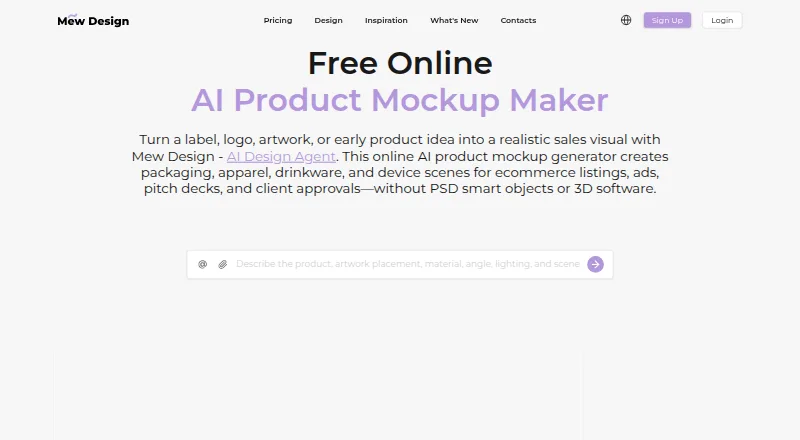
Mew Design AI Product Mockup Maker creates product mockups from prompts and optional brand assets. It covers packaging, apparel, drinkware, devices and other product types. Users can upload a logo, label, artwork, screenshot or reference image and specify its placement on a product. The maker composes mockups with surface-aware artwork placement, lighting, texture, depth and shadows, then allows revisions through Chat Edit. Exports include PNG and JPG, and generated images are described as watermark-free. New users receive 50 free credits after signup without a credit card; generation uses 2 to 60 credits depending on format, size and quality. The Free plan is free, with standard-resolution downloads. HD images and PDF downloads require an active membership. Hobby costs $5.69 a month and includes high-resolution downloads and print-quality PDF export. Pro is $19.99 a month, Mega is $35.99 a month, and Max is $64.99 a month. Prompts, uploads and generated content may be sent to AI providers for generation and editing.
Good
- Supports packaging, apparel, drinkware and devices
- Users can upload brand assets and references
- Offers Chat Edit revisions
- PNG and JPG exports are available
- Free plan provides 50 signup credits
Watch out
- Free downloads are standard resolution
- HD and PDF downloads require active membership
- Generation consumes 2 to 60 credits
Who it suits
It suits people creating product visuals who want to guide mockups with prompts and brand artwork. Free users can try standard-resolution downloads, while HD and PDF exports require a membership.
Verdict
Mew Design combines prompt-based mockup creation with artwork placement and editing. Check export requirements and credit use when choosing a plan.
Plans and prices
From Mew Design AI Product Mockup Maker's own pricing page, checked 20 Oct 2026.
| Plan | Price | What it gives you |
|---|---|---|
| Free | Free | 50 credits on signup · 5-7 designs · 100MB storage · standard download · fast generation · standard conversations |
| Hobby | $5.69 a month | 500 credits/month · 50-70 designs · 500MB storage · HD download · print-quality PDF · DeepMode · standard conversations · monthly |
| Pro | $19.99 a month | 2500 credits/month · 250-350 designs · 2GB storage · HD download · print-quality PDF · DeepMode · extended context memory · visual editor · monthly |
| Mega | $35.99 a month | 5000 credits/month · 500-700 designs · 5GB storage · HD download · print-quality PDF · DeepMode · extended context memory · visual editor · premium AI model priority · monthly |
| Max | $64.99 a month | 10000 credits/month · 1000-1400 designs · 10GB storage · HD download · print-quality PDF · DeepMode · extended conversation context · visual editor · premium AI model priority · monthly |
The facts
Each one read from Mew Design AI Product Mockup Maker's own pages, with the date it was checked.
What it does
- API
- The integration guide documents POST https://api.mew.design/open/api/design/generate for automated design generation.checked 20 Oct 2026
- API keys
- Account documentation says users can create API keys for MCP or Open API workflows.checked 20 Oct 2026
- Artwork placement
- Users can upload a logo, label, artwork, screenshot, or reference image and specify where it should appear on the product.checked 29 Sep 2026
- Chat Edit
- Users can request targeted changes such as different placement, devices, backgrounds, shadows, crops, or coordinated variations through Chat Edit.checked 20 Oct 2026
- Credit expiry
- Subscription credits reset at the end of each membership cycle, while officially granted credits and purchased credit packs do not expire.checked 20 Oct 2026
- Credit limits
- Design generation consumes 2 to 60 credits depending on image format, size, and quality, while subscription credits reset at the end of the membership cycle.checked 29 Sep 2026
- Credit usage
- Documentation lists 10 credits for a new design, 5 for a modification, and 2-60 credits for premium image models depending on settings.checked 20 Oct 2026
- Design controls
- The workspace exposes scenario, dimensions, aspect ratio, output count, asset library, design history, and export controls.checked 20 Oct 2026
- Documentation depth
- Public documentation covers signup, workspace areas, prompt construction, asset handling, generation, refinement, export, credits, and API/MCP integration.checked 20 Oct 2026
- Editable layouts
- Mew Design emphasizes editable text, hierarchy, typography, spacing, and layout rather than image generation alone.checked 20 Oct 2026
- Export limits
- Free users can download standard-resolution images; HD image downloads and PDF downloads require an active membership.checked 29 Sep 2026
- Exports
- Mockups can be exported as PNG or JPG; the site says website and app mockups are presentation images rather than interactive prototypes or production code.checked 20 Oct 2026
- Founder engineering account
- Elliot Bai's July 21, 2026 article says he began building MewDesign in early 2025 and describes it as a commercial product with real users and revenue.checked 20 Oct 2026
- Funding
- Crunchbase's public profile does not show a disclosed funding amount for MAGOAI LTD.checked 20 Oct 2026
- Generation and editing
- The maker composes a mockup with surface-aware artwork placement, lighting, texture, depth, and shadows, then supports revisions through Chat Edit.checked 29 Sep 2026
The company
- Company
- Mew Design says it was founded in 2024 and launched in 2025; the service is operated by MAGOAI LTD, registered in England and Wales with a London registered office.checked 29 Sep 2026
- Company activities
- Crunchbase describes MAGOAI as developing AI design and web platforms that generate editable graphics from natural-language prompts.checked 20 Oct 2026
- Company headquarters
- Crunchbase lists MAGOAI's location as London, England, United Kingdom.checked 20 Oct 2026
- Company legal name
- The terms identify MAGOAI LTD as a private limited company registered in England and Wales, company number 15976121.checked 20 Oct 2026
- Company reach
- The about page claims Mew Design has reached users in more than 80 countries.checked 20 Oct 2026
- Founded
- Mew Design's about page states it was founded in 2024 and launched in 2025.checked 20 Oct 2026
- Headquarters
- London, United Kingdomchecked 28 Sep 2026
Money
- Free credits
- New users receive 50 free credits after signup with no credit card required; the product page says credit use depends on the model and number of variations.checked 29 Sep 2026
- Free signup
- New accounts receive 50 credits without a credit card; referrals give both participants 100 bonus credits.checked 20 Oct 2026
The full review of Mew Design AI Product Mockup Maker
Mew Design AI Product Mockup Maker is a web tool for creating product visuals from prompts and placing existing artwork onto them. It suits designers and small businesses preparing branded concepts; the main trade-off is that HD image and PDF exports require a paid membership.
Overview
The tool combines AI image generation with control over where a logo, label, screenshot, artwork, or reference image appears. It renders the design onto product surfaces with lighting, texture, depth, and shadows, then lets users revise the result through Chat Edit. That makes it more useful for branded concept visuals than a generator focused only on producing generic product imagery.
Supported mockup types range from packaging and apparel to drinkware, stationery, signage, posters, books, cosmetics, cans, mugs, phones, and device screens. PNG and JPG exports are supported, and generated exports are described as watermark-free. PDF export is also available on paid memberships. Mockups are visualizations rather than proof of a manufactured item: Mew recommends checking against physical products before publishing regulated items or making exact claims.
Key features
- Prompting and artwork placement: Users can generate a concept from a prompt, upload existing artwork, and specify its placement. This is a practical fit for presenting branding on product surfaces, while the result still needs physical verification when accuracy matters.
- AI rendering and revision: Surface-aware placement, lighting, texture, depth, and shadows help give concepts product context. Chat Edit supports revisions, so users can refine a direction rather than treating the initial generation as final.
- Credits and output: New users receive 50 credits after signup without a credit card. A design uses 2 to 60 credits depending on image format, size, and quality, so the number of usable iterations varies. Subscription credits reset at the end of each membership cycle.
- Export and commercial use: PNG and JPG are available, with PDF included as an export format on paid plans. Commercial licensing is included, but vector export is not; teams needing editable vector artwork will need another workflow.
Pricing
Mew Design is freemium, with a free trial and five monthly plans. The free plan costs nothing (billed $0/month) and includes 50 signup credits, roughly 5–7 designs, 100MB of storage, and standard downloads. It is suitable for trying the workflow or making occasional previews, but it does not include HD image or PDF downloads.
- Hobby: $5.69 a month (billed $5.69/month) buys 500 credits per month, an estimated 50–70 designs, 500MB storage, high-resolution downloads, and print-quality PDF export. It is the entry point for users who need presentation-quality files.
- Pro: $19.99 a month (billed $19.99/month) includes 2,500 credits, about 250–350 designs, 2GB storage, a visual editor, and extended context memory. It fits users with recurring production needs who want more control during editing.
- Mega: $35.99 a month (billed $35.99/month) provides 5,000 credits, around 500–700 designs, 5GB storage, a visual editor, and premium AI model priority access. The larger allowance suits heavier use, though the value depends on regularly consuming the quota.
- Max: $64.99 a month (billed $64.99/month) raises the allowance to 10,000 credits, approximately 1,000–1,400 designs, and 10GB storage, alongside a visual editor and premium model priority access. It is intended for very high-volume creation rather than occasional mockups.
Each paid tier’s design estimate is approximate because credit use varies with format, size, and quality. Subscription credits do not carry past the membership cycle. Custom pricing is not needed for the listed plans.
Platforms
Mew Design runs on the web. Sign-in options include Google and GitHub. Payments are processed by Stripe; Mew says payment details are not stored by the service and transactions use 256-bit SSL encryption. Prompts, uploads, and generated content may be sent to AI providers for creation and editing. Mew says it does not sell private design files or personal information for money, and describes administrative, technical, and organizational safeguards while noting that no internet service can guarantee perfect security.
Who it's for
This is a strong fit for solo designers, small brands, and product teams that need to see existing artwork on packaging, apparel, drinkware, or devices before committing to a concept. The free tier can establish whether the prompt-and-placement workflow fits, while Hobby is the sensible starting point for regular HD or print-quality PDF delivery. Users needing vector exports, guaranteed physical accuracy, or only occasional standard-resolution images should consider alternatives or stay on the free plan.
Pros and cons
- Pro: Artwork placement and prompt-based creation work together, making branded concept mockups possible without beginning from a blank product image.
- Pro: Hobby adds HD downloads and print-quality PDF at $5.69 a month, addressing the main export limitation of the free tier.
- Pro: Commercial licensing is included, which supports use in commercial concept work.
- Con: Credit consumption can range from 2 to 60 per design, so a fixed monthly credit balance does not guarantee a fixed number of outputs.
- Con: Free users get standard-resolution downloads only; HD and PDF exports require an active membership.
- Con: There is no vector export, and mockups should not stand in for checking regulated products or precise physical claims against manufactured items.
Alternatives
For a broader category comparison, see AI Mockup Generators. Artwork focused on repeatable surface designs may be better served by AI Pattern Generators or AI Fashion Design Generators; cover-specific projects can start with Album Cover Maker Software.
- Repper is worth considering when Android or iOS access matters; its free mobile option is limited, including image upload only during the first two weeks and simplified exports.
- AIT AI Tools is a web-based freemium option with 20 daily free credits, though free accounts are limited to 1–2 uses per tool in a rolling four-hour window.
- Image to Pattern is a better comparison for pattern workflows, with web, extension, and API platforms and paid tiers measured by pattern quotas.
- Nano Banana 2 AI Pattern Generator offers free daily pattern generation without signup or a credit card, making it a simpler option for occasional pattern work.
- Patternful.ai suits users looking for a wider collection of AI image, editing, upscaling, and video tools alongside pattern creation.
- Texloom Studio is a web and extension option for users who want a broad set of textile tools, including free tool pages without signup.
- Pattern Weaver offers a low-commitment pattern workflow with three free credits and PNG/JPG export; some tiling and enhancement tools are pay-per-use.
- PatternForge is an alternative for pattern generation with three free patterns per day and standard PNG downloads.
Verdict
Choose Mew Design if you need to place real brand artwork into polished product concepts and want a direct path from prompt to revisable mockup. Its strongest case is the combination of placement control, broad product coverage, and affordable HD/PDF access on Hobby. Look elsewhere if vector output or reliable proof of a physical product’s exact appearance is essential.
Getting started
- Open the Mew Design product page.
- Sign up to receive 50 free credits; no credit card is required.
- Upload a logo, label, artwork, screenshot or reference image, or use a prompt.
- Specify where the artwork should appear on the product.
- Generate the mockup and revise it through Chat Edit.
- Download PNG or JPG; use an active membership for HD images or PDFs.
Limits worth knowing
The Free plan includes 50 signup credits and standard-resolution downloads. Generation costs 2 to 60 credits depending on image format, size and quality; HD image and PDF downloads require an active membership.
Questions
Is Mew Design free?
Yes. The Free plan is free and includes 50 credits on signup, 100MB of storage and standard downloads.
What do paid plans cost?
Hobby is $5.69 a month, Pro is $19.99 a month, Mega is $35.99 a month, and Max is $64.99 a month.
Which platforms does it support?
Mew Design is available on the web.
What export formats are available?
PNG, JPG and PDF are listed. HD image and PDF downloads require an active membership.
Can I use the mockups commercially?
A commercial license is included.
What happens to my prompts and uploads?
Prompts, uploads and generated content may be sent to AI providers for generation and editing.
Alternatives to Mew Design AI Product Mockup Maker
- 1
Clearly Logo Maker
Free planWebAPImacOSWindows7.8From $29 a month - 2

Fashion Diffusion
AndroidiOSWebAPI7.7From $119.99 a year - 3

Style3D AI
Free planWebAPImacOSWindows7.6From CN¥49.90 a month - 4

Pattern Weaver
Free planWebAPI7.4$19.99 one-time - 5
Catwalk.AI
Free planiOSmacOS7.2$9.99 one-time - 6
FashionAI
Web7.1From $15 a month