
AIT AI Tools
AIT AI Tools is a web platform for textile designers who create patterns and prepare designs for production.
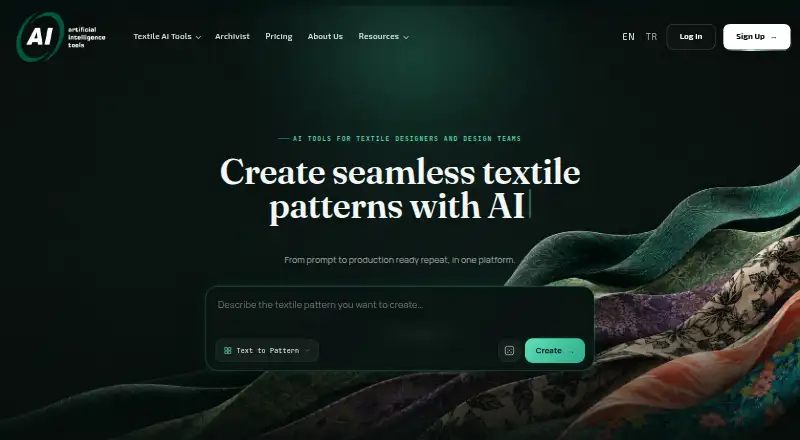
What AIT AI Tools is
AIT AI Tools is a web platform for textile designers who create patterns and prepare designs for production. It offers text-based and reference-based pattern creation, style transfer, extraction, expansion, inpainting, and editing. Production tools include repeat repair, upscaling, color separation, vectorization, background removal, and colorway development. Designs can be previewed on 2D and 3D wear designs, product mockups, and AI-generated scenes. Archivist indexes an existing pattern archive for natural-language, code, tag, and visual-similarity search without requiring folders to be reorganized. Access permissions can be set by user and collection, and collection access can be revoked. AIT says generated designs remain private to the account and are not used to train its models; it also says models are developed in-house and user data is hosted on its own local servers. The free plan provides 20 credits per day, with one to two uses per tool during a rolling four-hour window. Individual costs $39 a month; Professional is $350 a month, and Business is $495 a month. Unused monthly credits do not roll over.
Good
- Offers multiple pattern creation and editing methods.
- Includes production-preparation tools such as vectorization and color separation.
- Archivist supports visual-similarity and text-based search.
- Collection access can be assigned and revoked.
- AIT says designs are private and not used for model training.
Watch out
- Free accounts have one to two uses per tool per rolling four-hour window.
- Unused monthly credits do not roll over.
- Paid plans are credit-based.
- Enterprise pricing is custom.
Who it suits
AIT AI Tools is intended for textile designers, freelancers, studios, design teams, and larger organizations. It may suit users who need both pattern development and production-preparation tools.
Verdict
AIT AI Tools combines textile pattern creation, production preparation, visualization, and archive search. Review the credit and tool-use limits alongside the plan prices, especially if production needs vary from month to month.
Plans and prices
From AIT AI Tools's own pricing page, checked 3 Oct 2026.
| Plan | Price | What it gives you |
|---|---|---|
| Free | Free | 20 credits/day · free accounts limited to 1–2 uses per tool in a rolling 4-hour window |
| Individual | $39 a month | Monthly credit-based production · 1 user · standard processing · personal workspace · standard support · Billed monthly |
| Professional | $350 a month | Higher production capacity · 1 user · priority processing · expanded asset storage · priority support · Billed monthly |
| Business | $495 a month | 5 users · shared workspace · role-based collaboration · expanded team storage · dedicated onboarding · business support · Billed monthly |
| Enterprise & Partnerships | Priced on request | Custom users and usage · tailored workflow · onboarding · enterprise support planning · integration discussions where supported · Custom pricing |
The facts
Each one read from AIT AI Tools's own pages, with the date it was checked.
What it does
- Archivist
- Archivist indexes an existing pattern archive and supports natural-language, code, tag and visual-similarity search without requiring folder reorganization.checked 3 Oct 2026
- Archivist access controls
- Archivist supports access permissions by user and collection, and says collection access can be revoked at any time.checked 3 Oct 2026
- Generated design privacy
- The FAQ says generated designs are private to the account and are not shared publicly or used to train AIT’s AI models.checked 3 Oct 2026
- Infrastructure
- AIT says its models are developed in-house and user data is hosted on its own local servers without third-party APIs.checked 3 Oct 2026
- Integrations
- The pricing page offers enterprise integration discussions where supported but does not name specific third-party integrations.checked 3 Oct 2026
- Intended users
- AIT positions the product for textile designers, freelancers, studios, design teams and larger organizations.checked 3 Oct 2026
- Limits
- Credits and tool usage vary; free accounts have 1–2 uses per tool in a rolling four-hour window, and unused monthly credits do not roll over.checked 3 Oct 2026
- Pattern tools
- Its tools include text-to-pattern generation, reference-based creation, style transfer, pattern extraction, expansion, inpainting and pattern editing.checked 3 Oct 2026
- Production preparation
- The workflow includes repeat repair, upscaling, color separation, vectorization, background removal and colorway development.checked 3 Oct 2026
- Purpose
- AIT AI Tools is a textile-focused platform for creating seamless patterns and preparing designs for production.checked 3 Oct 2026
- Support
- AIT says contact enquiries receive a reply within one working day and offers a 20-minute live demo.checked 3 Oct 2026
- Visualization
- Users can preview textile designs on 2D and 3D wear designs, product mockups and AI-generated scenes.checked 3 Oct 2026
The company
- Company and location
- The maker is A.I.T. Bilgisayar Sistemleri Makine San. ve Tic. Ltd. Şti., with an address in Nilüfer, Bursa, Türkiye.checked 3 Oct 2026
- Headquarters
- Bursa, Türkiyechecked 23 Sep 2026
The full review of AIT AI Tools
AIT AI Tools is a web-based textile design platform for creating patterns, preparing artwork for production and searching existing archives. It is best suited to textile designers and teams whose work spans those stages. Its specialized workflow is a stronger reason to consider it than unrestricted image generation; credit and tool-use limits are important to weigh against the monthly cost.
Overview
AIT brings pattern creation and production preparation into one textile-focused workflow. Designers can start from text or a reference, adapt styles, extract or expand patterns, and edit them with inpainting. They can then repair repeats, upscale, separate colors, vectorize artwork, remove backgrounds and develop colorways. This breadth can reduce the need to move between separate tools for design and preparation, though the credit-based model makes sustained production capacity a key plan consideration.
For presentation, designs can be previewed on 2D and 3D wear designs, product mockups and AI-generated scenes. Archivist adds a useful archive-search function: it indexes existing patterns and supports natural-language, code, tag and visual-similarity searches without requiring folder reorganization. User- and collection-level access permissions, with collection access revocable at any time, make it more relevant to teams managing shared assets.
Key features
Creation and production workflow
AIT covers both generating a new pattern and preparing it for use, including repeat repair, color separation and vectorization. SVG and PNG exports are supported. That combination is a fit for textile work that needs production-oriented steps, rather than only a finished image; AIT does not name specific third-party integrations, so teams should not assume a particular integration is available.
Privacy and infrastructure
AIT says designs generated in an account remain private and are not shared publicly or used to train its models. It also says its models are developed in-house and user data is hosted on local servers without third-party APIs. Those commitments may matter to studios handling client designs, while the privacy statement applies to generated designs and should not be read as a broader guarantee about every kind of data.
Capacity and support
Credits and tool usage vary. Free accounts are limited to one or two uses per tool in a rolling four-hour window, and monthly credits do not roll over. These limits can make irregular or high-volume work harder to plan. AIT offers a 20-minute live demo and says contact enquiries receive a reply within one working day, giving prospective buyers a way to discuss workflow fit before committing.
Pricing
The free plan costs nothing and provides 20 credits per day, subject to the per-tool rolling four-hour cap. It is useful for trying the workflow, but the use cap and limited daily allocation make it a poor basis for dependable production.
Individual costs $39 a month, billed monthly, for one user, monthly credit-based production, standard processing, a personal workspace and standard support. It is the entry paid option for a solo designer, but capacity remains credit-based and no credit rollover is available. Professional costs $350 a month, billed monthly, and remains a one-user plan; it adds higher production capacity, priority processing, expanded asset storage and priority support. That is a substantial step up for a solo user who needs more capacity or faster processing, not a team-seat upgrade.
Business costs $495 a month, billed monthly, and includes five users, a shared workspace, role-based collaboration, expanded team storage, dedicated onboarding and business support. It is the clearest fit for a small team that needs shared work and permissions. Enterprise & Partnerships uses custom pricing for custom users and usage, a tailored workflow, onboarding, enterprise support planning and integration discussions where supported. Choose it when the standard seat and usage arrangements do not fit; integration discussions are not a promise of a particular connector.
Platforms
AIT AI Tools runs on the web. That makes it accessible through a browser, but it is not presented as a native desktop or mobile app.
Who it's for
AIT is aimed at textile designers, freelancers, studios, design teams and larger organizations. Freelancers can benefit from having pattern creation and production preparation together, while teams may value Archivist and the Business plan's shared workspace and role-based collaboration. It is less compelling for users who only need occasional image generation or who cannot work within variable credit and tool-use limits.
Pros and cons
- Pros: A textile-specific workflow spans pattern generation, production preparation and visualization, reducing the need to assemble those capabilities separately.
- Pros: Archivist searches patterns by several methods without requiring archive folder reorganization, with user- and collection-level access controls.
- Pros: A free plan and 20-minute demo offer ways to assess the workflow before paying.
- Cons: Free users face a one-to-two-use-per-tool cap in each rolling four-hour window, which restricts sustained evaluation and production.
- Cons: Monthly credits do not roll over, and credit-based production can make variable workloads harder to budget.
- Cons: Professional costs $350 a month for one user, while the five-seat Business plan costs $495 a month; teams should compare those seat and collaboration differences carefully.
Alternatives
For a broader comparison of tools in this area, browse AI Fashion Design Generators or AI Pattern Generators.
Choose Style3D AI instead if its free plan's 50 credits, approximately 50 images and 15-day asset storage suit your initial workload, or if you need a macOS option as well as web access. Consider Fabra if you want a free plan with 300 AI credits updated yearly and Design Editor access, while noting that its free plan does not include Tech Pack or high-resolution design exports.
Mew Design AI Product Mockup Maker is another web-based freemium option, with a 50-credit signup allowance, 100MB storage and standard downloads on its free plan. Pattern Weaver offers a free plan with three credits, PNG/JPG export and 2K patterns, and may suit a narrower pattern-generation need.
Resleeve offers a free plan with $25 in credits and a Basic plan at $19 a month with a $19 monthly balance; consider it if that credit-based approach better matches your needs. Texloom Studio has a free plan with 100 starting credits and 27 tool pages free without signup, which may appeal if you want to explore a broader set of tool pages before creating an account.
Fashion Diffusion is a paid option with a free plan and trial, and its Starter plan is $12 a month for 100 monthly credits, 4K images, 1080p AI videos and developer API access. The New Black AI is another paid option with a free plan and trial; its Starter plan is $15 a month, billed monthly with cancellation at any time, and includes 200 monthly credits and three seats.
Verdict
AIT AI Tools is a strong candidate for textile designers and teams that need pattern creation, production preparation and archive search in one web workflow. Its main advantage is the range of textile-specific work it brings together; its main drawback is that variable credit limits and steep paid tiers can make capacity costly or difficult to predict. Start with the free plan or demo if your workload is uncertain, and look elsewhere if you need a lower-cost, more predictable option for occasional design work.
Getting started
- Visit the AIT AI Tools website.
- Start with the free account, which provides 20 credits per day.
- Choose a monthly Individual, Professional or Business plan for its listed capacity and workspace features.
- Contact AIT to discuss custom Enterprise & Partnerships pricing and supported integration discussions.
- Request a 20-minute live demo if you want a product walkthrough.
Limits worth knowing
Free accounts receive 20 credits per day and are limited to one to two uses per tool in a rolling four-hour window. Individual is limited to one user; unused monthly credits do not roll over.
Questions
Is AIT AI Tools free?
Yes. The Free plan is listed as free and provides 20 credits per day, with tool-use limits.
How much do paid plans cost?
Individual costs $39 per month, Professional costs $350 per month and Business costs $495 per month. Enterprise & Partnerships uses custom pricing.
Which platforms and export formats are supported?
AIT AI Tools is a web platform. Listed export formats are SVG and PNG.
Does it connect to third-party services?
Enterprise integration discussions are offered where supported, but no specific third-party integrations are named.
How does AIT describe design privacy and its infrastructure?
AIT says generated designs are private to the account and are not used to train its models. It says its models are developed in-house and user data is hosted on its own local servers without third-party APIs.
Who makes AIT AI Tools?
The maker is A.I.T. Bilgisayar Sistemleri Makine San. ve Tic. Ltd. Şti., with an address in Nilüfer, Bursa, Türkiye.
Alternatives to AIT AI Tools
- 1

Recraft
Free planAndroidiOSWebAPI8.2Free plan - 2

Pattern Weaver
Free planWebAPI7.4$19.99 one-time - 3
Seamlessify
Free planWeb7.4From $9.99 a month - 4
Image to Pattern
Free planWebAPIExtension7.3From $19 a month - 5
Repper
Free planAndroidiOSWeb7.3From $12.99 a month - 6

Texloom Studio
Free planWebExtension6.9From $15 a month