
Fabra
Fabra is a web-based product design studio for developing designs in 2D or 3D, planning collections, and preparing production specifications.
What Fabra is
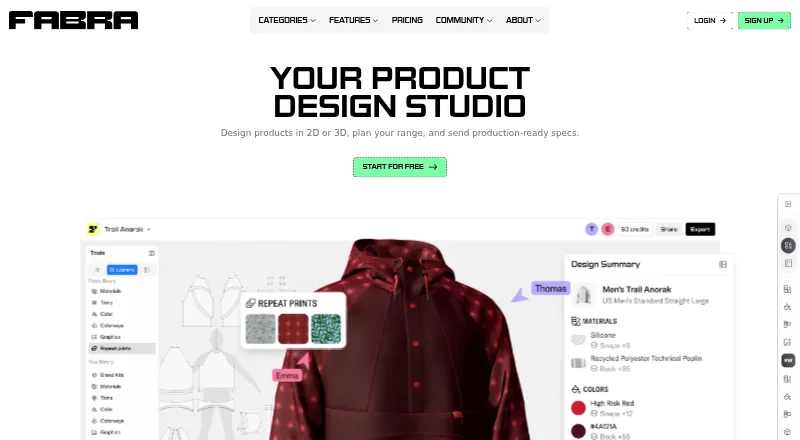
Fabra is a web-based product design studio for developing designs in 2D or 3D, planning collections, and preparing production specifications. Its Design Editor links a 2D pattern, 3D design, and Tech Pack, which updates as the design changes. Projects can start from a template or base product, a pattern drafted from scratch, or an uploaded DXF. Tech Packs include measurement lines, materials and trims in a Bill of Materials, and construction callouts; they can be exported to Excel or shared by live link. Fabra also offers artwork downloads and prompt-based generation of materials and trims, plus flat-lay or on-model images using plan credits. Range Plan places styles and colorways side by side. Pattern Editing, Range Plan, Repeat Print Maker, and AI Tools are marked beta. The Free plan allows up to three replaceable designs and 300 AI credits updated yearly, but Tech Pack and high-resolution design exports require a paid plan.
Good
- Links 2D patterns, 3D designs, and Tech Packs
- Accepts patterns drafted from scratch or uploaded as DXF
- Tech Packs can be exported to Excel
- Range Plan compares styles and colorways side by side
Watch out
- Free plan allows up to three replaceable designs
- Tech Pack exports require a paid plan
- High-resolution exports require a paid plan
- Several features are labeled beta
Who it suits
Fabra suits people developing product ideas who need design, collection planning, and production specifications in one web tool. The Free plan is an option for trying its editor within the listed design and export limits.
Verdict
Fabra connects product design work with Tech Pack details and collection planning. Review the Free plan's design and export limits, and note that several features are labeled beta.
Plans and prices
From Fabra's own pricing page, checked 28 Sep 2026.
| Plan | Price | What it gives you |
|---|---|---|
| Free | Free | 300 AI credits, updated yearly · Up to 3 replaceable designs · Design Editor access · Generation tools · Tech Pack exports and high-res design exports not included · forever |
| Starter | $15 a month | 2,000 AI credits/month · Unlimited designs · 5 Tech Pack exports/month · 1 Range Plan board · Pattern import and export · Repeat Print Maker · High-res design exports · $144 billed yearly • 20% off; yearly display also shows $12 per month |
| Pro | $50 a month | 5,000 AI credits/month · Unlimited designs · 30 Tech Pack exports/month · Unlimited Range Plan boards · Unlimited custom Brand Kits · $396 billed yearly • 34% off; yearly display also shows $33 per month |
The facts
Each one read from Fabra's own pages, with the date it was checked.
What it does
- AI tools
- Generation tools create materials and trims from prompts and can export AI-generated flat-lay or on-model images using plan credits.checked 28 Sep 2026
- Audience
- Fabra says its tool is for people developing product ideas, including business, label, and product ideas, and describes its team as designers, developers, and makers.checked 28 Sep 2026
- Beta features
- The site labels Pattern Editing, Range Plan, Repeat Print Maker, and AI Tools as beta features.checked 28 Sep 2026
- Credit limits
- Subscription credits reset each billing cycle and do not roll over, while Free plan credits never expire; credit top-ups are available only on subscription plans.checked 28 Sep 2026
- Design editor
- The Design Editor keeps the 2D pattern, 3D design, and Tech Pack in sync.checked 28 Sep 2026
- Pattern workflows
- Users can start from a template or base product, draft a pattern from scratch, or upload a DXF.checked 28 Sep 2026
- Product
- Fabra describes itself as a product design studio for designing in 2D or 3D, planning collections, and sending production-ready specifications.checked 28 Sep 2026
- Production details
- Tech Packs support measurement lines, materials and trims in the Bill of Materials, and construction callouts; exports include Excel or cloud sharing.checked 28 Sep 2026
- Sharing
- People can view a shared design with a free account, but viewing and downloading its Tech Pack requires a paid plan.checked 28 Sep 2026
- Support
- Fabra directs users to its Help Center and lists [email protected] as a contact email.checked 28 Sep 2026
- Tech Packs
- Each design generates a Tech Pack that updates as the design changes, with Excel export, artwork download, and live-link sharing.checked 28 Sep 2026
Money
- Collection planning
- Range Plan lets users plan a collection with styles and colorways side by side; the Free and Starter plans include one board, while Pro includes unlimited boards.checked 28 Sep 2026
- Free-plan limit
- The Free plan allows up to three replaceable designs and 300 AI credits that are updated yearly; Tech Pack exports and high-resolution design exports require a paid plan.checked 28 Sep 2026
The company
- Headquarters
- Surry Hills, New South Wales, Australiachecked 28 Sep 2026
The full review of Fabra
Fabra is a web-based workspace for developing product designs and production specifications. It is best suited to designers and small product teams who need patterns, Tech Packs and collection planning connected. Its strongest advantage is that the design and specification stay in sync; the catch is that essential exports are paid features.
Overview
Fabra connects 2D patterns, 3D designs and Tech Packs in one Design Editor. That makes it a more practical choice for moving a product idea toward production than a tool focused only on generating images. Work can start from a template or base product, a pattern drafted from scratch, or an uploaded DXF.
Each design generates a Tech Pack that updates as the design changes. It can include measurement lines, a Bill of Materials for materials and trims, and construction callouts. Excel export and live-link sharing support handoff, and users can download artwork. These connected steps are Fabra’s clearest strength, though export quotas on paid plans matter for teams preparing many designs.
Key features
Patterns and Tech Packs
Pattern workflows include both drafting and DXF import and export. The automatically updated Tech Pack helps keep production details aligned with design revisions, reducing the need to treat the specification as a separate document. Free users cannot export Tech Packs, however, and shared-design viewers need a paid plan to view or download the Tech Pack.
AI tools and collection planning
Prompt-based tools generate materials and trims, while plan credits can also be used for AI-generated flat-lay or on-model images. Range Plan puts styles and colorways side by side, which is useful when comparing a collection rather than evaluating each design in isolation. Pattern Editing, Range Plan, Repeat Print Maker and AI Tools are labeled beta, so they are less suitable as the foundation of a workflow that depends on stable behavior.
Free and Starter include one Range Plan board; Pro removes that cap with unlimited boards. Subscription credits reset each billing cycle and do not roll over, while Free credits do not expire; credit top-ups are available only on subscription plans.
Pricing
Fabra has a free plan and paid subscriptions. The Free plan costs nothing, billed forever. It includes 300 AI credits updated yearly, up to three replaceable designs, Design Editor access and generation tools. It is enough to explore the editor and try generation, but the design cap and lack of Tech Pack and high-resolution exports make it a poor fit for production handoff.
Starter is $15 a month, or $144 billed yearly, shown as $12 per month with 20% off. It includes 2,000 AI credits/month, unlimited designs, five Tech Pack exports/month, one Range Plan board, pattern import and export, Repeat Print Maker and high-resolution design exports. This is the practical entry tier for an individual developing products who needs export access, though five Tech Pack exports a month can constrain busier work.
Pro is $50 a month, or $396 billed yearly, shown as $33 per month with 34% off. It includes 5,000 AI credits/month, unlimited designs, 30 Tech Pack exports/month, unlimited Range Plan boards and unlimited custom Brand Kits. It suits teams or designers managing larger collections and more frequent handoffs; users needing more than 30 monthly exports may need another arrangement. Paid subscription credits reset each billing cycle and do not roll over.
Fabra’s pricing note says paid plans start at $16.50/mo (annual), while the plan display gives Starter’s yearly billing as $144 billed yearly, shown as $12 per month. Compare the stated plan terms before choosing a subscription.
Platforms
Fabra runs on the web. Its export options include Excel and DXF, giving users formats for Tech Pack handoff and pattern workflows.
Who it's for
Fabra suits people developing product, label or business ideas who need design work tied to production details. Independent designers can use Starter to get unlimited designs and a modest monthly export allowance; product teams planning multiple styles may find Pro’s higher export cap and unlimited Range Plan boards more appropriate. It is not the right fit for someone who only needs occasional visuals and expects to export production documents for free.
Pros and cons
- Pro: The 2D pattern, 3D design and Tech Pack stay connected, making revisions more useful for production than a standalone image workflow.
- Pro: Measurement lines, materials and trims, and construction callouts give Tech Packs substantive handoff detail.
- Pro: DXF workflows and Excel export support pattern work and production sharing.
- Con: Free users cannot export Tech Packs or high-resolution designs, limiting the free plan to exploration and sharing designs without production documents.
- Con: Starter’s five monthly Tech Pack exports and single Range Plan board may be restrictive for active collections.
- Con: Several features are beta, and subscription credits expire at each billing-cycle reset.
Alternatives
For a broader browse of category options, see AI Fashion Design Generators.
- Catwalk.AI is a web alternative? It is available on iOS and macOS, with one-time 10 Try On Pack for 9.99 USD and 100 Try-On pack for 99.99 USD; choose it when its try-on packs and Apple platforms fit better than Fabra’s design-to-Tech-Pack workflow.
- Clearly Logo Maker is a freemium option for readers looking for a different tool; its Free plan is free.
- Style3D AI offers a free plan with 50 credits (about 50 images), one image generation at a time and 15-day asset storage; consider it when those image-generation limits and macOS or web access better match the task.
- AIT AI Tools has a web-based Free plan with 20 credits/day and limits free accounts to 1–2 uses per tool in a rolling four-hour window; it is an option when that daily credit structure suits the work.
- Mew Design AI Product Mockup Maker has a web Free plan with 50 signup credits, 5–7 designs, 100MB storage and standard downloads; it may suit a smaller mockup workflow.
- Pattern Weaver offers a web Free plan with three credits and PNG/JPG export, plus 2K patterns; choose it when pattern output and image formats matter more than Fabra’s connected Tech Packs.
- Resleeve offers a web Free plan with $25 in credits and no credit card required; consider it if those terms better fit a credit-based workflow.
- Texloom Studio is a web and extension alternative with 100 starting credits on its Free plan; it may fit users who prefer that platform mix.
Verdict
Choose Fabra if you are developing products toward production and want patterns, collection planning and updated Tech Packs in one workspace. Its linked editor and detailed specifications are the main reason to pick it. Look elsewhere if free production exports are essential, or if beta features and monthly export limits are a poor fit for your workflow.
Alternatives to Fabra
- 1

Clearly Logo Maker
Free planWebAPImacOSWindows7.8From $29 a month - 2

Fashion Diffusion
AndroidiOSWebAPI7.7From $119.99 a year - 3

Style3D AI
Free planWebAPImacOSWindows7.6From CN¥49.90 a month - 4

Mew Design AI Product Mockup Maker
Free planWebAPI7.5From $5.69 a month - 5

Pattern Weaver
Free planWebAPI7.4$19.99 one-time - 6
Catwalk.AI
Free planiOSmacOS7.2$9.99 one-time