ShareDrop.org
ShareDrop.org is a free service for transferring files between two devices through browsers or mobile apps.
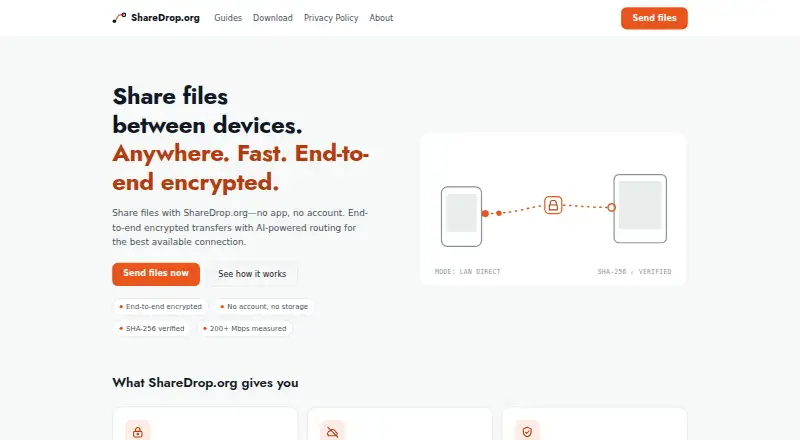
What ShareDrop.org is
ShareDrop.org is a free service for transferring files between two devices through browsers or mobile apps. It supports Android, iOS, Linux, macOS, Windows, and the web. A user can invite another device with a QR code, link, or 8-character short code, and the receiving device must approve the connection. Transfers use WebRTC and try a local network connection, then a direct internet connection, then an encrypted relay. Both devices calculate SHA-256 checksums, and a transfer is marked complete only when the checksums match. Folder transfers preserve their structure in Chrome and Edge on desktop, and transfers can resume after brief connection drops. The maker says file contents, names, and checksums pass between devices and are not received or stored by its servers. Because it does not hold files on a server, the service cannot scan them for malware. Mobile apps use Google AdMob and Firebase Analytics; the web transfer app has no advertising scripts.
Good
- Free to use with no premium tiers.
- Connection can use a QR code, link, or short code.
- Transfers verify matching SHA-256 checksums.
- Transfers can resume after brief connection drops.
- Supports Android, iOS, desktop systems, and web.
Watch out
- Firefox, Safari, and mobile browser downloads cap files at 512 MB.
- The service cannot scan files for malware.
- Mobile apps use AdMob and Firebase Analytics.
- No phone support is offered.
Who it suits
ShareDrop.org suits people who want to transfer files between two devices without a fee or account. It supports browser and mobile use, with folder structure preservation specifically listed for Chrome and Edge desktop.
Verdict
ShareDrop.org offers browser and app transfers with checksum verification and several connection options. Note the 512 MB per-file limit for specified browsers and mobile-browser downloads, and that the service does not scan files for malware.
Plans and prices
From ShareDrop.org's own pricing page, checked 4 Oct 2026.
| Plan | Price | What it gives you |
|---|---|---|
| Free | Free | No account · no premium tiers · no fee to unlock larger files |
The facts
Each one read from ShareDrop.org's own pages, with the date it was checked.
What it does
- Accessibility
- The About page says the team aims for WCAG 2.2 AA on essential operations and lists keyboard operation and screen-reader status announcements among implemented features.checked 4 Oct 2026
- Connection
- Transfers use WebRTC and try a local network connection, a direct internet connection, then an encrypted relay.checked 4 Oct 2026
- File size limits
- Firefox, Safari, and mobile browsers using in-memory downloads are capped at 512 MB per file; the iOS and Android apps have no per-file cap stated on the limits page.checked 4 Oct 2026
- Folders and resume
- Folder transfers preserve structure in Chrome and Edge desktop, and transfers can resume after brief connection drops.checked 4 Oct 2026
- Integrity
- Both devices compute SHA-256 checksums, and a transfer is marked complete only when they match.checked 4 Oct 2026
- Invites
- Users can invite another device with a QR code, link, or 8-character short code, and must approve the connection.checked 4 Oct 2026
- Privacy
- The maker says file contents, names, and checksums are exchanged between devices and are not received or stored by its servers.checked 4 Oct 2026
- Privacy and ads
- The privacy policy says the mobile apps use Google AdMob and Firebase Analytics, while the web transfer app has no advertising scripts.checked 4 Oct 2026
- Purpose
- ShareDrop.org transfers files between two devices using their browsers or mobile apps.checked 4 Oct 2026
- Security limit
- The service says it cannot scan files for malware because it does not hold them on a server.checked 4 Oct 2026
- Support
- Support is offered by email; the maker says support requests are typically answered within a few business days and it does not offer phone support.checked 4 Oct 2026
Where it runs
- Platforms
- The site says the web app runs in modern browsers on Windows, Mac, and Linux, and offers native iPhone, iPad, and Android apps.checked 4 Oct 2026
Alternatives to ShareDrop.org
- 1

Internxt Drive
Free planOpen sourceAndroidiOSWebAPI8.6Free plan - 2

Seafile
Free planOpen sourceAndroidiOSWebAPI8.6Free plan - 3

Box
Free planAndroidiOSWebAPI8.3From $5 a month - 4
Google Drive
Free planAndroidiOSmacOSWindows8.2Free plan - 5

MEGA
Free planAndroidiOSWebAPI8.2Free plan - 6
Microsoft OneDrive
Free planAndroidiOSmacOSWindows8.0From $1.99 a month