Shape Collage
Shape Collage arranges photos into a collage using a selected shape, such as a rectangle, heart, circle, letter or a shape drawn by the user.
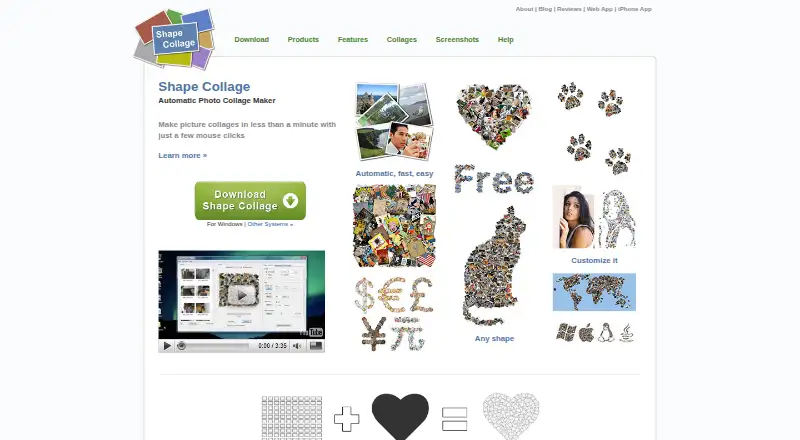
What Shape Collage is
Shape Collage arranges photos into a collage using a selected shape, such as a rectangle, heart, circle, letter or a shape drawn by the user. It can use photos from a computer or from listed web sources, including Facebook, Instagram, Flickr, Dropbox and Google Drive. Users can adjust collage size, photo size, photo count, spacing, background and border colour.
Finished collages can be saved as JPEG, PNG or Photoshop PSD files. The free personal-use version is available without ads or spyware. Pro removes watermarks and adds manual photo editing, PSD export, and the ability to save and load projects. The personal Pro license costs 40.00 USD once and is for non-business use on one computer; the commercial Pro license costs 75.00 USD once and covers business, academic or government use on one computer. Shape Collage runs on iOS, Linux, macOS, web and Windows. Linux users need Java installed. There is no built-in print function, so printing requires another program or service.
Good
- Collages can use drawn shapes, letters and common forms.
- Users can adjust spacing, photo count and colours.
- Exports include JPEG, PNG and Photoshop PSD.
- Photos can come from a computer or listed web sources.
Watch out
- The free version is for personal use only.
- Pro costs 40.00 USD once for personal use.
- Linux requires Java.
- Printing requires another program or service.
Who it suits
Shape Collage suits people who want to arrange photos into a chosen or custom shape and save the result as an image. The free version is for personal use; Pro offers separate personal and commercial licenses.
Verdict
Shape Collage offers shape-based layouts and adjustable settings, with image exports and a free personal-use option. Note the separate Pro license terms, Linux Java requirement and lack of built-in printing.
Plans and prices
From Shape Collage's own pricing page, checked 2 Oct 2026.
| Plan | Price | What it gives you |
|---|---|---|
| Shape Collage Free | Free | Free for personal use · Pro required for commercial use and watermark removal |
| Shape Collage Pro (Personal) | $40, paid once | Personal, non-business use · One computer per license · License does not expire |
| Shape Collage Pro (Commercial) | $75, paid once | Business, academic, or government use · One computer per license |
The facts
Each one read from Shape Collage's own pages, with the date it was checked.
What it does
- Automatic layout
- The maker says collages can be created in less than a minute and photos are automatically placed using a fast, patent-pending method.checked 2 Oct 2026
- Commercial license
- The commercial Pro license permits use in business, academic, or government environments, and the maker says one license covers exactly one computer.checked 2 Oct 2026
- Custom shapes
- Users can make collages in shapes such as rectangles, hearts, circles, letters, or their own drawn shape.checked 2 Oct 2026
- Export formats
- The app can save collages as JPEG, PNG, or Photoshop PSD files.checked 2 Oct 2026
- Image sources
- The product can use photos on the computer or from the web; the download page lists Facebook, Instagram, Flickr, Dropbox, Google Drive, Google+, Google Search, Twitter, and Tumblr among sources.checked 2 Oct 2026
- Layout controls
- Users can adjust collage size, photo size, number of photos, spacing, background, and border colour.checked 2 Oct 2026
- Notable limit
- The FAQ says Shape Collage has no built-in print function; it creates an image file that users can print with another program or service.checked 2 Oct 2026
- Pro features
- Pro removes watermarks and adds manual photo editing, PSD export, and saving and loading projects.checked 2 Oct 2026
- Purpose
- Shape Collage automatically arranges photos into a collage in a chosen shape.checked 2 Oct 2026
- Security claims
- The features page describes the personal-use version as having no ads or spyware.checked 2 Oct 2026
- Server license
- A separate server license allows running the software on a web server or as a command-line program in automated or batch systems, with details available from sales.checked 2 Oct 2026
- Support
- The maker directs users to its FAQ and accepts support requests through a contact form or [email protected].checked 2 Oct 2026
The company
- Founded
- 2007checked 28 Sep 2026
Where it runs
- Platform detail
- The Linux download page says Java must be installed for Shape Collage to run.checked 2 Oct 2026
The full review of Shape Collage
Overview
Shape Collage is a photo-collage maker that automatically arranges images into a selected or user-drawn shape. It suits people who want a shaped composition without positioning every photo individually. Its appeal is the mix of shape control and export choices; its main trade-offs are watermarks on the free edition, separate commercial licensing and no built-in printing.
Photos can come from a computer or web sources including Facebook, Instagram, Flickr, Dropbox, Google Drive, Google Search, Twitter and Tumblr. The app saves JPEG and PNG files, while PSD export is a Pro feature. The maker says its automatic arrangement can produce a collage in less than a minute.
For more options, see Collage Maker Software.
Key features
- Shape-based layouts: Choose a rectangle, heart, circle or letter, or draw a custom shape. This is the defining strength for users who want a silhouette rather than a conventional grid.
- Adjustable composition: Set collage and photo sizes, the number of photos, spacing, background and border colour. These controls offer meaningful tailoring without requiring manual placement of every image.
- Export and project options: JPEG and PNG cover common image sharing and printing workflows. Pro adds PSD export and the ability to save and load projects, which better suits users who expect to revisit or refine a composition.
- Manual editing: Pro adds manual photo editing; the free edition is more limited when automatic placement alone is not enough.
- Text overlays: Text overlays are supported, adding another way to personalize a collage.
Pricing
Shape Collage uses a freemium model, with a free personal-use option and one-time Pro licenses. There is no free trial.
- Shape Collage Free — free: A no-cost choice for personal use. It does not remove watermarks, and commercial use requires Pro.
- Shape Collage Pro (Personal) — $40, paid once: For non-business personal use on one computer. The license does not expire; Pro removes watermarks and adds manual editing, PSD export, and project saving and loading.
- Shape Collage Pro (Commercial) — $75, paid once: For business, academic or government use, on one computer per license. The higher price is the relevant route for organizational work; the personal license is not a substitute.
A separate server license allows use on a web server or in command-line automated and batch systems, with custom pricing through sales. The maker describes the personal-use version as having no ads or spyware.
Platforms
Shape Collage is available for iOS, Linux, macOS, web and Windows. Linux users need Java installed to run the software. The lack of built-in printing means any user who wants a physical copy must print the exported image through another program or service.
Who it's for
Shape Collage is a good fit for personal projects where the outline matters as much as the photos: a heart, letter or custom silhouette, for example. Its size, spacing and photo-count controls help users tune the result, while automatic placement avoids laborious image-by-image arrangement. People who need commercial rights, watermark-free output or editable project files should budget for Pro. Those seeking a direct print workflow should choose a tool with built-in printing instead.
Pros and cons
Pros
- Custom-drawn shapes and letter layouts go beyond standard rectangular arrangements.
- Adjustments for photo count, spacing, background and border colour provide control over the finished composition.
- The personal Pro license is a one-time $40.00 USD purchase and does not expire.
- JPEG, PNG and Pro PSD exports support both common image use and a layered-file workflow.
Cons
- The free edition is limited to personal use and retains watermarks, so it is not a clean commercial or watermark-free option.
- Each personal or commercial license covers one computer, which can be restrictive across multiple machines.
- There is no built-in print function; printing requires another program or service.
- Linux requires Java, an extra prerequisite for that platform.
Alternatives
FotoJet is worth considering if you want a free online collage maker with basic editing tools and templates, or prefer a monthly Plus plan over Shape Collage's one-time personal license.
PhotoGrid is an alternative for Android users or anyone who wants a web or iOS option; its free plan includes 100 MB of cloud storage.
CollageIt is a Windows or Mac alternative whose free edition supports up to 200 photos; its personal Pro license is priced at $29.90, paid once.
PicCollage suits readers looking for an Android, iOS or web option with a free plan and trial; premium templates, stickers and advanced features require a subscription.
SnapLayout is for iOS and macOS users who want a slide-based workflow: its free plan includes up to 20 slides and caps exports at 1080px on the longest edge.
Photovisi is a web-based alternative with free collage making, though its free output may have limited resolution or a watermark.
CollagePhotoApp is another freemium option for web, iOS and Android.
Fotowall is a free alternative for web, Windows and Linux.
Verdict
Choose Shape Collage if you want photos arranged into a distinctive shape and value control over spacing, scale and colour without manually placing each image. Its free personal edition is a sensible starting point, while Pro is the practical choice for watermark-free or commercial work. Look elsewhere if printing inside the app or licensing one installation across multiple computers is essential.
Getting started
- Open the Shape Collage website
- Choose the free personal version or a Pro license
- Install it on iOS, Linux, macOS, web, or Windows
- Install Java first on Linux
- Add photos from your computer or a listed web source
- Choose a shape and adjust the collage settings
- Save the result as JPEG, PNG, or PSD
Limits worth knowing
The free plan is for personal use and does not include Pro features such as watermark removal, manual photo editing, PSD export, or project saving and loading. Pro licenses cover one computer; the personal license costs $40.00 USD once and commercial Pro costs $75.00 USD once.
Questions
Is Shape Collage free?
Yes. Shape Collage Free costs nothing for personal use.
What does Personal Pro cost?
Personal Pro costs 40.00 USD once, is for non-business use, covers one computer, and does not expire.
Which platforms are supported?
Shape Collage runs on iOS, Linux, macOS, web, and Windows.
Can it remove watermarks?
Yes. Pro removes watermarks.
Can Shape Collage print directly?
No. It creates an image file that can be printed with another program or service.
Is there a commercial license?
Yes. Commercial Pro costs 75.00 USD once for business, academic, or government use on one computer.
Alternatives to Shape Collage
- 1
FotoJet
Free planWebExtensionLinuxmacOS8.0From $39.99 a year - 2

Collage Pro
Free planAndroidiOSWeb7.9From $29.90 a year - 3

PicCollage
Free planAndroidiOSWeb7.3From $35.99 a year - 4

Scatter
Free planAndroidiOSWeb7.1$19 one-time - 5

CollageIt
Free planiOSmacOSWindows7.0$29.90 one-time - 6

PhotoGrid
Free planAndroidiOSWeb7.0Free plan