
CollageIt
CollageIt creates photo grids and collages for albums, posters, scrapbook projects, art projects, and presentations.
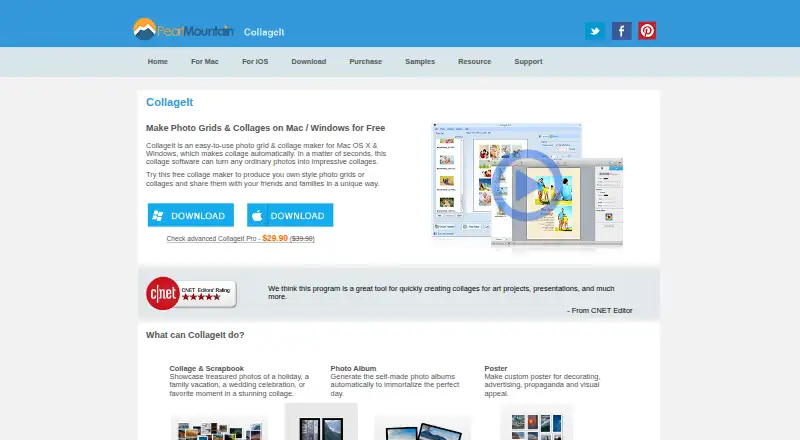
What CollageIt is
CollageIt creates photo grids and collages for albums, posters, scrapbook projects, art projects, and presentations. Its desktop version can accommodate up to 200 photos, with controls for page size, background, spacing, margins, rotation, frames, shadows, cropping, and random layouts. The Mac version offers Mosaic, Grid, Center, Pile, and Free Mode, with more than 60 templates. Face recognition helps fit photos into layouts, and a real-time preview shows the result. Collages can be saved in JPEG, PNG, PDF, PSD, TIFF, BMP, GIF, and other image formats. The iOS app supports up to nine photos and collage sizes up to 1800 by 1800 pixels; users can add photos from Facebook albums and share collages to Facebook, Twitter, Flickr, Tumblr, and Instagram. The free plan is available for Windows and Mac. Paid personal licenses cost $29.90, paid once for up to two PCs or Macs; commercial licenses cost $49.90, paid once for up to five PCs or Macs. CollageIt supports iOS, macOS, and Windows.
Good
- Desktop version supports up to 200 photos.
- Mac version includes more than 60 templates.
- Offers controls for cropping, rotation, frames, and shadows.
- Exports include JPEG, PNG, PDF, and PSD.
- iOS app can import photos from Facebook albums.
Watch out
- iOS app is limited to nine photos.
- iOS collage sizes are limited to 1800 by 1800 pixels.
- Windows and Mac versions listed are from 2015 and 2016.
Who it suits
CollageIt suits people making photo collages for albums, posters, scrapbook or art projects, and presentations. The iOS app is for smaller collages of up to nine photos.
Verdict
CollageIt offers automatic desktop collage layouts and a range of editing controls, with a smaller photo capacity on iOS. Paid personal and commercial licenses are listed for both Windows and Mac.
Plans and prices
From CollageIt's own pricing page, checked 2 Oct 2026.
| Plan | Price | What it gives you |
|---|---|---|
| CollageIt Free | Free | Windows and Mac downloads; home page says it supports up to 200 photos |
| CollageIt Pro Personal License for Mac | $29.90, paid once | Up to 2 Macs |
| CollageIt Pro Personal License for Windows | $29.90, paid once | Up to 2 PCs |
| CollageIt Pro Commercial License for Mac | $49.90, paid once | Up to 5 Macs |
| CollageIt Pro Commercial License for Windows | $49.90, paid once | Up to 5 PCs |
The facts
Each one read from CollageIt's own pages, with the date it was checked.
What it does
- Automatic layout
- The Mac version uses face recognition to fit photos when generating layouts and provides real-time preview.checked 2 Oct 2026
- Customization
- The desktop product supports page size, background, photo spacing, margins, rotation, frames, shadows, cropping, and random layouts.checked 2 Oct 2026
- Download versions
- The download page lists Windows version 1.9.5 released January 5, 2015, Mac version 3.6.0 released September 7, 2016, and iOS version 2.0.0 released September 14, 2013.checked 2 Oct 2026
- Exports
- The home page lists JPEG, PNG, PDF, PSD, and other image formats for saving collages.checked 2 Oct 2026
- Integrations and sharing
- The iOS page says users can add photos from Facebook albums and share collages to Facebook, Twitter, Flickr, Tumblr, and Instagram.checked 2 Oct 2026
- Intended uses
- The home page describes collages for scrapbook projects, photo albums, posters, art projects, and presentations.checked 2 Oct 2026
- Photo capacity
- The desktop home page says the software can accommodate up to 200 photos.checked 2 Oct 2026
- Pro benefits
- The purchase page lists removal of limitations and splash screen, photo cropping, large-size collage export, lifetime support, and a 30-day money-back satisfaction guarantee.checked 2 Oct 2026
- Security and privacy
- The privacy policy says PearlMountain does not know users’ credit card numbers or other sensitive payment information, which is handled by its payment providers.checked 2 Oct 2026
- Support
- The support page directs product questions to PearlMountain technical support and provides FAQs.checked 2 Oct 2026
- Templates and styles
- The Mac version supports Mosaic, Grid, Center, Pile, and Free Mode, with more than 60 templates.checked 2 Oct 2026
- What it does
- CollageIt automatically creates photo grids and collages for sharing, printing, and other uses.checked 2 Oct 2026
The company
- Founded
- 2006checked 28 Sep 2026
Where it runs
- iOS limit
- The iOS app supports up to 9 photos and collage sizes up to 1800 by 1800 pixels.checked 2 Oct 2026
The full review of CollageIt
CollageIt is a collage maker that automatically arranges photos into grids and other layouts for print, sharing, and creative projects. It is best suited to desktop users who want to shape larger photo collections rather than make quick phone collages. The desktop tools are broad, while the iOS app is capped at nine photos per collage.
Overview
CollageIt supports uses from scrapbook pages and photo albums to posters, art projects, and presentations. Its desktop edition can accommodate up to 200 photos, making it the more capable choice for dense collages; the iOS app is better suited to smaller compositions, with a maximum size of 1800 by 1800 pixels.
The Mac edition offers Mosaic, Grid, Center, Pile, and Free Mode, plus more than 60 templates. That range gives users several starting points, from regular grids to looser arrangements, without requiring every layout to be built from scratch.
Key features
On Mac, face recognition helps fit photos into automatically generated layouts, and a real-time preview lets users see the composition as it takes shape. Desktop users can also adjust page size, background, spacing, margins, rotation, frames, shadows, and cropping, or generate random layouts. Custom layouts and text overlays are supported, so the software can serve projects that need more than a basic photo grid.
Collages can be exported as JPEG, PNG, PDF, PSD, TIFF, BMP, GIF, and other image formats. The iOS app can import photos from Facebook albums and share collages to Facebook, Twitter, Flickr, Tumblr, and Instagram. That makes mobile sharing convenient, but its nine-photo ceiling and output-size cap are meaningful constraints for print work or larger collections.
Pricing
CollageIt Free costs nothing and is available as a Windows or Mac download. It retains the desktop capacity of up to 200 photos, making it a useful way to create larger collages without paying. Pro removes limitations and the splash screen, and adds photo cropping, large-size collage export, lifetime support, and a 30-day money-back satisfaction guarantee.
- Pro Personal License for Windows: $29.90, paid once, for up to 2 PCs. A fit for personal users who want the Pro benefits on a small number of Windows computers.
- Pro Personal License for Mac: $29.90, paid once, for up to 2 Macs. The equivalent option for personal Mac use.
- Pro Commercial License for Windows: $49.90, paid once, for up to 5 PCs. Choose it for commercial work on Windows rather than a personal license.
- Pro Commercial License for Mac: $49.90, paid once, for up to 5 Macs. It provides the commercial option for Mac users.
The personal licenses cost less but cover fewer machines and personal use; commercial licenses allow up to five computers of the matching platform. CollageIt is also offered on iOS, though the listed Pro purchase options are for Windows and Mac.
Platforms
CollageIt is available for Windows, macOS, and iOS. The download page lists Windows 1.9.5, released January 5, 2015; Mac 3.6.0, released September 7, 2016; and iOS 2.0.0, released September 14, 2013. These release dates are old, so users who need a more recently released version should consider another option.
Who it's for
CollageIt is a sensible fit for people making desktop collages for albums, posters, presentations, or art projects, especially when they want capacity for up to 200 photos and control over spacing, cropping, and other layout details. The free desktop plan covers substantial photo capacity; Pro is the better fit for users who need its added cropping and large-size export or want a commercial license. It is less suitable for users whose main need is a current, small-screen collage workflow or who regularly build mobile collages with more than nine photos.
Pros and cons
- Pros
- Desktop support for up to 200 photos gives larger projects more room than the iOS app.
- Mac offers five layout modes and more than 60 templates, while desktop controls allow detailed adjustments to composition and appearance.
- Free Windows and Mac downloads retain the 200-photo capacity, so users can make substantial collages before paying.
- Pro licenses distinguish personal from commercial use and cover up to two or five computers, respectively.
- Cons
- The iOS app is limited to nine photos and 1800 by 1800 pixels, restricting larger or print-oriented projects.
- The listed desktop and iOS releases date from 2015, 2016, and 2013, which may deter users seeking a recently released version.
- Pro cropping and large-size export require a paid license, so the free plan is not the full-featured choice for those needs.
Alternatives
Collage Maker Software is a useful next stop for comparing collage-making options across the category.
Choose FotoJet instead if Linux or web access matters: it supports Linux, macOS, web, and Windows, with a free online collage maker and a paid Plus plan at $6.99 a month.
Shape Collage is another freemium option for readers comparing collage apps across desktop, web, and mobile platforms.
Consider PhotoGrid if Android access is important; it supports Android, iOS, and web.
PicCollage is an alternative for Android, iOS, and web users.
SCRL is an alternative for Android, iOS, and web users.
April is an alternative for Android and iOS users.
CollagePhotoApp is an alternative for Android, iOS, and web users.
Fotowall is a free alternative for Linux, Windows, and web; its browser version has limited performance and features.
Verdict
Choose CollageIt if you want a desktop collage maker with room for up to 200 photos, flexible layout controls, and a free Windows or Mac option. Its Pro licenses add cropping, large-size export, and commercial coverage for a one-time price. Look elsewhere if your priority is a recently released app or an iOS workflow that can handle larger photo sets.
Getting started
- Open the CollageIt website
- Choose Windows, Mac, or iOS
- Download the version for your platform
- Add photos or import them from Facebook albums on iOS
- Choose a template or layout mode
- Adjust collage settings and export the result
Limits worth knowing
The iOS app supports up to nine photos and 1800 by 1800 pixel collages. The free desktop plan supports up to 200 photos; Pro licenses add removal of limitations and splash screen, cropping, and large-size export.
Questions
Is CollageIt free?
Yes. CollageIt Free costs 0.00 USD and is available as Windows and Mac downloads.
What are the Pro license prices?
Personal Windows and Mac licenses cost 29.90 USD once and cover up to two computers. Commercial Windows and Mac licenses cost 49.90 USD once and cover up to five computers.
Which platforms are supported?
CollageIt is available on iOS, macOS, and Windows.
How many photos can it handle?
The desktop product supports up to 200 photos. The iOS app supports up to nine photos.
Which export formats are available?
Listed formats include JPEG, PNG, PDF, PSD, TIFF, BMP, and GIF.
Can collages be shared to social networks?
On iOS, collages can be shared to Facebook, Twitter, Flickr, Tumblr, and Instagram.
Alternatives to CollageIt
- 1
FotoJet
Free planWebExtensionLinuxmacOS8.0From $39.99 a year - 2

Collage Pro
Free planAndroidiOSWeb7.9From $29.90 a year - 3

PicCollage
Free planAndroidiOSWeb7.3From $35.99 a year - 4
Shape Collage
Free planiOSWebLinuxmacOS7.3$40 one-time - 5

Scatter
Free planAndroidiOSWeb7.1$19 one-time - 6

PhotoGrid
Free planAndroidiOSWeb7.0Free plan