
Scatter
Scatter creates Hockney-style photo joiners from overlapping photographs of one scene.
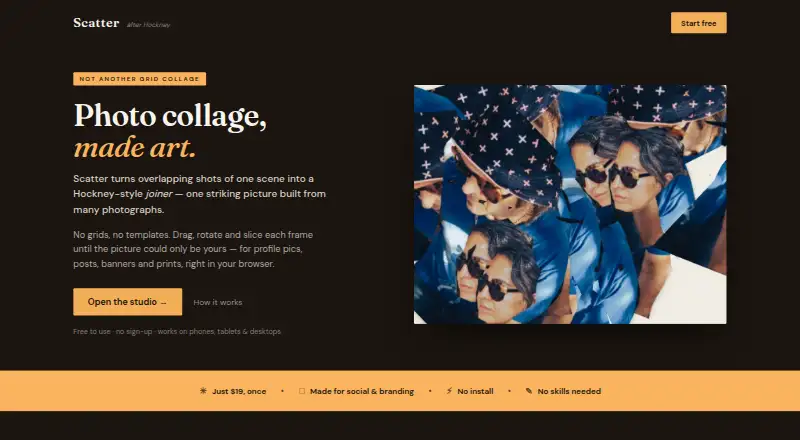
What Scatter is
Scatter creates Hockney-style photo joiners from overlapping photographs of one scene. It runs on Android, iOS, and the web, with touch controls for dragging, rotating, resizing, slicing, cropping, and erasing photo frames. Filters can be applied across the composition. Users can start without an account, and saved projects remain on the device where they were created. The maker says photos stay in the browser or on the user’s machine rather than being uploaded. Once loaded, editing and exporting continue on the computer if the connection drops, although reloading while offline is discouraged. The free plan includes editing tools, filters, and on-device project saving, but exports carry a small watermark. Scatter PRO costs $19, paid once, removes the watermark, adds full-resolution 4× exports and all canvas shapes, and works on every device owned by the buyer.
Good
- Works on Android, iOS, and web
- No account required to start
- Photos remain on the user’s device
- Offline editing continues after loading
- One-time Pro license
Watch out
- Free exports include a small watermark
- Projects stay on their original device
- Offline reloads are discouraged
- Pro costs $19, paid once
Who it suits
It suits people making profile pictures, social posts, personal-brand banners, prints, or gifts. It also fits users wanting touch-based editing on phones or browsers.
Verdict
Scatter provides touch-friendly photo-joiner editing with local project storage and browser-based offline continuation. The free plan is functional, while the one-time Pro purchase removes watermark limits and adds higher-resolution exports.
Plans and prices
From Scatter's own pricing page, checked 11 Oct 2026.
| Plan | Price | What it gives you |
|---|---|---|
| Free | Free | All editing tools and filters · Save projects on device · Exports have a small watermark · Free forever |
| Scatter PRO | $19, paid once | Everything in Free · No watermark · Full-resolution 4× exports · All canvas shapes · One-time purchase |
The facts
Each one read from Scatter's own pages, with the date it was checked.
What it does
- Account requirement
- The maker says users can start without signing up or creating an account.checked 11 Oct 2026
- Editing
- Users can drag, rotate, resize, slice, crop, and erase photo frames, then apply filters across the composition.checked 11 Oct 2026
- Exports
- The page describes high-resolution exports for prints, posters, gifts, or online posts; Pro includes full-resolution 4× exports.checked 11 Oct 2026
- Install option
- The page says Scatter can optionally be added to the home screen on iPhone or iPad, Android, and computers using supported browsers.checked 11 Oct 2026
- Intended users
- The maker presents Scatter for profile pictures, social posts, personal-brand banners, prints, and gifts.checked 11 Oct 2026
- License
- The maker says Pro is a one-time purchase with no subscription or renewals, and its license works on every device the buyer owns.checked 11 Oct 2026
- Mobile support
- The studio is touch-friendly and supports dragging, rotating, pinch-to-zoom, and exporting from a phone.checked 11 Oct 2026
- Offline use
- After the page loads, editing and exporting happen on the user's computer and continue if the connection drops; the page advises against reloading while offline.checked 11 Oct 2026
- Privacy
- The maker says photos are not uploaded and remain in the user's browser or on their own machine.checked 11 Oct 2026
- Project storage
- Saved projects live on the device where they were saved.checked 11 Oct 2026
- What it does
- Scatter makes Hockney-style photo joiners from overlapping photographs of one scene.checked 11 Oct 2026
Where it runs
- New-device access
- The FAQ says clearing saved data signs out Pro; users can unlock it again or set it up on a new device by re-entering the license key from their purchase email.checked 11 Oct 2026
Alternatives to Scatter
- 1
FotoJet
Free planWebExtensionLinuxmacOS8.0From $39.99 a year - 2

Collage Pro
Free planAndroidiOSWeb7.9From $29.90 a year - 3

PicCollage
Free planAndroidiOSWeb7.3From $35.99 a year - 4
Shape Collage
Free planiOSWebLinuxmacOS7.3$40 one-time - 5

CollageIt
Free planiOSmacOSWindows7.0$29.90 one-time - 6

PhotoGrid
Free planAndroidiOSWeb7.0Free plan