
PhotoGrid
PhotoGrid is a browser-based photo editor, collage maker, and AI creation service, with Android and iOS apps.
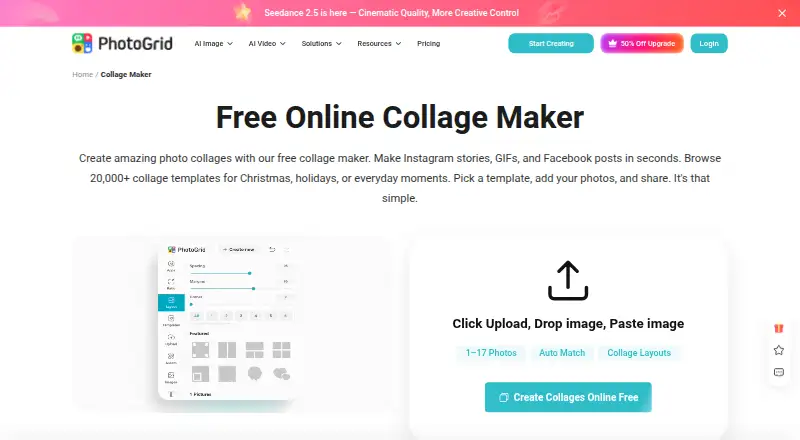
What PhotoGrid is
PhotoGrid is a browser-based photo editor, collage maker, and AI creation service, with Android and iOS apps. Its online collage maker offers more than 20,000 templates and supports projects using two or more than 15 photos. You can change layouts, edit pictures individually, and customize collages with text, cutouts, stickers, backgrounds, borders, and spacing. Custom layouts and video collages are supported, with PNG and JPG exports. Templates and formats are available for Instagram, Facebook, Twitter, and wallpapers, and creations can be downloaded in high resolution. PhotoGrid also provides AI photo editing, AI image generation, and AI video generation; credits are used for AI editing and video generation. The Free plan costs nothing, is billed monthly, and includes 100 MB of cloud storage. Its listed free-plan exports are watermarked. VIP, Pro, and Ultra plans list monthly credits, batch-edit capacities, and cloud-project limits: 180 credits and 10 images for VIP, 500 credits and 20 images for Pro, and 2,000 credits and 50 images for Ultra. A 3-day trial is listed, although availability depends on plan and account eligibility. Monthly plans renew monthly, yearly plans renew yearly, and yearly plans are advertised as 50% off.
Good
- 20,000+ collage templates
- Supports projects with two or more than 15 photos
- AI photo, image, and video creation tools
- Custom layouts and video collages
- PNG and JPG exports
- Templates for Instagram, Facebook, Twitter, and wallpapers
Watch out
- Free exports are watermarked
- Free cloud storage is limited to 100 MB
- AI editing and video generation use credits
- Higher plans list batch-edit and project caps
Who it suits
PhotoGrid suits people making personal projects, social posts, e-commerce images, or marketing materials. It is also useful for users who want browser access alongside Android or iOS apps, with collage templates and AI image or video tools.
Verdict
Choose PhotoGrid for template-rich collages, browser editing, and AI image or video creation across web and mobile. Look elsewhere if you need unwatermarked free exports, more than 100 MB of free storage, or AI work without credit usage.
Plans and prices
From PhotoGrid's own pricing page, checked 30 Sep 2026.
| Plan | Price | What it gives you |
|---|---|---|
| Free | Free | Standard photo editing · basic collage and layout tools · free templates · 100 MB cloud storage · watermarked exports |
| Pro | — | 500 credits/month · up to ~500 AI images or ~50 AI videos · all AI models · batch edit up to 20 images · 5,000 cloud projects · priority processing · Monthly plan; renews every month. Price not shown on the opened page. |
| Ultra | — | 2,000 credits/month · up to ~2,000 AI images or ~200 AI videos · batch edit up to 50 images · 30,000 cloud projects · premium customer support · Monthly plan; renews every month. Price not shown on the opened page. |
| VIP | — | 180 credits/month · up to ~180 AI images or ~18 AI videos · core AI models · batch edit up to 10 images · 1,000 cloud projects · no-watermark downloads · Monthly plan; renews every month. Price not shown on the opened page. |
The facts
Each one read from PhotoGrid's own pages, with the date it was checked.
What it does
- AI tools
- PhotoGrid describes AI photo editing, AI image generation, and AI video generation, with credits used for AI editing and video generation.checked 30 Sep 2026
- Collage features
- The online collage maker offers 20,000+ templates, supports uploading two or more than 15 photos, and lets users adjust layouts and edit photos individually.checked 30 Sep 2026
- Editing controls
- Users can customize collages with text, cutouts, stickers, backgrounds, borders, and spacing.checked 30 Sep 2026
- Export
- The collage maker says users can download a high resolution file; the free plan lists watermarked exports.checked 30 Sep 2026
- Integrations and sharing
- The collage maker offers formats and templates for Instagram, Facebook, Twitter, and wallpapers; its page describes downloading the creation to share.checked 30 Sep 2026
- Intended users
- PhotoGrid presents its tools for personal projects, social media, e-commerce, and marketing.checked 30 Sep 2026
- Privacy
- Google Play’s developer supplied disclosure says the app does not share data with third parties and may collect personal info, messages, and two other data types.checked 30 Sep 2026
- Product
- PhotoGrid offers browser based tools for editing photos, making collages, and generating images and videos with AI.checked 30 Sep 2026
- Security
- Google Play says the app encrypts data in transit and lets users request deletion of their data.checked 30 Sep 2026
- Support
- The Google Play listing provides [email protected] as the support email.checked 30 Sep 2026
Money
- Billing
- Monthly plans renew monthly and yearly plans renew yearly; the pricing page advertises yearly plans as 50% off.checked 30 Sep 2026
- Free plan
- Yeschecked 20 Sep 2026
- Trial
- The pricing FAQ says free trial availability depends on the plan and account eligibility.checked 30 Sep 2026
The company
- Company
- PhotoGrid’s terms identify Jupiter Palace Pte. Ltd. as the company providing its products and services.checked 30 Sep 2026
Where it runs
- Platforms
- PhotoGrid’s official site links to App Store and Google Play downloads, and says paid benefits work across supported platforms when users sign in to the same account.checked 30 Sep 2026
The full review of PhotoGrid
PhotoGrid is a browser, Android, and iOS service for photo editing, collage design, and AI-generated images and videos. It suits personal creators as well as social, e-commerce, and marketing users who want templates and several media tools in one place. Its breadth is attractive, but free exports carry a watermark and AI creation consumes credits.
Overview
It accepts two photos or more than 15 photos, while still allowing each image to be edited separately. That makes it practical for anything from a small family montage to a dense product or campaign board.
The service also covers AI photo editing, AI image generation, and AI video generation. Those tools broaden PhotoGrid beyond a conventional collage app, although credit usage becomes an important consideration for frequent AI work. Finished projects can be downloaded as high-resolution PNG or JPG files. The free plan applies watermarks, so public-facing work may require a paid option.
Key features
- 20,000+ templates: The extensive starting library is useful when you need a designed composition quickly for personal projects, social posts, e-commerce, or marketing.
- Flexible collage layouts: Arrange two or more than 15 photos, adjust the layout, or build a custom layout when a preset does not fit.
- Detailed design controls: Text overlays, cutouts, stickers, backgrounds, borders, and spacing let you refine individual images and the overall composition rather than accepting a fixed grid.
- Video collages: PhotoGrid supports video collages in addition to still-image projects, giving users a route to motion-based posts within the same service.
- AI creation and editing: AI photo editing, image generation, and video generation cover several stages of visual production. Credits are used for AI editing and video generation, so usage is tied to the allowance in your plan.
- Social formats and downloads: Templates and formats target Instagram, Facebook, Twitter, and wallpapers. PNG and JPG downloads make the final files usable outside PhotoGrid.
Pricing
PhotoGrid uses a freemium model. The Free plan costs nothing, is billed monthly, and includes 100 MB of cloud storage. Free exports are watermarked, which limits its suitability for polished client or storefront material. A 3-day trial is advertised, but trial availability depends on the plan and account eligibility.
VIP has custom pricing and includes 180 credits per month, batch editing for up to 10 images, and 1,000 cloud projects. It is a reasonable fit for lighter recurring production that needs more than the free allowance, but the published information does not provide a price to compare against the higher tiers.
Pro also has custom pricing. Its 500 monthly credits, batch editing for up to 20 images, and 5,000 cloud projects suit users with a steadier content workload. Ultra raises those allowances to 2,000 credits per month, batch editing for up to 50 images, and 30,000 cloud projects, targeting heavy production rather than occasional collage work.
Monthly subscriptions renew monthly and yearly subscriptions renew yearly. Yearly plans are advertised as 50% off. The credit quotas and project limits matter more than the tier names: choose according to expected AI use, batch size, and cloud archive needs, not simply the number of templates.
Platforms
PhotoGrid runs on Android, iOS, and the web. The browser version is particularly relevant for users who prefer larger-screen collage editing, while mobile availability supports creation on phones and tablets. Google Play says data is encrypted in transit and that users can request deletion of their data. Its developer disclosure says the app does not share data with third parties, although it may collect personal information, messages, and two other data types. Support is provided at [email protected]. PhotoGrid’s terms identify Jupiter Palace Pte. Ltd. as the provider.
Who it's for
Choose PhotoGrid if you need a broad template-driven collage workflow, custom composition controls, and AI image or video tools across web and mobile. It is well suited to social-media creators, small e-commerce teams, marketers, and personal users assembling varied visual projects.
It is less suitable for anyone who needs clean free exports, more than 100 MB of free cloud storage, or predictable high-volume AI use without monitoring credits. The free tier is best treated as an evaluation and occasional-use option.
Pros and cons
Pros
- More than 20,000 templates provide substantial variety for personal and promotional work.
- Custom layouts and controls for text, cutouts, stickers, borders, backgrounds, and spacing allow detailed compositions.
- AI photo, image, and video tools and video collages extend the service beyond static grids.
- Web, Android, and iOS access supports cross-device workflows.
Cons
- Watermarked free exports are a drawback for published or commercial designs.
- The Free plan includes only 100 MB of cloud storage.
- AI editing and video generation consume credits, making intensive use dependent on monthly quotas.
- VIP, Pro, and Ultra prices are custom, so subscription cost is not transparent before contacting the provider or checking an eligible account.
Alternatives
Browse Collage Maker Software when you want to compare collage-focused products by category. For motion-first projects, see Video Collage Maker Software. If AI editing is your priority, consult AI Photo Editors.
FotoJet is a freemium alternative with basic editing tools, basic templates, and a free online collage maker; its Plus plan costs $6.99 a month and it runs on Linux, macOS, Windows, and the web.
Shape Collage offers a free personal-use tier across iOS, Linux, macOS, Windows, and the web, but Pro is required for commercial use and watermark removal.
CollageIt is a freemium desktop option for Windows and Mac, with a free version that supports up to 200 photos and a Pro personal Windows license priced at 29.90 USD once.
PicCollage is another freemium Android, iOS, and web choice with a watermark-removal option and a VIP tier.
SCRL, April, and CollagePhotoApp are freemium mobile-oriented alternatives, while Fotowall is a free Linux, Windows, and web application.
Verdict
PhotoGrid is a strong choice for users who want template-rich collages, granular design controls, and AI image or video creation on web and mobile. Its main reasons to look elsewhere are the watermark on free exports, the 100 MB free-storage ceiling, and credit-based AI usage combined with custom-priced paid tiers.
Getting started
- Open the PhotoGrid collage maker website
- Use the browser tools or install the Android or iOS app
- Choose the Free plan or review VIP, Pro, and Ultra
- Upload two or more photos, including projects exceeding 15 photos
- Select a template or custom layout and edit the collage
- Download the result as PNG or JPG
Limits worth knowing
The Free plan provides 100 MB of cloud storage and lists watermarked exports. VIP, Pro, and Ultra provide 180, 500, and 2,000 monthly credits respectively, with batch editing capped at 10, 20, and 50 images and cloud projects capped at 1,000, 5,000, and 30,000.
Questions
Is PhotoGrid free?
Yes. The Free plan costs nothing, is billed monthly, and includes 100 MB of cloud storage.
Which platforms support PhotoGrid?
PhotoGrid offers browser-based tools and apps for Android and iOS.
Does PhotoGrid offer a trial?
A 3-day trial is listed. Trial availability depends on the plan and account eligibility.
What AI tools are available?
PhotoGrid describes AI photo editing, AI image generation, and AI video generation. Credits are used for AI editing and video generation.
What export formats are supported?
The feature list names PNG and JPG exports. The collage maker also says creations can be downloaded in high resolution.
How do paid plans differ?
VIP lists 180 credits monthly, batch editing for up to 10 images, and 1,000 cloud projects. Pro lists 500 credits, 20 images, and 5,000 projects; Ultra lists 2,000 credits, 50 images, and 30,000 projects.
Alternatives to PhotoGrid
- 1
FotoJet
Free planWebExtensionLinuxmacOS8.0From $39.99 a year - 2

Collage Pro
Free planAndroidiOSWeb7.9From $29.90 a year - 3

PicCollage
Free planAndroidiOSWeb7.3From $35.99 a year - 4
Shape Collage
Free planiOSWebLinuxmacOS7.3$40 one-time - 5

Scatter
Free planAndroidiOSWeb7.1$19 one-time - 6

CollageIt
Free planiOSmacOSWindows7.0$29.90 one-time