
SearchReverseImage
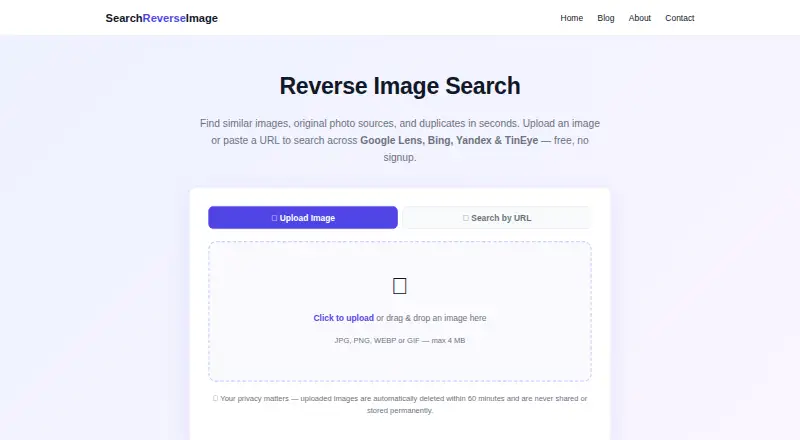
SearchReverseImage lets users search visually related image results by uploading a picture or pasting an image URL.
What SearchReverseImage is
SearchReverseImage lets users search visually related image results by uploading a picture or pasting an image URL. One workflow searches across Google Lens, Bing Visual Search, Yandex Images and TinEye. Results can include similar images, pages containing the image, higher-resolution versions and original sources. Supported formats are JPG/JPEG, PNG, WEBP and GIF, with a maximum size of 4 MB. The browser-based service works on any device without software installation, including iPhone and Android through a mobile browser. It offers unlimited searches without registration, watermarks or hidden fees. The company says uploaded images are automatically deleted within approximately 60 minutes after temporary processing and are not permanently stored, viewed, analyzed, shared or sold, nor associated with user identity. It also says traffic and uploads use HTTPS/TLS encryption. The terms prohibit automated scripts or bots from making bulk requests. The site lists photographers, shoppers, journalists, researchers, online daters, travelers and brand owners among possible users.
Good
- Searches four visual search engines in one workflow.
- Unlimited searches are offered without registration.
- Supports JPG/JPEG, PNG, WEBP and GIF.
- Works in a browser without installation.
- Uploads are deleted within approximately 60 minutes.
Watch out
- Uploads are limited to 4 MB.
- Automated scripts and bots cannot make bulk requests.
Who it suits
SearchReverseImage may suit anyone trying to find related images, pages containing a picture, or an original image source. Its browser access and mobile support suit users who do not want to install software.
Verdict
SearchReverseImage combines four third-party visual search engines in a free browser workflow. Check the 4 MB file limit and avoid automated bulk requests.
Plans and prices
From SearchReverseImage's own pricing page, checked 30 Sep 2026.
| Plan | Price | What it gives you |
|---|---|---|
| Free | Free | unlimited photo searches · no signup · no watermarks · JPG/JPEG, PNG, WEBP or GIF up to 4 MB · 100% Free |
The facts
Each one read from SearchReverseImage's own pages, with the date it was checked.
Where it runs
- Browser access
- It works in a browser on any device and requires no software installation.checked 30 Sep 2026
What it does
- Core function
- Users can upload an image or paste an image URL to search across Google Lens, Bing Visual Search, Yandex Images and TinEye.checked 30 Sep 2026
- Image deletion
- Uploaded images are automatically deleted within approximately 60 minutes after temporary processing.checked 30 Sep 2026
- Image privacy
- The company says it does not permanently store, view, analyze, share or sell uploaded images and does not associate them with user identity.checked 30 Sep 2026
- Intended users
- The site describes use cases including photographers, shoppers, journalists, researchers, online daters, travelers and brand owners.checked 30 Sep 2026
- Mobile support
- The site says it works on iPhone and Android through a mobile browser.checked 30 Sep 2026
- No account
- The service provides unlimited photo searches without registration, watermarks or hidden fees.checked 30 Sep 2026
- Privacy rights
- The policy says visitors may have access, correction and deletion rights under laws including GDPR and CCPA.checked 30 Sep 2026
- Results
- The tool returns visually similar images, pages containing the image, higher-resolution versions and original sources.checked 30 Sep 2026
- Search engines
- SearchReverseImage combines four third-party visual search engines in one upload workflow.checked 30 Sep 2026
- Support
- Questions, technical support, business and advertising inquiries can be emailed to [email protected], with usual replies within 24–48 hours.checked 30 Sep 2026
- Supported files
- Supported formats are JPG/JPEG, PNG, WEBP and GIF, with a maximum file size of 4 MB.checked 30 Sep 2026
- Transport security
- Site traffic and uploaded images are transmitted over HTTPS/TLS encryption.checked 30 Sep 2026
- Usage limits
- The terms prohibit automated scripts or bots from making bulk requests.checked 30 Sep 2026
The full review of SearchReverseImage
SearchReverseImage is a browser-based reverse image search for people who want to check a picture across several visual search engines in one go. It suits individual lookups on phones and computers; the main trade-off is a 4 MB upload limit and a ban on automated bulk requests.
Overview
Upload a supported image or paste its URL to search Google Lens, Bing Visual Search, Yandex Images and TinEye through one workflow. Results can surface similar images, pages containing the image, higher-resolution copies and original sources. Combining the four engines saves repeating the same lookup, but SearchReverseImage relies on those third-party services rather than offering a separate image index.
Searches are unlimited and free, with no account, watermarks or software installation required. JPG/JPEG, PNG, WEBP and GIF files are supported up to 4 MB, so a larger original may need resizing first. The terms prohibit automated scripts and bots from making bulk requests, which rules it out for routine collection-scale processing.
Key features
One upload, four search engines
Sending an image to four visual search services at once is useful when a shopper is checking a product photo or a photographer is looking for copies. Journalists, researchers, travelers, online daters and brand owners may also use the results to find an image's source or related appearances. The range of results depends on the third-party engines; this is a convenient gateway, not a guarantee that every match will surface.
Browser access and privacy
The site works in a browser on web, Android and iOS, including on iPhone and Android phones, without an installation. SearchReverseImage says uploads are not permanently stored, viewed, analyzed, shared or sold, and that images are not tied to user identity. Files are automatically deleted within approximately 60 minutes after temporary processing, and HTTPS/TLS protects traffic and uploads in transit. That makes the service convenient for casual searches, though users handling sensitive images should weigh temporary upload processing before submitting them.
The privacy policy says visitors may have access, correction and deletion rights under laws including GDPR and CCPA. Support questions, technical issues and business or advertising inquiries can be sent to [email protected]; usual replies take 24–48 hours.
Pricing
Free: free (billed 100% Free). It includes unlimited photo searches, no signup, no watermarks and searches for JPG/JPEG, PNG, WEBP or GIF images up to 4 MB. This is a strong fit for occasional or frequent personal lookups, with no paid tier needed for the stated search allowance. The trade-offs are the upload-size ceiling and the prohibition on automated bulk requests.
Platforms
SearchReverseImage runs in a browser on web, Android and iOS. No software installation is required, so it works across devices with a browser rather than through a dedicated app.
Who it's for
Choose it for free, individual image lookups: checking a product picture, tracing a likely source, or finding visually similar images across several engines. It is less suited to businesses or researchers that need automated bulk searches, and the 4 MB cap can be inconvenient for large image files.
Pros and cons
- Four engines in one workflow: Google Lens, Bing Visual Search, Yandex Images and TinEye reduce the need to repeat uploads across services.
- Unlimited searches without signup: Useful for repeated personal lookups without a subscription or account.
- Broad browser and mobile access: Works on web, Android and iOS without installation.
- 4 MB maximum file size: Larger images must be resized before upload.
- No automated bulk requests: The terms make it a poor fit for large-scale or scripted search workflows.
- Temporary image processing: Uploads are deleted within approximately 60 minutes, but are not processed solely on the user's device.
Alternatives
For a broader directory of tools, browse Reverse Image Search Software.
- Lenso.ai is a freemium alternative with a Starter plan that includes 50 unlocks, 10 alerts and unlimited searches, and a Developer plan with 5,000 API calls. Consider it when those unlocks, alerts or API calls suit the workflow better.
- LocalLens is a free, open-source alternative for Linux, macOS, Windows, web and self-hosted use. Choose it if those platforms or open-source software matter more than SearchReverseImage's stated mobile-browser support.
- Imagga Visual Search offers API access and an Indie plan at $79 a month, billed monthly, with 70,000 API requests and several image-processing APIs. It is the clearer fit when a paid API workflow and its additional APIs are needed.
- ImageRights Discovery has a free ImageRights Pilot plan covering the first 100 images. Consider it for that limited initial image volume.
- Pixsy offers a free plan that monitors 500 images, with limited import sources, regular-priority match scanning, zero takedown notices and unlimited case submission. It fits users who want image monitoring and case submission rather than only an individual reverse-image lookup.
- Reverse Image Search Anywhere is a free alternative for Android, web and extension use, with publicly available source code under the MIT license.
- RIMG is a free alternative for Android, iOS and web, with no usage limit stated. Consider it if those platforms are a closer fit.
- SerpApi is a freemium API and web option; its free plan allows 250 searches per month and 50 throughput per hour. It suits workflows that need API access and can work within that monthly quota.
Verdict
SearchReverseImage is a sensible choice for anyone who wants free, unlimited individual image searches across four visual search engines without installing an app or registering. Its chief advantages are convenience and breadth; look elsewhere if your images exceed 4 MB or your work depends on automated bulk requests.
Alternatives to SearchReverseImage
- 1
Berify
Free planAndroidiOSWebAPI8.0From $5.95 a month - 2

Reverse Image Search Anywhere
Free planOpen sourceAndroidWebExtensionLinux7.8Free plan - 3
LocalLens
Free planOpen sourceWebLinuxmacOSSelf-hosted7.5Free plan - 4

Pixsy
Free planWebAPI7.4From $209 a year - 5

SerpApi
Free planWebAPIExtension7.4From $25 a month - 6

ImageRights Discovery
Free planWebAPImacOSWindows7.0Free plan