
RIMG
RIMG is a reverse image search tool for finding similar pictures, image sources, products, people, and other information.
What RIMG is
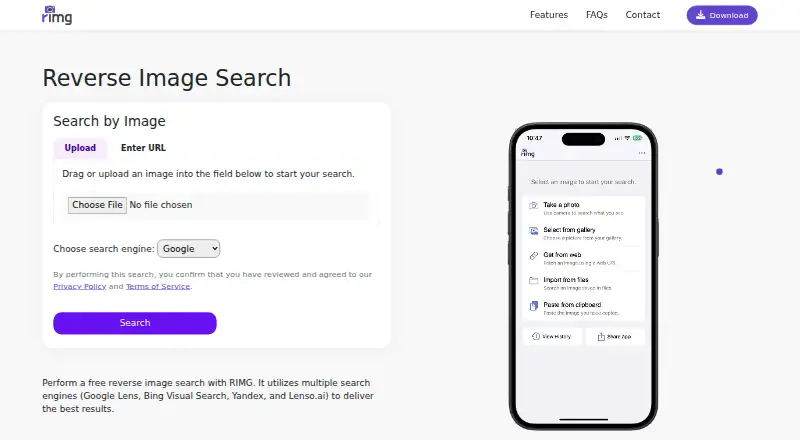
RIMG is a reverse image search tool for finding similar pictures, image sources, products, people, and other information. Users can upload or select an image, enter its URL, or take a camera picture. RIMG says it returns results using Google, Bing, Yandex, and Lenso.ai, and supports all valid image file formats. Suggested uses include identifying objects, finding a product match or a lower-cost option, tracing an image's source, and checking whether a picture may be reused or misleading. The service is available on Android, iOS, and the web, and it lists a browser extension. Searches are free, with no usage limit stated. For a search, an image is temporarily uploaded to a remote server to receive a URL, which is then sent to a search engine. Submitted images are forwarded to third-party reverse image search services, where their own terms and privacy policies apply. On iOS, users can paste an image from the clipboard; the FAQ says this is not yet available on Android. The terms require users to be at least 16, or 13 with parental consent where applicable by law.
Good
- Free searches with no usage limit stated.
- Search by upload, image URL, or camera picture.
- Uses Google, Bing, Yandex, and Lenso.ai for results.
- Supports all valid image file formats.
- Available on Android, iOS, and web.
Watch out
- Images are temporarily uploaded to a remote server.
- Images are forwarded to third-party search engines and their policies apply.
- Android does not yet support clipboard image pasting.
- Users must meet the listed minimum age requirements.
Who it suits
RIMG suits shoppers, bloggers, students, or anyone trying to identify or trace an image. It is available across web and mobile, with clipboard image pasting available on iOS but not Android.
Verdict
RIMG offers several ways to search for image matches and sources without a stated usage cap. Consider its temporary uploads and third-party processing before submitting images.
Plans and prices
From RIMG's own pricing page, checked 2 Oct 2026.
| Plan | Price | What it gives you |
|---|---|---|
| Free | Free | Reverse image searches are free; no usage limit stated |
The facts
Each one read from RIMG's own pages, with the date it was checked.
What it does
- Age requirement
- The terms require users to be at least 16, or 13 with parental consent where applicable by law.checked 2 Oct 2026
- Image formats
- The FAQ says reverse image search supports all valid image file formats.checked 2 Oct 2026
- Intended audience
- RIMG says it is useful for bloggers, shoppers, students, or anyone curious about an image.checked 2 Oct 2026
- Privacy statement
- The site says RIMG does not request unnecessary permissions and securely transmits information.checked 2 Oct 2026
- Search engines
- RIMG says it uses Google, Bing, Yandex, and Lenso.ai to return image search results.checked 2 Oct 2026
- Support
- RIMG asks users with questions or persistent issues to use its contact form and says it will investigate reported issues.checked 2 Oct 2026
- Temporary image handling
- The FAQ says searched images are uploaded to a remote server temporarily to assign a URL, which is sent to a search engine.checked 2 Oct 2026
- Third-party processing
- RIMG’s terms say submitted images are forwarded to third-party reverse image search engines, whose own terms and privacy policies apply.checked 2 Oct 2026
- Use cases
- RIMG describes uses including finding product matches or cheaper options, identifying objects, finding an image’s source, and checking whether images are reused or misleading.checked 2 Oct 2026
- Ways to search
- Users can upload or select an image, enter an image URL, or take a picture with the camera.checked 2 Oct 2026
- What it does
- RIMG lets users search the web using an image to find similar images, original sources, products, people, and other information.checked 2 Oct 2026
The company
- Founded
- 2020checked 28 Sep 2026
Where it runs
- iOS clipboard support
- The FAQ says iOS users can paste an image from the clipboard; Android users do not have this feature yet.checked 2 Oct 2026
The full review of RIMG
RIMG is a reverse image search tool for people who want to trace an image, find similar pictures or look for matching products. It suits shoppers, bloggers, students and anyone curious about an image. Its free searches have no stated usage limit, but submitted images pass through temporary server storage and third-party search engines.
Overview
Rather than relying on one search engine, RIMG says it draws results from Google, Bing, Yandex and Lenso.ai. That gives users several avenues for finding an image’s source or related results in one search experience. You can upload or choose an image, provide its URL, or take a picture with a camera.
RIMG’s use cases range from practical shopping comparisons to checking whether an image has been reused or may be misleading. Those are useful starting points, but image matches are search results—not, by themselves, proof of an image’s origin or context.
Key features
Several ways to search
Image uploads, URLs and camera capture make RIMG workable for both pictures already on a device and objects in front of you. The FAQ says it accepts all valid image file formats. On iOS, users can also paste an image from the clipboard; Android does not yet support that option.
Temporary uploads and third-party processing
RIMG says searched images are uploaded temporarily to a remote server so it can assign a URL, which is then sent to a search engine. Its terms also say submitted images are forwarded to third-party reverse image search engines, whose own terms and privacy policies apply. The site says it avoids unnecessary permissions and securely transmits information, but those assurances do not remove the implications of sending an image to outside services. Avoid submitting images you are not comfortable sharing this way.
Pricing
RIMG’s Free plan costs free. Reverse image searches are free, with no usage limit stated. There is no free trial, but a trial is unnecessary for a free plan. This is a strong fit for occasional or frequent lookups when a stated search quota would be a drawback; it does not offer a paid tier for users seeking different plan terms.
Platforms
RIMG is available on Android, iOS and the web, and it has a browser extension. iOS clipboard pasting is a useful shortcut; Android users must use another supported search method instead.
Who it's for
RIMG is a sensible choice for shoppers comparing product matches, bloggers tracing image sources, students identifying objects and people checking where an image appears elsewhere. Its free, uncapped searches suit users who want to look things up without tracking a quota. It is less suitable for anyone unwilling to send submitted images to RIMG’s server and onward to third-party search engines.
Pros and cons
- Pros: Free reverse image searches with no stated usage cap make repeated lookups accessible.
- Pros: Upload, URL and camera search cover several common ways to provide an image, with iOS clipboard support as an extra shortcut.
- Pros: Results draw on Google, Bing, Yandex and Lenso.ai rather than a single named search engine.
- Cons: Images are temporarily uploaded and forwarded to third parties, so privacy-conscious users should consider what they submit.
- Cons: Android lacks the clipboard-paste feature available on iOS.
Alternatives
For another free option with no price or usage limits stated on its page, Google Lens is worth considering; it also supports macOS and Windows, alongside Android, iOS and the web. If you need API access as well as broad platform coverage, Lenso.ai offers a Starter plan with 50 unlocks, 10 alerts and unlimited searches, plus a Developer plan with 5,000 API calls.
Berify may suit users who want a free basic reverse image search with a free trial available, or a paid plan with a stated image count. For image-rights monitoring, Pixsy’s free plan monitors 500 images and includes unlimited case submissions, though takedown notices are not included. ImageRights Discovery offers a free pilot for the first 100 images.
Copyseeker is an alternative for users who prefer a paid plan with unlimited searches and priority speed. TinEye may fit businesses that need a defined image-search allowance: its Starter plan is $200 a month for 5,000 images and 1,000 monthly searches. For API-focused visual search and image-processing tools, Imagga Visual Search has an Indie plan at $79 a month with 70,000 API requests.
Browse more options in AI Reverse Image Search Tools or Reverse Image Search Software.
Verdict
Choose RIMG if you want free reverse image searches without a stated usage cap, multiple ways to submit a picture and results from several search engines. Its main trade-off is clear: searches involve temporary uploads and third-party processing. If that is acceptable, it is a practical choice for everyday image lookups; if not, look for a workflow whose image handling better fits your needs.
Alternatives to RIMG
- 1
Berify
Free planAndroidiOSWebAPI8.0From $5.95 a month - 2
Ximilar Visual Search
Free planAndroidiOSWebAPI7.9From $69 a month - 3

Pixsy
Free planWebAPI7.4From $209 a year - 4

ViSenze
AndroidiOSWebAPI7.3 - 5
Cloudinary
Free planWebAPIExtension7.2Free plan - 6

ImageRights Discovery
Free planWebAPImacOSWindows7.0Free plan