Save Keeper
Save Keeper backs up PS Vita and PSP save games and syncs them to Google Drive.
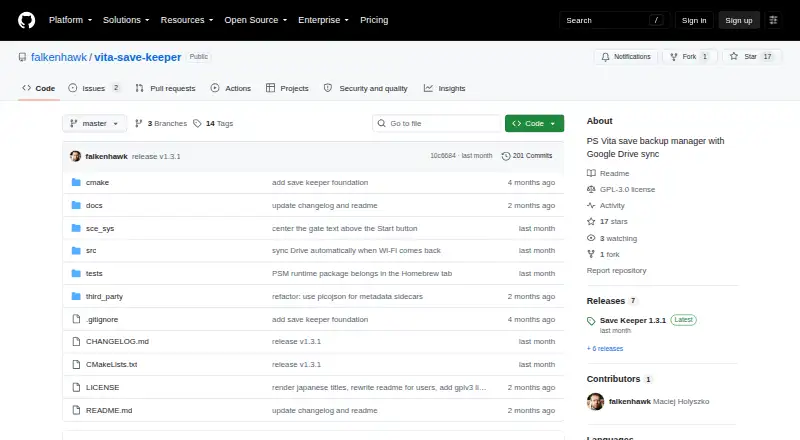
What Save Keeper is
Save Keeper backs up PS Vita and PSP save games and syncs them to Google Drive. It creates timestamped ZIP files for Vita, PSP/Adrenaline, and homebrew saves, with automatic game detection and multiple backups kept for each game. Users can label backups and sort them by name, latest backup, or last saved. Restoring is manual; before a save is overwritten, the app backs up the current version unless an identical backup already exists. Backups in the same Google Drive account can be downloaded and restored on another Vita or PS TV. For homebrew, users can choose savedata paths, while the built-in configuration currently covers RetroArch. Google sign-in starts with a QR code scanned by phone or a code entered at google.com/device. Backups go to a PSV Saves folder in the user’s Drive. The setup guide says the app requests the Drive drive.file permission; it also warns that the sign-in token stored on the Vita should be treated like a password. Save Keeper is free and open source under GPLv3.
Good
- Creates timestamped ZIP backups.
- Keeps multiple backups per game.
- Backups can be restored on another Vita or PS TV.
- Users can label and sort backups.
- Free and open source under GPLv3.
Watch out
- Requires HENkaku or h-encore and unsafe homebrew.
- Google Drive sync requires a Google account.
- Built-in homebrew configuration currently covers only RetroArch.
- The sign-in token on Vita should be treated like a password.
Who it suits
Save Keeper suits PS Vita or PS TV owners who want to keep save backups in Google Drive and restore them across devices. It requires HENkaku or h-encore, unsafe homebrew enabled, a VPK installer, and a Google account for Drive sync.
Verdict
Save Keeper offers save history and Google Drive syncing for compatible Vita and PS TV setups. Its main caveats are the homebrew requirements and limited built-in configuration for homebrew saves.
Plans and prices
From Save Keeper's own pricing page, checked 11 Oct 2026.
| Plan | Price | What it gives you |
|---|---|---|
| Save Keeper | Free | PS Vita or PS TV with HENkaku / h-encore · Google account required for Drive sync |
The facts
Each one read from Save Keeper's own pages, with the date it was checked.
What it does
- Authentication
- Google sign-in uses a QR code or a code entered at google.com/device, and the sign-in token is stored on the Vita in google-token.json.checked 11 Oct 2026
- Backup format
- It creates timestamped ZIP backups of Vita, PSP/Adrenaline, and homebrew saves.checked 11 Oct 2026
- Backup history
- It keeps multiple backups per game so users can restore an older save.checked 11 Oct 2026
- Backup management
- The app keeps multiple backups per game and lets users label them and sort by name, latest backup, or last saved.checked 10 Oct 2026
- Build and distribution
- The README documents VPK installation and building from source with VitaSDK.checked 11 Oct 2026
- Credential handling
- The app stores OAuth client credentials and a Google sign-in token on the Vita, and the README says to treat the token like a password.checked 10 Oct 2026
- Credential sensitivity
- The setup guide says to treat google-token.json like a password because anyone who copies it can read the backups in the user's Drive.checked 11 Oct 2026
- Drive integration
- Backups are uploaded to a PSV Saves folder in the user's own Google Drive and can be downloaded or restored on other devices.checked 11 Oct 2026
- Google permissions
- The setup guide says Save Keeper requests only the Google Drive drive.file permission, which grants access to files the app created itself.checked 11 Oct 2026
- Homebrew support
- Users can select homebrew savedata paths, and the built-in configuration currently covers RetroArch.checked 11 Oct 2026
- Integration
- Google sign-in is started by scanning a QR code with a phone, and backups are uploaded to a PSV Saves folder in Google Drive.checked 10 Oct 2026
- License
- The project is licensed under GPLv3.checked 11 Oct 2026
- Notable limitation
- The built-in homebrew savedata configuration currently covers only RetroArch, though more apps can be added.checked 10 Oct 2026
- Purpose
- Save Keeper backs up PS Vita and PSP save games and syncs backups to the user's Google Drive.checked 11 Oct 2026
- Requirements
- The app requires a PS Vita or PS TV with HENkaku or h-encore enabled, unsafe homebrew enabled, and a way to install a VPK.checked 11 Oct 2026
- Restore protection
- Before restoring, the app automatically backs up the current save unless an identical backup already exists.checked 10 Oct 2026
- Restore safety
- Before a restore overwrites a save, Save Keeper automatically backs up the current save unless an identical backup already exists.checked 11 Oct 2026
- Security
- The README says HTTPS uses a Mozilla CA bundle with TLS verification enabled.checked 10 Oct 2026
- Transport security
- The project README says HTTPS uses a packaged Mozilla CA bundle with TLS verification enabled.checked 11 Oct 2026
The company
- Maker identity
- The GitHub release page identifies the maker as Maciej Holyszko.checked 11 Oct 2026
Where it runs
- Multiple devices
- Backups stored in the same Google Drive account can be downloaded and restored on another Vita or PS TV.checked 10 Oct 2026
Alternatives to Save Keeper
- 1
SaveState
Free planOpen sourceAndroidLinuxmacOSWindows7.4Free plan - 2
Ludusavi
Free planOpen sourceAPIExtensionLinuxmacOS7.3Free plan - 3

Checkpoint64
Free planLinuxmacOSWindows6.6From €5 a month - 4

Hoard
Free planLinuxmacOSSelf-hostedWindows6.6From €1.99 a month - 5
SaveKnight
Free planWindows6.4From $5 a month - 6
Playnite Save Manager
Free planExtensionWindows6.3Free plan