Ludusavi
Ludusavi is a free utility written in Rust for backing up PC video game save data.
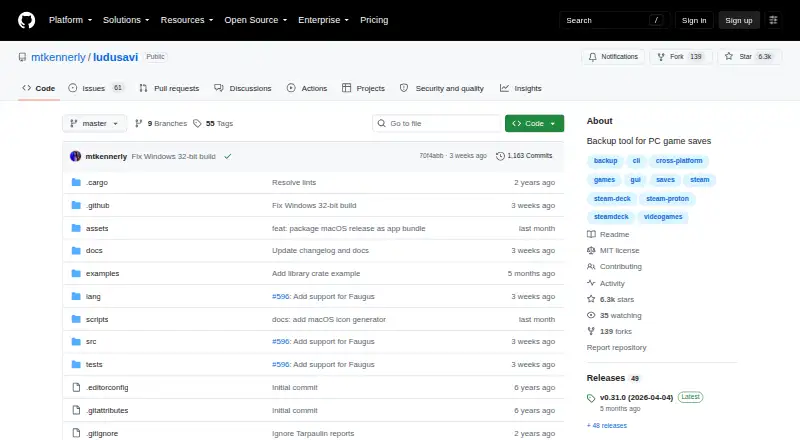
What Ludusavi is
Ludusavi is a free utility written in Rust for backing up PC video game save data. It covers more than 19,000 games, allows custom entries and supports libraries such as Steam, GOG, Epic, Heroic and Lutris. Users can work through a graphical interface or a command-line interface for scripting. Supported data includes file-based saves, Windows registry saves, Steam Proton saves and Steam screenshots. Ludusavi can connect with Rclone for cloud backups, including remotes such as Google Drive, OneDrive, Dropbox, Box, FTP, SMB and WebDAV. Its synchronization checks whether local and cloud saves match before uploading changes and warns about conflicts. The utility also supports scheduled backups and version history, and is available as a Playnite extension. Its backup information uses the Ludusavi Manifest, whose information is primarily sourced from PCGamingWiki. Portable executables are available for Windows, Linux and Mac, and the project is released under the MIT License. Ludusavi does not automatically support backing up on one operating system and restoring on another.
Good
- Supports more than 19,000 games and custom entries
- Offers graphical and command-line interfaces
- Works with major PC game libraries
- Integrates with Rclone cloud remotes
- Supports scheduled backups and version history
Watch out
- Does not automatically support cross-OS backup and restore
Who it suits
Ludusavi suits PC gamers who want to back up save data across supported games and libraries. Its command-line interface may also suit people who want to script backup tasks.
Verdict
Ludusavi covers many PC games and save types, with both graphical and scripting interfaces and optional Rclone integration. Its cross-operating-system restore limitation is important for anyone moving saves between different systems.
Plans and prices
From Ludusavi's own pricing page, checked 15 Oct 2026.
| Plan | Price | What it gives you |
|---|---|---|
| Free | Free | Portable desktop backup and restore; no paid tiers stated |
| Ludusavi | Free | portable executable · Windows, Linux, or Mac · MIT licensed |
The facts
Each one read from Ludusavi's own pages, with the date it was checked.
What it does
- Cloud backup
- It integrates with Rclone and supports Rclone remotes including Google Drive, OneDrive, Dropbox, Box, FTP, SMB, and WebDAV.checked 30 Sep 2026
- Cloud integration
- Cloud synchronization is implemented through Rclone, with bundled Rclone updates noted in releases.checked 15 Oct 2026
- Cloud synchronization
- Automatic synchronization checks whether local and cloud saves are in sync before uploading changes and warns about conflicts.checked 30 Sep 2026
- Command API
- The CLI includes an api command that executes bulk requests using JSON input and supports JSON schemas for input and output.checked 30 Sep 2026
- Command line
- A command-line interface supports scripting and tab completion for Bash, Fish, Zsh, PowerShell and Elvish.checked 15 Oct 2026
- Distribution
- Portable executables are available for Windows, Linux, and Mac, with Winget, Scoop, Flatpak, and Cargo distribution also listed.checked 30 Sep 2026
- Documentation
- The repository links detailed help for automation, exclusions, retention, validation, cloud backup, custom games, configuration, CLI usage, logging and troubleshooting.checked 15 Oct 2026
- Extensibility
- Community projects provide secondary manifests and plugins for Decky Loader, LaunchBox and Visual Studio Code.checked 15 Oct 2026
- Game coverage
- The project says its manifest covers more than 19,000 games and supports custom entries.checked 15 Oct 2026
- Graphical interface
- A graphical interface provides scan, backup and restore workflows.checked 15 Oct 2026
- Independent editor assessment
- FileHippo describes Ludusavi as a portable, free, open-source Rust tool with a user-friendly backup workflow and Playnite integration.checked 15 Oct 2026
- Installation methods
- Portable releases are provided for Windows, Linux and Mac, with Winget, Scoop, Flatpak and Cargo installation options.checked 15 Oct 2026
- Interfaces
- It provides both a graphical interface and a command line interface for scripting.checked 30 Sep 2026
- Latest release
- The releases page lists version 0.31.0 dated April 4, 2026.checked 15 Oct 2026
- Library SDK
- Release 0.31.0 added an experimental crates.io library crate exposing some Ludusavi internals.checked 15 Oct 2026
- License
- The repository is released under the MIT License.checked 15 Oct 2026
- Limit: duplicate management
- FileHippo's editorial review reports inconsistent duplicate detection and no delete function for unwanted saves.checked 15 Oct 2026
- Limit: missing games
- Independent testing notes that games absent from the manifest require custom entries and manual configuration.checked 15 Oct 2026
- Limit: no native post-play automation
- Independent analysis says automatic backup after closing a game requires a launcher such as Playnite rather than Ludusavi alone.checked 15 Oct 2026
- Limit: no symlinks
- Independent analysis notes that Ludusavi cannot create symlinks for game data, unlike GameSave Manager.checked 15 Oct 2026
Where it runs
- Cross-OS limitation
- Ludusavi does not automatically support backing up on one operating system and restoring on another.checked 30 Sep 2026
- Limit: cross-OS restores
- Steam Deck HQ cautions that moving saves between Linux and Windows may not work well because paths differ.checked 15 Oct 2026
- Linux requirement
- Linux source installation lists GCC, CMake, X11/XCB, font, GTK and related development packages for Ubuntu.checked 15 Oct 2026
The company
- Maker identity
- The GitHub account identifies the maintainer as Matthew Kennerly.checked 15 Oct 2026
The full review of Ludusavi
Overview
Ludusavi is a free PC game-save backup utility for Windows, Linux and Mac. It suits players with saves spread across multiple libraries, as well as users who want to automate backups from the command line. Its breadth is a strong point; moving a save between different operating systems is a notable limitation.
It covers more than 19,000 games and accepts custom entries, giving it scope for large libraries and titles outside its standard catalog. Backup definitions draw primarily on PCGamingWiki through the Ludusavi Manifest, so the project’s coverage is a practical foundation rather than a guarantee that every game-specific setup is handled automatically.
For other options in the category, see Game Save Managers.
Key features
- Wide library and save support: Ludusavi works with Steam, GOG, Epic, Heroic, Lutris and other libraries. It can handle file saves, Windows registry data, Steam Proton saves and Steam screenshots, covering more than ordinary save folders.
- Visual and scripted workflows: The graphical interface is suited to manual backups, while the command-line interface supports scripting. Its API command accepts bulk JSON requests and supports schemas for input and output, which is useful for structured automation.
- Cloud storage through Rclone: Rclone integration connects backups to remotes including Google Drive, OneDrive, Dropbox, Box, FTP, SMB and WebDAV. Automatic synchronization checks local and cloud saves before uploading and warns about conflicts, a helpful safeguard when multiple copies may have changed.
- Playnite extension: Playnite users can access Ludusavi as an extension, making it a relevant choice for those who manage games through that launcher.
- Download security control: Runtime configuration governs certificate and hostname validation; safe validation is the default, while an unsafe option disables it. Most users should keep the safer default.
The key caveat is cross-OS restoration: Ludusavi does not automatically support backing up on one operating system and restoring on another. That makes it less suitable as a seamless migration tool for someone moving a game and its saves between, for example, Windows and Linux.
Pricing
Ludusavi — free. The free plan provides portable executables for Windows, Linux or Mac and is MIT licensed. Automatic and scheduled backups, version history, game detection and both restore options are included. There is no paid tier or subscription to weigh against a reduced plan.
Distribution also includes Winget, Scoop, Flatpak and Cargo. The project is released under the MIT License, and support and community participation are available through GitHub issues and discussions; translations are invited through Crowdin.
Platforms
Ludusavi supports Windows, Linux and macOS, with portable executables for all three. It also has an API interface and a Playnite extension. The range suits mixed desktop setups, but it does not remove the restriction on automatic restore across operating systems.
Who it's for
Choose Ludusavi if you want a free, open-source way to protect saves across a large PC game library, especially if you value scripting, scheduled backups, version history or Rclone destinations. It is also a strong fit for Playnite users and for people whose saves include registry or Proton data.
Look elsewhere if your central need is automatic cross-operating-system migration. Ludusavi’s breadth is most valuable when backing up and restoring within the same operating-system context.
Pros and cons
- Pro — Broad coverage: More than 19,000 games, custom entries and support for several major libraries suit players with varied collections.
- Pro — Flexible automation: Scheduled backups, a scripting CLI and JSON-based bulk API requests serve users who want more than manual backup runs.
- Pro — Multiple save types and cloud destinations: Registry, Proton and screenshot support plus Rclone remotes extend it beyond basic file copying.
- Con — No automatic cross-OS restore: Users changing operating systems should not expect a direct, seamless migration workflow.
Alternatives
- Game Save Genie is another free option for Linux, macOS, Windows and self-hosted setups; choose it if that platform mix better fits your environment.
- OpenSave is free and open source, with no subscription, pro tier, ads or telemetry. It is worth considering if those terms are a priority.
- GSBS is a free alternative spanning API, Linux, self-hosted, web and Windows platforms; consider it if that platform combination suits your use.
- Hoard is a freemium option for Linux, macOS, Windows and self-hosted environments. Its project is credited to solo developer Raimundo León Oliva.
- Gamekeeper is a Windows freemium alternative. Its free plan limits Multi-Space to three per game and includes cloud storage options such as FTP, SFTP, WebDAV, SMB/CIFS and S3.
- Game Backup Monitor is free and open source for Linux and Windows, with unlimited games and 7-Zip compression; cloud backup requires a provider and sync client.
- Game Save Manager is a Windows freemium choice with a free GitHub edition offered as a 64-bit installer under GPL-3.0.
- EmuSync is free with no subscription or paywall and supports API, Linux and Windows.
Verdict
Ludusavi is an excellent fit for PC players who want broad game coverage, flexible interfaces and capable backup automation without a subscription. Its Rclone integration and range of save types make it more than a simple folder copier. Choose it if your backups stay within the same operating-system context; if cross-OS restoration is essential, look for a tool built around that workflow.
Alternatives to Ludusavi
- 1
SaveState
Free planOpen sourceAndroidLinuxmacOSWindows7.4Free plan - 2

Checkpoint64
Free planLinuxmacOSWindows6.6From €5 a month - 3

Hoard
Free planLinuxmacOSSelf-hostedWindows6.6From €1.99 a month - 4
SaveKnight
Free planWindows6.4From $5 a month - 5
Playnite Save Manager
Free planExtensionWindows6.3Free plan - 6

QSave
Free planmacOSWindows6.2Free plan