
Hoard
Hoard syncs game saves across devices and keeps versioned backups, with support for Linux, macOS, Windows and self-hosting.
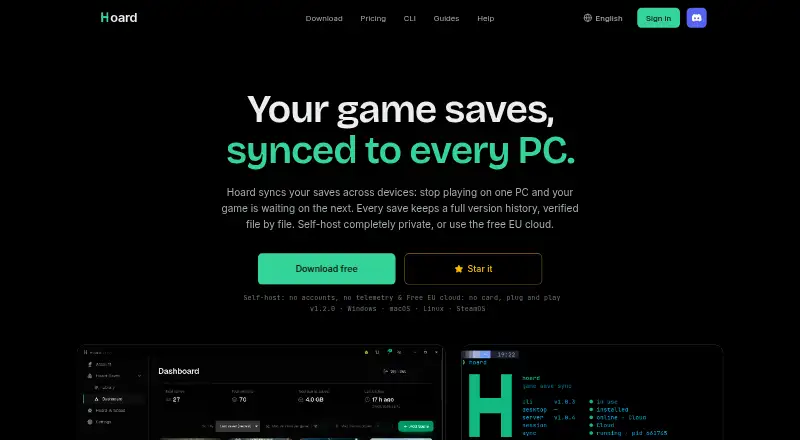
What Hoard is
Hoard syncs game saves across devices and keeps versioned backups, with support for Linux, macOS, Windows and self-hosting. It detects when play stops and then syncs saves automatically. If devices have different versions, the newer save takes precedence and Hoard backs up the other locally. Snapshots are kept indefinitely, and users can roll back to an earlier version. The app checks files with SHA-256 and re-hashes them during restoration. It detects libraries such as Steam, Epic, GOG, Proton and Wine, using the Ludusavi manifest for thousands of titles; the site says save paths for 71 games have been checked by hand. The free plan provides 2 GB cloud storage, a 1–1.5 GB maximum save size and three devices. Pro costs €1.99 per month and includes 100 GB, saves up to 10 GB and unlimited devices. Save export in the original game format is available on the free tier. Self-hosting uses the same Rust binary, without an account or quotas.
Good
- Automatic syncing when play stops.
- Keeps snapshots indefinitely for rollback.
- Exports saves in their original format on Free.
- Self-hosting has no account or quotas.
- Snapshots are encrypted at rest, per the privacy policy.
Watch out
- Free plan includes 2 GB of cloud storage.
- Free plan supports three devices.
- Pro costs €1.99 per month.
- Diagnostics are on by default.
Who it suits
Hoard suits players who want game saves synced between devices with a history they can restore. Its free tier is limited by storage, save size and device count, while self-hosting is an option for users who want to run the service themselves.
Verdict
Hoard combines automatic cross-device syncing with persistent save history and original-format export. Choose between the free limits, Pro's larger allowances or self-hosting without an account or quotas.
Plans and prices
From Hoard's own pricing page, checked 30 Sep 2026.
| Plan | Price | What it gives you |
|---|---|---|
| Hoard Free | Free | Cloud storage: 2 GB · Max size per save: 1 GB–1.5 GB · Devices: 3 · Free forever |
| Hoard Pro | €1.99 a month | Cloud storage: 100 GB · Max size per save: 10 GB · Devices: Unlimited · billed monthly |
The facts
Each one read from Hoard's own pages, with the date it was checked.
What it does
- Automatic sync
- The app detects when you stop playing and syncs saves automatically.checked 30 Sep 2026
- Conflict handling
- When two machines have diverging saves, the newest wins and the other is backed up locally.checked 30 Sep 2026
- Diagnostics
- Anonymous diagnostics are on by default but can be turned off, and the policy says the service works the same with them off.checked 30 Sep 2026
- Export
- Users can export saves in the game's original format, including on the Free tier.checked 30 Sep 2026
- Game detection
- The app detects libraries including Steam, Epic, GOG, Proton and Wine, and uses the Ludusavi manifest for thousands of titles.checked 30 Sep 2026
- Integrity
- Hoard uses SHA-256 checks on files and re-hashes them on restore.checked 30 Sep 2026
- Privacy and security
- The privacy policy says snapshots are encrypted at rest, app-to-server communication uses TLS, and save data is stored in the EU without replication outside it.checked 30 Sep 2026
- Purpose
- Hoard syncs game saves across devices and keeps versioned backups.checked 30 Sep 2026
- Self-hosting
- Hoard can be self-hosted using the same Rust binary under the AGPL-3.0 license, without an account or quotas.checked 30 Sep 2026
- Support
- The site links to a Discord community and a contact page.checked 30 Sep 2026
- Verified games
- The site says 71 games have save paths checked by hand.checked 30 Sep 2026
- Version history
- Snapshots are kept indefinitely and users can roll back to an earlier version.checked 30 Sep 2026
The company
- Maker
- The site credits Raimundo León Oliva and describes Hoard as a solo-developed project.checked 30 Sep 2026
The full review of Hoard
Overview
Hoard is a game-save manager for players who want saves to follow them between computers without remembering to back them up after each session. It is best for people who value persistent rollback history, cloud syncing or the choice to self-host.
When you stop playing, Hoard syncs automatically. If two machines have different saves, it keeps the newest and backs up the other locally. That prevents the losing copy from simply disappearing, but it does not merge versions or resolve the conflict for you. Snapshots stay available indefinitely, while restores are manual—useful protection against an unwanted change, provided you are willing to choose when to roll back.
Key features
Hoard detects libraries from Steam, Epic and GOG, as well as Proton and Wine, and uses the Ludusavi manifest for thousands of titles. The site says 71 games have save paths checked by hand, so broad manifest coverage should not be confused with the same level of manual verification for every game.
SHA-256 checks verify files, with another hash check during restore. Saves can also be exported in their original game format, including on the Free plan. That makes it easier to retain control of your saves instead of relying on Hoard's cloud as the only way to retrieve them.
Snapshots are encrypted at rest, and communication between the app and server uses TLS. Save data is stored in the EU without replication outside it. Anonymous diagnostics are on by default, but can be disabled without changing how the service works. Hoard is a solo-developed project credited to Raimundo León Oliva; support is through a Discord community and contact page.
Pricing
Hoard Free costs nothing, billed Free forever. It includes 2 GB of cloud storage, a 1 GB–1.5 GB maximum save size and three devices. This is a sensible starting point for a small setup, but storage and device caps may constrain a larger library or someone playing across more machines.
Hoard Pro costs €1.99 a month, billed monthly. It raises cloud storage to 100 GB and the maximum save size to 10 GB, and removes the device limit. Choose it when the Free caps get in the way; Free already includes original-format export and version history, so Pro's practical case is its larger allowances rather than access to those capabilities. There is no free trial.
Self-hosting is another option: the same Rust binary is available under the AGPL-3.0 license, without an account or quotas. That avoids Hoard's account and cloud allowances, but means choosing to host it yourself rather than use the hosted plans.
Platforms
Hoard supports Linux, macOS and Windows, with self-hosting also available. Cloud synchronization and automatic backup are supported; scheduled backups are not.
Who it's for
Hoard suits players who move between supported computers and want automatic syncing backed by durable, manually restorable snapshots. Free fits a limited device count and modest storage needs; Pro is the clearer fit for larger saves or more than three devices. Self-hosting suits people who want to run the service without an account or quotas. Look elsewhere if you need scheduled backups or automatic conflict resolution.
Pros and cons
- Pros: Automatic syncing reduces reliance on remembering backups after play.
- Pros: Indefinite snapshots, manual rollback and local backup of the losing conflict copy provide multiple ways to recover a save.
- Pros: Original-format export is available even on Free, and self-hosting has no account or quotas.
- Cons: Free is capped at three devices, 2 GB of cloud storage and a 1 GB–1.5 GB maximum save size.
- Cons: Conflicts favor the newest save rather than merging versions, and restoring an earlier snapshot requires manual action.
- Cons: Scheduled backups are not supported.
Alternatives
For a broader comparison, see Game Save Managers.
- Checkpoint64 is another freemium option; its Free plan is free and centers on spaces, teams and read-only fans, so consider it if those collaboration limits fit your needs better than Hoard's device-based allowance.
- Game Save Genie is free and uses your own cloud storage, a fit if you prefer to bring the storage rather than use Hoard's cloud plans.
- Ludusavi is a free, MIT-licensed portable executable for Windows, Linux or Mac; choose it if that portable tool and license suit you better.
- OpenSave is free and open source, with no subscription, Pro tier, ads or telemetry.
- EmuSync is free with no subscription or paywall.
- Game Backup Monitor is free and open source, supports unlimited games and 7-Zip compression; cloud use requires a provider and sync client.
- Playnite Save Manager is a free Windows plugin for Playnite save backup and management; its cloud sync is experimental.
- SideSave is a free self-hosted option built from source, with no published releases.
Verdict
Choose Hoard if you want game saves synced automatically across supported computers, with indefinite rollback history and original-format export. Its strongest reason to look elsewhere is the combination of manual conflict recovery and Free's tight device and storage ceilings; Pro eases those limits, while self-hosting trades the hosted service for your own setup.
Getting started
- Open the Hoard website.
- Choose Linux, macOS, Windows, or the self-hosted Rust binary.
- Select Hoard Free or Hoard Pro for cloud storage.
- Install Hoard on the devices you use for games.
- Let Hoard detect supported libraries and synchronize saves.
- Use manual restore or export saves in their original format.
Limits worth knowing
Hoard Free includes 2 GB of cloud storage, saves up to 1–1.5 GB, and three devices. Hoard Pro costs €1.99 per month and provides 100 GB, 10 GB per save, and unlimited devices.
Questions
Is Hoard free?
Yes. Hoard Free costs €0.00 forever; Pro costs €1.99 per month.
Which platforms does Hoard support?
It supports Linux, macOS, Windows, and self-hosted installations.
Can Hoard be self-hosted?
Yes. The same Rust binary is available under AGPL-3.0, without an account or quotas.
Does Hoard keep save history?
Yes. Snapshots are retained indefinitely and can be rolled back manually.
How does Hoard handle conflicting saves?
The newest save wins, and the other version is backed up locally.
Are saves exportable on the free plan?
Yes. Saves can be exported in the game's original format, including on Free.
Alternatives to Hoard
- 1
SaveState
Free planOpen sourceAndroidLinuxmacOSWindows7.4Free plan - 2
Ludusavi
Free planOpen sourceAPIExtensionLinuxmacOS7.3Free plan - 3

Checkpoint64
Free planLinuxmacOSWindows6.6From €5 a month - 4
SaveKnight
Free planWindows6.4From $5 a month - 5
Playnite Save Manager
Free planExtensionWindows6.3Free plan - 6

QSave
Free planmacOSWindows6.2Free plan