SaveState
SaveState is a graphical app for backing up and restoring video game save files, including saves from games without cloud saves.
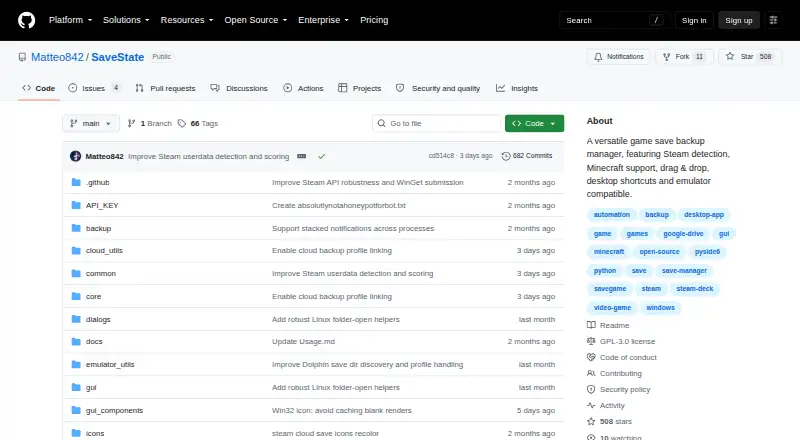
What SaveState is
SaveState is a graphical app for backing up and restoring video game save files, including saves from games without cloud saves. It creates compressed ZIP backups, supports one-click backup and restore, and can automatically rotate older backups. To locate a save folder, users can drop a game launcher shortcut onto the app. Its desktop launcher list includes Steam, Epic, GOG, Battle.net, Ubisoft, EA App, Playnite, and Heroic; it can also discover saves for emulators including RetroArch, Dolphin, ares, DuckStation, PPSSPP, and PCSX2. SaveState is free, GPLv3-licensed, and offers local backups without an account or cloud provider. Optional sync providers include Google Drive, WebDAV, FTP or FTPS, SMB or network folders, and Git. Desktop versions are offered for Windows and Linux, while release notes describe Dolphin directory discovery for macOS locations. A separate Android app is in pre-release alpha and supports emulator detection, save scanning, ZIP backups, restore, and profiles. Some Android emulator saves in protected Android/data paths require a rooted device and superuser access through Root mode.
Good
- Creates compressed ZIP backups with one-click restore.
- Supports many listed game launchers and emulators.
- Local backups work without an account.
- Optional sync supports Google Drive, WebDAV, and Git.
Watch out
- Android app is in pre-release alpha.
- Protected Android/data saves may require a rooted device.
- Desktop versions are offered for Windows and Linux.
Who it suits
SaveState suits players who want local backups for game or emulator saves, with optional cloud synchronization. Android users should note that some protected save locations require a rooted device.
Verdict
SaveState focuses on game-save backup and restore, with launcher and emulator discovery plus optional sync. Its Android version is still pre-release alpha, and some Android saves require root access.
Plans and prices
From SaveState's own pricing page, checked 14 Oct 2026.
| Plan | Price | What it gives you |
|---|---|---|
| Free | Free | Windows/Linux desktop app · local ZIP backups · optional cloud sync · GPLv3 source |
The facts
Each one read from SaveState's own pages, with the date it was checked.
Where it runs
- Android limitation
- Some Android emulator saves stored in protected Android/data paths require a rooted device and granting superuser access to Root mode.checked 8 Oct 2026
- Android maturity
- The Android companion is pre-release alpha v0.8, distributed through beta testing rather than a public Play release.checked 14 Oct 2026
- Android roadmap
- Android auto-scheduling, Google Drive/OneDrive cloud backup, profile import/export, and more languages are listed as roadmap items.checked 14 Oct 2026
- Android version
- A separate Android app is in pre-release alpha and supports detecting emulators, scanning saves, creating ZIP backups, restoring saves, and managing profiles.checked 8 Oct 2026
- Cross-device restore
- Version 3.1 can link downloaded cloud backups to existing or newly created profiles with device-specific paths.checked 14 Oct 2026
- Desktop platforms
- The desktop version is offered for Windows and Linux, with Windows ZIP/WinGet downloads and a Linux AppImage.checked 8 Oct 2026
- Install Linux
- Linux distribution is an AppImage inside a tarball that users make executable and run.checked 14 Oct 2026
- Install Windows
- Windows distribution is a ZIP archive with no installer, and WinGet installation uses Matteo842.SaveState.checked 14 Oct 2026
What it does
- Backup and restore
- It creates compressed ZIP backups, supports one-click backup and restore, and can rotate older backups automatically.checked 8 Oct 2026
- Backup format
- Backups are compressed ZIP archives with configurable retention and restore operations.checked 14 Oct 2026
- Build requirements
- Source builds require Python 3.10 or newer, pip, Git, and either Windows 10/11 or tested Ubuntu 24.x LTS.checked 14 Oct 2026
- CLI/API scope
- Published developer documentation describes a command-line silent-backup option but no web API or SDK.checked 14 Oct 2026
- Cloud controls
- Cloud Sync provides upload, download, status indicators, automatic sync, bandwidth limits, and storage quotas.checked 14 Oct 2026
- Cloud providers
- Optional synchronization supports Google Drive, WebDAV, FTP/FTPS, SMB or NAS shares, and Git repositories.checked 14 Oct 2026
- Cloud sync
- Optional sync providers include Google Drive, WebDAV, FTP/FTPS, SMB/network folders, and Git; nothing is uploaded unless a provider is configured.checked 8 Oct 2026
- Code signing
- The project says its artifact is signed by SignPath.io with a certificate from the SignPath Foundation.checked 8 Oct 2026
- Contribution policy
- The repository asks for issue feedback but says code pull requests are not accepted.checked 14 Oct 2026
- Distribution listing
- An itch.io publication page describes SaveState as a downloadable Windows/Linux tool that creates compressed backups.checked 14 Oct 2026
- Documentation
- Documentation covers usage, cloud synchronization, save-search heuristics, and source building.checked 14 Oct 2026
- Emulator coverage
- The desktop project lists emulators including RetroArch, Dolphin, ares, Ryujinx, Yuzu, PCSX2, xemu, and others.checked 14 Oct 2026
- Emulators
- The desktop app supports save discovery for emulators including RetroArch, Dolphin, ares, DuckStation, PPSSPP, and PCSX2.checked 8 Oct 2026
- Game detection
- Users can drop a game launcher shortcut onto the app to detect the game and search for its save folder.checked 8 Oct 2026
- Independent changelog
- NewReleases records version 2.7 adding an opt-in updater, profile icons, backup notes, and improved RetroArch detection.checked 14 Oct 2026
- Independent review
- GamingOnLinux described SaveState as a user-friendly backup manager for games without Steam Cloud, Minecraft, and detected emulators.checked 14 Oct 2026
The full review of SaveState
Overview
SaveState is a game-save backup and restore app for desktop and Android. It best suits players who want to protect saves across launchers and emulators without relying on a game’s own cloud support. Its optional sync and broad discovery make it flexible, while the Android alpha and root requirement for some saves are meaningful limits.
Key features
SaveState packages saves into compressed ZIP backups, with one-click backup and restore and automatic rotation of older copies. Scheduled backups and version history help maintain a succession of copies, but restores are manual; users should not expect an unattended recovery process.
On desktop, dropping a launcher shortcut onto the app prompts it to identify the game and search for its save folder. Supported launchers include Steam, Epic, GOG, Battle.net, Ubisoft, EA App, Playnite, and Heroic. Emulator discovery covers RetroArch, Dolphin, ares, DuckStation, PPSSPP, and PCSX2, a useful breadth for players whose saves are spread across storefronts and emulation.
Cloud sync is optional and supports Google Drive, WebDAV, FTP/FTPS, SMB or network folders, and Git. Nothing is uploaded until a provider is configured, so SaveState can remain a local-backup tool. That choice gives privacy-conscious users control over where copies go, but cloud synchronization requires setup.
Restore safeguards described for version 3.1 include preflight checks, staged extraction, atomic installation, and an attempted rollback if replacing a save fails. These measures reduce the risk of a partial restore, though rollback is described as an attempt rather than a guarantee. The project says its artifact is signed by SignPath.io with a certificate from the SignPath Foundation. SaveState is GPLv3-licensed; it accepts bug reports and feature suggestions but not code pull requests.
Pricing
SaveState is free and open source. Its Free plan costs nothing, requires no account, and includes local backups with optional cloud sync. There are no paid tiers or seat limits to weigh; users provide their own configured sync destination if they want cloud copies. This is a straightforward fit for individuals who want backup features without a subscription, though it does not offer a managed storage plan.
Platforms
The desktop app is offered for Windows and Linux, with Windows ZIP and WinGet downloads and a Linux AppImage. macOS support is narrower in the described release notes, which mention discovery of Dolphin save directories in macOS locations. Android is a separate pre-release alpha app with emulator detection, save scanning, ZIP backup and restore, and profile management. Saves in protected Android/data paths may require a rooted device and superuser access through Root mode, making Android less convenient for users unwilling or unable to root their device.
Who it's for
SaveState is a strong fit for PC players with saves across multiple launchers or emulators, and for anyone who wants local backups before choosing whether to configure cloud sync. Android users comfortable with alpha software and, where needed, root access may also find its profile and save-management tools useful. It is a weaker choice for people who need a polished Android release or automatic restoration.
Pros and cons
- Pros: Launcher shortcut detection and support for several major launchers reduce the work of finding saves across a varied library.
- Pros: Emulator discovery and ZIP backups make it useful beyond games with built-in cloud saves.
- Pros: Local backups work without a cloud provider, while several sync options are available for those who want them.
- Cons: Restores are manual, even though scheduled backups and version history are supported.
- Cons: The Android app is pre-release alpha, and some protected saves require a rooted device.
- Cons: macOS support is described for Dolphin directory discovery rather than a full desktop offering.
Alternatives
For a broader comparison, browse Game Save Managers. Checkpoint64 is worth considering if you want a team-oriented freemium option: its free plan includes 20 MiB per space, one team, three friend-team memberships, and three read-only fans, while Pro costs €5 a month billed monthly and cancellable anytime. Game Save Genie is another free option that uses your own cloud storage.
Hoard is a freemium alternative credited as a solo-developed project. Ludusavi may suit users looking for a portable, MIT-licensed executable for Windows, Linux, or Mac. OpenSave is a free, open-source alternative with no pro tier, ads, or telemetry. EmuSync is free with no subscription or paywall. Game Backup Monitor offers unlimited games and 7-Zip compression on Linux and Windows, with cloud backup requiring a provider and sync client. Playnite Save Manager is a Windows plugin for Playnite save backup and management, with experimental cloud sync.
Verdict
Choose SaveState if you want a free, open-source way to back up saves across launchers and emulators, with local storage by default and optional sync through your own provider. Its desktop breadth and restore safeguards are compelling; look elsewhere if you need dependable Android support without root, a full macOS desktop app, or automatic restore.
Getting started
- Visit https://github.com/Matteo842/SaveState.
- Download the Windows ZIP or WinGet package, or the Linux AppImage.
- Open the app and drop a game launcher shortcut onto it to search for the save folder.
- Create a backup or restore a saved ZIP backup.
- Configure a supported cloud provider only if you want synchronization.
Limits worth knowing
The Android app is in pre-release alpha. Accessing some emulator saves in protected Android/data paths requires a rooted device and superuser access through Root mode.
Questions
How much does SaveState cost?
SaveState is free, with a plan listed as free.
Does it need an account or cloud storage?
No account or cloud provider is needed for local backups. Cloud synchronization is optional and nothing is uploaded unless a provider is configured.
Which desktop platforms are offered?
Desktop releases are offered for Windows and Linux. Release notes describe Dolphin save-folder discovery for macOS locations.
Is SaveState open source?
Yes. It is GPLv3-licensed.
Which cloud providers can it use?
Optional sync providers include Google Drive, WebDAV, FTP/FTPS, SMB or network folders, and Git.
What is the Android limitation?
The separate Android app is in pre-release alpha. Some emulator saves in protected Android/data paths require a rooted device and superuser access through Root mode.
Alternatives to SaveState
- 1
Ludusavi
Free planOpen sourceAPIExtensionLinuxmacOS7.3Free plan - 2

Checkpoint64
Free planLinuxmacOSWindows6.6From €5 a month - 3

Hoard
Free planLinuxmacOSSelf-hostedWindows6.6From €1.99 a month - 4
SaveKnight
Free planWindows6.4From $5 a month - 5
Playnite Save Manager
Free planExtensionWindows6.3Free plan - 6

QSave
Free planmacOSWindows6.2Free plan