Salesforce Authenticator
Salesforce Authenticator is a mobile app that adds a second verification step to multi-factor authentication logins.
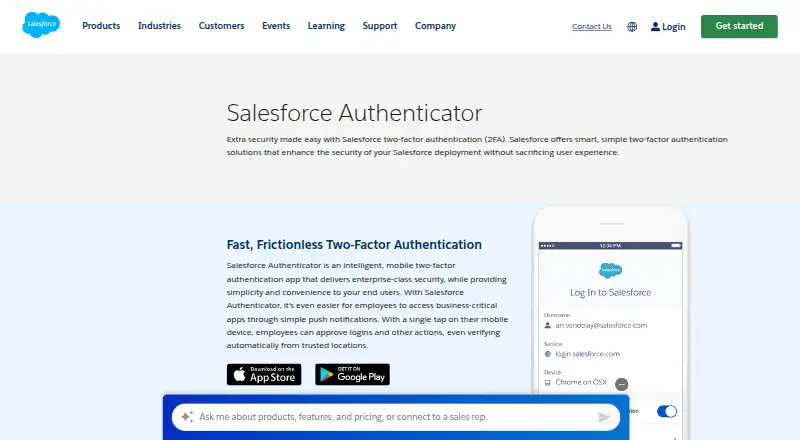
What Salesforce Authenticator is
Salesforce Authenticator is a mobile app that adds a second verification step to multi-factor authentication logins. For Salesforce sign-ins, it can send a push notification after the user enters a username and password, which the user can approve in the app. It also generates time-based one-time passwords for other accounts that support TOTP, including services set up by scanning a QR code; those codes can be used without an internet connection. The app supports encrypted backup and team administration. When enabled, Einstein automation can trust requests a user has approved three or more times. Salesforce says location information used for automation and activity history stays on the mobile device, is used only for identity verification, and is not shared. The app is free at no cost and is listed for iOS and Android. Requirements specify iPhone XR or later with iOS 14.0 or later, or an Android phone with Android 9.0 or later. Database.com Edition is unsupported, and Salesforce recommends phishing-resistant methods for privileged users.
Good
- Push approvals for Salesforce sign-ins
- Generates offline TOTP codes
- Encrypted backup is supported
- Location data stays on the device
Watch out
- Database.com Edition is unsupported
- Requires iPhone XR or later on iOS
- Requires Android 9.0 or later
Who it suits
It suits people who need mobile MFA for Salesforce products or TOTP-compatible online accounts. Teams can also use its administration features, while privileged users should note Salesforce’s recommendation for phishing-resistant verification.
Verdict
Salesforce Authenticator combines push approval for Salesforce logins with TOTP codes for other compatible services. It is free, but device requirements and the unsupported Database.com Edition are worth checking first.
Plans and prices
From Salesforce Authenticator's own pricing page, checked 21 Sep 2026.
| Plan | Price | What it gives you |
|---|---|---|
| Free | Free | Mobile MFA verification · Push notifications · TOTP codes |
| Salesforce Authenticator | Free | Mobile app for MFA and identity verification · Free |
The facts
Each one read from Salesforce Authenticator's own pages, with the date it was checked.
Where it runs
- Automated approvals
- When enabled, Einstein automation can trust requests that a user has approved three or more times for future logins.checked 11 Oct 2026
- Device requirements
- The documented requirements are iPhone XR or later with iOS 14.0 or later, or an Android phone with Android 9.0 or later.checked 11 Oct 2026
- Push approvals
- Yeschecked 21 Sep 2026
- Supported platforms
- iOS,Androidchecked 21 Sep 2026
What it does
- Code type
- totpchecked 21 Sep 2026
- Editions and limits
- MFA support covers listed Salesforce editions from Essentials through Contact Manager, while Database.com Edition is unsupported.checked 11 Oct 2026
- Encrypted backup
- Yeschecked 21 Sep 2026
- Location privacy
- Location data used for automated verifications and activity history is stored securely on the mobile device, not in the cloud.checked 11 Oct 2026
- Location use
- Salesforce says location data is used only to automate identity verification requests and is not shared with anyone.checked 11 Oct 2026
- Offline codes
- The app generates time-based one-time passwords that can be used to log in to other accounts without an internet connection.checked 11 Oct 2026
- Other accounts
- It supports any online service that offers MFA with TOTP codes, including accounts connected by scanning a QR code.checked 11 Oct 2026
- Purpose
- Salesforce Authenticator is a mobile app used as a second factor for multi-factor authentication logins.checked 11 Oct 2026
- Push verification
- For Salesforce logins, the app sends a push notification after the user enters a username and password, which the user can approve in the app.checked 11 Oct 2026
- Salesforce products
- Salesforce Authenticator is available for Salesforce products that provide MFA functionality.checked 11 Oct 2026
- Security guidance
- Salesforce recommends phishing-resistant verification methods for privileged users; its help page describes Salesforce Authenticator as a standard MFA method.checked 11 Oct 2026
Money
- Free plan
- Yeschecked 21 Sep 2026
The company
- Headquarters
- San Francisco, California, United Stateschecked 28 Sep 2026
- Maker
- Salesforce says it was founded in 1999 and has its headquarters in San Francisco.checked 11 Oct 2026
- Team administration
- Yeschecked 21 Sep 2026
Alternatives to Salesforce Authenticator
- 1

Bitwarden
Free planOpen sourceAndroidiOSWebAPI9.3From $1.65 a month - 2

Duo Mobile
Free planAndroidiOS8.5From $3 a month - 3
SAASPASS Authenticator
Free planAndroidiOSWebExtension8.4From $1 a year - 4

LastPass
Free planAndroidiOSWebExtension8.4Free plan - 5
Yubico Authenticator
Free planAndroidiOSLinuxmacOS8.1Free plan - 6
HYPR Authenticate
AndroidiOSWebAPI8.1From $3 a month