rustfmt
rustfmt is a free, open-source formatter for Rust code.
What rustfmt is
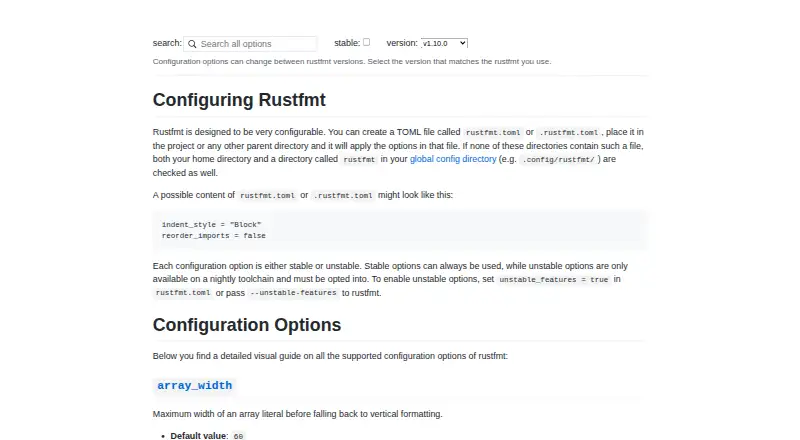
rustfmt is a free, open-source formatter for Rust code. It applies Rust style guidelines to files or code provided through standard input, and can write formatted results to standard output. With Cargo, `cargo fmt` formats binary and library targets in a crate and works across workspaces. A `rustfmt.toml` or `.rustfmt.toml` file can hold configuration; stable and nightly-only options are available. The tool can run from editors including Vim, Emacs, Sublime Text 3, Atom, Visual Studio Code, IntelliJ, and CLion. For automated checks, `--check` reports whether formatting changes are needed, and can be used in CI. Rustfmt is available on Windows, macOS, and Linux, and is distributed under the MIT and Apache License 2.0 licenses. Its limitations include not formatting comments, as well as listed issues with macros, unparsable code, fragments, and non-ASCII Unicode. Unstable settings require opt-in on a nightly toolchain; the latest version requires nightly.
Good
- Free and open source under two listed licenses.
- Works with Cargo crates and workspaces.
- Supports several listed editor integrations.
- Check mode can flag formatting differences in CI.
Watch out
- It does not attempt to format comments.
- Some macro declarations and uses are limited.
- Unstable options require nightly and opt-in.
- The latest version requires the nightly toolchain.
Who it suits
rustfmt suits Rust developers who want consistent formatting through Cargo, an editor, or CI. It is also relevant to developers who need configurable formatting behavior.
Verdict
rustfmt provides a free formatting workflow for Rust projects, including Cargo and CI use. Be aware of its stated limitations and the nightly requirement for unstable options and the latest version.
Plans and prices
From rustfmt's own pricing page, checked 3 Oct 2026.
| Plan | Price | What it gives you |
|---|---|---|
| rustfmt | Free | No paid plans stated |
The facts
Each one read from rustfmt's own pages, with the date it was checked.
What it does
- Cargo
- The `cargo fmt` command formats binary and library targets in a crate and works with Cargo workspaces.checked 3 Oct 2026
- Check mode
- With `--check`, rustfmt exits with code 0 when no formatting changes are needed and 1 when changes would be made.checked 3 Oct 2026
- CI
- The README describes using `cargo fmt --all -- --check` to fail a CI build when code is not formatted.checked 3 Oct 2026
- CI use
- The README describes using `--check` in CI to report formatting differences through an error code.checked 2 Oct 2026
- Configuration
- Configuration can be set in `rustfmt.toml` or `.rustfmt.toml`, and the default style conforms to the Rust style guide.checked 3 Oct 2026
- Direct use
- The rustfmt binary formats files in place or reads Rust code from standard input and writes formatted code to standard output.checked 3 Oct 2026
- Editor integrations
- The README lists integrations or usage instructions for Vim, Emacs, Sublime Text 3, Atom, Visual Studio Code, and IntelliJ or CLion.checked 3 Oct 2026
- Input and output
- The rustfmt binary can format files or read Rust code from standard input and write formatted output to standard output.checked 2 Oct 2026
- Install
- The README installs rustfmt as a component through rustup.checked 3 Oct 2026
- IntelliJ and CLion
- The IntelliJ and CLion instructions describe enabling rustfmt on save or assigning a shortcut to reformat a file.checked 3 Oct 2026
- License
- rustfmt is distributed under both the MIT License and Apache License 2.0.checked 3 Oct 2026
- Limitations
- The README lists limitations involving unparsable code, macros, comments, code fragments, non-ASCII Unicode, and bugs.checked 3 Oct 2026
- Limit: comments
- Rustfmt does not currently attempt to format comments, though it formats code that contains comments.checked 2 Oct 2026
- Nightly options
- The README marks coverage, checkstyle, and JSON emit formats as nightly-only options.checked 3 Oct 2026
- Purpose
- rustfmt formats Rust code according to style guidelines.checked 3 Oct 2026
- Security contact
- The Rust Security Response Working Group handles vulnerability reports and security issues for rust-lang organization repositories.checked 2 Oct 2026
- Style stability
- The Rust Edition Guide describes a formatting stability guarantee intended to avoid noisy formatting changes when updating the Rust toolchain.checked 2 Oct 2026
- Support
- The README points users to `rustfmt --help` and `cargo fmt --help` for command usage and arguments.checked 3 Oct 2026
- Toolchains
- The README says rustfmt runs with Rust 1.24 and above, while the latest version requires the nightly toolchain.checked 3 Oct 2026
Where it runs
- Limit: macros
- The README says some macro declarations and uses are formatted, while macro declarations and uses are listed among rustfmt’s limitations.checked 2 Oct 2026
The full review of rustfmt
rustfmt is the Rust code formatter that applies Rust style guidelines to files and Cargo projects. It suits Rust developers who want a shared format across local work, editors, and CI. Its free, open-source workflow is a strong fit for ordinary Rust code, but comments and some macro cases remain rough edges, and the latest version requires nightly.
Overview
Rustfmt can format files in place or take Rust code on standard input and return formatted output on standard output. For Cargo projects, cargo fmt formats the crate’s binary and library targets and works across workspaces, making it practical to apply one formatting convention across a project rather than invoke the formatter file by file.
The Rust Edition Guide describes a formatting stability guarantee intended to prevent noisy changes when updating the Rust toolchain. That matters for teams: formatting is most useful when it settles routine style decisions without turning a toolchain update into a broad diff.
Key features
Cargo and CI
Use cargo fmt --all -- --check in CI to fail a build when formatting changes are needed. In check mode, rustfmt exits with code 0 when no changes are needed and 1 when it would make changes. This gives teams a straightforward way to enforce formatting without having CI rewrite files.
Configuration and editors
Configuration goes in rustfmt.toml or .rustfmt.toml. Stable options suit teams that want customization without moving to nightly; unstable options require opt-in and a nightly toolchain. The README lists integrations for Vim, Emacs, Sublime Text 3, Atom, Visual Studio Code, IntelliJ, and CLion. IntelliJ and CLion can run formatting on save or through a shortcut.
One practical boundary is that rustfmt formats code containing comments but does not attempt to format the comments themselves. Its documented limitations also include some macro declarations and uses, unparsable code, code fragments, non-ASCII Unicode, and bugs, so projects with those cases should expect exceptions rather than assume every file will be handled uniformly.
Pricing
Rustfmt is free and open source, with a listed price of no cost. It is distributed under both the MIT License and Apache License 2.0. There is no paid plan or trial to weigh against the free offering.
Platforms
Rustfmt supports Windows, macOS, and Linux. It is a Rust formatter, not a multi-language tool. The README says it runs with Rust 1.24 and above, while the latest version requires the nightly toolchain; stable-toolchain installation is documented with rustup component add rustfmt. That makes stable rustfmt the simpler route for users who do not need nightly-only configuration, while those seeking the latest version must accept the nightly dependency.
Who it's for
Rustfmt is the natural choice for Rust developers who want formatting integrated with Cargo, editor workflows, or a CI check, especially when the team values a consistent style and predictable diffs. It is less suitable as a comments formatter or for codebases that rely heavily on macro forms or other documented limitations. Developers who cannot use nightly should also weigh whether the stable toolchain meets their needs.
Pros and cons
- Pro: Cargo and workspace support makes project-wide formatting practical.
- Pro: CI check mode reports needed changes with a nonzero exit code, so teams can enforce formatting without rewriting files in the build.
- Pro: Configuration files and a broad set of editor integrations support both personal and team workflows.
- Con: Comments themselves are not formatted, so rustfmt does not solve all source-layout cleanup.
- Con: Some macro cases and other documented limitations can prevent uniform handling across a codebase.
- Con: The latest version requires nightly, and unstable settings require nightly plus opt-in.
Alternatives
For a broader set of code-formatting choices, browse Code Formatting Tools.
Pick Black for Python formatting, Prettier for web-oriented formatting, or gofmt for Go; each is a free formatter for a different language or project focus. dprint is another free, MIT-licensed CLI with self-managed installation, while Biome is a free open-source toolchain for web projects. Consider Ruff for Python tooling, or Taplo for TOML. Accessibility Test Framework for Android is another free option, with Android, Linux, macOS, and Windows support.
Verdict
Choose rustfmt if you work in Rust and want a free formatter that fits Cargo, editors, and CI, with a stability guarantee aimed at keeping toolchain updates from producing noisy formatting changes. Look elsewhere if formatting comments or reliably covering your project’s macro-heavy code is central, or if you need the latest version but cannot use nightly.
Alternatives to rustfmt
- 1

Prettier
Free planOpen sourceWebAPIExtensionLinux7.5Free plan - 2
Avidemux
Free planOpen sourceWebLinuxmacOSWindows7.3Free plan - 3
Fourmolu
Free planWebLinuxWindows6.7Free plan - 4
Black
Free planLinuxmacOSSelf-hostedWindows6.5Free plan - 5

Ruff
Free planWebLinuxmacOSSelf-hosted6.5Free plan - 6
Zig fmt
Free planLinuxmacOSWindows6.5Free plan