Black
Black is a Python code formatter that applies a consistent style while following PEP 8.
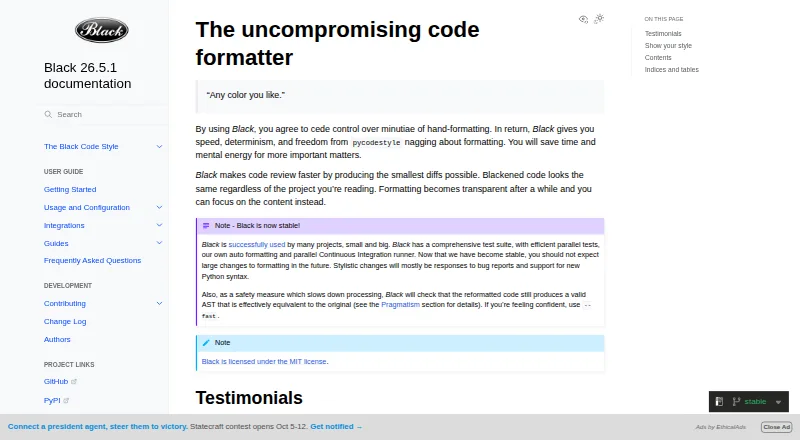
What Black is
Black is a Python code formatter that applies a consistent style while following PEP 8. It rewrites entire files in place and uses an 88-character default line length. Its limited style choices are intended to keep formatting consistent across projects; indentation style cannot be configured. After formatting, Black checks whether the code's abstract syntax tree is effectively equivalent and raises an error if that check fails. Install it with pip; it requires Python 3.10 or newer. Black is primarily a command-line tool and does not provide a Python interface. Its documented integrations include editors and IDEs such as Emacs, PyCharm, IntelliJ IDEA, Vim, Neovim, Visual Studio Code, and Sublime Text, as well as GitHub Actions and doctest formatting. Notebook formatting is available with the jupyter extra, but cells with certain magics or invalid syntax are skipped. The free, MIT-licensed tool also includes blackd, an HTTP server that binds to localhost by default. Stable releases preserve formatting within the same calendar year when options match.
Good
- Free and licensed under MIT.
- Formats Python files in place.
- Checks that formatting preserves an effectively equivalent syntax tree.
- Supports notebooks through the jupyter extra.
- Documented integrations include editors and GitHub Actions.
Watch out
- Requires Python 3.10 or newer.
- Indentation style cannot be configured.
- Does not provide a Python interface.
- Some notebook cells are skipped.
Who it suits
Black suits Python developers who want consistent formatting with few style decisions. It can also suit teams using documented editor integrations or GitHub Actions.
Verdict
Black offers a constrained approach to Python formatting, with integrations for editors, CI, and notebooks. Its command-line focus and fixed indentation style may not fit every workflow.
Plans and prices
From Black's own pricing page, checked 29 Sep 2026.
| Plan | Price | What it gives you |
|---|---|---|
| Black | Free | MIT-licensed Python code formatter |
The facts
Each one read from Black's own pages, with the date it was checked.
What it does
- API limit
- Black is fundamentally a command-line tool and does not currently provide a Python interface.checked 28 Sep 2026
- CI integration
- Black provides a GitHub Actions integration that supports GitHub-hosted runner operating systems.checked 28 Sep 2026
- Code review
- Black says it can make code review faster by producing the smallest diffs possible.checked 29 Sep 2026
- Command line tool
- Black is fundamentally a command line tool and the documentation says it does not yet provide a Python interface.checked 29 Sep 2026
- Configuration limit
- Black provides no option to configure indentation style and says requests for that option will not be considered.checked 29 Sep 2026
- Consistent style
- Black limits style options and aims to make code look consistent across projects.checked 28 Sep 2026
- Docker
- Official Black Docker images are available, with tags for releases and prereleases.checked 28 Sep 2026
- Editor integrations
- The documentation describes integrations for editors including PyCharm, Vim, Neovim, Visual Studio Code, and Sublime Text.checked 28 Sep 2026
- Editor support
- Documented editor integrations include Emacs, PyCharm and IntelliJ IDEA, Vim, Neovim, Visual Studio Code, SublimeText, and others.checked 29 Sep 2026
- Formatting
- Black reformats whole files in place and uses a default line length of 88 characters.checked 28 Sep 2026
- Installation
- Black installs with pip or pipx and requires Python 3.10 or later to run.checked 29 Sep 2026
- Integrations
- The documentation lists editor and IDE, GitHub Actions, source version control, and doctest formatting integrations.checked 29 Sep 2026
- License
- Black is licensed under the MIT license.checked 29 Sep 2026
- Local server
- Black includes blackd, an HTTP server that binds to localhost by default.checked 28 Sep 2026
- Notebook limits
- Black skips notebook cells containing automagics, non-Python or multiline magics, transformed magic code, or invalid syntax.checked 29 Sep 2026
- Notebook support
- Jupyter Notebook formatting is available with the black[jupyter] installation extra.checked 29 Sep 2026
- Purpose
- Black is an opinionated formatter for Python code that follows PEP 8.checked 28 Sep 2026
- Python compatibility
- Black promises support for Python versions that have not reached end of life, for both running Black and formatting code.checked 29 Sep 2026
- Safety check
- Black checks that reformatted code has a valid AST effectively equivalent to the original and raises an error without changing the file if issues are found.checked 29 Sep 2026
- Style stability
- For stable releases, code formatted with a release remains unchanged under other releases in the same calendar year when using the same options.checked 28 Sep 2026
- What it does
- Black is an opinionated code formatter that formats Python code with consistent style.checked 29 Sep 2026
The full review of Black
Black is a Python formatter for developers and teams who want code style applied consistently rather than negotiated file by file. Its whole-file approach and broad editor and CI integrations make it a practical fit for shared workflows, provided you accept its fixed style and command-line orientation.
Overview
Black follows PEP 8 and reformats Python files in place, using a default line length of 88 characters. Its limited style options are the point: teams can reduce formatting debates and keep code visually consistent across projects. That trade-off is worthwhile when uniformity matters more than matching an existing indentation preference; Black offers no way to configure indentation style.
Black aims to keep code-review diffs small, and checks that the reformatted code has an effectively equivalent abstract syntax tree, raising an error if that check fails. Stable releases also preserve formatting across releases in the same calendar year when used with the same options, which can help avoid unnecessary style churn.
Key features
- Whole-file formatting: Black applies its format to complete files. This is a clear, repeatable policy for projects that want one standard, but it is not the choice for teams seeking a changed-lines-only workflow.
- Editor and CI integration: Documented integrations cover editors and IDEs such as PyCharm, IntelliJ IDEA, Vim, Neovim, Visual Studio Code, Sublime Text, and Emacs. GitHub Actions integration supports GitHub-hosted runner operating systems, making Black suitable for enforcing formatting in development and CI.
- Jupyter notebooks: Installing Black with the jupyter extra enables notebook formatting. It skips cells with automagics, non-Python or multiline magics, transformed magic code, or invalid syntax, so notebooks with those cells will not receive comprehensive formatting.
- Local and container workflows: The blackd HTTP server binds to localhost by default, and official Docker images have release and prerelease tags. Black installs with pip and requires Python 3.10 or newer to run.
- Python compatibility: Black promises support for Python versions that have not reached end of life, both for running the formatter and formatting code.
Black is fundamentally a command-line tool and does not provide a Python interface. That is a meaningful constraint for developers who want to embed it as a library, even though integrations can bring it into editors and automation.
Pricing
Black is free: the Black plan costs nothing and provides an MIT-licensed Python code formatter. There is no free trial because the software is already available at no cost, and no paid tier or seat-based pricing is part of this offer. The practical cost is accepting its fixed formatting policy and installing it in an environment with Python 3.10 or newer.
Platforms
Black supports Windows, macOS, and Linux, as well as self-hosted use. Its local HTTP server adds an API-style workflow, but does not change the core product's command-line nature or provide a Python library API. The MIT license allows the formatter to fit into open-source and commercial development workflows.
Who it's for
Black is best for Python developers and teams that want a shared, low-debate formatting standard across editors, notebooks, and CI. The syntax-equivalence check and stable-release behavior strengthen its appeal for teams that value predictable automated formatting. Look elsewhere if your project requires configurable indentation, a Python interface, or notebook formatting that handles magic-heavy cells.
Pros and cons
Pros
- Consistent team style: Few formatting choices make it easier to apply the same conventions across projects.
- Safety check: AST equivalence checking can catch a formatting result that does not preserve the code's structure.
- Broad workflow coverage: Editor, GitHub Actions, notebook, Docker, and local-server options support use beyond a standalone terminal command.
- Free and permissively licensed: The MIT license and 0.00 USD price make it accessible without a paid plan.
Cons
- Fixed indentation: No indentation-style setting rules out teams that must follow a different house convention.
- No Python library API: Black cannot be used as a Python interface for embedding directly in another program.
- Notebook edge cases: Certain magic commands, transformed code, and invalid syntax cause cells to be skipped.
- Runtime requirement: Running Black requires Python 3.10 or newer.
Alternatives
For other options, browse Code Formatting Tools. Choose Ruff if you want a free Python-ecosystem alternative from a maker focused on high-performance developer tools. rustfmt is a free alternative for readers whose code is in Rust, while Prettier is a free open-source formatter for a different set of platforms, including web and extension use.
Scalafmt is the free option for Scala formatting; Taplo is another free choice with API and extension platforms. For web projects, Biome offers an open-source toolchain. CSharpier suits C# and XML formatting as a .NET tool. Accessibility Test Framework for Android is a free Android accessibility-testing alternative, rather than a Python formatter.
Verdict
Choose Black when your Python project needs consistent formatting across developers and automation, and you are willing to accept its fixed style. The free MIT-licensed tool, AST safety check, and editor and CI integrations make that policy easy to carry through a workflow. Choose another tool if configurable indentation or a Python library interface is essential.
Getting started
- Install Black with pip.
- Use it on a system running Python 3.10 or newer.
- For Jupyter Notebook formatting, install Black with the jupyter extra.
- Connect it to a documented editor, IDE, or GitHub Actions workflow if needed.
Questions
Is Black free and open source?
Yes. Black is free and licensed under the MIT License.
Which language does Black format?
Black formats Python code.
What Python version does it require?
Black requires Python 3.10 or newer to run.
Does Black have a Python library interface?
No. Black is fundamentally a command-line tool and does not currently provide a Python interface.
Can Black format Jupyter Notebooks?
Yes, notebook formatting is available by installing Black with the jupyter extra. It skips cells containing certain magics, transformed magic code, or invalid syntax.
Can indentation style be configured?
No. Black does not provide an option to configure indentation style.
Alternatives to Black
- 1

Prettier
Free planOpen sourceWebAPIExtensionLinux7.5Free plan - 2
Avidemux
Free planOpen sourceWebLinuxmacOSWindows7.3Free plan - 3
Fourmolu
Free planWebLinuxWindows6.7Free plan - 4
rustfmt
Free planLinuxmacOSWindows6.6Free plan - 5

Ruff
Free planWebLinuxmacOSSelf-hosted6.5Free plan - 6
Zig fmt
Free planLinuxmacOSWindows6.5Free plan