Rubric Scorer
Rubric Scorer is an Android and iOS app for teachers who want to build rubrics, grade students, and add written feedback.
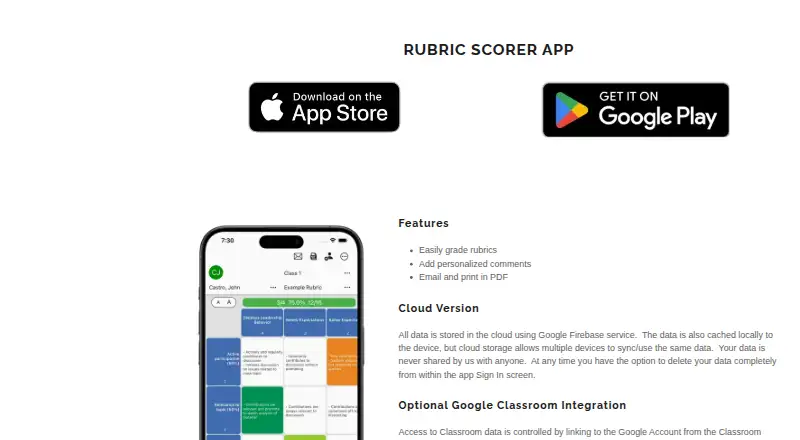
What Rubric Scorer is
Rubric Scorer is an Android and iOS app for teachers who want to build rubrics, grade students, and add written feedback. Rubrics can contain up to 20 rows and 10 columns, and grading uses touch controls. Teachers can choose predefined comments or write custom ones, then view, print, or email a rubric as a PDF. Rubrics can also be shared with other teachers. The free app plan costs nothing and covers up to three rubrics for one class. Premium supports up to 20 classes and 100 rubrics per class, and adds bulk grade emails, combined PDFs for a class, quick comments, and class statistics. The app supports LMS integration, including Google Classroom through a linked Google Account. Gmail linking is optional and is used to email students and parents whose details are stored in the app. In the cloud version, data is stored with Google Firebase, cached locally, and synced across devices; users can delete cloud data in the app's Sign In screen. The developer is Glen Botha, based in San Francisco, California.
Good
- Build rubrics up to 20 rows by 10 columns.
- Grade by touch and add custom or predefined comments.
- View, print, or email rubrics as PDFs.
- Share rubrics with other teachers.
- Premium includes bulk grade emails and class statistics.
Watch out
- The free plan is limited to three rubrics for one class.
- Premium is billed as a monthly renewable subscription.
Who it suits
Rubric Scorer suits teachers who need a mobile way to create rubrics, score students, and deliver comments or PDF copies. It may also suit teachers who share rubrics or need the premium class-management features.
Verdict
Choose Rubric Scorer if you want rubric creation and touch-based grading on Android or iOS, with PDF sharing and comments.
Plans and prices
From Rubric Scorer's own pricing page, checked 7 Oct 2026.
| Plan | Price | What it gives you |
|---|---|---|
| Free app | Free | Up to 3 rubrics for 1 class |
| Premium subscription | — | Up to 20 classes · 100 rubrics per class · premium features · Monthly renewable subscription; price not stated on the opened pages |
The facts
Each one read from Rubric Scorer's own pages, with the date it was checked.
What it does
- Cloud storage
- The maker says the cloud version stores data with Google Firebase, caches it locally, and syncs data across devices.checked 7 Oct 2026
- Data deletion
- The maker says cloud-version users can delete their data completely from within the app's Sign In screen.checked 7 Oct 2026
- Gmail
- The maker says Gmail linking is optional, is used to send emails to students and parents stored in the app, and does not access other Gmail data.checked 7 Oct 2026
- Google Classroom
- The maker says Classroom access is controlled by linking a Google Account, and users control synced data and can unlink at any time.checked 7 Oct 2026
- PDF output
- Users can view, print, or email a PDF copy of a rubric.checked 7 Oct 2026
- Premium features
- Premium features include bulk emailing grades, combined PDFs for a class, quick comments, and class statistics.checked 7 Oct 2026
- Privacy
- The maker's privacy policy says cloud app data is stored by Google in a cloud database and users can permanently delete it in the app.checked 7 Oct 2026
- Purpose
- Rubric Scorer is described as a teacher-focused app for creating rubrics, scoring students, and leaving comments.checked 7 Oct 2026
- Rubric size
- Users can create rubrics up to 20 rows by 10 columns.checked 7 Oct 2026
- Scoring and feedback
- The app supports touch-based grading and custom or predefined comments.checked 7 Oct 2026
- Sharing
- Users can share rubrics with other teachers.checked 7 Oct 2026
- Support
- The Google Play listing gives [email protected] as the app support email.checked 7 Oct 2026
The company
- Headquarters
- San Francisco, California, United Stateschecked 28 Sep 2026
- Maker and location
- Google Play identifies the developer as Glen Botha and lists an address in San Francisco, California.checked 7 Oct 2026
The full review of Rubric Scorer
Rubric Scorer is a mobile app for teachers to build rubrics, score students, and leave comments. It is best suited to educators who prefer marking on Android or iOS and sharing work as PDFs. Its classroom-focused workflow is appealing, but the free plan is tightly capped and Premium has custom pricing.
Overview
Rubrics can contain up to 20 rows and 10 columns, accommodating assessments with several criteria and performance levels. Teachers can score by touch, add custom or predefined comments, and share rubrics with colleagues. The app also lets them view, print, or email a PDF copy of a rubric, keeping rubric creation and core marking tasks together on a mobile device.
The limit that matters most is the free plan: three rubrics for one class. That is enough to try the workflow or maintain a small assessment set, but teachers serving multiple classes or building a larger library will need the subscription's expanded capacity.
Key features
Scoring and feedback
Touch-based grading suits teachers who mark on a phone or tablet. Custom and predefined comments provide a choice between tailored notes and reusable feedback. Premium adds quick comments, bulk emailing of grades, combined PDFs for a class, and class statistics. Those additions are aimed at reducing repetitive work and organizing results across classes; teachers who only need to score and share individual rubrics may not need them.
Sharing and integrations
Teachers can share rubrics with other teachers, while PDF output offers a straightforward way to view, print, or email a rubric. Google Classroom access is controlled through a linked Google Account; users control synced data and can unlink whenever they choose. Gmail linking is optional and is used to email students and parents stored in the app, rather than to access other Gmail data.
Cloud data
The cloud version stores data with Google Firebase, keeps a local cache, and syncs data across devices. Users can permanently delete cloud data from the app's Sign In screen. This combination supports access across devices while leaving account linking and deletion under the user's control.
Pricing
Rubric Scorer is freemium, with a free plan and a free trial. The Free app plan costs free and allows up to three rubrics for one class. It is the sensible starting point for a teacher evaluating the workflow or working with a limited set of assessments, but the single-class and rubric caps restrict ongoing use at larger scale.
The Premium subscription has custom pricing and is billed as a monthly renewable subscription. It supports up to 20 classes and 100 rubrics per class, and includes premium features such as quick comments, bulk emailing grades, combined class PDFs, and class statistics. This is the relevant plan for teachers who need broader class coverage or those time-saving tools. Since the subscription renews monthly, its recurring commitment matters; choose it only if its expanded limits and features justify the price offered.
Platforms
Rubric Scorer is available on Android and iOS. Teachers who want a mobile-first marking workflow can use it on either platform; it is not a fit for readers seeking a web or desktop option.
Who it's for
The app is a strong match for classroom teachers who want to create rubrics, score students by touch, leave comments, and share PDFs from a mobile device. Its free tier works for a small, single-class setup. Teachers handling many classes, repeating feedback at volume, or distributing class results in bulk have clearer reasons to consider Premium. Those who need a published subscription price before committing, or a non-mobile workflow, should look elsewhere.
Pros and cons
- Pros: Rubrics support up to 20 rows by 10 columns, providing room for structured assessments.
- Pros: Touch scoring, custom and predefined comments, and PDF sharing bring core grading tasks into one mobile app.
- Pros: Premium supports up to 20 classes and 100 rubrics per class, with bulk email, combined PDFs, quick comments, and class statistics.
- Cons: The free plan allows just three rubrics for one class, making it a limited long-term option for teachers with broader needs.
- Cons: Premium is a monthly renewable subscription with custom pricing, so its cost must be confirmed before subscribing.
- Cons: Android and iOS are the supported platforms, limiting its fit for teachers who want a browser-based workflow.
Alternatives
For a wider comparison, browse Rubric Software.
- Gradescope is a better fit for readers who want web access alongside Android and iOS, plus assignment statistics, regrade requests, and data export on its free Basic plan.
- UniRubric suits lecturers who need rubric-anchored marking output and approval before release; its free plan covers one lifetime marking job and includes PDF export.
- GradeBoard is worth considering for web-based assessment workflows that use AI grading, annotated DOCX downloads, and basic analytics; its free plan caps submissions at 10 learners per month.
- OpenRubric is an alternative for readers considering a self-hosted or web option.
- Pawtograder offers a free community instance for instructors evaluating the self-hosted or web product; ongoing use at scale requires contacting its team.
- RubiStar is a free web-based option for educational use, though rubrics may be deleted if used personally or commercially.
- RubriqFlow may suit institutions that want unlimited free faculty and staff accounts, with student access charged at $5 a month per student per semester.
- Feedbacker is an open-source project available for Linux, macOS, web, and Windows.
Verdict
Choose Rubric Scorer if you are a classroom teacher who wants to create rubrics and mark students on Android or iOS, with comments and PDF sharing in the same workflow. Its mobile grading tools and higher-capacity Premium plan are the main reasons to choose it. Look elsewhere if three rubrics for one class is too restrictive, you need web access, or you want to know the subscription price before considering a monthly renewal.
Getting started
- Visit https://inpocketsolutions.com/rubric-scorer-app.
- Use the app on Android or iOS.
- Start with the free app plan, which covers up to three rubrics for one class.
- Choose the monthly renewable premium subscription for expanded class capacity and premium features.
- Link a Google Account for Google Classroom access; Gmail linking is optional.
Limits worth knowing
The free plan covers up to three rubrics for one class.
Questions
Is Rubric Scorer free?
Yes. The free app plan costs nothing and covers up to three rubrics for one class.
What does premium add?
Premium includes bulk emailing grades, combined PDFs for a class, quick comments, and class statistics. It supports up to 20 classes and 100 rubrics per class.
What platforms does it support?
Rubric Scorer is available on Android and iOS.
Does it integrate with Google Classroom?
Yes. Classroom access is controlled through a linked Google Account, and users can control synced data and unlink the account.
Is Gmail access required?
No. Gmail linking is optional and is used to send emails to students and parents stored in the app.
Who makes Rubric Scorer?
Google Play identifies the developer as Glen Botha and lists an address in San Francisco, California.
Alternatives to Rubric Scorer
- 1

Gradescope
Free planAndroidiOSWeb7.6Free plan - 2
UniRubric
Free planWebAPI7.3From $9 a year - 3
OpenRubric
Free planWebAPISelf-hosted7.2$50 one-time - 4

Classwise AI
Web6.9From $17 a month - 5

Teachfloor
WebAPI6.7From $89 a month - 6

GradeBoard
Free planWeb6.6From £24.99 a month