
GradeBoard
GradeBoard is a web-based grading platform for educators that uses AI to give feedback in line with rubric outcomes.
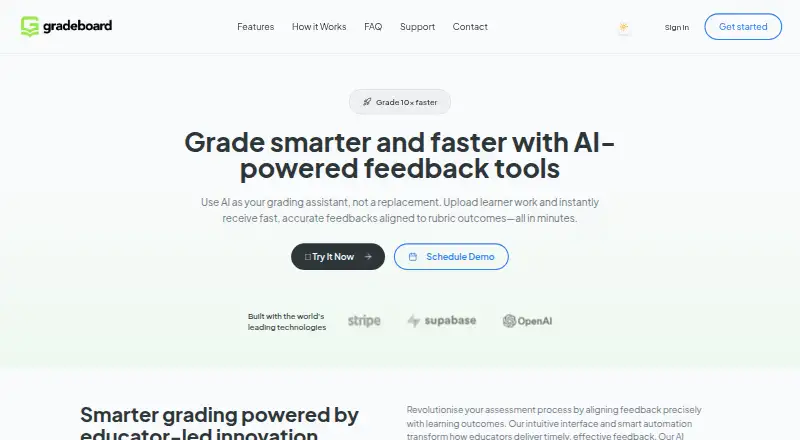
What GradeBoard is
GradeBoard is a web-based grading platform for educators that uses AI to give feedback in line with rubric outcomes. It accepts PDF, DOCX, TXT, and image uploads, with OCR text extraction listed for images. Its analysis aligns learner work semantically with rubric criteria and can produce inline comments, summative feedback, and annotations that remain editable before export. The site says batch processing can handle 50 or more submissions at once. Analytics cover performance trends, time savings, and the distribution of student progress. The Free plan costs nothing and includes 10 learner submissions monthly, limited rubric uploads, basic analytics, and 30-day data retention. Pro is £24.99 a month for up to 200 submissions, batch grading, OCR, and six-month retention. The platform lists GDPR compliance and offers web access.
Good
- Accepts PDF, DOCX, TXT, and image uploads.
- Batch processing handles 50+ submissions.
- Annotations can be edited before export.
- Analytics track performance trends and student progress.
- Free plan includes 10 monthly submissions.
Watch out
- Free plan is limited to 10 monthly submissions.
- Free retention period is 30 days.
- Annotated DOCX and batch ZIP exports are listed on paid plans.
Who it suits
GradeBoard suits educators who want rubric-aligned feedback for individual learner work or institutional batch processing. Its plans range from a free option to enterprise features such as SSO and custom API/LMS support.
Verdict
GradeBoard brings rubric-based AI feedback, submission processing, and analytics together in a web platform. Check the plan limits and retention period against your grading volume and data needs.
Plans and prices
From GradeBoard's own pricing page, checked 4 Oct 2026.
| Plan | Price | What it gives you |
|---|---|---|
| Free | Free | 10 learner submissions/month · Standard AI model · Limited rubric uploads · DOCX annotated download · Basic analytics · 30-day data retention · Email support |
| Pro | £24.99 a month | 200 submissions/month · Priority AI model · Batch grading · Advanced developmental feedback · OCR · 6-month data retention |
| Enterprise | £250 a month | Unlimited submissions · SSO · Team management · Custom API/LMS integration · 12-month data retention · Dedicated success manager · From |
The facts
Each one read from GradeBoard's own pages, with the date it was checked.
What it does
- AI analysis
- Its AI analysis uses semantic alignment with rubrics and generates feedback.checked 4 Oct 2026
- Analytics
- Analytics track performance trends, time savings, and student progress distribution.checked 4 Oct 2026
- Audience
- The site presents GradeBoard for educators and describes use from single submissions to institutional batch processing.checked 4 Oct 2026
- Batch grading
- The site says batch processing can handle 50+ submissions simultaneously.checked 4 Oct 2026
- Contact and location
- The site lists 128 City Road, London EC1V 2NX, and [email protected].checked 4 Oct 2026
- Data retention
- Listed retention periods are 30 days for Free, 6 months for Pro, and 12 months for Enterprise.checked 4 Oct 2026
- Enterprise integrations
- The Enterprise plan lists SSO integration and custom API/LMS support.checked 4 Oct 2026
- Exports
- The site lists annotated DOCX downloads and batch feedback ZIP downloads on paid plans.checked 4 Oct 2026
- Feedback
- The platform offers inline comments, summative feedback, and editable annotations before export.checked 4 Oct 2026
- Privacy
- The registration page says GradeBoard complies with GDPR and other data protection regulations.checked 4 Oct 2026
- Purpose
- GradeBoard provides AI-powered feedback aligned with rubric outcomes for learner work.checked 4 Oct 2026
- Support
- The Free plan includes email support; Enterprise includes a dedicated success manager.checked 4 Oct 2026
- Uploads
- The site lists PDF, DOCX, TXT, and image uploads, with OCR text extraction.checked 4 Oct 2026
The company
- Headquarters
- London, United Kingdomchecked 28 Sep 2026
The full review of GradeBoard
GradeBoard is a web platform for educators who want AI-generated feedback tied to rubric outcomes. It is best suited to recurring assessment where editable comments and batch processing matter; occasional graders may find its wider workflow unnecessary.
Overview
GradeBoard analyzes learner work against rubric criteria and produces inline comments and summative feedback. Educators can edit annotations before exporting them, leaving room for review rather than treating generated feedback as final. That makes it a stronger fit for feedback workflows than for educators seeking only a score.
Uploads include PDF, DOCX, TXT and image files, with OCR text extraction. The platform also tracks performance trends, time savings and student progress distribution. Those analytics can help educators follow patterns across assignments, though their usefulness depends on having enough submissions to make trends meaningful.
Key features
Batch grading can handle 50 or more submissions simultaneously, a useful capacity for large classes or institutional processing. The Free plan allows just 10 learner submissions per month, however, so this scale is mainly relevant to paid users. Pro raises the allowance to 200 submissions monthly and adds a priority AI model, batch grading, advanced developmental feedback and OCR.
Annotated DOCX downloads and batch feedback ZIP downloads are paid-plan exports. Free includes annotated DOCX download but not the listed batch ZIP option. GradeBoard also supports LMS integration; Enterprise adds custom API/LMS support, SSO and team management.
Pricing
The freemium structure gives educators a way to try the workflow, but the free quota is small for regular classes.
- Free — free: 10 learner submissions per month, standard AI model, limited rubric uploads, DOCX annotated download, basic analytics, 30-day data retention and email support. It suits a low-volume evaluation or occasional use, but limited rubric uploads and the submission cap constrain broader teaching use.
- Pro — £24.99 a month: 200 submissions per month, priority AI model, batch grading, advanced developmental feedback, OCR and six-month data retention. This is the practical tier for educators with recurring assessment and moderate volume; the 200-submission ceiling still matters for larger cohorts.
- Enterprise — From £250 a month: unlimited submissions, SSO, team management, custom API/LMS integration, 12-month data retention and a dedicated success manager. It is aimed at institutional use, where administration and integrations can justify the higher starting price.
GradeBoard says it complies with GDPR and other data protection regulations. Its retention period increases by plan, from 30 days on Free to 12 months on Enterprise, so institutions should weigh those terms against their data needs.
Platforms
GradeBoard runs on the web. It supports LMS integration, with custom API/LMS integration listed for Enterprise.
Who it's for
Educators who grade against rubrics and want to combine editable AI feedback, batch processing and progress analytics are the clearest fit. Free is more suitable for a small-scale trial than a full course; Pro fits sustained individual or class use, while Enterprise targets teams and institutions with larger volumes or integration needs.
Pros and cons
- Pro: Rubric-aligned analysis produces both inline and summative feedback, and annotations can be edited before export.
- Pro: Batch processing of 50+ submissions and analytics support recurring, higher-volume assessment.
- Con: Free stops at 10 submissions per month and limits rubric uploads, making it restrictive for regular multi-course use.
- Con: Retention varies substantially by tier, so Free’s 30-day period may not suit educators who need longer access to submissions.
Alternatives
Rubric Software is a useful category starting point for comparing rubric tools. Choose Gradescope instead if Android or iOS access matters, or if its free tier’s dynamic rubrics, question-by-question grading, statistics and regrade requests better fit the workflow.
Rubric Scorer is a mobile option for Android and iOS; its free app supports up to three rubrics for one class. UniRubric may suit a lecturer who wants a single lifetime marking job with rubric-anchored output and PDF export at no cost.
OpenRubric is an alternative for readers considering a self-hosted or web option. Pawtograder offers a free community instance for instructors evaluating it, with ongoing use at scale requiring contact.
RubiStar is a free web option for educational use, though rubrics may be deleted if used personally or commercially. RubriqFlow may fit institutions wanting unlimited faculty and staff accounts at no charge, with student access priced at $5 a month.
Quick Rubric is a free web-based choice when publicly available rubrics and non-commercial reuse are acceptable.
Verdict
GradeBoard is a strong fit for educators who need rubric-linked feedback across recurring assignments, especially when batch grading and analytics are valuable. Its editable annotations preserve educator oversight, but the free quota is too low for sustained class use and plan retention limits deserve attention. Choose Pro for moderate ongoing volume; look elsewhere if mobile access or a larger free allowance is essential.
Getting started
- Open GradeBoard in a web browser
- Choose the Free, Pro or Enterprise plan
- Upload PDF, DOCX, TXT or image learner work
- Add or use rubric criteria for semantic analysis
- Review and edit inline comments, summative feedback and annotations
- Download the available feedback files
Limits worth knowing
The Free plan stops at 10 learner submissions per month, limited rubric uploads and 30-day data retention. Pro allows 200 submissions monthly with six-month retention, while Enterprise lists unlimited submissions and 12-month retention.
Questions
Is there a free GradeBoard plan?
Yes. The Free plan costs nothing and includes 10 learner submissions monthly, basic analytics and email support.
What does Pro cost?
Pro costs £24.99 a month and includes 200 submissions monthly.
What file types can be uploaded?
GradeBoard lists PDF, DOCX, TXT and image uploads, with OCR text extraction.
Does GradeBoard support LMS integration?
Yes. The Enterprise plan lists custom API/LMS support and SSO integration.
How long is data retained?
Listed retention is 30 days for Free, six months for Pro and 12 months for Enterprise.
Alternatives to GradeBoard
- 1

Gradescope
Free planAndroidiOSWeb7.6Free plan - 2
UniRubric
Free planWebAPI7.3From $9 a year - 3
OpenRubric
Free planWebAPISelf-hosted7.2$50 one-time - 4

Classwise AI
Web6.9From $17 a month - 5

Teachfloor
WebAPI6.7From $89 a month - 6
RubriqFlow
Free planWeb6.6From $5 a month